A NAS (network-attached storage device) suits AI photo search and running a small LLM (large language model, the kind of AI behind chat assistants) at home, but interactive work with heavier models usually belongs on a separate GPU (graphics processing unit) computer. An NPU (Neural Processing Unit) is a specialised accelerator for supported AI operations. Avoid entry models with fixed low memory and weak CPUs if local LLM use is a purchase requirement, and do not pay extra for an NPU until the chosen application names it as a supported accelerator.
In short: Choose a supported vendor NAS with mature photo software for face and object search. Small local LLMs suit an x86 NAS, meaning one based on the common desktop-PC processor family, with upgradeable memory and support for the intended runtime, while heavier models need a high-memory GPU machine for responsive use. A mini-PC or workstation is the better buy when conversational speed, image generation or several simultaneous users matter, with the NAS retained for storage and backup.
What Does "AI on a NAS" Actually Mean in 2026?
The phrase "AI NAS" covers three distinct workloads, and they have very different hardware demands. Understanding which one you actually want is the first step to buying the right device.
- AI photo and video search: Face recognition, object detection, and semantic scene indexing run at indexing time (not query time). Synology Photos, QNAP QuMagie, and ASUSTOR Photo Gallery provide locally processed photo-organization features on supported models. A quad-core Celeron N5095 with 4GB RAM can do this. Slowly. A Ryzen V1500B or AMD Ryzen R1600 with 8-16GB RAM does it at a pace that keeps up with a large photo library without hours-long initial indexing queues.
- Local LLM inference (Ollama, LM Studio via network): Ollama is a free tool that runs AI language models on your own hardware, and LM Studio is a desktop app that does the same. A 4-bit 7B/8B model typically uses roughly 4-5GB for the model file, with additional RAM required for the runtime, context cache, operating system, and other NAS services. 16GB is the practical floor for comfortable operation with a 4-bit quantised model. CPU-only inference on these models is slow even on desktop hardware; on a NAS Celeron it becomes borderline unusable. Ryzen V1500B and Core i3/i5 class CPUs produce tolerable token generation speeds for text tasks that don't require real-time responses.
- Edge inference / vector search / RAG pipelines: Running retrieval-augmented generation (RAG) locally. Indexing documents, generating embeddings, and querying a local vector database like ChromaDB or Qdrant. Is more memory-bound than compute-bound. 16GB+ RAM, a fast NVMe (plug-in solid-state drive) cache, and a capable CPU all contribute meaningfully here. This is also where 10GbE networking starts to matter if multiple clients are querying simultaneously.
GPU-accelerated inference is limited to NAS models that explicitly support a compatible add-in GPU; verify the vendor's model-specific GPU compatibility list and supported container or VM path. No model ships with a discrete GPU, and the PCIe (internal expansion card) slots available on QNAP's higher-end units are occupied by network and storage expansion cards in any practical deployment. If GPU acceleration is a hard requirement, a separate mini PC or workstation running Ollama with GPU passthrough. Accessed from the NAS via API. Is the right architecture.
An NPU only accelerates software built to use it
An NPU is useful when the vendor identifies the exact application and operation it accelerates. A published NPU specification by itself does not prove that photo search, transcription and local LLM software will all use the hardware.
QNAP, for example, documents the TS-AI642's built-in NPU for face and object recognition. That is evidence for a defined image-analysis workload, not evidence that every application installed on the NAS will accelerate. The distinction matters because an AI label may describe software features, dedicated hardware or both. See the official QNAP TS-AI642 documentation.
The current Ollama hardware support documentation describes supported GPU acceleration routes. Buyers considering an NPU-equipped NAS for Ollama should therefore treat acceleration as unconfirmed unless the runtime and NAS vendor both document the exact hardware path.
Use this evidence test before paying an AI hardware premium:
- Is the intended feature named in the NAS compatibility documentation?
- Does the vendor say which processor or accelerator performs the work?
- Is acceleration available in the shipping software, rather than only a demonstration or roadmap?
- Are there model-specific requirements for memory, operating system version or installed packages?
- Is there a measured result for the intended workload, not merely a general AI performance figure?
A listing that cannot answer those questions may still describe a capable NAS. It does not establish that the unit is a better purchase for the buyer's particular AI workload.
Minimum Specs for AI Use Cases. What to Look For
Before diving into specific models, here are the hardware thresholds that meaningfully separate usable AI performance from theoretical AI capability:
| Use Case | Minimum CPU | Minimum RAM | Storage Requirement | Network |
|---|---|---|---|---|
| AI photo indexing (Synology Photos / QuMagie) | Intel Celeron N5095 or better | 4GB (8GB preferred) | Standard HDD array | 1GbE sufficient |
| Local LLM 7B model (4-bit quant) | AMD Ryzen V1500B / R1600 / Core i3 | 16GB | NVMe cache recommended | 1GbE sufficient |
| RAG pipeline / vector database | AMD Ryzen or Intel Core class | 16-32GB | NVMe SSD or fast cache | 2.5GbE+ preferred |
| Whisper transcription (CPU only) | Intel Core i3 N305 or Ryzen class | 8GB+ | SSD preferred | 1GbE sufficient |
These low-power ARM NAS models are poor choices for practical LLM inference because of their limited CPU performance, RAM, and software support, even though Ollama itself provides a Linux ARM64 build. Don't buy these units for AI use cases beyond basic photo tagging.
Buy for acceptable response time, not the largest model name
The correct hardware tier depends on how long the user can wait and what else the NAS must do at the same time. Model size alone does not capture runtime memory, conversation length, concurrent storage services or the difference between a background job and an interactive conversation.
- For photo indexing, check that the exact NAS appears on the vendor's feature compatibility list. Indexing can run in the background, so consistent completion matters more than instant responses. Synology publishes a current model list for Photos face and object recognition.
- For occasional summaries or classification jobs, a capable x86 NAS can be reasonable when waiting is acceptable. Allow memory for the operating system, storage services and the AI runtime instead of sizing only for the downloaded model.
- For an interactive chatbot, coding assistant or several users, use a dedicated GPU computer and let the NAS store source documents, models and backups. This separates a bursty compute workload from the system responsible for protecting data.
- For document indexing or other scheduled jobs, prioritise enough memory and reliable storage before buying an accelerator whose application support is unclear.
Buyers who know the model family they want to run can use the RAM fit guide. Those still choosing an architecture should compare a combined system with the mini-PC versus NAS guide or use the AI hardware selector.
Best NAS for AI Photo Search. Synology DS925+
The Synology DS925+ is the best-balanced option for Australian buyers who want AI photo search as their primary use case, with enough headroom for light LLM experimentation. At a market price of about $1,099, it sits at a price point where the performance-per-dollar case is strong.
Synology Photos is the most polished AI photo management software in the NAS category. Face recognition, object tagging, and location clustering all run locally on the unit. On the DS925+, which runs an AMD Ryzen V1500B quad-core/eight-thread CPU with 4GB of DDR4 ECC RAM (expandable to 32GB), initial indexing time for a 100,000-photo library varies with file formats, enabled recognition features, library composition, and concurrent NAS load. The 2.5GbE port ensures photo streaming to clients doesn't become a bottleneck once the library is indexed.
The DS925+ also runs Synology's Container Manager, which supports Docker (a way of packaging each app with everything it needs to run), so deploying Ollama as a container is straightforward. With RAM expanded to 16GB or 32GB using a third-party SODIMM, a 7B quantised model becomes usable for occasional text tasks. Think document summarisation or a local chatbot for personal use, not production throughput. Be aware that Synology's official RAM compatibility list is conservative; community testing shows many standard DDR5 SODIMMs work correctly, but this carries no warranty guarantee.
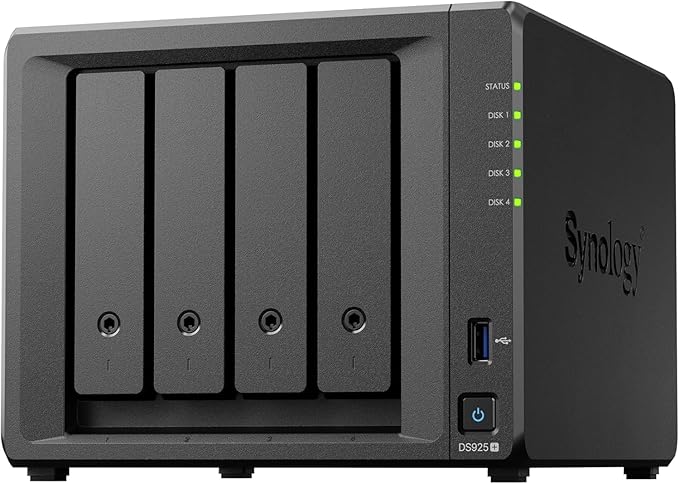
| Model | Synology DS925+ |
|---|---|
| CPU | AMD Ryzen V1500B quad-core/eight-thread 2.2GHz |
| RAM | 4GB DDR4 ECC SODIMM (expandable to 32GB) |
| Drive Bays | 4x 3.5"/2.5" SATA + 2x M.2 NVMe (cache) |
| Network | 2x 2.5GbE |
| USB | 2x USB 3.2 Gen 1 |
| AU market price | $1,099 |
Pros
- Synology Photos AI is the most polished photo intelligence software in the NAS category
- Expandable to 32GB RAM. Opens door to 7B LLM use with third-party SODIMMs
- M.2 NVMe cache slots improve container/AI workload I/O significantly
- 2.5GbE standard. No additional network card needed for most home/SMB use
- Strong DSM ecosystem. Container Manager, Active Backup, Surveillance Station all available
- 3-year warranty, strong Australian distributor support via BlueChip
Cons
- 4GB base RAM is too low for LLM work. Budget for RAM upgrade at purchase
- No PCIe expansion slot for 10GbE or GPU acceleration
- Synology's official RAM compatibility list limits warranty-safe upgrade options
- Only 4 HDD bays. Capacity ceiling lower than 6-bay alternatives at similar price
Best NAS for Local LLMs on a Budget. QNAP TS-473A
The QNAP TS-473A is the strongest value case for local LLM inference in Australia's current retail market. At a market price of about $1,401, it ships with an AMD Ryzen V1500B quad-core/8-thread CPU and 8GB of DDR4 RAM (the preinstalled module is non-ECC, but the NAS accepts ECC modules). And crucially, it has two PCIe 3.0 x4 expansion slots that can accept supported network, storage, or graphics adapters.
The Ryzen V1500B is a meaningful step above Celeron for CPU-bound AI work. CPU-only token generation on the TS-473A varies substantially with the model, quantisation, context size, runtime version, memory configuration, and thermal conditions; benchmark the intended workload before purchase. Slow by GPU standards, but usable for tasks where you submit a query and come back in 30 seconds for a result. For document processing pipelines running overnight, it's entirely practical.
QNAP's AI tools (QuMagie for photos, AI Assistant in QTS 5.2+) are available and functional, though less polished than Synology's equivalents. The TS-473A's real advantage over Synology at this price point is the PCIe slot and QNAP's more open ecosystem. Deploying custom AI containers via Container Station involves fewer restrictions than DSM (DiskStation Manager, the operating system on Synology NAS units).
RAM can be expanded to 64GB using standard DDR4 ECC SO-DIMMs. At 32GB, models up to 13B parameters become accessible in 4-bit quantisation. At 64GB, 34B models become theoretically runnable. Though token generation at that scale on CPU-only hardware will test your patience.

| Model | QNAP TS-473A-8G |
|---|---|
| CPU | AMD Ryzen V1500B quad-core/8-thread 2.2GHz |
| RAM | 8GB DDR4 non-ECC SO-DIMM preinstalled (ECC supported, up to 64GB) |
| Drive Bays | 4x 3.5"/2.5" SATA |
| M.2 Slots | 2x M.2 2280 PCIe Gen3 x1 |
| Network | 2x 2.5GbE |
| Expansion | 2x PCIe Gen3 x4 (for 10GbE, extra M.2 or a supported GPU) |
| AU market price | $1,401 |
Pros
- Ryzen V1500B delivers meaningful CPU AI performance vs Celeron alternatives
- PCIe expansion slot enables 10GbE upgrade. Important for multi-client AI serving
- Built-in M.2 NVMe slots for fast model storage and cache
- Expandable to 64GB ECC RAM. Supports larger LLM models
- QNAP Container Station has fewer deployment restrictions than Synology
- Dual 2.5GbE standard
Cons
- QNAP's AI software (QuMagie) is less polished than Synology Photos
- QTS ecosystem more complex than DSM. Steeper learning curve
- Two PCIe Gen3 x4 slots; GPU use requires a model-specific compatible card and supported deployment path.
- Only 4 HDD bays
- QNAP's recent security track record has required active patching discipline
Best NAS for AI on a Budget. UGREEN DXP4800 GT
The UGREEN NASync DXP4800 GT is the budget choice for technically confident buyers who want to experiment with local language models while keeping storage, containers and networking in one four-bay system. It has a market price of about $1,020. The main reason it earns this position is its 64GB memory ceiling. The shipped 8GB is enough to start, but a substantial upgrade gives smaller local models more working memory. Its AMD Ryzen Embedded R2514 is a newer embedded part than the V1500B, with four cores and eight threads, but that does not imply desktop GPU performance or a particular inference speed.
Local model inference on this NAS should be treated as CPU-only experimentation. It can suit private assistants, document tools and other light containerised projects where response speed is not critical. Two 10GbE ports with link aggregation and two M.2 slots also make it unusually well connected at this price. Photo recognition is available through the UGOS Pro photo app, although that software is younger than Synology Photos and QNAP QuMagie. The missing PCIe expansion slot is the decisive limit because there is no internal GPU upgrade path. Do not buy it for large models, production inference, fast multi-user AI services or workloads that need CUDA-class acceleration. Buyers who mainly want polished photo management should also favour the more mature software option elsewhere in this guide.
| Model | UGREEN NASync DXP4800 GT |
|---|---|
| CPU | AMD Ryzen Embedded R2514, 4 cores / 8 threads |
| RAM | 8GB DDR4, expandable to 64GB, UGREEN lists ODECC support |
| Drive Bays | 4 SATA bays |
| M.2 Slots | 2 |
| Network | 2 x 10GbE, link aggregation supported |
| Expansion | No PCIe expansion slot |
| AU market price | $1,020 |
Pros
- 64GB maximum RAM supports more useful local LLM experiments after an upgrade
- AMD Ryzen Embedded R2514 has 4 cores and 8 threads
- Two built-in 10GbE ports support link aggregation
- Two M.2 slots provide fast storage or caching options
- Four SATA bays balance capacity and physical size
Cons
- Local LLM inference is CPU-only
- Shipped 8GB RAM is restrictive for serious model experiments
- No PCIe slot means no internal GPU upgrade path
- UGOS Pro photo software is less mature than Synology Photos or QuMagie
- Storage drives and any memory upgrade cost extra
Best NAS for AI. SMB / Power User. TerraMaster F4-424 Pro (now superseded by the F4-425 Pro; compare current pricing and specifications)
The TerraMaster F4-424 Pro is a genuine standout for AI workloads at its price point, and it's arguably the most overlooked option in Australia's NAS market for this use case. At a market price of about $1,100, it ships with an Intel Core i3-N305 and 32GB DDR5 non-ECC RAM from the factory. Few NAS units at this price arrive ready for serious local LLM work without a RAM upgrade. Its successor, the F4-425 Pro, ships with 8GB or 16GB instead, and none of the Australian retailers we track listed it in September 2026.
The Core i3-N305 delivers meaningfully better single-thread performance than the Ryzen V1500B, which matters for LLM inference. CPU-only LLM performance depends on memory bandwidth, CPU architecture, SIMD support, threading, quantisation, context size, runtime implementation, and thermal limits. The F4-424 Pro has newer CPU and memory hardware than the TS-473A, but matched 7B-model benchmarks are needed before claiming a specific token-generation advantage.
TerraMaster's TOS (TerraMaster OS) is less mature than DSM or QTS (QNAP's operating system). Docker container support exists (via ContainerStation equivalent), but the ecosystem of first-party AI applications is thinner than either Synology or QNAP. For buyers who plan to self-manage Ollama containers and don't need hand-holding from the NAS OS, this is not a meaningful disadvantage. For buyers who want a polished, integrated AI photo experience comparable to Synology Photos, it is a real limitation.
One consideration specific to Australia: TerraMaster is distributed here by Encomtech Australia. For a business-critical deployment, the uncertainty around warranty turnaround time is a legitimate concern. For a home power user or small creative studio comfortable with self-managing support, it's less of an issue.

| Model | TerraMaster F4-424 Pro |
|---|---|
| CPU | Intel Core i3-N305, 8-core/8-thread |
| RAM | 32GB DDR5 non-ECC (factory; maximum supported 32GB) |
| Drive Bays | 4x 3.5"/2.5" SATA |
| M.2 Slots | 2x M.2 NVMe |
| Network | 2x 2.5GbE |
| AU market price | $1,100 |
Pros
- 32GB RAM factory standard. No upgrade needed for 7B LLM work
- Core i3-N305 delivers better single-thread LLM performance than Ryzen V1500B
- Best price-to-AI-performance ratio of any 4-bay NAS in AU retail
- Full Docker/container support for Ollama, ChromaDB, Whisper, etc.
- Dual 2.5GbE and M.2 NVMe slots included
Cons
- TerraMaster TOS is less mature and less polished than DSM or QTS
- AI photo management software significantly behind Synology Photos and QuMagie
- Encomtech Australia distribution means weaker AU warranty chain vs BlueChip/Dicker
- Smaller community = less online troubleshooting help in Australia
- Not a good fit for buyers who want a turnkey AI photo experience
Best for AI Photo Search. High-End Option. Synology DS1825+
For users with large photo and video libraries (500,000+ files), the Synology DS1825+ at a market price of about $1,993 delivers the capacity and performance to keep AI indexing from becoming a permanent background burden. Eight bays, a Ryzen V1500B CPU, and Synology's mature DSM platform make this the natural endpoint for serious Synology Photos deployments in Australia.
Unlike the DS925+, the DS1825+ gives you room to grow storage capacity well beyond 4 drives. Relevant when a photo and video library includes raw camera files, 4K video, and multi-year archive material. The same Ryzen V1500B CPU means AI workload performance is comparable to the TS-473A, and RAM can be expanded to 32GB using standard DDR4 ECC SO-DIMMs for LLM experimentation alongside the photo AI workloads.
The DS1825+ is priced as a prosumer or SMB (small and medium business) device. Synology is distributed through BlueChip in Australia. Effectively every model is in stock at all times, and warranty claims flow through a well-established chain with 2-3 week turnaround as the typical expectation. For buyers who want certainty around after-sales support, Synology's AU distribution structure is the strongest in the category.

| Model | Synology DS1825+ |
|---|---|
| CPU | AMD Ryzen V1500B quad-core 2.2GHz |
| RAM | 8GB DDR4 ECC (expandable to 32GB) |
| Drive Bays | 8x 3.5"/2.5" SATA + 2x M.2 NVMe |
| Network | 2x 2.5GbE (10GbE via PCIe expansion card) |
| Expansion | 1x PCIe 3.0 slot + up to 2x 5-bay DX525 expansion units supported |
| AU market price | $1,993 |
Pros
- 8 bays provides headroom for large photo/video archives
- Ryzen V1500B handles sustained AI indexing without thermal throttling concerns
- PCIe slot enables 10GbE upgrade. Meaningful for multi-client or RAG serving
- Synology Photos AI is best-in-class for photo intelligence
- Strongest AU warranty chain of any NAS brand (BlueChip distribution)
- Up to two DX525 expansion units if storage grows further
Cons
- 8GB base DDR4 ECC RAM is installed; additional RAM may be needed depending on the LLM, context size, and concurrent NAS services.
- Dual built-in 2.5GbE; faster 10/25GbE networking requires a compatible PCIe card.
- At about $1,993 diskless, drive costs add significantly to total investment
- Overkill for users with photo libraries under 100,000 files
Comparison: AI NAS Models Available in Australia
AI NAS Comparison. Australia 2026
| Synology DS925+ | QNAP TS-473A | UGREEN DXP4800 GT | TerraMaster F4-424 Pro | Synology DS1825+ | |
|---|---|---|---|---|---|
| CPU Class | Ryzen V1500B | Ryzen V1500B | Ryzen R2514 | Core i3-N305 | Ryzen V1500B |
| Base RAM | 4GB DDR4 ECC | 8GB DDR4 ECC | 8GB DDR4 | 32GB DDR5 | 8GB DDR4 ECC |
| Max RAM | 32GB | 64GB | 64GB | 32GB | 32GB |
| Drive Bays | 4 | 4 | 4 | 4 | 8 |
| Built-in M.2 NVMe | Yes (2x) | Yes (2x) | Yes (2x) | Yes (2x) | Yes (2x) |
| Best Network | 2.5GbE x2 | 2.5GbE x2 | 10GbE x2 | 2.5GbE x2 | 2.5GbE x2 (upgradeable) |
| PCIe Expansion | No | Yes (2x Gen3 x4) | No | No | Yes |
| AI Photo Software | Synology Photos (best-in-class) | QuMagie (good) | UGOS Pro photos (developing) | TOS AI (basic) | Synology Photos (best-in-class) |
| LLM Suitability | Good (with RAM upgrade) | Very good | Good (with RAM upgrade) | Very good (32GB ready) | Good (with RAM upgrade) |
| AU Price (approx) | $1,099 (market price) | $1,401 (market price) | $1,020 (market price) | $1,100 (market price) | $1,993 (market price) |
| AU Warranty Chain | Strong (BlueChip) | Strong (BlueChip) | UGREEN AU (2 years) | Encomtech Australia | Strong (BlueChip) |
Prices last verified: 30 March 2026; several listed prices have since changed. Re-verify all retailer prices before publication. Always check retailer before purchasing.
What About the QNAP TS-673A for AI?
The QNAP TS-673A at a market price of about $1,799 is worth mentioning for buyers who need six bays and want AI capability. It uses the same Ryzen V1500B chip as the TS-473A with 8GB of DDR4 RAM (ECC modules supported) and dual 2.5GbE, adding two more drive bays. The PCIe expansion slot is present, enabling a 10GbE upgrade path. The AI workload story is identical to the TS-473A. The extra bays are the only meaningful difference. If your storage needs have you filling four bays already, the TS-673A is the natural step up without sacrificing AI performance.
Networking for AI: Why Upload Speed and Local Network Matter
If you plan to use your NAS-hosted LLM or vector search from multiple devices on your local network, or to query it remotely, there are two Australian-specific network realities worth noting.
On local network: 1GbE is the bandwidth floor for serving a local LLM API. Realistically, text-based LLM inference generates very little data per token. 1GbE is more than adequate for the response stream. Where bandwidth matters is when serving large embedding payloads or returning vector search results over many simultaneous connections. For single-user or low-concurrency use cases, 1GbE is fine. For multi-user office deployments, 2.5GbE or 10GbE is worth the upgrade.
On NBN: If you're considering exposing your local LLM endpoint to the internet for remote access, NBN upload speed varies by retail plan, wholesale tier, and access technology; check the upload specification for the actual service rather than assuming a 56Mbps ceiling. This is workable for remote API queries to a text LLM, but it's a hard ceiling for any application that streams large amounts of data (video processing results, large document embeddings). More importantly, Some Australian ISPs place services behind CGNAT, which can prevent ordinary inbound IPv4 port forwarding; check the policy for your specific ISP and plan, which blocks inbound connections entirely. Making remote access to a home-hosted AI endpoint impossible without a VPN tunnel, reverse proxy, or a Tailscale-style solution. Check with your ISP before planning remote access to a home NAS AI endpoint.
UGREEN NASync. Worth Considering?
UGREEN now has two distinct NAS paths in Australia. The ARM-based DH line includes the two-bay DH2300 and four-bay DH4300 Plus. These are better viewed as approachable home storage and photo-management systems. Their ARM processors and fixed or modest memory configurations place tighter limits on local language models and third-party AI software. The DH2300 also lacks official Docker support, according to UGREEN's Australian product page.
The x86 DXP line is the more suitable starting point for custom AI containers. It includes the Ryzen Embedded DXP4800 GT discussed above and the DXP4800 Pro, which uses an Intel Core i3-1315U, ships with 8GB DDR5 and supports up to 96GB. The Pro provides one 10GbE port and one 2.5GbE port. Model choice should therefore follow the required processor architecture, memory ceiling and network layout rather than the UGREEN badge alone.
UGREEN sells these systems through its official Australian storefront and lists a two-year warranty. That establishes a local purchase and warranty route, although support experiences can still differ between direct and retailer purchases. UGOS is an operating system that runs every UGREEN NAS, and UGOS Pro supports Docker on the DXP models, but its app ecosystem, documentation and administration workflows remain younger than established NAS platforms. Buyers deploying custom AI containers should confirm image architecture, hardware access and update behaviour before relying on a workload in production.
Australian Consumer Law note: Australian Consumer Law protections apply when purchasing any NAS from an authorised Australian retailer, regardless of brand. For an ACL consumer-guarantee remedy, contact the seller; a separate manufacturer warranty may also provide additional rights. For NAS devices specifically. Which hold your data. Understanding the retailer's warranty replacement process before you buy is essential. Ask: "If this unit fails within warranty, what's your process? Is an advanced replacement available?" Warranty turnaround varies by retailer, fault assessment, stock availability, remedy, distributor, and shipping; ask the seller for its current process and expected timeframe. Plan your backup strategy accordingly. For official ACL guidance, visit accc.gov.au. This article provides general guidance only and does not constitute legal advice.
Don't Buy These for AI
These models are good NAS devices for their intended use cases but are not suitable for meaningful AI workloads:
- Synology DS423: ARM-based RTD1619B CPU. Synology Photos basic tagging only. No LLM capability.
- Synology DS225+: Intel Celeron J4125, with 2GB base RAM and a 6GB official maximum. Passable for photo indexing at small scale. Too slow for LLM inference and RAM ceiling is low.
- QNAP TS-433: ARM Cortex-A55. Same ARM limitation as Synology ARM models. Basic photo AI only.
- QNAP TS-233: ARM, 2GB RAM. Not suitable for any meaningful AI workload beyond basic QuMagie features.
- Asustor AS3304T: Realtek RTD1296 ARM CPU with 2GB RAM, and now discontinued. Same ARM limitation applies.
The ARM-CPU models in this list are perfectly capable NAS devices for file storage, media serving, and backup. The limitation is specifically for AI workloads. If AI is not a priority, they remain valid options at their respective price points.
Three mistakes that turn an AI feature into an expensive compromise
The first mistake is buying the words "AI NAS" instead of buying support for a named task. Photo recognition, local text generation and surveillance analysis use different software paths, so one successful feature does not validate the others.
The second mistake is assuming Docker support guarantees useful performance. Docker, software that runs apps in isolated containers without altering the core operating system, can make an application installable, but it cannot supply missing memory or turn a low-power CPU into responsive AI hardware.
The third mistake is making the storage system responsible for every part of the workload. Running sustained inference on the same appliance that serves files, creates backups and protects business data can create resource contention and complicate maintenance. A separate compute device is often the cleaner design because either side can be upgraded or restarted without replacing the other.
Before replacing an existing NAS, follow this sequence:
- Name the feature that will be used each week.
- Check whether the current NAS already supports that feature or can provide its data to another computer.
- Test the intended model or application on an existing PC where possible.
- Record the acceptable wait time and number of simultaneous users.
- Buy a new NAS only if storage capacity, supported software or reliability requirements make the replacement necessary.
If faster inference is the only unmet requirement, compare a separate local AI home server before replacing functional storage hardware.
Where to Buy in Australia. Pricing and Retailer Notes
Australian NAS pricing is relatively uniform across the major retailers. The key differences between retailers are stock depth, pre-sales guidance, and what happens when something goes wrong.
Scorptec and PLE Computers are the strongest all-round choices for AI NAS purchases in Australia. Both hold genuine stock of most current models, have staff who can provide pre-sales guidance, and have established processes for warranty claims. For the models covered in this guide, current market prices are about $1,056 for the Synology DS925+, $1,993 for the DS1825+, $1,489 for the QNAP TS-473A, $1,020 for the UGREEN DXP4800 GT and $1,100 for the TerraMaster F4-424 Pro.
Mwave stocks a solid range of Synology and QNAP models at competitive prices and is a reliable option. PLE is particularly strong on Asustor and QNAP.
Synology and QNAP are both distributed primarily through BlueChip in Australia. Restocking time varies by model, retailer, distributor inventory, and shipping location; confirm an ETA with the retailer before ordering. Enterprise and rackmount units are a different story. These can take longer to ship than the listing suggests, so confirm stock with the retailer before ordering.
For business buyers, always request a formal quote rather than buying at listed retail price. For business, education and government purchases, ask for a formal quote rather than paying the listed retail price. Particularly on business-grade units.
HDD prices in 2026 remain elevated from early 2025 levels. A NAS-grade 4TB drive such as the Seagate IronWolf or WD Red Plus has a market price of about $350 in September 2026. Budget accordingly when calculating the total cost of a diskless NAS purchase.
Confirm the Exact Australian Model Before You Buy
Australian availability should be confirmed against the exact local SKU, not inferred from a global announcement or vendor demonstration. Check whether a retailer's availability means stock physically held or a supplier order, then save the product page and compatibility documentation that describe the AI feature being purchased.
For UGREEN products, use the brand's official Australian storefront. Its current catalogue should not be treated as evidence that a different model shown on another regional site can be ordered or supported locally.
Do not compare diskless enclosure prices alone. The purchase decision should include suitable drives, any required memory, backup storage and separate AI compute where applicable. Existing networking guidance in this guide should also be applied before planning remote access over an Australian internet service.
Summary: Which AI NAS for Which Use Case
The Synology DS925+ suits home users and small creative professionals who want the best AI photo experience available in a NAS, with room to expand RAM for occasional LLM use. The polished Synology Photos ecosystem and strong Australian warranty chain justify its market price of about $1,401.
The QNAP TS-473A suits technically capable users who want maximum flexibility for self-hosted AI containers. Ollama, ChromaDB, Whisper, RAG pipelines. And are willing to manage QNAP's more complex ecosystem in exchange for expandable RAM (up to 64GB), two PCIe expansion slots, and open container deployment.
The UGREEN DXP4800 GT suits budget-conscious experimenters who will upgrade its memory and accept CPU-only local LLM inference. Its four SATA bays, two M.2 slots and dual 10GbE networking provide strong storage foundations, while the 64GB RAM ceiling creates useful room for smaller models. Skip it if polished photo software, fast production inference or a future internal GPU upgrade matters more than hardware value.
The TerraMaster F4-424 Pro suits power users who prioritise raw AI compute at the lowest price. 32GB factory RAM and a Core i3 CPU at about $1,100 is an unusually strong value proposition. Accept the less mature software ecosystem and weaker AU warranty chain as the trade-off.
The Synology DS1825+ suits users with large (500,000+ file) photo and video archives who need 8 bays, want Synology's mature AI photo tools, and value the certainty of Synology's AU distribution and warranty chain over all other factors.
Related reading: our NAS buyer's guide, our NAS vs cloud storage comparison, and our NAS explainer.
Free tools: NAS Sizing Wizard and AI Hardware Requirements Calculator. No signup required.
Related reading: our OCR on NAS guide.
Related reading: our AI photo search on NAS Australia, our Paperless-ngx on NAS guide, and our is self-hosted email worth it.
Related reading: our Australia Privacy Act and self-hosting and our when to stop self-hosting.
Found the right NAS for your Photography NAS? Our expert build review checks your full configuration. Photo backup and cataloguing. Before you spend. $149 AUD, delivered within 3 business days.
Related reading: our mini-PC vs NAS for local AI comparison and our guide to running a local LLM on a NAS.
See also: our complete UGREEN NAS Australia guide.
See also: our complete Synology NAS Australia guide.
See also: our complete QNAP NAS Australia guide.
See also: our complete Asustor NAS Australia guide.
See also: our full Photo and Video Storage guide.
Related reading: our AI photo search on NAS Australia.
Related reading: our AI photo search on NAS Australia and our do you need an AI NAS.
Related reading: our Synology vs QNAP vs UGREEN for AI features and our eGPU and PCIe expansion for NAS AI workloads.
Can any NAS run a local LLM like Llama 3 or Mistral?
Yes, but with significant caveats. Any NAS running a Linux-compatible operating system with Docker/container support can technically run Ollama and serve a local LLM. The practical question is whether the hardware makes the experience usable. ARM-based NAS units (Realtek, Cortex-A55) cannot run llama.cpp at usable speeds. Avoid these for LLM work entirely. Intel Celeron NAS units (N5095, N5105) can run 7B quantised models but generate tokens slowly (1-3 per second). AMD Ryzen V1500B and Intel Core i3/i5 NAS units are the minimum for a tolerable interactive experience. Most entry-level NAS units use CPU-only inference, but selected NAS models support compatible add-in GPUs; verify the exact NAS, GPU, power, physical-fit, and software compatibility before purchase.
How much RAM do I need for local LLM inference on a NAS?
The RAM requirement is determined by the model you want to run. A 7B parameter model in 4-bit quantisation (Q4_K_M) requires approximately 5-6GB of RAM for the model weights alone. Meaning 8GB total RAM is the absolute minimum, and the system will have very little headroom for the OS and other services. 16GB is the comfortable minimum for a 7B model with concurrent NAS services running. A 13B Q4 model's weight file size varies by model and quantisation format; additional RAM is required for the runtime and context cache. 16GB works, 32GB is comfortable. TerraMaster's F4-424 Pro ships with 32GB from the factory, making it one of very few NAS units at this price that arrive ready for 13B model work without a RAM upgrade.
Which NAS has the best AI photo search in Australia?
Synology Photos, running on any Synology Plus-series or higher NAS, is the most polished AI photo management software available in the NAS category. Synology Photos supports face and object recognition plus albums based on location and other metadata; manually tagged faces are not used to train its recognition system. QNAP's QuMagie is a solid second. Capable and well-featured, though the interface is less intuitive. Asustor's AiData is functional but behind both. TerraMaster's photo AI tools are basic by comparison. For AI photo search as the primary use case, a Synology DS925+ or DS1825+ running Synology Photos is the strongest recommendation in Australia's current retail market.
Can I access my NAS-hosted AI tools remotely from outside my home?
Technically yes, but there are Australian-specific complications. Many residential and some business NBN connections sit behind CGNAT (Carrier Grade NAT), which blocks inbound connections. If your connection uses CGNAT, standard port forwarding won't work. You'll need a VPN tunnel (Tailscale, WireGuard), a reverse proxy through a cloud relay, or a Synology/QNAP QuickConnect-style relay service. NBN upload speed depends on the retail plan, wholesale tier, and access technology; check the actual upload specification for your service, which is workable for remote text LLM queries but limits use cases involving large data transfers. Check with your ISP whether your connection uses CGNAT before planning remote AI access to a home NAS.
What happens if my AI NAS fails during the warranty period in Australia?
Your warranty claim goes to the retailer where you purchased the unit. Not the manufacturer. Synology, QNAP, and Asustor don't have service centres in Australia. The retailer escalates to their distributor (BlueChip for Synology and QNAP, Dicker Data for Asustor), who escalates to the vendor in Taiwan. Resolution. Almost always a replacement rather than repair. Flows back down the chain. Resolution time and remedy vary with the fault assessment, retailer process, stock availability, shipping, and whether the failure is major or minor under the ACL. Advanced replacements (receiving a new unit before returning the faulty one) are not officially supported by most vendors, though some resellers will arrange an informal purchase-and-refund process. Ask your retailer about their warranty process at the time of purchase, not when a failure occurs. Under Australian Consumer Law, Whether a dead NAS counts as a major or minor failure under ACL depends on the situation, not a fixed rule. It's a major failure if it can't be used for its normal purpose and can't easily be fixed within a reasonable time, in which case you choose a refund or replacement. Otherwise it's treated as minor, and the retailer can choose to repair or replace it first, though you can request a refund if they can't fix it within a reasonable time. For official ACL guidance, visit accc.gov.au.
Is the UGREEN NASync DH4300 Plus a good AI NAS option for Australia?
The DH4300 Plus can handle UGREEN's built-in photo organisation, but it is a limited choice for custom local AI. It uses an eight-core Rockchip RK3588C ARM processor and fixed 8GB LPDDR4X memory. There is no Intel variant. Those limits restrict local LLM compatibility and leave no memory upgrade path. Its market price is about $629, and it is sold through UGREEN's official Australian storefront with a two-year warranty. Buyers seeking a budget system for expandable local LLM experiments should consider the x86 DXP4800 GT instead.
Do I need a 10GbE network for AI workloads on a NAS?
For most home and small office AI NAS use cases. Personal photo libraries, single-user LLM inference, personal RAG pipelines. 1GbE or 2.5GbE is sufficient. LLM text responses generate very little bandwidth per token, and 2.5GbE provides more than enough throughput for simultaneous NAS file storage and AI API traffic for 1-3 concurrent users. 10GbE becomes relevant when serving AI workloads to a larger number of simultaneous users, when embedding large document corpora with fast turnaround requirements, or when the NAS is also serving large media files at the same time as handling AI requests. For the models covered in this guide, 2.5GbE is the practical sweet spot. It's standard on the QNAP TS-473A and TerraMaster F4-424 Pro, the UGREEN DXP4800 GT goes further with two 10GbE ports, while the Synology DS925+ includes two 2.5GbE ports. The DS1825+ ships with dual 2.5GbE and supports optional 10/25GbE through a compatible PCIe expansion card.
Does every AI NAS contain an NPU?
No. An AI NAS may provide AI-labelled software using its general-purpose CPU, while another model may contain an NPU for specified image or surveillance tasks. Check the exact processor specification and application compatibility documentation rather than treating the product category as a hardware standard.
Does an NPU automatically make a NAS good for Ollama?
No. Ollama acceleration depends on a supported hardware and software path, not the presence of an NPU alone. If the official runtime documentation and NAS vendor do not identify the exact accelerator path, assess the system as CPU-only for purchasing purposes until support is demonstrated.
Can an existing NAS be paired with a mini-PC or GPU computer?
Yes. The NAS can hold documents, photos, models and backups while a separate computer performs inference and returns results through an API, a standard way for software on one machine to request work from another. This architecture suits buyers who need faster AI performance but do not need to replace otherwise adequate storage, and it preserves independent upgrade paths for storage and compute.
Choosing the right NAS for your AI use case depends on more than specs. Storage planning, network setup, and backup strategy all matter. Explore the Need to Know IT NAS buying guides for deeper coverage of each platform.