The Synology DS425+ is the best-balanced choice here, but the right purchase starts with bay count and total system cost. Around $1,000 is where most people buy their first serious home storage device, a NAS (network-attached storage device), a box that plugs into your router and lets every computer, phone and TV in your house reach the same files and backups without cables. The real budget is the NAS plus the drives, which can cost more than the enclosure. This guide also stretches just beyond $1,000 where ECC memory, faster networking or a specific business feature justifies the step.
In short: The Synology DS425+ is the all-rounder at a market price of about $899. The Asustor AS5404T saves $150 while retaining four bays, dual 2.5GbE ports and four M.2 slots. Stretching just above $1,000 can buy standard-model ECC memory, 10GbE or more processing headroom, but a 2-bay NAS can cost about as much as a 4-bay model while holding less protected data.
How to Spend the Budget
The first decision is not the brand. It is how much protected storage the household or business needs, followed by what remains for the enclosure. Buyers with a smaller workload should also compare the best NAS under $500 guide, where simpler processors and networking may still be enough.
Every model in this guide is diskless, so the hard drives are purchased separately. The cost tables below show why budgeting only for the enclosure is the most expensive mistake on this page. NAS-grade drives are designed for continuous multi-bay use, but buyers should still check the NAS compatibility list and the drive workload rating.
Two bays usually mean one drive stores the data while the other mirrors it, like keeping an identical working copy in a second drawer. Four bays can deliver more usable space from smaller drives and leave a path to add capacity later. For usable capacity by RAID level and how to expand past four bays, see the 4-bay NAS guide; buyers committed to a compact mirror can compare the best 2-bay NAS guide.
Quick Comparison: NAS Models Around $1,000 in Australia
NAS Models Around $1,000 AUD, Market Prices
| Asustor AS5402T | Synology DS423 | Asustor AS5404T | Synology DS425+ | QNAP TS-462 | Synology DS725+ | QNAP TS-264 | Synology DS925+ | QNAP TS-464 | Asustor AS6704T v2 | |
|---|---|---|---|---|---|---|---|---|---|---|
| Bays | 2 | 4 | 4 | 4 | 4 | 2 | 2 | 4 | 4 | 4 |
| CPU | Intel Celeron N5105 | Realtek RTD1619B | Intel Celeron N5105 | Intel Celeron J4125 | Intel Celeron N4505 | AMD Ryzen R1600 | Intel Celeron N5095 | AMD Ryzen V1500B | Intel Celeron N5095 | Check current specification |
| RAM | 4GB DDR4 | 2GB DDR4 | 4GB DDR4 | 2GB DDR4 | 4GB DDR4 | 4GB DDR4 ECC | 8GB DDR4 | 4GB DDR4 ECC | 8GB DDR4 | Check current specification |
| Network | 2x 2.5GbE | 2x 1GbE | 2x 2.5GbE | 1x 2.5GbE + 1x 1GbE | 1x 2.5GbE | 1x 2.5GbE + 1x 1GbE | 2x 2.5GbE | 2x 2.5GbE | 2x 2.5GbE | Check current specification |
| M.2 NVMe slots | 4 | 0 | 4 | 2 | 2 | 2 | 2 | 2 | 2 | Check current specification |
| AU market price | $545 | $635 | $749 | $899 | $919 | $989 | $999 | $1,099 | $1,129 | $1,049 |
| Budget position | Within $1,000 | Within $1,000 | Within $1,000 | Within $1,000 | Within $1,000 | Within $1,000 | Right at $1,000 | Just over $1,000 | Just over $1,000 | Just over $1,000 |
Market prices checked 25 September 2026. Always check current listings before buying.
A market price is the price most Australian retailers list for that model, and this guide uses one figure for each NAS. Prices move with promotions and availability, so compare current listings before placing an order.
Cost Per Terabyte: What the Whole System Costs
A NAS (network-attached storage device, like a shared filing cabinet for every device) is only part of the bill, and at these prices the drives cost more than the enclosure.
For a 2-bay system, this comparison assumes two WD Red Plus 8TB drives at a market price of about $599 each, configured as a RAID 1 mirror or SHR for 8TB usable.
| AS5402T | DS725+ | TS-264 | |
|---|---|---|---|
| NAS market price | $545 | $989 | $999 |
| Drives (market price, total) | $1,198 | $989 | $999 |
| Total system | $1,743 | $2,187 | $2,197 |
| Usable space | 8 TB | 8 TB | 8 TB |
| Cost per usable TB | $218 | $273 | $275 |
For a 4-bay system, this comparison assumes four WD Red Plus 4TB drives at a market price of about $349 each, configured as RAID 5 or SHR-1 for 12TB usable.
| DS423 | AS5404T | DS425+ | TS-462 | |
|---|---|---|---|---|
| NAS market price | $635 | $749 | $899 | $919 |
| Drives (market price, total) | $1,396 | $1,396 | $1,396 | $1,396 |
| Total system | $2,031 | $2,145 | $2,295 | $2,315 |
| Usable space | 12 TB | 12 TB | 12 TB | 12 TB |
| Cost per usable TB | $169 | $179 | $191 | $193 |
For a larger 4-bay system, this comparison assumes four WD Red Plus 8TB drives at a market price of about $599 each, configured as RAID 5 or SHR-1 for 24TB usable.
| DS423 | AS5404T | DS425+ | TS-462 | DXP4800 GT | DS925+ | DXP4800 Pro | F4-424 Pro | TS-464 | AS6704T V2 | |
|---|---|---|---|---|---|---|---|---|---|---|
| NAS market price | $635 | $749 | $899 | $919 | $1,020 | $1,099 | $1,149 | $1,100 | $1,129 | $1,049 |
| Drives (market price, total) | $2,396 | $2,396 | $2,396 | $2,396 | $2,396 | $2,396 | $2,396 | $2,396 | $2,396 | $2,396 |
| Total system | $3,031 | $3,145 | $3,295 | $3,315 | $3,416 | $3,495 | $3,545 | $3,496 | $3,525 | $3,445 |
| Usable space | 24 TB | 24 TB | 24 TB | 24 TB | 24 TB | 24 TB | 24 TB | 24 TB | 24 TB | 24 TB |
| Cost per usable TB | $126 | $131 | $137 | $138 | $142 | $146 | $148 | $146 | $147 | $144 |
RAID 5 (a layout that spreads data and recovery information across the drives, like distributing a puzzle and its repair clues among several boxes) preserves the capacity of three drives in a four-drive set. SHR (Synology Hybrid RAID, a more flexible Synology arrangement that automates similar protection choices) is easier when drive sizes may change. Usable space means what remains for files after protection capacity is reserved, before filesystem overhead.
Cost per usable terabyte falls as more bays are filled because one protected drive can cover a larger pool. At 12TB usable, the DS423 is the lowest-cost option in the table, while the AS5404T is the lower-cost choice among the faster Intel-based four-bay models. The DS425+ costs more per usable terabyte because part of its price pays for a different processor, faster networking and the Synology software experience.
Once four 8TB drives are installed, moving from the DS425+ to a model just over $1,000 adds only a few dollars per usable terabyte. That does not make every upgrade sensible. The extra enclosure spend should buy a feature the workload will use, such as ECC memory, 10GbE networking or more processor capacity.
Unused bays are a choice rather than waste. A buyer can begin with two drives and add another pair when capacity is actually needed, much like leaving two shelves empty in a cabinet. A NAS is not a backup, so important data still needs a separate copy away from the enclosure.
2-Bay or 4-Bay? What the Same Money Buys
A 4-bay NAS (network-attached storage device) is usually the better capacity purchase around this budget, even when the target is the same protected space.
The comparison below uses usable space, meaning the capacity left for files after drive-failure protection. A mirror keeps the same data on two drives, like photocopying every page into a second binder. RAID 5 (data and recovery information spread across multiple drives) or SHR-1 (Synology's flexible one-drive protection layout) uses four smaller drives differently.
| DS725+ with 2x 12TB | DS425+ with 4x 4TB | DS423 with 4x 4TB | |
|---|---|---|---|
| Protection layout | Mirror | RAID 5 or SHR-1 | RAID 5 or SHR-1 |
| Usable space | 12 TB | 12 TB | 12 TB |
| Drive cost | $1,778 | $1,396 | $1,396 |
| NAS market price | $989 | $899 | $635 |
| Total system | $2,767 | $2,295 | $2,031 |
For the same 12TB usable, four smaller drives cost $382 less than two larger drives. That saving is greater than the entire $354 enclosure-price gap between the Synology DS725+ and DS423. It also leaves the DS425+ system $472 below the DS725+ system at the same usable capacity.
The trade-off is real. A four-drive array has four drives that can fail rather than two, and a RAID 5 rebuild must read every surviving drive. A two-drive mirror is simpler to understand and restore, although neither layout replaces an independent backup.
Starting small changes the decision again. A 4-bay unit can begin with two WD Red Plus 8TB drives, costing $1,198 and providing 8TB usable in a mirror, then accept two more drives later. A full 2-bay unit cannot grow internally, so expansion means replacing drives or adding supported external hardware.
- Choose a 2-bay DS725+, TS-264 or AS5402T when the faster processor, lower entry price or compact enclosure matters and the workload will never exceed one drive's protected capacity.
- Choose a 4-bay model for most other buyers, especially when capacity is likely to grow or cost per usable terabyte matters.
See the 2-bay NAS guide for compact choices and NAS RAID explained before selecting a protection layout.
Synology DS425+. The Best All-Rounder Under $1,000
The Synology DS425+ is the model that suits the widest range of buyers in this bracket. It succeeds the DS423+ line and adds 2.5GbE networking, while its market price of about $899 places it in the middle of this guide. It makes sense when four bays, Synology DSM and Intel-based media support matter more than getting the lowest enclosure price.

| CPU | Intel Celeron J4125 (4 cores, 4 threads) |
|---|---|
| RAM | 2GB DDR4 non-ECC (one slot, maximum 6GB total) |
| Drive Bays | 4x 3.5"/2.5" SATA |
| M.2 Slots | 2x NVMe (cache/storage) |
| Network | 1x 2.5GbE + 1x 1GbE |
| USB | 2x USB 3.2 Gen 1 |
| Warranty | 3 years |
| AU market price | $899 |
Synology's DSM operating system is the single biggest reason to buy a Synology NAS. It is polished, intuitive, and requires less technical knowledge than QNAP's QTS or Asustor's ADM. Synology Photos is a genuine Google Photos / iCloud replacement, Synology Drive handles file sync across devices, and Hyper Backup makes offsite backups straightforward. For users who want a NAS that works reliably without constant tinkering, DSM remains the gold standard. Read more in our best Synology NAS guide.
With an active Plex Pass and compatible media, the DS425+ can use Intel Quick Sync for hardware-accelerated transcoding. Results depend on codec, resolution, bitrate, subtitles and client settings. Its 2GB base memory is the practical limit for buyers planning several containers, so memory needs should be checked before purchase rather than treated as a later surprise.
Pros
- Synology DSM is approachable for first-time NAS owners
- Four bays support a lower cost per usable terabyte than comparable 2-bay systems
- 2.5GbE is included
- Intel Quick Sync can assist compatible Plex transcoding
- Two M.2 NVMe slots support cache or storage configurations
Cons
- Only 2GB RAM is installed
- Only one 2.5GbE port
- No PCIe expansion slot for a later 10GbE card
- Costs more than several hardware-focused alternatives
Synology DS423. Budget 4-Bay Without the Plus Features
The Synology DS423 has a market price of about $635 and is the storage-first Synology choice. Its Realtek RTD1619B processor and fixed 2GB of memory suit file storage, photo backup and straightforward household sharing rather than demanding media conversion or container workloads. With four WD Red Plus 4TB drives, its total system cost is $2,031 for 12TB usable.
The DS423 buys four bays and the Synology software environment at the lowest enclosure cost in the main comparison. It has no M.2 slots and remains limited to two 1GbE ports, so stepping up to the DS425+ is justified when faster networking, expandable memory or Intel media features matter.

| CPU | Realtek RTD1619B (quad-core) |
|---|---|
| RAM | 2GB DDR4 (not expandable) |
| Drive Bays | 4x 3.5"/2.5" SATA |
| M.2 Slots | None |
| Network | 2x 1GbE |
| Warranty | 2 years |
| AU market price | $635 |
Pros
- Full Synology DSM experience at the lowest 4-bay price
- Synology Photos, Drive, and Hyper Backup all supported
- Low power consumption. ARM processor sips power
- Dual 1GbE with link aggregation
Cons
- Container Manager is supported through compatible builds, although the DS423 may not receive the latest package version
- No hardware transcoding for Plex
- RAM is not upgradeable
- No M.2 NVMe cache slots
- Only 1GbE networking. No 2.5GbE
Synology DS725+: Processing Before Bay Count
The Synology DS725+ has a market price of about $989, placing it close to several four-bay models. The money buys an AMD Ryzen R1600, 4GB of standard-model DDR4 ECC memory, one 2.5GbE port, one 1GbE port and two M.2 slots, but only two internal drive bays.
The DS725+ suits buyers who value its processor, standard-model ECC memory and Synology software more than internal capacity. It can support one DX525 expansion unit, although buyers expecting growth should compare a four-bay enclosure first. For the same 12TB usable target, the DS425+ system in this guide costs less and remains simpler than adding an expansion unit later.

| CPU | AMD Ryzen R1600 (dual-core) |
|---|---|
| RAM | 4GB DDR4 ECC |
| Drive Bays | 2x 3.5"/2.5" SATA |
| M.2 Slots | 2x NVMe |
| Network | 1x 2.5GbE + 1x 1GbE |
| Expansion | Supports one DX525 expansion unit |
| Warranty | 3 years |
| AU market price | $989 |
Synology DS925+: Standard-Model ECC and Four Bays
The Synology DS925+ has a market price of about $1,099. Compared with the DS425+, the extra spend buys an AMD Ryzen V1500B, 4GB of standard-model DDR4 ECC memory and a second 2.5GbE port. Compared with the DS725+, it adds two internal bays. It does not add built-in 10GbE or a PCIe slot, so buyers paying for high-speed networking should look elsewhere.
The DS925+ best fits a small office that values Synology software, four bays and standard-model ECC memory. Home photo and media buyers should read the Synology NAS guide, while business buyers can compare the small-business NAS guide and the detailed DS925+ review.
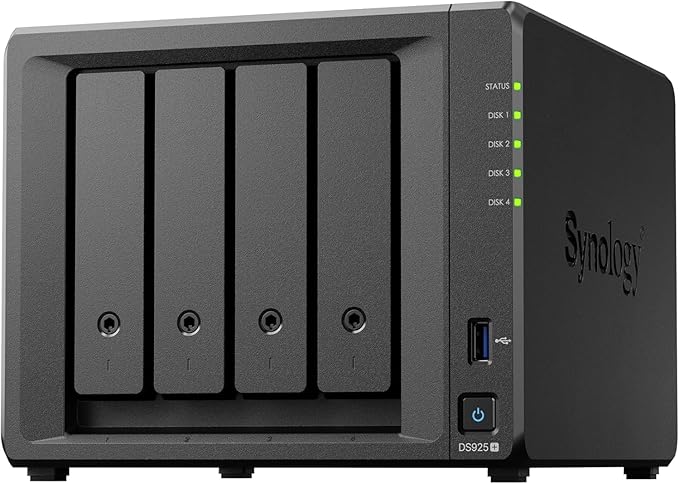
| CPU | AMD Ryzen V1500B (quad-core) |
|---|---|
| RAM | 4GB DDR4 ECC |
| Drive Bays | 4x 3.5"/2.5" SATA |
| M.2 Slots | 2x NVMe |
| Network | 2x 2.5GbE |
| PCIe Expansion | None |
| Expansion | Supports one DX525 expansion unit |
| Warranty | 3 years |
| AU market price | $1,099 |
QNAP TS-464: More Hardware Flexibility
The QNAP TS-464 has a market price of about $1,129. The step buys an Intel Celeron N5095, 8GB of memory, two 2.5GbE ports, two M.2 slots, an HDMI output and a PCIe slot that can accept a compatible optional 10GbE card. It does not make QTS as simple as Synology DSM, and the buyer still needs drives. See the QNAP NAS guide for the wider range.
The TS-464 is the stretch choice for buyers who will use its expansion slot, media engine or extra base memory. Paying more solely for basic file storage is difficult to justify.
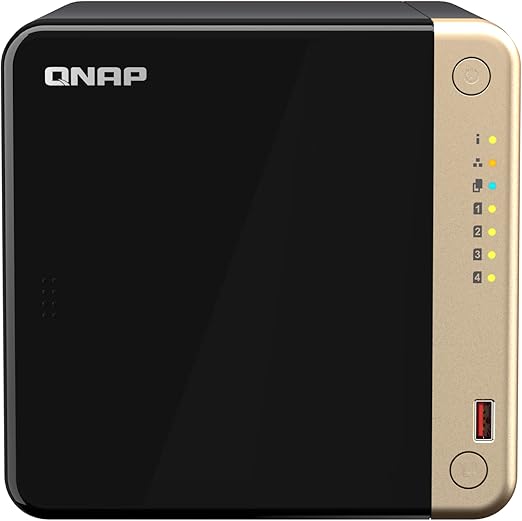
| CPU | Intel Celeron N5095 (4 cores, 4 threads) |
|---|---|
| RAM | 8GB DDR4 (maximum 16GB) |
| Drive Bays | 4x 3.5-inch SATA |
| M.2 Slots | 2x M.2 2280 PCIe Gen 3 x1 |
| Network | 2x 2.5GbE, optional 10GbE through PCIe |
| HDMI | HDMI output |
| USB | Check current specification |
| PCIe Expansion | 1x PCIe Gen 3 x2 slot |
| Warranty | 3 years |
| AU market price | $1,129 |
QNAP TS-462: Lower-Cost QTS with Legacy Status
The QNAP TS-462 has a market price of about $919, while QNAP lists the model as Legacy. It has a dual-core Celeron N4505, 4GB of memory, one 2.5GbE port and two M.2 slots. The $210 gap to the TS-464 is meaningful, so the older model can still fit light file, backup and media workloads if current support conditions are acceptable.
The TS-462 makes sense for QNAP buyers who want four bays and QTS without stretching past $1,000. Buyers planning several containers or heavier transcoding should compare the TS-464, but basic storage users should not pay the step merely to obtain a higher model number.

| CPU | Intel Celeron N4505 (2 cores, 2 threads) |
|---|---|
| RAM | 4GB DDR4 (maximum 16GB) |
| Drive Bays | 4x 3.5-inch SATA |
| M.2 Slots | 2x M.2 2280 PCIe Gen 3 x1 |
| Network | 1x 2.5GbE |
| HDMI | HDMI output |
| PCIe Expansion | 1x PCIe Gen 3 x2 slot, optional 10GbE |
| Lifecycle | Legacy |
| Warranty | 2 years |
| AU market price | $919 |
QNAP TS-264: A 2-Bay Hardware Exception
The QNAP TS-264 has a market price of about $999. It combines a Celeron N5095, 8GB of memory, two 2.5GbE ports, two M.2 slots and a PCIe slot in a two-bay enclosure. The hardware is capable, but the buyer is paying almost the full budget before drives for only one drive's worth of protected mirror capacity.
Choose the TS-264 when QTS, Intel media support or PCIe expansion matters more than bay count. Otherwise, the DS425+ costs $100 less and provides four internal bays. A RAID 1 mirror fills both TS-264 bays immediately, so future capacity usually means replacing both drives or using supported expansion hardware.
Asustor AS5404T: Spend Less on the Enclosure
The Asustor AS5404T has a market price of about $749, which is $150 below the DS425+. It buys a Celeron N5105, 4GB of memory, dual 2.5GbE ports and four M.2 slots. This is a hardware-led alternative for buyers prepared to trade some software polish for a lower total system cost. The Asustor NAS Australia guide explains the wider platform choice.
The AS5404T supports hardware transcoding and can expand through compatible Asustor storage units. Its four M.2 slots provide more flash-storage flexibility than the DS425+, like adding fast working drawers beside a larger filing cabinet. The deciding question is whether those hardware features matter more than Synology's software environment.

| CPU | Intel Celeron N5105 (quad-core) |
|---|---|
| RAM | 4GB DDR4 (maximum 16GB) |
| Drive Bays | 4x 3.5"/2.5" SATA |
| M.2 Slots | 4x NVMe 2280 |
| Network | 2x 2.5GbE |
| HDMI | HDMI output |
| Expansion | Supports AS6004U and AS5004U units |
| Warranty | 3 years |
| AU market price | $749 |
Pros
- Costs less than the DS425+
- Four bays reduce cost per usable terabyte compared with the 2-bay choices
- 4GB RAM and dual 2.5GbE are included
- Four M.2 NVMe slots provide flexible flash storage options
Cons
- ADM is less polished than Synology DSM
- Smaller first-party app ecosystem than Synology
- Chassis design will not suit every room
- Purchase support depends on the chosen Australian seller
Asustor AS6704T v2: Verify the Current Specification
The Asustor AS6704T v2 has a market price of about $1,049. It sits above the AS5404T in Asustor's range, but the current v2 specification should be checked before comparing its processor, memory or ports. The older AS6704T database record does not establish the v2 hardware.
At this price, the AS6704T v2 needs to solve a requirement the AS5404T does not. Buyers without a confirmed feature need should spend the difference on drives or backup instead.
Asustor AS5402T: The Lowest Entry Price
The Asustor AS5402T has a market price of about $545 and shares the Celeron N5105, dual 2.5GbE ports and four M.2 slots of its four-bay sibling. It is $312 below the AS5404T, making it a sensible entry point when two bays will remain enough. Buyers expecting growth should favour four internal bays, because a RAID 1 mirror occupies both bays from the start.
Just Over $1,000: When Stretching Pays Off
Stretching past $1,000 pays off when the workload needs standard-model ECC memory, faster networking or a specific business feature, not for a basic home photo and media NAS.
The comparison below treats each upgrade as a purchase decision rather than a ranking. A 10GbE port is like widening the driveway to the storage box, but it helps only when the switch, client and workload can also use that wider path. ECC memory checks and corrects certain memory errors, which matters more for business and always-on data services than casual media storage.
| DXP4800 GT | DS925+ | DXP4800 Pro | TerraMaster F4-424 Pro | TS-464 | AS6704T v2 | |
|---|---|---|---|---|---|---|
| AU market price | $1,020 | $1,099 | $1,149 | $1,100 | $1,129 | $1,049 |
| Step above the DS425+ | $121 above the DS425+ | $200 above the DS425+ | $250 above the DS425+ | $201 above the DS425+ | $230 above the DS425+ | $150 above the DS425+ |
| What the step buys | Two 10GbE ports and ECC support | Standard-model ECC memory and dual 2.5GbE | Core i3, 10GbE and 2.5GbE | Core i3 and 32GB RAM | PCIe expansion, 8GB RAM and dual 2.5GbE | Higher-tier Asustor model, check current specification |
| What it does not fix | Software maturity and the cost of 10GbE equipment | No PCIe slot or built-in 10GbE | No PCIe expansion slot | No built-in 10GbE or PCIe slot | No built-in 10GbE | Specification uncertainty for the v2 model |
The ladder steps are deliberately incremental. They show what each next model adds, but they do not make every step good value for every workload. A buyer who cannot name the application or network bottleneck being fixed should keep the enclosure budget lower and put the difference into drives, backup or networking.
For a home photo archive, family file share or direct-play media library, the DS425+, AS5404T or DS423 is usually enough. The stretch models make more sense for virtualised services, many simultaneous users, high-speed editing workflows or businesses that specifically value ECC memory. An expansion unit means an external bay enclosure connected to the NAS, like adding another cabinet, but it also adds cost and another piece of hardware to manage.
UGREEN DXP4800 GT
The UGREEN DXP4800 GT market price is $1,020. Compared with the DS425+, the extra spend buys two 10GbE ports, 8GB of memory, support for up to 64GB and ODECC support. Compared with the DS725+, it adds two bays and much faster built-in networking. It does not guarantee that a home network can use 10GbE, and its software fit should be assessed separately from its hardware.
| CPU | AMD Ryzen Embedded R2514 (4 cores) |
|---|---|
| RAM | 8GB, up to 64GB |
| ECC | ODECC supported |
| Drive Bays | 4x SATA |
| M.2 Slots | 2 |
| Network | 2x 10GbE |
| PCIe Expansion | None |
| Hardware Transcoding | Possible through AMD GPU |
| Warranty | 2 years |
| AU market price | $1,020 |
UGREEN DXP4800 Pro: Core i3 and Built-In 10GbE
The UGREEN DXP4800 Pro has a market price of about $1,149. Compared with the DS425+, the extra spend buys a six-core Core i3-1315U, 8GB DDR5, one 10GbE port, one 2.5GbE port and two M.2 slots. Compared with the DS725+, it adds two bays and Intel Quick Sync. It does not provide a PCIe slot, and hardware specifications alone do not settle the software-platform decision.
The DXP4800 Pro suits compute-heavy home-lab or high-speed file workloads more than a basic photo archive. Read the UGREEN NAS Australia guide before deciding whether its software and support path fit the workload.
| CPU | Intel Core i3-1315U (6 cores) |
|---|---|
| RAM | 8GB DDR5 (maximum 96GB, ODECC supported) |
| Drive Bays | 4x SATA |
| M.2 Slots | 2 |
| Network | 1x 10GbE + 1x 2.5GbE |
| PCIe Expansion | None |
| Hardware Transcoding | Intel Quick Sync |
| Warranty | 2 years |
| AU market price | $1,149 |
TerraMaster Options Around $1,000
The TerraMaster F4-425 has a market price of about $679 and combines four bays with a Celeron N5095, 4GB of memory and one 2.5GbE port. The F4-425 Plus sits right at the threshold at about $999 and adds its hybrid-bay design. The F4-424 Pro has a market price of about $1,100 and steps up to an eight-core Core i3-N305 with 32GB of DDR5 memory.
TerraMaster's hardware can be competitive at each price step, but TOS remains a less mature software environment than DSM, QTS or ADM. These models suit buyers who are comfortable assessing apps, update policy and backup tools separately instead of choosing from the processor specification alone.
What to Buy at Each Budget Step
Start with File Storage and Capacity
The AS5402T, at a market price of $545, is the entry point when two bays are enough. The DS423, at a market price of $635 and $90 above the AS5402T, buys four bays and Synology DSM. Another $44 reaches the TerraMaster F4-425 at a market price of $679, adding an Intel Celeron and 2.5GbE for buyers willing to assess TOS. Compare the broader field in the best NAS Australia guide.
Add Media and Container Headroom
The AS5404T, at a market price of $749 and $70 above the F4-425, buys dual 2.5GbE, four M.2 slots and an Intel media engine. The DS425+, at a market price of $899 and another $150, trades some hardware abundance for Synology DSM. The TS-462, at a market price of $919 and another $20, buys QTS and PCIe expansion but carries Legacy status. Workload-specific comparisons are in the Plex NAS guide and Docker and virtualisation guide.
Pay More for Two Bays Only with a Reason
The DS725+, at a market price of $989 and $70 above the TS-462, buys a Ryzen processor, standard-model ECC memory and Synology's software in a two-bay enclosure. The TS-264, at a market price of $999 and another $10, instead buys an Intel media engine, 8GB of memory and PCIe expansion. Both need a specific processor, software or space-saving reason to overcome the capacity disadvantage. Business buyers should compare the small-business NAS guide and ask for a formal quote.
Stretch for ECC or Faster Networking
The DXP4800 GT, DS925+, DXP4800 Pro, F4-424 Pro, TS-464 and AS6704T v2 each cost more than the DS425+, by $121, $200, $250, $201, $230 and $150 respectively. Choose among them only when ECC support, 10GbE, PCIe expansion, more base memory or a particular software platform answers a defined workload.
Networking, NBN, and Remote Access
Most NAS models in this guide support 2.5GbE, while the Synology DS423 is limited to two 1GbE ports. Faster networking helps only when the router, switch and client also support it, much like a wider pipe that narrows again at the next fitting. Check current switch pricing and read the NAS networking guide before budgeting for an upgrade.
Remote access is limited by the internet connection's upload rate, not the NAS port alone. The current nbn wholesale table lists a 100 Mbps Home Fast service at up to 20 Mbps upload on Fibre and HFC, while actual retail performance depends on the plan, access technology, provider and local conditions. Check the exact retail plan before relying on remote video or large-file transfers.
RAID and Drive Choice
A four-bay NAS is commonly configured with RAID 5 or Synology SHR-1. RAID 5 spreads recovery information across the set so one failed drive can be replaced without losing the array, while SHR automates a similar one-drive-protection choice and can be more flexible with mixed drive sizes. A rebuild still stresses the remaining drives, so protection against one drive failure should not be confused with backup.
Choose capacity from the workload and retention period, then check the NAS vendor's drive compatibility list. The best NAS hard drive guide covers suitable models and current buying considerations. Whether local storage costs less than cloud storage depends on capacity, electricity, maintenance, backup requirements and the cloud service being compared.
Warranty, ACL, and Where to Buy
Australian Consumer Law: Consumer guarantees apply to products sold by Australian retailers. In practice, a buyer with a faulty NAS usually starts the claim with the seller, while a manufacturer warranty may provide another claim path. Ask the retailer how it handles assessment, repair, replacement and data-bearing drives before purchase, then read the ACCC guidance. This is general information, not legal advice.
Warranty length varies by model. The DS423 and QNAP TS-462 have two-year warranties, while the DS425+, DS725+, DS925+ and TS-464 have three-year warranties. Before buying, ask the retailer what its fault-assessment process is, where the enclosure is sent and how long each stage normally takes.
A budget buyer should compare at least three retailers because the same NAS can be listed at different prices. On Amazon AU and other marketplaces, check who the seller is, whether it has an Australian presence and how its fault process handles a diskless enclosure. Consumer guarantees may apply to purchases from Australian sellers, and the ACCC page above explains the general framework.
Plan for enclosure failure as part of the storage design. Keep an independent offsite copy, cloud copy or secondary system for important data, and document how files will be restored while the main unit is unavailable.
Use our free NAS Sizing Wizard to get a personalised NAS recommendation.
Found the right NAS for your mid-range NAS build? Our expert build review checks your full configuration. Drives, RAID, and performance config. Before you spend. $149 AUD, delivered within 3 business days.
Compare the full market in the best NAS Australia guide or work through the Australian NAS buying guide.
Brand-specific details are available in the UGREEN, Synology, QNAP and Asustor guides.
For capacity and expansion planning, use the 4-bay NAS guide; for a compact mirror, compare the 2-bay NAS guide.
Is a NAS under $1,000 powerful enough for Plex transcoding?
Yes, but hardware transcoding depends on the processor, media format, Plex Pass status and client. Intel-based models such as the DS425+, TS-462, TS-264 and AS5404T can use supported hardware media engines, while an AMD Ryzen model should not be assumed to offer the same Plex path. Direct play is preferable because the client reads the original file without asking the NAS to convert it. See the best NAS for Plex guide for workload-specific choices.
Should I buy a Synology or QNAP NAS around $1,000?
Synology suits buyers who prioritise a more approachable software environment, integrated photo tools and a simpler first setup. QNAP generally provides more hardware flexibility in this group, including HDMI output or PCIe expansion on selected models, but QTS asks more of the administrator. Choose from the applications and maintenance effort first, then compare bays and network ports. The Synology versus QNAP comparison covers that platform decision in more detail.
Do I need 2.5GbE networking on my NAS?
2.5GbE has two and a half times the nominal link rate of 1GbE, but actual transfer speed depends on the NAS, drives, protection layout, protocol, client and workload. It is useful for large file transfers or several active users. The switch and client must also support 2.5GbE, otherwise the connection runs at the slower shared link. Check current switch pricing and see the NAS networking guide before adding network hardware to the budget.
How much does a complete NAS setup cost in Australia including drives?
The enclosure is often the smaller part of the bill. A DS423 with four WD Red Plus 4TB drives totals $2,031 for 12TB usable, while a DS425+ with the same drives totals $2,295. With four WD Red Plus 8TB drives, those systems total $3,031 and $3,295 respectively for 24TB usable. A 2-bay AS5402T with two 8TB drives totals $1,743 for 8TB usable. See the NAS hard drive guide before choosing a drive model.
Is the Synology DS425+ worth the upgrade over the DS423?
Yes when the workload needs an Intel processor, expandable memory, M.2 slots or 2.5GbE networking. The DS425+ has a market price of $899, while the DS423 market price is $635, a gap of $264. File storage, photo backup and basic sharing do not automatically need the more expensive model. Choose the DS423 for those lighter jobs, but choose the DS425+ when media conversion, containers or faster local transfers are part of the plan.
Can I access my NAS remotely over the internet?
Yes. Synology QuickConnect, QNAP myQNAPcloud and Asustor EZ-Connect provide relay-based access that can work without manual port forwarding. Remote performance is limited by the retail plan's upload speed, congestion, access technology and the route to the remote user. Check the plan's typical upload speed rather than assuming its download label describes both directions. For sensitive or frequent access, review VPN options and the NAS remote access guide.
Where is the best place to buy a NAS in Australia?
Compare at least three Australian retailers and judge the whole transaction, not only the displayed price. Check who the legal seller is, whether the exact model and memory configuration match, and how a fault assessment is handled. Marketplace listings need extra care because the storefront and seller can be different businesses. Keep the invoice and serial number, and read the where to buy NAS Australia guide before ordering.
Q: Is it worth paying over $1,000 for a NAS? A: Only when the step buys a feature tied to a defined workload. Standard-model ECC memory can matter for business services, while 10GbE can help large local transfers when the rest of the network supports it. A PCIe slot may also provide a useful upgrade path. Basic photo backup, file sharing and direct-play media do not justify the higher enclosure price by themselves. Put the difference into drives, an independent backup or network equipment unless a specific bottleneck has been identified.
Q: Should I buy a 2-bay or a 4-bay NAS for about $1,000? A: A 4-bay model suits most buyers because it can reach the same protected capacity with smaller drives and can start with two drives before expanding. In this guide, four 4TB drives cost $382 less than two 12TB drives for the same 12TB usable. Choose a 2-bay DS725+, TS-264 or AS5402T when compact size, a particular processor or the lower enclosure entry price matters and one drive's protected capacity will remain enough.
Looking for the full picture? Our Best NAS Australia guide covers every price bracket and use case with real AU pricing.