AI features on NAS devices are no longer a marketing checkbox. But the gap between Synology, QNAP, and UGREEN is substantial, and only one platform is genuinely ready to run local AI workloads on hardware that most Australians can actually buy. In 2026, all three brands advertise some form of AI capability, ranging from photo recognition and smart search through to local large language model inference. The reality is more nuanced: Synology offers polished, consumer-ready AI tools baked into DSM with no technical overhead; QNAP goes significantly further with dedicated AI acceleration hardware and support for running local LLMs; and UGREEN NASync is an interesting new entrant with AI ambitions that currently outpace its ecosystem maturity. Which one suits you depends less on the marketing and more on what you actually plan to do with it.
In short: For most Australian home users and SMBs who want AI photo organisation and smart search without any technical setup, Synology is the safe choice. The DS925+ ($1,048 at Mwave) runs these features well on modest hardware. QNAP officially documents deploying Ollama through Container Station using CPU-only operation or compatible GPU hardware. QNAP's QAI and Hailo accelerators are intended for supported image-recognition and surveillance applications, not documented LLM acceleration. UGREEN NASync is worth watching but not ready to lead on AI in 2026.
What 'AI Features' Actually Means on a NAS in 2026
The term 'AI' is used loosely across all three brands, so it helps to define the categories clearly before comparing them:
- Photo AI (recognition and tagging): Automatically identifying faces, objects, scenes, and locations in your photo library. All three brands offer some version of this.
- Smart search: Natural-language or semantic search across your files. Finding a document by describing what it contains rather than knowing its filename.
- On-device LLM inference: Running a local large language model (like Llama, Mistral, or similar open-weight models) directly on the NAS hardware. No cloud, no subscription, no data leaving your network. This requires dedicated hardware acceleration or a powerful CPU.
- AI-assisted surveillance: Object detection, person detection, and licence plate recognition in security camera footage, processed locally.
- Workflow automation with AI: Using AI models to classify, tag, or route files automatically as they arrive on the NAS.
The distinction matters because Synology's AI strengths sit firmly in the first two categories, QNAP competes seriously across all five, and UGREEN is currently strongest in the first category with aspirations toward the others.
Synology AI Features. Polished But Bounded
Synology's AI story in 2026 centres on Photos (the DSM photo management application) and the broader DSM 7.x intelligent search capabilities. Synology Photos uses on-device machine learning to automatically recognise faces, tag subjects, and identify scenes. All processed locally on the NAS without any data going to Synology's servers. For a family photo library or a small business with a media archive, this works genuinely well and requires zero configuration beyond enabling the feature.
Universal Search supports filename, file-content and keyword searches. Synology's natural-language AI Search is a Synology Drive feature, not a Universal Search feature, and currently requires a supported GPU-equipped Synology storage system; it is not supported on the DS225+, DS425+ or DS925+. This is quietly useful for knowledge workers with large document libraries.
Synology also offers AI-driven features in Surveillance Station. The DVA1622 desktop NVR (a dedicated device rather than a standard NAS) supports deep video analytics including person and vehicle detection. Standard DS-series NAS units can perform pixel-change motion detection in Surveillance Station. Synology's people, vehicle and other deep-learning analytics require DVA hardware or supported analytics from a compatible Synology camera. but the more powerful analytics are reserved for DVA hardware.
The practical hardware requirement for Synology's photo AI is modest. The DS225+ supports facial recognition, but object recognition requires upgrading its total memory from the stock 2 GB to at least 4 GB. Synology does not publish a 50,000-photo performance threshold for this model. The DS425+ (from $848 at Mwave, $999 at PLE) is more comfortable for larger libraries. The DS925+ (from $1,048 at Mwave) with its quad-core CPU is the point where AI processing stops feeling like a background chore.
What Synology does not offer in 2026 is any pathway to running local LLMs or custom AI inference workloads on standard DSM hardware. There is no Synology-supported container or package for Ollama, llama.cpp, or similar tools in the way QNAP has formalised. Technically sophisticated users can run Docker containers on Plus-series hardware, but this is firmly in DIY territory and Synology does not document or support it as an AI use case.
Pros
- Photo AI (face recognition, object tagging) works well out of the box with zero configuration
- Processes everything locally. No cloud dependency or subscription required
- Universal Search supports indexed filename, metadata and file-content searches. Synology Drive AI Search requires a supported GPU-equipped Synology storage system.
- Runs adequately on modest hardware. DS425+ handles most home/SMB photo libraries
- Surveillance Station AI detection available on standard NAS hardware (with limitations)
Cons
- No supported pathway to local LLM inference or custom AI model hosting
- Surveillance deep video analytics require dedicated DVA hardware, not standard NAS
- M.2 NVMe drive restrictions still apply on Plus series. Affects potential AI cache/storage setups
- AI features are deliberately bounded. Power users will hit the ceiling quickly
- The cited Plus-series DiskStations do not offer a documented user-installable AI accelerator card option.
Synology Models Relevant to AI. AU Pricing

| DS225+ | 2-bay, Intel Celeron J4125, 2GB DDR4 (expandable to 6GB). From $689 (Mwave) / $599 (PLE, Scorptec) |
|---|---|
| DS425+ | 4-bay, Intel Celeron J4125, 2GB DDR4 (expandable to 6GB). From $848 (Mwave) / $999 (PLE) / $849 (Scorptec) |
| DS725+ | 2-bay, AMD Ryzen R1600, 4GB DDR4 (expandable to 32GB). From $869 (Mwave, Scorptec) |
| DS925+ | 4-bay, AMD Ryzen V1500B (quad-core), 4GB DDR4 (expandable to 32GB). From $1,048 (Mwave) / $1,049 (Scorptec) |
| DS1525+ | 5-bay, AMD Ryzen V1500B, 8GB DDR4 (expandable). From $1,750 (Mwave) / $1,759 (Scorptec) |
| DS1825+ | 8-bay, AMD Ryzen V1500B, 8GB DDR4 ECC (expandable to 32GB). Check current Scorptec pricing. |
The DS725+ and DS925+ are worth highlighting specifically for AI workloads within Synology's ecosystem. The DS725+ and DS925+ use different Ryzen processors from the Celeron-based DS225+ and DS425+, but Synology does not publish a direct Photos AI-indexing benchmark between these models. If photo AI performance matters to you. Particularly if your library is large or you're running Surveillance Station alongside Photos. The step up to Ryzen is worth the premium. The DS925+ at around $1,048 from Mwave is the recommended entry point for serious Synology AI use.
QNAP AI Features. The Most Capable Platform
QNAP is the most technically ambitious of the three brands when it comes to on-device AI in 2026, and the gap between QNAP and its competitors on this axis is significant. The platform's AI story has two distinct layers: the built-in AI features of QTS/QuTS Hero, and the hardware-accelerated AI capabilities unlocked by QNAP's dedicated AI expansion cards.
QTS built-in AI features mirror and extend what Synology offers. QuMagie (QNAP's photo management app) includes face recognition, object detection, and location-based organisation. AI-powered search works across files and photos. QNAP discontinued Surveillance Station in July 2024. Current standard-NAS surveillance options use QVR Surveillance, QVR Pro and related QVR analytics, subject to model, processor and camera requirements. QVR analytics vary by application, licence, NAS hardware and camera configuration. QVR Smart Search, for example, requires a compatible x86-64 QNAP NAS with at least 8GB RAM and an appropriate licence.
The AI accelerator layer is where QNAP pulls away. QNAP offers QAI-M100 M.2 and QAI-U100 USB accelerators for supported image-recognition applications, while Hailo-8 support is aimed at surveillance analytics. QNAP AI Core is software, and QM2 cards provide M.2 SSD or network expansion. QNAP does not document these accelerators as hardware acceleration for Ollama, local LLMs, or image-generation models.
More practically, QNAP officially supports Container Station for running Ollama, Open WebUI, and similar LLM serving frameworks as Docker containers. For a technically confident user, deploying a local instance of Llama 3 or Mistral on a QNAP TS-473A. Scorptec listed the TS-473A-8G at $1,499 when checked; verify current PLE and Scorptec pricing before publication. Is a documented and supported workflow, not a workaround. QNAP documents CPU-only Ollama deployment, but does not publish performance results for Ryzen V1500B-based models; practical responsiveness will vary with the model, quantisation, context length and workload.
QNAP does not document a QTS application called AI Hub. Its AI functions are divided among Container Station for Ollama and Open WebUI deployments, QNAP AI Core for recognition in QuMagie and Qsirch, and Hardware Resource settings for compatible accelerators. QNAP therefore cannot be credited with the claimed unified or unique model-management framework; UGREEN now documents a Model Manager for AI models, while Synology AI Console centrally manages supported AI integrations rather than deploying local models.
The trade-off is the characteristic QNAP complexity. Setting up a local LLM on QNAP requires comfort with Docker, Container Station, and some command-line interaction. Synology's photo AI, by contrast, just works. Both approaches are valid. They serve different users.
Pros
- Supports local LLM inference via Container Station and Ollama. Officially documented
- QNAP offers QAI-M100 M.2 and QAI-U100 USB NPU accelerators for compatible models; QAI-M100 can use a suitable QM2 PCIe carrier where supported.
- QNAP's AI functions are managed across applications including QNAP AI Core, Qsirch, QuMagie and Container Station.
- QVR surveillance and analytics applications run on compatible standard QNAP NAS hardware, subject to model, processor, memory, camera and licence requirements.
- QuTS Hero ZFS platform well-suited for AI data pipelines requiring data integrity
- Widest range of CPU options. Ryzen and higher-end processors for heavier AI workloads
Cons
- Significantly steeper learning curve. AI features require technical confidence to deploy
- QNAP’s AI-capable models carry a premium. AI-capable models carry a premium
- AI Hub and accelerator ecosystem still maturing. Documentation can be inconsistent
- QTS interface complexity can overwhelm less technical users before they reach the AI features
QNAP Models Relevant to AI. AU Pricing
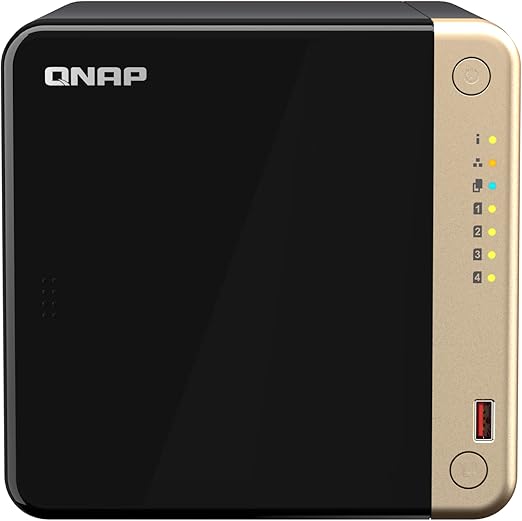
| TS-264-8G | 2-bay, Intel Celeron N5095, 8GB DDR4. From $819 (PLE) / $917 (Mwave) / $949 (Scorptec). Suitable for basic AI features and photo indexing. |
|---|---|
| TS-464-8G | 4-bay, Intel Celeron N5095, 8GB DDR4. From $999 (Scorptec) / $1,099 (PLE). M.2 NVMe slots for SSD cache; good entry point for AI workloads. |
| TS-473A-8G | 4-bay, AMD Ryzen V1500B, 8GB DDR4. Check current retailer pricing. It supports QNAP's documented Ollama deployment route, but QNAP specifies at least 16GB RAM for 7B models. |
| TS-664-8G | 6-bay, Intel Celeron N5095, 8GB DDR4. From $1,549 (PLE) / $1,599 (Scorptec). More storage bays for AI dataset storage. |
| TS-673A-8G | 6-bay, AMD Ryzen V1500B, 8GB DDR4. From $1,699 (PLE). Best balance of storage capacity and AI processing power in the QNAP consumer range. |
| TVS-H874X-I9-64G | 8-bay, Intel Core i9, 64GB DDR4. $8,999 (Scorptec). High-end option for serious AI workloads; supports GPU/NPU acceleration cards. |
QNAP stock note: QNAP availability varies by model and retailer, and stock levels can change. Check stock at Scorptec or PLE before committing to a project timeline. Availability and delivery estimates vary by model and retailer; verify current stock and ETA before committing to a project timeline.
UGREEN NASync AI Features. Ambitious but Early
UGREEN entered the NAS market with the NASync range, announced at CES in January 2024 and launched via Kickstarter that March, and has been aggressive in positioning AI as a core feature. UGREEN's Australian store currently lists the DH2300, DH4300 Plus, DXP2800 GT, DXP4800 GT and DXP4800 Pro. The DH2300 and DH4300 Plus run UGOS Pro with built-in AI-assisted photo organisation features; check current Australian pricing.
For its price point, the DH2300 is a surprisingly capable device for AI photo management. The Rockchip RK3576-based hardware includes an eight-core A72+A53 CPU and a 6-TOPS NPU, and UGREEN's software interface is clean and approachable. Arguably closer to Synology's ease of use than QNAP's complexity.
The DH4300 Plus at $628 uses a Rockchip A76+A55 octa-core processor and 8GB of RAM, giving it legitimate processing headroom for AI tasks. UGREEN now ships Model Manager and local Uliya LLM features on supported iDX systems; availability and capabilities vary by model and region and should not be attributed to the DH range generally.
UGREEN sells the NASync range direct through its own official store, UGREEN AU, with warranty claims going straight to UGREEN AU and a 2-year warranty, 30-day returns, and 30-day price match included.
UGREEN's software ecosystem is also much younger than either Synology DSM or QNAP QTS. Third-party app support, community resources, and integration with other services are all more limited. If you're comfortable with the ecosystem immaturity and the current support situation, UGREEN NASync offers compelling hardware at a strong price point. But don't buy it primarily for AI features that haven't shipped yet.
Pros
- DH4300 Plus offers genuinely capable hardware (Rockchip A76+A55, 8GB RAM) at a competitive $628 AU price
- Photo AI and smart search work well for the price. Clean, approachable interface
- Strong AI roadmap with on-device LLM ambitions
- DH2300 at $351 is an accessible entry point for basic NAS with AI photo features
- Hardware specs punch above the price compared to Synology and QNAP equivalents
Cons
- Only two NAS models available in Australia. Very limited range for specific requirements
- Software ecosystem significantly less mature than Synology or QNAP
- UGREEN now ships local-LLM and AI-automation features on supported iDX systems; availability and capabilities vary by model and region, and should not be attributed to the DH series generally.
- Limited third-party app support and community resources
- Only two NAS models available in Australia. Very limited range for specific requirements
UGREEN NASync Models Available in Australia

| DH2300 | 2-bay, Realtek CPU, 4GB DDR4. $340 (UGREEN AU store). Entry-level AI photo features for smaller libraries. |
|---|---|
| DH4300 Plus | 4-bay, Rockchip A76+A55 octa-core, 8GB DDR4. $595 (UGREEN AU store). Lower-cost UGREEN option for AI-assisted photo organisation; more demanding workloads may benefit from an Intel-based DXP model. |
| DXP4800 Pro | 4-bay, Intel Core i3-1315U, 8GB DDR5 (expandable to 96GB), 10GbE. $1,149.99 (UGREEN AU store). The DXP4800 Pro is Intel-based, unlike the Rockchip ARM-based DH4300 Plus. Both support Docker, while the DXP4800 Pro also supports virtual machines. |
Head-to-Head: AI Feature Comparison
Synology vs QNAP vs UGREEN. AI Features Comparison 2026
| Synology | QNAP | UGREEN NASync | |
|---|---|---|---|
| Photo face recognition | Yes. Built into Synology Photos | Yes. QuMagie | Yes. Built into UGREEN NAS OS |
| Object/scene tagging | Yes | Yes | Yes (basic) |
| Semantic/smart search | Yes. DSM Universal Search | Yes. QTS search | Yes (basic) |
| Local LLM inference | No official support | Yes. Via Container Station / Ollama | Yes on supported iDX systems through Uliya AI Chat and Model Manager; availability varies by model and region. |
| AI acceleration hardware | No | Yes. QAI-M100 M.2 and QAI-U100 USB accelerators are supported on compatible models and applications; QNAP AI Core is software. | No |
| Surveillance AI (person/vehicle detection) | DVA hardware or compatible Synology-camera analytics for advanced features; basic motion detection on standard NAS | Conditional. Available through compatible QVR applications with hardware, licence and camera requirements | No documented native equivalent |
| AI model management UI | No dedicated interface | No unified AI Hub documented; relevant functions are split across QNAP AI Core, Qsirch, QuMagie and Container Station. | No |
| Setup complexity for AI features | Very low. Just enable in app | Medium to high. Requires technical confidence | Low |
| Ecosystem maturity | High. DSM 7.x is mature | High. QTS/QuTS is mature | Low. Software still maturing |
| AU distributor / warranty | BlueChip + MMT. Strong local support | BlueChip primary. Solid local support | No third-party Australian distributor; UGREEN sells through its official Australian NAS store and handles its advertised two-year product warranty directly. |
| Entry price for AI-capable model (AU) | Entry pricing changes frequently; check current Australian listings. | Entry pricing changes frequently; check current Australian listings. | Entry pricing changes frequently; check current Australian listings. The lower-priced DH2300 also includes AI-assisted photo organisation features. |
Choosing the Right Platform for Your AI Use Case
The right answer depends more on what you actually plan to do with AI features than on any abstract comparison of specs and feature lists.
If you want AI photo organisation and smart search. Synology
Synology Photos with on-device face recognition and object tagging is the most polished, accessible AI experience of the three. It works reliably, requires no technical configuration, and processes everything locally. The DS425+ supports face and object recognition, with at least 4GB total memory required for object recognition; performance varies with library size and concurrent workloads, and current retailer pricing should be checked. The DS925+ (check current retailer pricing) is the recommended step-up for larger collections or users running Surveillance Station simultaneously.
Don't overpay for QNAP's complexity if photo AI and smart search are your primary requirements. Synology does this better from a user experience standpoint, and the DS425+ costs less than the comparable TS-464-8G.
If you want to run local LLMs or custom AI workloads. QNAP
QNAP has a documented Ollama deployment route through Container Station, but it is no longer the only one of these vendors with documented local-LLM capability: UGREEN documents a built-in LLM and fully offline Uliya AI Chat on the iDX6011 series. Synology AI Console can connect supported packages to a self-hosted OpenAI-compatible endpoint, although that integration does not establish that a standard DiskStation hosts the model itself. The TS-473A can use QNAP's x86 Ollama deployment route, but QNAP does not publish TS-473A generation-speed benchmarks; its guide specifies at least 16GB RAM for 7B models. QNAP does not publish a TS-473A-versus-Celeron Ollama benchmark; performance varies with the model, quantisation, context length and workload. Expect to allocate 16GB RAM for comfortable LLM operation; QNAP's RAM upgrade options make this achievable.
The TS-673A-8G at $1,899 from PLE adds two additional drive bays. Useful if you're storing large AI datasets or model weights alongside your standard NAS workload. For users who want AI acceleration hardware, the TVS-H874X range at $8,999 from Scorptec supports PCIe GPU/NPU cards for significantly faster inference, though this is a substantial investment.
Be realistic about the technical overhead. Running a local LLM on QNAP requires comfort with Container Station, Docker, and at least basic command-line usage. If those terms are unfamiliar, this use case isn't for you yet.
If budget is tight and photo AI is the main requirement. UGREEN DH4300 Plus
The UGREEN DH4300 Plus uses a Rockchip A76+A55 octa-core processor and 8GB LPDDR4X and is positioned as a lower-cost photo-management option; verify current prices against the DS425+ and TS-464 before purchase. If the core requirement is photo organisation and smart search, and you're comfortable accepting a less mature software ecosystem with limited third-party app support, UGREEN is worth considering.
Don't buy it for AI features that haven't shipped yet. UGREEN now offers local-LLM and model-management features on supported iDX systems, but these capabilities vary by model and should not be assumed on the DH4300 Plus. Buy what's available today and evaluate future capabilities when they actually land in firmware.
UGREEN sells direct through its own official store, UGREEN AU, with warranty claims going straight to UGREEN AU rather than through a third-party distributor, and a 2-year warranty, 30-day returns, and 30-day price match included. Australian Consumer Law protections apply as normal when purchasing from UGREEN's Australian store.
NBN and Remote AI Access. A Practical Note
One frequently overlooked consideration for Australian NAS users interested in AI features is the practical reality of remote access. If you want to access your NAS's AI-powered search, photo library, or local LLM remotely. Whether from another site, a mobile device away from home, or a remote worker's laptop. Your NBN connection becomes a constraint.
Eligible FTTP and HFC Home Fast services were accelerated from 100/20Mbps to 500/50Mbps in September 2025. Upload speeds on FTTN, FTTB, FTTC and fixed-wireless services vary by technology and retail plan. Remote video monitoring and large photo transfers can consume substantial upstream bandwidth. By contrast, text-only access to a locally hosted LLM normally sends prompts and streams text responses while inference remains on the NAS, so its bandwidth demand is comparatively modest; uploads, image generation, voice, or other media-heavy AI workflows can require much more. The latency and upload constraints of standard NBN plans make some of these use cases genuinely impractical without a plan upgrade.
CGNAT (Carrier-Grade NAT) is also relevant here. Some NBN providers use CGNAT, which generally prevents unsolicited inbound IPv4 port forwarding unless the provider supplies a public address or mapping. IPv6 or an outbound tunnel, relay or VPN may provide alternative remote-access paths. Both Synology (QuickConnect) and QNAP (myQNAPcloud) offer relay services that work around CGNAT, but these add a cloud intermediary to what you might have assumed was a purely local AI setup. Check with your ISP whether you're behind CGNAT before assuming direct remote access will work.
Buying in Australia. What to Know
Synology publicly recognized Bluechip Infotech, Multimedia Technology and Silicon Memory Technology as Australian distributors in 2025; current stock and support arrangements should be confirmed with the seller. This distribution stability is a genuine advantage for Australian buyers. Synology availability, pricing and warranty handling vary by model and retailer; buyers should confirm stock and the seller's warranty process before purchase. Both BlueChip and MMT put significant work into supporting Synology in the Australian market.
QNAP currently lists Bluechip Infotech and Dicker Data as Australian distributors, which has been the brand's anchor through a period of significant vendor leadership change in Australia. Pricing has increased substantially. QNAP availability varies by model and retailer; check current stock and supplier ETA rather than assuming a fixed production delay.
UGREEN sells NASync direct through its own official UGREEN AU store rather than through a third-party distributor, with warranty claims going straight to UGREEN AU and a 2-year warranty, 30-day returns, and a 30-day price match included. For business-critical deployments, the main open risk is software maturity rather than warranty support.
Australian NAS prices vary by model, retailer, promotion, and stock status, so buyers should compare current local listings rather than assume pricing is uniform. The real differentiator is what happens when something goes wrong. For business deployments, always request a formal quote. For business, education and government purchases, ask for a formal quote rather than paying the listed retail price.
Australian Consumer Law: When purchasing NAS devices from Australian retailers, ACL protections apply. Under the Australian Consumer Law, the seller must assist with consumer-guarantee remedies and cannot simply direct you to the manufacturer. For some guarantees, consumers may instead pursue the manufacturer, although the remedies available can differ. A manufacturer's voluntary warranty is separate from ACL rights. Warranty handling depends on the seller, vendor programme and type of claim; ask the retailer how Australian claims are assessed and fulfilled. Whether a dead NAS counts as a major or minor failure under ACL depends on the situation, not a fixed rule. It's a major failure if it can't be used for its normal purpose and can't easily be fixed within a reasonable time, in which case you choose a refund or replacement. Otherwise it's treated as minor, and the retailer can choose to repair or replace it first, though you can request a refund if they can't fix it within a reasonable time. Ask your retailer about their warranty process before you need it. This is general guidance only. For official information on your rights, visit accc.gov.au.
Related reading: our Synology brand guide, our Synology vs QNAP comparison, and our NAS vs cloud storage comparison.
Free tools: NAS Sizing Wizard and AI Hardware Requirements Calculator. No signup required.
Related reading: our NAS explainer and our UGREEN brand guide.
Once you have chosen your NAS, get a second opinion on the full build. Drives, RAID type, network setup, and backup strategy. Before committing. $149 AUD, delivered within 3 business days.
Related reading: our best NAS for AI in Australia guide, including when AI features are worth paying for.
See also: our complete UGREEN NAS Australia guide.
See also: our complete Synology NAS Australia guide.
See also: our complete QNAP NAS Australia guide.
Looking for UGREEN accessories?
UGREEN also makes chargers, power banks, USB-C docks, wireless chargers, Ethernet adapters and storage accessories. We have sorted the Australian range into the products actually worth considering.
Browse UGREEN accessories →Related reading: our UGREEN's HomeAgent local AI launch.
Related reading: our is AI NAS just marketing, our do you need an AI NAS, and our UGREEN iDX6011 review.
Can I run a local LLM like Llama or Mistral on a Synology NAS?
Not through any officially supported Synology workflow in 2026. Technically, Docker containers can be run on Plus-series NAS models with adequate RAM, and llama.cpp or Ollama can be deployed manually. But Synology does not document or support this as a use case, there is no App Center package for it, and performance on Celeron-based hardware is poor for anything beyond very small models. If running local LLMs is your primary goal, QNAP's TS-473A or TS-673A with Container Station is the purpose-built option. Synology's AI strengths are in photo recognition, smart search, and media organisation. Not LLM inference.
Does QNAP's AI acceleration hardware work with all NAS models?
QNAP accelerator compatibility depends on the exact accelerator and NAS model. QAI-U100 uses USB 3.2 Gen 1 Type-A, while QAI-M100 uses a compatible M.2 2280 PCIe slot or a suitable QM2 expansion card. QNAP AI Core is software, not a PCIe card. Check QNAP's compatibility list for the exact combination. Models like the TS-473A and TS-673A have PCIe expansion options, and the TVS-H874X range is designed with this in mind. Before buying a QNAP NAS specifically for AI acceleration, check QNAP's compatibility information for the exact NAS and QAI accelerator combination. QNAP AI Core is software, while QAI-M100 and QAI-U100 are hardware accelerators. The QNAP compatibility list on their website is the authoritative reference.
Is UGREEN NASync available through retailers like Scorptec or PLE in Australia?
As of March 2026, UGREEN NASync is sold through UGREEN's own Australian online store (UGREEN AU) rather than through major retail chains like Scorptec, PLE, or Mwave. Check UGREEN AU for current DH2300 and DH4300 Plus pricing. UGREEN sells direct rather than through the distributor-backed retail chain that Synology and QNAP use, so warranty and support claims go straight to UGREEN AU, with a 2-year warranty, 30-day returns, and 30-day price match included. Australian Consumer Law still applies for purchases from UGREEN's Australian store.
How much RAM does a QNAP NAS need to run AI workloads comfortably?
For basic photo AI, face recognition, and smart search: 8GB is adequate and is the standard RAM on QNAP's Celeron-based models like the TS-464-8G and TS-664-8G. For running local LLMs via Container Station: 16GB is the practical minimum for comfortable operation with 7B parameter models at 4-bit quantisation; 32GB is recommended if you want to run larger models or run LLM inference alongside other NAS workloads. QNAP's QuTS Hero ZFS operating system requires at least 8GB to install, and deduplication workloads benefit from 16GB+. The TS-473A-8G ships with 8GB and can be upgraded. Check QNAP's memory compatibility list for approved modules before purchasing third-party RAM.
Does Synology's drive compatibility restriction affect AI setups?
Partly. Synology reversed the third-party HDD restrictions with DSM 7.3 in October 2025, restoring support for Seagate and Western Digital 3.5-inch HDDs on desktop Plus-series models. This means standard NAS drives for primary storage are no longer a concern on current consumer models. However, M.2 NVMe SSD restrictions remain in place. Only drives on Synology's Hardware Compatibility List can be used for new cache or storage pool creation on Plus-series models. For AI workloads that benefit from NVMe caching (faster index access, AI model storage on fast media), this restriction is relevant. Enterprise and rackmount models (RS, XS, SA series) still have stricter drive compatibility requirements. Check the Synology compatibility list for your specific model before purchasing NVMe drives for AI use.
Which NAS is best for AI-assisted home photo management in Australia in 2026?
Synology is the best choice for AI photo management for most Australian home users. Synology Photos offers reliable face recognition, object tagging, and smart search that works out of the box without any technical configuration, and processes everything locally without sending data to any cloud service. The DS425+ supports face and object recognition, with object recognition requiring at least 4 GB of memory. The DS925+ at $1,048 from Mwave is recommended for larger libraries or users who also run Surveillance Station. UGREEN's DH4300 Plus at $595 is a capable budget alternative if cost is the primary constraint, but Synology's more mature software ecosystem and stronger Australian distribution and warranty support make it the safer long-term choice for most users.
Should I wait for UGREEN to get an Australian distributor before buying a NASync?
That depends on your risk tolerance. For purchases from UGREEN's Australian store, warranty claims are handled directly by UGREEN under its advertised warranty. Purchases from an Australian retailer should be raised with that seller, subject to Australian Consumer Law. Slower and less straightforward than the retailer-to-distributor-to-vendor chain that Synology and QNAP use. For a device that stores your data, this matters. If UGREEN's hardware and price point appeal to you, and you're comfortable with a DIY approach to any warranty issues that might arise, buying now is reasonable. If you're deploying the NAS in a business context or storing irreplaceable data without a robust off-site backup strategy, waiting until local distribution is confirmed is the more prudent approach. Either way, have a solid backup plan. A NAS is not a backup regardless of which brand it is.
Looking for a deeper guide to the best NAS for home or SMB use in Australia? The Need to Know IT team covers the full range of Synology, QNAP, and UGREEN models with real AU pricing and honest assessments of what each platform actually delivers.