Synology and UGREEN sit at opposite ends of the maturity/value spectrum in 2026: Synology offers the most polished NAS operating system available (DSM), backed by a decade of app development and enterprise security features; UGREEN offers significantly stronger hardware specs per dollar with a software ecosystem that is still developing. This comparison covers software depth, hardware value, security track record, backup capabilities, and the direct verdict at each use case and price tier. Australian purchasing guidance, pricing, and warranty details are in the AU section below.
For a broader overview of this topic, see our complete Synology ecosystem guide.
In short: Synology suits buyers who want a proven, easy-to-use software platform with strong Australian retail availability and local warranty support through established distributors. UGREEN suits technically confident buyers willing to trade software maturity for better hardware specs per dollar. If you just want it to work without fuss, buy Synology. If you want more hardware for your money and are comfortable managing a newer platform, UGREEN is worth a serious look.
The Core Difference: Software Ecosystem vs Hardware Value
Synology and UGREEN represent two fundamentally different strategies in the NAS market. Synology has spent nearly two decades refining DiskStation Manager (DSM), building an ecosystem of first-party applications that covers backup, file sync, surveillance, media management, Docker containers, and more. Their hardware is competent but rarely class-leading for the price. You pay a premium for the software experience.
UGREEN entered the NAS market in 2024 with the NASync range and took a different approach: pack in more powerful hardware at aggressive pricing and build the software over time. Their UGOS operating system is functional and improving rapidly, but it is years behind DSM in polish, app breadth, and community ecosystem. The hardware itself is often significantly better specified than a Synology at the same price point.
This is the trade-off that drives every decision in this comparison. If you are reading a best NAS Australia guide and these two brands keep appearing, the deciding factor is almost always whether you value the software or the hardware more.
AU Pricing: Head-to-Head Comparison
Pricing tells a clear story. Synology models are readily available from multiple Australian retailers, but pricing can vary materially by retailer and promotion. UGREEN NAS units are sold direct through UGREEN's own official Australian store, UGREEN AU (UGREEN AU), rather than through a traditional retailer network, with Amazon AU as a secondary option for some models.
2-Bay Models
2-Bay NAS: Synology vs UGREEN
 Synology DS225+
|
UGREEN NASync DXP2800 | |
|---|---|---|
| AU Price | $597 (market price) | Check marketplace stock and seller/import status; the original DXP2800 is not listed in UGREEN AU's current catalogue, which now lists the DXP2800 GT. |
| CPU | Intel Celeron (4-core, 2.0GHz) | Intel N100 (4-core, 3.4GHz boost) |
| RAM | 2GB DDR4 (expandable) | 8GB DDR5 |
| Network | 1x 2.5GbE + 1x 1GbE | 1x 2.5GbE |
| M.2 Slots | None | 2x NVMe |
| USB | 2x USB 3.2 Gen 1 | 2x USB 3.2 Gen 2 |
| Operating System | DSM 7.x | UGOS |
| Warranty | 3 years (extendable to 5) | 2 years |
Prices last verified: 16 March 2026. Always check retailer before purchasing.
The DS225+ is Synology's lower-tier current 2-bay Plus-series model. with a dual-port network configuration and DSM's full software suite. The DXP2800 counters with significantly more RAM and a faster CPU at a similar or lower price. For a deeper look at the Synology side, see our Synology DS225+ review.
4-Bay Models
4-Bay NAS: Synology vs UGREEN
 Synology DS425+
|
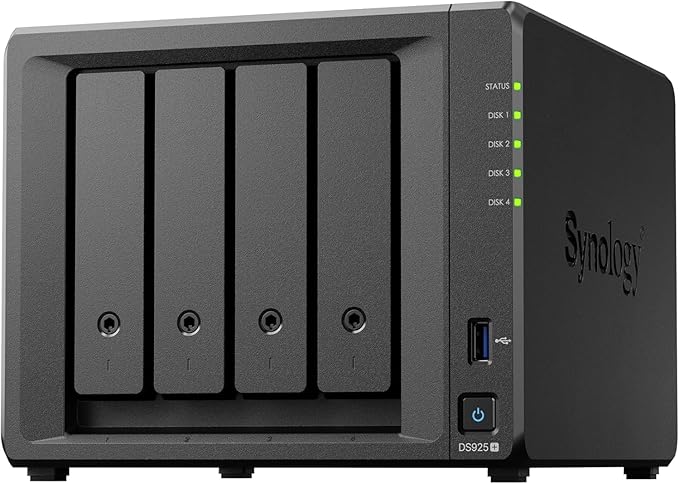 Synology DS925+
|
UGREEN NASync DXP4800 Pro | |
|---|---|---|---|
| AU Price | $899 (market price) | $1,081 (market price) | $1,149 (Scorptec / UGREEN AU) |
| CPU | Intel Celeron (4-core, 2.0GHz) | AMD Ryzen V1500B | Intel Core i3-1315U (6-core, up to 4.5GHz) |
| RAM | 2GB DDR4 | 4GB DDR4 (expandable) | 8GB DDR5 (expandable to 96GB) |
| Network | 1x 2.5GbE + 1x 1GbE | 2x 2.5GbE | 1x 10GbE + 1x 2.5GbE |
| M.2 Slots | 2x NVMe | 2x NVMe | 2x NVMe |
| Operating System | DSM 7.x | DSM 7.x | UGOS |
| Warranty | 3 years | 3 years (extendable to 5) | 2 years |
At the 4-bay level, the article’s listed DXP4800 Pro is priced above the DS925+. However, the DS925+ benefits from DSM's mature ecosystem, dual 2.5GbE networking, and full Australian retail availability with local warranty support. The DS425+ sits as a more affordable Synology entry point but with only 2GB RAM.
If you are comparing the Synology options against each other, our DS925+ vs DS725+ comparison breaks down the Synology-specific decision.
Software: DSM vs UGOS
This is where Synology holds its strongest advantage and it is not close. DSM is arguably the best NAS operating system available. It is intuitive, well-documented, and backed by a massive community of users and third-party guides. Synology's first-party applications, including Synology Drive, Hyper Backup, Active Backup for Business, Surveillance Station, and Photos, are polished and functional enough that many users never need to install third-party alternatives.
UGOS is functional but young. It covers the basics well: file management, user access control, backup scheduling, and media serving. Docker support is available, which opens up a world of third-party applications. But the first-party app library is thin compared to DSM, documentation is limited, and the community is still small. If you hit a problem with DSM, there are thousands of forum threads, Reddit posts, and YouTube tutorials to guide you. With UGOS, you may be on your own.
For buyers whose primary use case is straightforward backup and file storage, UGOS is perfectly adequate. For anyone who wants more, such as running Docker containers, setting up surveillance, or building a comprehensive backup strategy with 3-2-1 backup, DSM is the more capable and reliable platform today.
Pros
- DSM is the most intuitive NAS operating system available
- Extensive first-party app suite (Drive, Hyper Backup, Photos, Surveillance Station)
- Massive community and documentation for troubleshooting
- Docker and virtualisation support on Plus models
- Regular, well-tested security updates
Cons
- UGOS is improving rapidly but still years behind DSM in maturity
- UGOS documentation and community resources are limited
- UGOS first-party app library is thin
- DSM's M.2 NVMe drive restrictions still apply on newer models
- DSM's drive compatibility controversy (now largely reversed) damaged brand trust
Hardware: Where UGREEN Fights Back
UGREEN's hardware advantage is undeniable. In the models compared here, UGREEN generally offers more RAM and faster CPUs than similarly priced Synology models, and often faster USB connectivity. The DS225+ ships with 2GB of DDR4 RAM. The UGREEN DXP2800 ships with 8GB of DDR5. That is not a marginal difference, it is a generational one.
This hardware gap matters for specific workloads. Docker containers consume RAM. Surveillance with multiple camera streams needs processing power. Running Plex with transcoding demands a capable CPU. If your use case is hardware-intensive, UGREEN gives you significantly more headroom per dollar spent.
However, hardware only matters if the software can use it effectively. Synology's DSM extracts excellent performance from modest hardware through careful optimisation. Real-world DS225+ performance depends on the workload, container count, memory use, storage configuration, and other concurrently running services. UGREEN's extra hardware is a specification advantage, but real-world performance still depends on the workload and software configuration.
Buying in Australia: Availability and Support
This is where the comparison shifts decisively in Synology's favour for most Australian buyers. Synology products are distributed in Australia through Bluechip Infotech and Multimedia Technology (MMT), with stock varying by model and time. Consumer models are almost always available at major Australian retailers including Scorptec, PLE, Mwave, and others.
UGREEN sells its NAS range in Australia through its own official store, UGREEN AU (UGREEN AU), with Amazon AU as a secondary option for some models. This has practical implications that go beyond price.
UGREEN warranty in Australia: For purchases from UGREEN AU, warranty claims go directly to UGREEN. Some models are also sold by Australian retailers, in which case the seller's warranty and Australian Consumer Law processes apply. Australian Consumer Law protections apply when purchasing from Australian retailers, and the UGREEN AU store includes a 2-year warranty, 30-day returns, and 30-day price match handled directly by UGREEN.
For details on where to buy NAS in Australia and understanding the retailer landscape, we have a dedicated guide.
Remote Access and NBN Considerations
Both Synology QuickConnect and UGREENlink provide remote access without requiring manual port forwarding or a public IPv4 address. Synology's QuickConnect service provides relay-based remote access that works even behind CGNAT (Carrier-Grade NAT). If your ISP uses CGNAT for IPv4 and does not provide a public IPv4 address, conventional inbound IPv4 port forwarding will not work; DDNS alone does not bypass CGNAT. QuickConnect can work around this limitation; when it falls back to Synology's relay service, relay bandwidth and latency can reduce performance.
UGREEN offers remote access through UGREENlink without requiring manual port forwarding or a public IP address, but it is newer and less field-tested. Upload bandwidth depends on the nbn access technology and retail plan: current wholesale profiles include 25-100Mbps down and 5-20Mbps up on FTTB/FTTN/FTTC Home Fast, and 500/50Mbps on FTTP/HFC Home Fast, remote access performance is ultimately bottlenecked by upload bandwidth regardless of which NAS brand you choose. If remote access is a core requirement, Synology's more established relay infrastructure gives greater confidence.
The Drive Compatibility Factor
Synology's 2025 drive compatibility controversy is worth addressing directly. In April 2025, Synology restricted new Plus series models to Synology-branded or certified drives, blocking third-party HDDs from creating new storage pools. The backlash was severe and Synology reversed course with DSM 7.3 in October 2025, restoring support for third-party 3.5-inch HDDs and 2.5-inch SATA SSDs from brands like Seagate and Western Digital on desktop Plus series models.
Important restrictions remain: M.2 NVMe SSDs still require drives from Synology's official Hardware Compatibility List for new cache or storage pool creation. Enterprise and rackmount models still enforce stricter compatibility. This means if you are planning to use SSD cache on a Synology, check the compatibility list carefully before purchasing drives.
UGREEN has no such restrictions. UGREEN does not require branded drives, but buyers should check its model-specific compatibility list; unlisted drives may work, but UGREEN does not guarantee their stability or performance. UGREEN does not require UGREEN-branded drives, but buyers should still verify the exact drive model, including the best NAS hard drives for the job, against UGREEN's compatibility list.
Who Should Buy Synology
The Synology DS225+ at~$638 or the DS425+ at$899 from Australian retailers suits buyers who prioritise a polished, proven experience. If you want a NAS that works reliably out of the box with minimal configuration, excellent mobile apps, a comprehensive backup suite, and the confidence that comes from buying a well-established product through local retailers with local warranty support, Synology is the right choice.
Synology particularly suits first-time NAS buyers. The learning curve is gentle, the documentation is extensive, and when you hit a problem, the answer is almost always available through a quick search. If you are buying from a specialist like Scorptec or PLE, you can also get genuine pre-sales guidance, which is not something Amazon offers regardless of brand.
For a complete overview of the Synology lineup, see our Synology NAS Australia guide or the broader best Synology NAS recommendations.
Who Should Buy UGREEN
The UGREEN NASync range suits technically confident buyers who understand that they are buying into a newer platform and are comfortable with that trade-off. If you are already running Docker containers, are familiar with NAS administration from a previous device, or primarily need a high-performance storage appliance rather than a full software ecosystem, UGREEN delivers exceptional hardware value. UGREEN is also expanding beyond storage into smart home hardware; our UGREEN HomeAgent guide explains what that ecosystem includes and what is still unverified.
UGREEN also suits buyers who are cost-conscious but still want capable hardware. The DXP4800 Plus has 8GB DDR5 RAM and an Intel Pentium Gold 8505 processor; check its current Australian price and availability before comparing it with Synology models. If your use case is primarily Plex media serving, file storage, and basic backup, UGOS handles these tasks competently and the hardware advantage translates to smoother performance under load.
Don't buy UGREEN if you are a first-time NAS buyer with no technical background. The documentation is limited, the community is small, and Australian support is available through UGREEN AU and participating retailers, although UGREEN's local retail and support channel is newer and narrower than Synology's. For more on UGREEN's lineup, see our UGREEN NAS Australia guide.
Synology vs UGREEN: Key Specs at a Glance
Synology DS225+
| Bays | 2x 3.5"/2.5" SATA |
|---|---|
| CPU | Intel Celeron (4-core, 2.0GHz) |
| RAM | 2GB DDR4 (expandable) |
| Network | 1x 2.5GbE + 1x 1GbE |
| M.2 Slots | No M.2 slots |
| USB | 2x USB 3.2 Gen 1 |
| OS | DSM 7.x |
| AU Price (Scorptec) | $549 |
| AU Price (Mwave) | $585 |
| AU Price (PLE) | $599 |
Synology DS925+
| Bays | 4x 3.5"/2.5" SATA |
|---|---|
| CPU | AMD Ryzen (Quad-core) |
| RAM | 4GB DDR4 (expandable) |
| Network | 2x 2.5GbE |
| M.2 Slots | No M.2 slots |
| USB | 2x USB 3.2 Gen 1 |
| OS | DSM 7.x |
| AU Price (Scorptec) | $995 |
| AU Price (Mwave) | $1,029 |
Synology DS425+
| Bays | 4x 3.5"/2.5" SATA |
|---|---|
| CPU | Intel Celeron (4-core, 2.0GHz) |
| RAM | 2GB DDR4 |
| Network | 1x 2.5GbE + 1x 1GbE |
| M.2 Slots | No M.2 slots |
| USB | 2x USB 3.2 Gen 1 |
| OS | DSM 7.x |
| AU Price (Scorptec) | $849 |
| AU Price (Mwave) | $848 |
| AU Price (PLE) | $999 |
UGREEN NASync DXP2800

| Bays | 2x 3.5"/2.5" SATA |
|---|---|
| CPU | Intel N100 (4-core, 3.4GHz boost) |
| RAM | 8GB DDR5 (expandable to 16GB) |
| Network | 1x 2.5GbE |
| M.2 Slots | No M.2 slots |
| USB | 2x USB 3.2 Gen 2 |
| OS | UGOS |
| AU Price (est.) | Not currently listed by an AU retailer |
UGREEN NASync DXP4800 Plus

| Bays | 4x 3.5"/2.5" SATA |
|---|---|
| CPU | Intel Pentium Gold 8505 (5 cores/6 threads, up to 4.4GHz) |
| RAM | 8GB DDR5 (expandable to 64GB) |
| Network | 1x 10GbE + 1x 2.5GbE |
| M.2 Slots | No M.2 slots |
| USB | 1x USB-A 3.2 Gen 2, 1x USB-C 3.2 Gen 2, 1x USB-A 3.2 Gen 1, and 2x USB-A 2.0 |
| OS | UGOS |
| AU Price (est.) | check live AU availability; the DXP4800 Plus is not in UGREEN AU's current catalogue (Amazon AU) |
Total Cost of Ownership
The sticker price of a NAS is only part of the equation. Both Synology and UGREEN require drives, and NAS-drive pricing is volatile; check the current per-drive price and multiply it by the number of bays you plan to populate. At these drive costs, the price difference between the NAS enclosures themselves becomes a smaller percentage of the total investment.
Power consumption is another ongoing cost. Both brands are reasonably efficient for home NAS devices, but the Intel N100 in UGREEN's models is known for excellent power efficiency. Over years of 24/7 operation, a few watts difference adds up. See our NAS power consumption guide for detailed analysis.
Don't forget the UPS. A NAS running 24/7 should be protected by an uninterruptible power supply. A basic UPS suitable for a NAS costs $150-300 in Australia. Budget for this regardless of which brand you choose. Our UPS for NAS guide covers the options.
The Verdict
Synology remains the default recommendation for most NAS buyers in 2026. DSM is the best consumer NAS operating system available. Mature, secure, and backed by a deep app ecosystem. If you are buying a NAS for the first time, for a household, or for a small business, Synology is the lower-risk choice.
UGREEN is a legitimate competitor that offers better hardware per dollar. For technically confident buyers who prioritise raw specifications and are comfortable with a newer software platform, UGREEN represents genuine value. UGREEN's main structural difference is that it sells direct through its own official store rather than through a third-party distributor like Synology and QNAP use.
If you are comparing across all NAS brands, not just Synology and UGREEN, our Synology vs QNAP comparison and Synology vs Asustor comparison cover the other major matchups. For a broader view, start with our best NAS Australia guide.
Business and government buyers: Always request a formal quote rather than buying at listed retail price. Ask the reseller whether quote-specific pricing is available, as availability and any discount will vary by seller, product, and timing. Also note: Australian Consumer Law consumer guarantees apply to eligible purchases from Australian businesses and can also apply when an overseas business sells directly to consumers in Australia, although overseas remedies may be harder to enforce in practice.
🇦🇺 Australian Buyers: Pricing, Availability, and Warranty
Synology in Australia
Synology is distributed through BlueChip IT and well-stocked at all major Australian retailers. Pricing reference (September 2026): DS225+~$638, DS425+ $899 DS925+ $1,048 at Scorptec/Mwave/PLE. Eligible purchases from Australian retailers carry ACL consumer guarantees; Synology's separate three-year manufacturer warranty depends on the product and applicable warranty terms.
UGREEN in Australia
UGREEN sells direct through its own official store, UGREEN AU (UGREEN AU), with warranty claims going straight to UGREEN AU and a 2-year warranty, 30-day returns, and 30-day price match included. Amazon AU is a secondary channel for some models. CGNAT prevents conventional inbound IPv4 port forwarding, but remote access can use Synology QuickConnect, UGREENlink, Tailscale, or another relay or tunnel-based service. Use the NBN Remote Access Checker to verify your connection type.
Use our free NAS Sizing Wizard to get a personalised NAS recommendation.
Once you have chosen your NAS, get a second opinion on the full build. Drives, RAID type, network setup, and backup strategy. Before committing. $149 AUD, delivered within 3 business days.
For a full overview of every UGREEN NAS model and where to buy in Australia, see our UGREEN brand guide and full model lineup.
See also: our complete UGREEN NAS Australia guide.
See also: our complete Synology NAS Australia guide.
Looking for UGREEN accessories?
UGREEN also makes chargers, power banks, USB-C docks, wireless chargers, Ethernet adapters and storage accessories. We have sorted the Australian range into the products actually worth considering.
Browse UGREEN accessories →See also: our complete Synology ecosystem guide.
Related reading: our Synology's full 2026 lineup, every model and price.
Is UGREEN NAS available in Australia?
UGREEN NAS devices are available to Australian buyers primarily through UGREEN's own official store, UGREEN AU (UGREEN AU), with warranty claims going directly to UGREEN AU and a 2-year warranty, 30-day returns, and 30-day price match included. Amazon AU carries some models as a secondary option. Scorptec currently stocks at least the UGREEN DXP4800 Pro; availability at PLE, Mwave, and other Australian retailers should be checked separately.
Is Synology better than UGREEN for a first NAS?
Yes, for first-time NAS buyers, Synology is the better choice. DSM has a gentle learning curve, extensive documentation, and a massive community of users who have asked and answered most questions you will encounter. You can buy from a specialist Australian retailer like Scorptec or PLE who can provide pre-sales guidance, and warranty support goes through established local channels. UGREEN is a strong option for buyers who already have NAS experience and want better hardware value, but the limited documentation and smaller community make it harder for beginners.
Does UGREEN NAS support Docker?
Yes, UGREEN's UGOS supports Docker containers, which opens up a wide range of third-party applications. Docker support is available on all NASync DXP models with Intel processors (DXP2800, DXP4800, DXP4800 Plus, DXP6800 Pro, and DXP8800 Plus). The ARM-based DH4300 Plus also supports Docker via UGOS Pro Container Manager, using ARM64-compatible container images; the entry-level DH2300 does not support Docker. This is comparable to Synology's Docker support on Plus series models. The Docker implementation itself works well, though UGOS has fewer integrated management tools compared to DSM's Container Manager application.
Can I use any hard drive in a UGREEN NAS?
UGREEN NAS devices support third-party 3.5-inch and 2.5-inch SATA drives plus supported M.2 NVMe SSDs, but buyers should verify the exact part number against the model-specific compatibility list. This contrasts with Synology, which reversed third-party HDD restrictions with DSM 7.3 but still maintains M.2 NVMe compatibility requirements on newer Plus series models. For hard drive recommendations that work across all NAS brands, see our best NAS hard drive Australia guide.
What happens if my UGREEN NAS needs warranty repair in Australia?
For a purchase made directly from UGREEN AU, claims go to UGREEN under its published 2-year warranty, 30-day returns and 30-day price-match terms. For a purchase through an Australian retailer, contact that seller and use its warranty and Australian Consumer Law process. If you purchased through Amazon AU instead, Amazon's return and refund policy applies, but they may not offer a like-for-like replacement if the model is out of stock. A NAS is not a backup, so plan for replacement timing to vary depending on stock availability and warranty processing and ensure you have an offsite backup strategy in place regardless of which brand you choose.
Will remote access work with UGREEN NAS on NBN with CGNAT?
UGREENlink is designed to provide remote access without a public IP address or manual port forwarding. Both QuickConnect and UGREENlink are designed to provide remote access without manual port forwarding or a public IP address. If your ISP uses CGNAT, conventional inbound IPv4 port forwarding is unavailable; use a relay- or tunnel-based service, and expect remote performance to depend on your access technology and retail plan. For the most reliable remote access on Australian networks, Synology currently has the edge due to years of refinement.
Should I wait for UGREEN to get an Australian distributor before buying?
If Australian warranty support is important to you, waiting is reasonable. Local stock and retailer-based warranty channels already exist for some UGREEN NAS models. Australian Consumer Law consumer guarantees apply to eligible purchases from Australian businesses and do not depend on a separate distributor agreement. If you are comfortable with Amazon AU's return policy and are technically self-sufficient, buying now saves you money on hardware that is already well-reviewed globally. The NAS itself works the same regardless of where you buy it; it is the after-sales support that changes with local distribution.
Choosing a NAS for your home or office? Start with our complete guide to the best NAS options available in Australia, covering every major brand and use case.