The Synology DS925+ is the best 4-bay NAS for most Australian buyers, combining mature software, capable hardware and a clear expansion path at a market price of about $1,099. A network attached storage device (NAS) is a dedicated storage computer shared across a network, like a private filing cabinet that every approved device can reach. The DS925+ follows the DS923+ and uses an AMD Ryzen V1500B processor with dual 2.5GbE networking, while the Synology DS423 offers simpler file storage for about $635 and the QNAP TS-464-8G provides 8GB RAM, dual 2.5GbE and a PCIe slot for about $1,129.
Capacity and growth matter as much as processor speed because the RAID layout determines usable space, while RAM, M.2 slots and expansion support determine how far the enclosure can grow. If the budget is fixed near $1,000, the guide to spending around $1,000 on a NAS covers total cost with drives.
In short: The Synology DS925+, at about $1,099, is the best-balanced choice for storage, applications and later expansion. The Synology DS423, at about $635, suits straightforward file sharing and backup. The QNAP TS-464-8G, at about $1,129, is better equipped for containers, media and hardware upgrades. The Asustor AS5404T, at about $749, is the strongest Plex-focused alternative, with hardware transcoding, HDMI output and four M.2 slots.
Why a 4-Bay NAS?
A 4-bay NAS gives households and small offices enough bays to balance capacity, protection and later growth. Four current 24TB drives provide up to 96TB raw capacity, but usable capacity is lower after protection and system overhead. RAID (a way of arranging several drives so they work like one protected storage set, similar to keeping parts of a record across several filing drawers) can provide 24TB from four 8TB drives in RAID 5.
Four bays also let a buyer start with two drives and add more later. The RAID guide explains the protection choices, while the NAS hard drive guide covers suitable drive families.
The main advantage over a 2-bay mirror is flexibility. Two equal drives in RAID 1 devote half the raw capacity to a second copy, while four equal drives in RAID 5 devote one drive's worth of space to parity protection. SHR (Synology Hybrid RAID, a flexible layout that organises disks much like adjustable shelving) provides the same usable capacity as RAID 5 when all four drives are the same size.
How many drives to start with
Two matched drives are a sensible starting point when current data fits comfortably on one of them. Configure them as RAID 1 or SHR-1, leave two bays free, and add drives as storage demand becomes clearer. A 4-bay enclosure makes that staged approach possible without replacing the NAS, whereas a full 2-bay mirror has no empty internal bay. Confirm the vendor's supported migration path before buying drives because changing RAID layouts can require intermediate steps, free space and a current backup.
What four bays cost you in space and power
Four bays occupy more shelf space and can draw more power than a smaller enclosure, especially when every drive is spinning. In return, they support up to 96TB of raw capacity with four current 24TB drives and use capacity more efficiently under RAID 5 than a 2-bay mirror. That trade makes sense when growth is likely. It is harder to justify when the workload will remain small and a two-drive mirror already provides adequate usable space.
A 4-bay chassis is larger and usually supports more hardware than a 2-bay model. If two bays provide enough capacity and no four-drive growth path is needed, see the best 2-bay NAS options in Australia.
Best 4-Bay NAS Comparison Table
The table compares the six recommended 4-bay models across bay-level hardware, networking and expansion. Market prices were checked on 25 September 2026. For choices across other bay counts, see Best NAS Australia. If the purchase is governed mainly by a fixed budget, the guide to spending around $1,000 on a NAS covers the complete system cost.
| Synology DS925+ | Synology DS423 | QNAP TS-464-8G | Asustor AS5404T | UGREEN DXP4800 Pro | TerraMaster F4-424 Pro | |
|---|---|---|---|---|---|---|
| AU market price | $1,099 | $635 | $1,129 | $749 | $1,149 | $1,100 |
| CPU | AMD Ryzen V1500B, 4-core | Realtek RTD1619B, 4-core | Intel Celeron N5095, 4-core | Intel Celeron N5105, 4-core | Intel Core i3-1315U, 6-core | Intel Core i3-N305, 8-core |
| RAM | 4GB ECC DDR4 | 2GB DDR4, not expandable | 8GB DDR4 | 4GB DDR4 | 8GB DDR5, up to 96GB | 32GB DDR5 |
| Drive Bays | 4 x SATA | 4 x SATA | 4 x SATA | 4 x SATA | 4 x SATA | 4 x SATA |
| Networking | 2 x 2.5GbE | 2 x 1GbE | 2 x 2.5GbE | 2 x 2.5GbE | 1 x 10GbE and 1 x 2.5GbE | 2 x 2.5GbE |
| M.2 slots | 2 | None | 2 | 4 | 2 | 2 |
| HDMI output | No | No | Yes | Yes | No | No |
| Expansion path | One Synology DX525 | No unit listed, check vendor page | QNAP TL-D1600S | Asustor AS6004U or AS5004U | No unit listed, check vendor page | TerraMaster USB disk arrays only |
| Best for | Balanced home and business use | Basic storage and backup | Media, containers and PCIe upgrades | Plex and media | CPU, RAM and fast networking | Home lab workloads |
Market prices checked 25 September 2026. Always check current listings before buying.
Synology DS925+. Best Overall 4-Bay NAS
The Synology DS925+ follows the DS923+ in Synology's four-bay Plus line. Its AMD Ryzen V1500B has four cores and eight threads, while two native 2.5GbE ports provide faster local transfers without an add-in network card. A 2.5GbE link has two and a half times the headline bandwidth of standard gigabit Ethernet, like widening a one-lane data road into a larger channel.
For network planning, see the NAS networking guide. The full Synology DS925+ review examines its workload fit in more detail.
DSM 7 remains the gold standard for NAS operating systems. It is polished, stable, and has a mature ecosystem of first-party packages: Synology Drive for file sync, Synology Photos for photo management, Hyper Backup for automated backups, and Surveillance Station for camera recording. For small business deployments, Active Backup for Business provides free agent-based backup for Windows PCs and servers. No other NAS vendor matches Synology's software depth without requiring third-party apps or Docker knowledge.
The DS925+ has a market price of about $1,099. Compare sellers on the warranty process, product knowledge and help available after a fault, rather than treating a small listing difference as the deciding factor. The dedicated Synology NAS Australia guide explains how it fits within the wider range.
DS925+ capacity and expansion path
The DS925+ has the clearest growth path in this group. Its four SATA bays can be joined by one DX525 expansion unit, which adds five bays and takes the system to nine. An expansion unit is an extra drive enclosure attached to the NAS, much like adding another cabinet beside an existing filing cabinet. Two M.2 NVMe slots support fast solid-state storage or cache, while the base ECC memory can be expanded. NVMe is a fast SSD connection, similar to giving frequently used files an express lane. Once nine bays or the Ryzen processor becomes limiting, move to a larger NAS rather than chaining more hardware to this chassis.
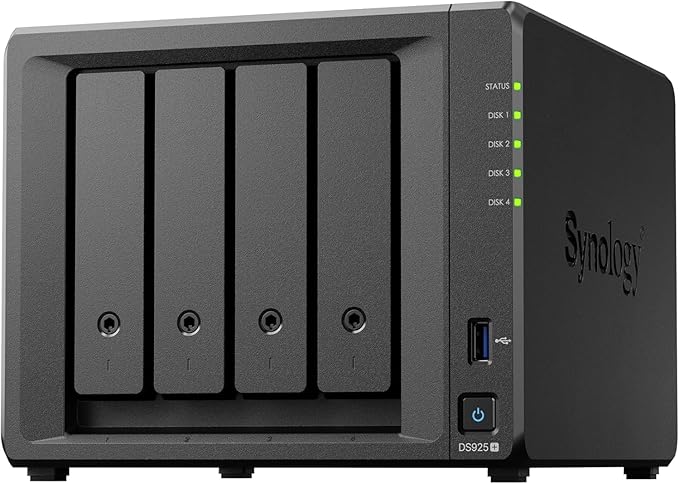
| CPU | AMD Ryzen V1500B, 4-core / 8-thread |
|---|---|
| RAM | 4GB DDR4 ECC (expandable to 32GB) |
| Drive Bays | 4x 3.5"/2.5" SATA (expandable to 9 with DX525) |
| NVMe Slots | 2x M.2 2280 NVMe (SSD cache or storage pool) |
| Networking | 2x 2.5GbE RJ45 |
| USB | 2x USB 3.2 Gen 1 |
| Operating System | Synology DSM 7 |
| Warranty | 3-year hardware warranty |
| AU market price | $1,099 |
Pros
- Mature DSM software with extensive first-party applications
- AMD Ryzen V1500B provides four cores and eight threads
- Dual 2.5GbE networking is built in
- ECC RAM supports data integrity
- Expandable to nine bays with one DX525 expansion unit
- Two M.2 NVMe slots support SSD cache or storage pools
Cons
- No HDMI output for direct TV playback
- 4GB base RAM may need an upgrade for heavier container workloads
- Costs more than the DS423 and AS5404T
- Some storage features depend on drives listed by Synology as compatible
Synology DS423. Best Value 4-Bay NAS
The Synology DS423 is the simpler entry into Synology's 4-bay range. Its Realtek RTD1619B ARM processor and fixed 2GB of memory suit file sharing, Synology Drive, Synology Photos and scheduled backup, but not heavy virtualisation or container workloads. At a market price of about $635, it is the model for buyers who value DSM and four drive bays more than application performance or faster networking.
The compromise is hardware headroom. Compared with the DS925+, the DS423 has fixed memory, no M.2 slots and two 1GbE ports instead of 2.5GbE. Those ports are adequate for ordinary documents, photos, backups and remote access, but one client cannot obtain 2.5GbE transfer speeds from them. Buyers who move large video projects or datasets across a fast local network should choose a model with native 2.5GbE.
DS423 growth within four bays
The DS423 grows by filling its four SATA bays, not by adding faster memory or M.2 storage. Start with two matched drives if that meets current capacity, then use the remaining bays as the supported storage layout allows. Its 2GB memory is not expandable, no M.2 slot is listed, and the specification database lists no compatible expansion unit. Check Synology's current product page before assuming an external enclosure can extend the storage pool. When all four bays are occupied or the fixed hardware limits the workload, replacement with a larger Plus-series NAS is the practical step.

| CPU | Realtek RTD1619B, 4-core ARM |
|---|---|
| RAM | 2GB DDR4 (not expandable) |
| Drive Bays | 4x 3.5"/2.5" SATA |
| NVMe Slots | Not included |
| Networking | 2x 1GbE RJ45 |
| USB | 2x USB 3.2 Gen 1 |
| Operating System | Synology DSM 7 |
| Warranty | 2-year hardware warranty |
| AU market price | $635 |
Pros
- Lowest-cost 4-bay NAS with Synology DSM 7 software
- Runs all core Synology apps: Drive, Photos, Hyper Backup
- Very low power consumption. Ideal for 24/7 operation
- Simple setup suitable for first-time NAS users
- Quiet fan design with minimal noise
Cons
- ARM processor. No Docker or Container Manager support
- Only 2GB non-expandable RAM limits multitasking
- No NVMe SSD cache slots
- 1GbE networking only. Slower local transfers than 2.5GbE models
- No Plex transcoding capability
QNAP TS-464-8G. Best for Media and Docker
The QNAP TS-464-8G combines an Intel Celeron N5095 processor, 8GB of RAM, dual 2.5GbE, two M.2 slots, an HDMI output and a PCIe Gen 3 x2 slot. Its market price is about $1,129. This hardware mix suits buyers running containers, media services, home automation or light virtual machines alongside file storage. The dedicated QNAP NAS Australia guide covers the wider range.
QNAP's operating system, QTS, is feature-rich but takes more time to learn than Synology's DSM. The app ecosystem is broad. QNAP's Container Station makes Docker accessible, and the built-in virtualisation support lets you run full Windows or Linux VMs directly on the NAS. The HDMI output allows direct media playback to a TV using QNAP's HD Station or Plex, which makes the TS-464 a capable lounge-room media server without needing a separate streaming device.
The TS-464's main limitation is QTS software polish. QTS has improved significantly in recent years, but it still has more rough edges than DSM. Particularly around mobile apps, notification management, and the initial setup experience. QNAP and Synology differ in the scope, classification, and disclosure practices of their security advisories, which means keeping the firmware updated promptly is essential. If you are comfortable with a slightly steeper learning curve and proactive about updates, the TS-464 delivers outstanding value for what you get hardware-wise.
TS-464 capacity and upgrade options
The TS-464 offers more upgrade routes than most four-bay rivals. Four SATA bays hold the main array, two M.2 slots add solid-state cache or storage options, and memory can grow from 8GB to 16GB. Its PCIe Gen 3 x2 slot can accept a compatible network or storage card, while QNAP lists the TL-D1600S expansion unit for adding up to twelve hard drives. That enclosure increases capacity but does not make the N5095 processor faster. When workloads need more CPU performance as well as more disks, replacing the chassis with a larger and faster NAS is the cleaner path.
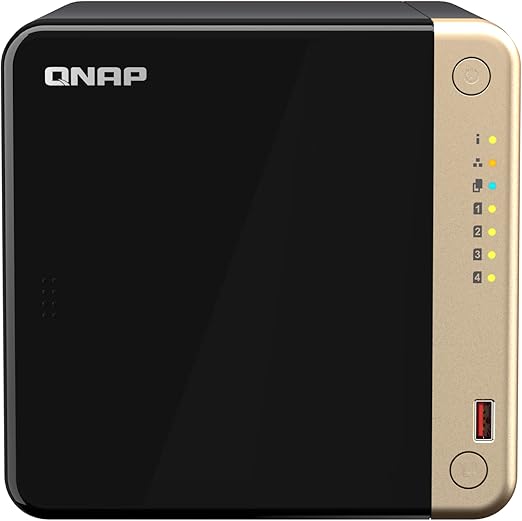
| CPU | Intel Celeron N5095, 4-core / 4-thread, burst up to 2.9GHz |
|---|---|
| RAM | 8GB DDR4 (expandable to 16GB) |
| Drive Bays | 4x 3.5"/2.5" SATA |
| NVMe Slots | 2x M.2 2280 PCIe Gen 3 x1 |
| Networking | 2x 2.5GbE RJ45; optional 10GbE through a compatible PCIe card |
| HDMI Output | 1x HDMI output |
| USB | 2x USB 3.2 Gen 2 and 2x USB 2.0 |
| Operating System | QNAP QTS 5 |
| Warranty | 3 years |
| AU market price | $1,129 |
Pros
- Dual 2.5GbE networking included. Best connectivity at this price
- 8GB RAM out of the box. Excellent for Docker and VMs
- HDMI 2.0 output for direct media playback to a TV
- Intel Celeron N5095 handles Plex transcoding well
- Two M.2 NVMe slots for SSD cache or tiered storage
- Container Station and virtualisation support built in
Cons
- QTS has a steeper learning curve than Synology DSM
- QNAP has had more security advisories historically. Firmware updates are essential
- Mobile apps are less polished than Synology's
- Fan noise is noticeable under sustained load
- Higher power consumption than ARM-based alternatives
Asustor AS5404T. Best for Plex
The Asustor AS5404T, also called the Nimbustor 4 Gen2, is the strongest dedicated Plex NAS in this group. Its Intel Celeron N5105 supports hardware-accelerated transcoding, while an HDMI output, dual 2.5GbE and four M.2 slots provide useful media and storage options. Its market price is about $749, below the TS-464 while retaining capable media hardware. The Asustor NAS Australia guide covers its software and range position.
Asustor's ADM (Asustor Data Master) operating system is simpler than both DSM and QTS, which works in its favour for media-focused users who don't need enterprise features. The Portainer-based Docker management is straightforward, and Asustor's Looksgood media player app provides a decent built-in media experience alongside Plex. The four M.2 NVMe slots are unusual at this price point. They allow SSD caching or even all-flash storage pools for users who want to push performance further.
The trade-off is ecosystem depth. ADM has fewer first-party applications and a less extensive backup ecosystem than Synology DSM, while Asustor has a smaller Australian install base than Synology or QNAP. The AS5404T makes sense when Plex, HDMI output and flexible M.2 storage matter more than the broadest collection of vendor applications.
AS5404T storage growth for media libraries
The AS5404T supports growth in several directions. Its four SATA bays hold the main hard-drive array, four M.2 slots can provide cache or separate solid-state storage, and memory can increase from 4GB to 16GB. Asustor lists the AS6004U and AS5004U capacity expanders for adding drives after the internal bays are full. That helps a growing media library, but it does not upgrade the N5105 processor or dual 2.5GbE links. If simultaneous services become the bottleneck rather than storage space, migrate to a more powerful chassis instead of adding another enclosure.

| CPU | Intel Celeron N5105, quad-core 2.0GHz, burst up to 2.9GHz |
|---|---|
| RAM | 4GB DDR4-2933 (expandable to 16GB) |
| Drive Bays | 4x 3.5"/2.5" SATA |
| NVMe Slots | 4x M.2 2280 NVMe |
| Networking | 2x 2.5GbE RJ45 |
| HDMI Output | 1x HDMI output |
| USB | 3x USB 3.2 Gen 2 Type-A |
| Operating System | Asustor ADM 4 |
| Warranty | 3 years |
| AU market price | $749 |
Pros
- Intel Quick Sync supports hardware-accelerated Plex transcoding
- HDMI output supports direct media playback
- Four M.2 NVMe slots provide unusual storage flexibility
- Two 2.5GbE ports support link aggregation
- Costs less than the TS-464
- Distinctive chassis design
Cons
- ADM has fewer first-party applications than Synology DSM
- Smaller Australian user community and knowledge base
- 4GB base RAM may need an upgrade for container workloads
- Backup application selection is less extensive than Synology's
UGREEN DXP4800 Pro. Best Value Intel 4-Bay
The UGREEN DXP4800 Pro pairs an Intel Core i3-1315U with 8GB DDR5 memory expandable to 96GB, one 10GbE port, one 2.5GbE port and two M.2 slots. Its market price is about $1,149. The processor and Intel Quick Sync acceleration suit Plex, containers and general storage workloads, but buyers must weigh that hardware against the younger UGOS software ecosystem.
UGREEN's NAS operating system, UGOS, is based on Linux and has improved rapidly since the product line launched. It supports Docker via Compose, has a clean web interface, and covers the basics: file sharing, media streaming, photo management, and backup. However, UGOS is not yet in the same league as DSM or QTS for reliability, polish, or breadth of features. It is a version-one product from a company that is best known for USB cables and chargers, not enterprise storage.
Australian buyers can use UGREEN's official local storefront through UGREEN AU. The DXP4800 Pro best suits technically confident buyers who maintain a separate backup and are comfortable with a newer operating system. Buyers who prioritise a longer-established software ecosystem should compare Synology, QNAP and Asustor before deciding.
DXP4800 Pro headroom and its four-bay limit
The DXP4800 Pro has substantial compute and memory headroom inside its four-bay chassis. Four SATA bays provide bulk storage, two M.2 slots add solid-state options, and the 8GB DDR5 base can grow to 96GB. The 10GbE and 2.5GbE ports also leave more network headroom than the other models here. However, the specification database lists no compatible expansion unit, so check UGREEN's current product page before planning beyond four hard drives. If the internal bays fill, migration to a larger chassis is safer than assuming a generic USB enclosure can extend the main pool.
UGREEN AU store: The DXP4800 Pro is available from the UGREEN AU store with fast and free shipping, a 2-year warranty, 30-day returns, and a 30-day price match guarantee. ACL consumer protections apply to all purchases from the UGREEN AU store.

| CPU | Intel Core i3-1315U, 6-core / 8-thread, up to 4.5GHz |
|---|---|
| RAM | 8GB DDR5-5600 (expandable to 96GB) |
| Drive Bays | 4x 3.5"/2.5" SATA |
| NVMe Slots | 2x M.2 2280 NVMe |
| Networking | 1x 10GbE and 1x 2.5GbE RJ45 |
| HDMI Output | No |
| USB | 2x USB 3.2 and 1x USB-C |
| Operating System | UGREEN UGOS |
| Warranty | 2-year product warranty |
| AU market price | $1,149 |
Pros
- Intel Core i3-1315U provides six cores and Intel Quick Sync acceleration
- 8GB DDR5 memory is expandable to 96GB
- One 10GbE port and one 2.5GbE port are built in
- Two M.2 slots add solid-state storage options
- Clean, modern hardware design
- Docker workloads are supported through Compose
Cons
- UGOS has fewer features and less operating history than DSM or QTS
- First-party application selection is limited compared with established vendors
- No expansion unit is listed in the specification database
- No HDMI output for direct media playback
- Long-term NAS software support history is still limited
TerraMaster F4-424 Pro. Budget Power Option
The TerraMaster F4-424 Pro is the raw hardware leader in this comparison. It combines an Intel Core i3-N305 with eight cores, 32GB DDR5 memory, dual 2.5GbE and two M.2 slots. Its market price is about $1,100, which is above the DS925+ but below the TS-464. It suits technically experienced buyers running many containers, home automation, surveillance or development services who place processor and memory resources ahead of software polish.
TerraMaster's TOS covers file sharing, RAID management and container workloads, but its application ecosystem is less extensive than DSM or QTS. The brand also has a smaller Australian install base. The F4-424 Pro therefore suits buyers who view the NAS as a compact server and expect to manage many services through containers instead of relying mainly on first-party applications.
Don't buy the F4-424 Pro if you want a polished, set-and-forget NAS experience. The software requires more hands-on management than Synology or QNAP, and TOS updates have historically been less predictable in their release cadence. However, if you are comfortable in a command line and want maximum hardware for your dollar, it is a legitimate option.
F4-424 Pro capacity after the bays fill
The F4-424 Pro concentrates its upgrade potential inside the chassis. Four SATA bays provide bulk capacity, two M.2 slots add solid-state storage or cache, and 32GB DDR5 is already the supported maximum. TerraMaster lists USB DAS disk arrays as its external capacity path, rather than a dedicated internal-bus expansion unit. A DAS is direct-attached storage, like placing another drive cabinet beside the NAS and linking it by cable. Use external arrays as distinct storage or backup targets where appropriate. If the primary pool needs more than four internal drives, a six-bay NAS is usually the simpler long-term choice.

| CPU | Intel Core i3-N305, 8-core / 8-thread, up to 3.8GHz |
|---|---|
| RAM | 32GB DDR5 non-ECC SODIMM (maximum 32GB) |
| Drive Bays | 4x 3.5"/2.5" SATA |
| NVMe Slots | 2x M.2 2280 NVMe, PCIe 3.0 x1 |
| Networking | 2x 2.5GbE RJ45 |
| HDMI Output | No |
| USB | 2x USB 3.2 Gen 2 |
| Operating System | TerraMaster TOS |
| Warranty | 2 years |
| AU market price | $1,100 |
Pros
- Intel Core i3-N305 8-core CPU. The most powerful processor in this roundup
- 32GB DDR5 RAM. Handles any home lab or Docker workload
- Dual 2.5GbE networking included
- Two M.2 NVMe slots for SSD cache or storage
- Exceptional value for the hardware specifications
- Docker and VM support
Cons
- TOS software is the least mature in this comparison
- Distribution and support run through Encomtech Australia
- No HDMI output
- Community and knowledge base are significantly smaller than Synology or QNAP
- First-party app ecosystem is thin. Relies heavily on Docker for services
- Less predictable firmware update schedule
How to Choose: Which 4-Bay NAS Suits You?
Choosing between these six NAS devices comes down to three questions: what will you use it for, how much do you want to manage yourself, and how important is local support?
A fourth question is how the storage should grow. Buyers who plan to fill two bays now and add two drives later can use any model here, subject to its supported RAID migration rules. Beyond four internal drives, the DS925+, TS-464 and AS5404T have named expansion units. The F4-424 Pro supports USB disk arrays, while no expansion unit is listed in the specification database for the DS423 or DXP4800 Pro. Those two should be treated as four-drive systems unless the vendor publishes compatible expansion support.
For most users: The Synology DS925+ is the safest all-round choice. DSM provides a polished operating environment, first-party applications cover common storage and backup tasks, and the DX525 offers a documented route to nine bays. Choose it when software consistency and a defined expansion path matter more than HDMI output or the highest processor performance.
For budget file storage: The Synology DS423 at $635 is the lowest-cost path into a reliable 4-bay NAS with proven software. Accept the ARM processor limitations (no Docker, no Plex transcoding) and enjoy the simplicity.
For media and tinkering: The QNAP TS-464-8G and Asustor AS5404T both provide dual 2.5GbE and HDMI output. The TS-464's advantages are 8GB base memory, a PCIe slot and support for the TL-D1600S expansion unit. The AS5404T costs less and provides four M.2 slots, making it attractive for Plex and mixed hard-drive plus solid-state storage.
For maximum hardware value: The TerraMaster F4-424 Pro and UGREEN DXP4800 Pro offer the most raw hardware per dollar, but both come with software and support trade-offs that experienced users should be comfortable managing.
What Drives Should You Buy?
A 4-bay NAS is sold without drives. Budget for at least two NAS-rated drives to start (running in RAID 1 or SHR-1), with the option to add two more later. Popular choices for Australian buyers include Seagate IronWolf and WD Red Plus in 4TB to 16TB capacities. Avoid using desktop drives (WD Blue, Seagate Barracuda). They are not designed for the vibration, heat, and 24/7 operation environment of a multi-bay NAS. For a full breakdown of current pricing and recommendations, see the best NAS hard drive Australia guide.
Drives can cost more than the empty enclosure, so calculate the complete purchase before choosing a RAID layout. A DS925+ with a market price of about $1,099 plus four WD Red Plus 8TB drives at about $599 each totals about $3,495. That investment makes correct RAID configuration important, but RAID still needs an independent offsite backup because it does not protect against deletion, theft, fire or a failed enclosure.
Networking Considerations for Australian Buyers
Every NAS in this guide except the DS423 includes at least one 2.5GbE port. Using it requires compatible networking at both ends, normally a 2.5GbE switch and a 2.5GbE adapter or built-in port on the client. Real-world large-file transfers are commonly about 110MB/s over 1GbE and about 280MB/s over 2.5GbE, so the difference is noticeable when moving backups, video or large photo libraries. The NAS networking guide explains the upgrade path.
For remote access, the internet upload path is usually the bottleneck rather than the NAS. Current nbn wholesale profiles list Home Fast I uploads of up to 20Mbps on FTTC, FTTN and FTTB, while eligible FTTP and HFC Home Fast II services list up to 50Mbps upload. Retail plan performance can be lower, so check the plan's typical upload speed before relying on remote video or large-file transfer.
CGNAT, or carrier-grade network address translation, lets an internet provider share public addresses much like an apartment building shares one street address. It can complicate direct inbound connections, so review the remote-access and VPN guidance in the NAS networking guide before deployment.
Where to Buy a 4-Bay NAS in Australia
Similar advertised prices do not make every seller experience identical. For equipment that stores important data, ask how the seller handles diagnosis, warranty assessment and replacement when a drive or enclosure fails. The where to buy NAS Australia guide explains the practical questions to ask before ordering.
Specialist technology retailers can provide product guidance and may carry a broader NAS range. Amazon AU can be convenient, but buyers should check whether Amazon or a marketplace merchant is the seller and identify the business responsible for the transaction. The appropriate choice depends on technical confidence, workload importance and the clarity of the fault-handling process, not an assumed price advantage.
For business, education or government purchases, ask for a written quote and confirm the warranty process before placing the order.
Australian Consumer Law note: Buying from an Australian retailer brings consumer guarantees under the Australian Consumer Law. How they apply to a faulty NAS depends on the circumstances, so read the ACCC's guidance on consumer rights and guarantees before raising a fault. Synology, QNAP and Asustor don't have service centres in Australia, so a hardware fault usually travels from the retailer to the distributor to the vendor in Taiwan and back again. Resolution time varies by retailer, fault assessment, parts and stock availability. Before buying, ask your retailer: "If this fails, what's your process?" The answer tells you more about the value of buying from that retailer than the price on the sticker. This is general information, not legal advice: the ACCC and your state or territory consumer affairs agency are the authoritative sources for an individual purchase.
Power Consumption: A Hidden Cost
A NAS runs 24/7, which means power consumption adds up over time. Synology specifies 32.41W for the DS423 during access and 4.97W during HDD hibernation under its test conditions; actual power use varies with drives and workload. The x86 models (DS925+, TS-464, AS5404T) typically draw 30-45W depending on the number of drives spinning and the workload. TerraMaster specifies 33W during read/write operation with four 4TB drives under its test conditions; actual consumption varies with the installed drives and workload. At current Australian electricity rates of roughly $0.30-0.35/kWh, the difference between a 25W and a 55W NAS running 24/7 works out to approximately $80-90 per year. Not a dealbreaker, but worth factoring into the total cost of ownership over the 5-7 year lifespan of a typical NAS.
How Much Storage Do Four Bays Give You?
Four 8TB drives provide 24TB of usable space in RAID 5 or SHR-1, or 16TB in RAID 6 or SHR-2.
Usable capacity means the space available for files after the RAID layout reserves drive capacity for protection, like the part of a warehouse left for goods after safety aisles are marked out. The figures below are decimal terabytes before filesystem overhead and the NAS system reserve, so the capacity shown by the operating system will be lower.
| 4 x 8TB | 4 x 12TB | 4 x 20TB | |
|---|---|---|---|
| RAID 0 or JBOD | 32TB | 48TB | 80TB |
| RAID 5 or SHR-1 | 24TB | 36TB | 60TB |
| RAID 6 or SHR-2 | 16TB | 24TB | 40TB |
| RAID 10 | 16TB | 24TB | 40TB |
| RAID 1 (4-way mirror) | 8TB | 12TB | 20TB |
What each layout protects
RAID 5 spreads data and one drive's worth of parity across the array, like keeping enough reconstruction notes across four folders to recreate one missing folder. It survives one drive failure. SHR-1 is Synology's flexible equivalent and provides the same 3 x drive-size result when all four drives match.
RAID 6 stores two drives' worth of parity, like keeping two independent sets of reconstruction instructions, and survives two drive failures. SHR-2 is Synology's equivalent for this four-drive calculation. RAID 10 creates two mirrored pairs and stripes data across them. It provides 2 x drive-size capacity and survives one failure in each mirrored pair, which can mean two failures in the best case.
RAID 0 uses every drive for speed and capacity but loses the array if one drive fails. JBOD also combines capacity without parity, although a failed drive affects the data on that drive rather than behaving exactly like RAID 0. A four-way RAID 1 mirror keeps four copies, survives up to three drive failures and provides only one drive's capacity, so it is rarely the sensible four-bay choice.
Why larger drives change the protection decision
Larger drives make RAID 6 or SHR-2 more attractive when the stored data is important and restoring it would be difficult. Rebuilding a failed array reads every surviving drive and can take longer as capacity grows. The practical risk is a second drive failing or producing an unrecoverable problem during that rebuild, not a single published failure-rate percentage.
The trade-off is capacity. Four 20TB drives provide 60TB under RAID 5 or SHR-1 but 40TB under RAID 6 or SHR-2. Protection is not backup, so either layout still needs another copy outside the NAS. Use the RAID calculator to work out exact usable space, read the SHR explanation, and estimate future demand with the capacity-planning guide.
Expanding Past Four Bays
Choose a 4-bay NAS with a documented expansion route, or move directly to a larger chassis if more than four internal drives are likely within the planned ownership period.
An expansion unit is a separate drive enclosure controlled by the main NAS, like adding another filing cabinet without replacing the office computer. The DS925+ supports one five-bay Synology DX525, taking the system to nine drive bays. The TS-464 supports QNAP's TL-D1600S, which adds up to twelve hard drives. The AS5404T supports the Asustor AS6004U and AS5004U capacity expanders.
The F4-424 Pro supports TerraMaster USB disk arrays only. The specification database lists no expansion unit for the DXP4800 Pro or DS423, so treat each as a four-drive system unless its current vendor page states otherwise. Do not assume that any USB enclosure can become part of the main storage pool.
When a larger NAS is the better starting point
A five-bay or six-bay chassis is usually cleaner when the fifth drive will be needed soon, when all drives should share one enclosure, or when the workload also needs more CPU, memory or network options. An eight-bay model makes more sense when growth is predictable enough that even one expansion unit would soon be crowded.
| Synology DS1525+ | QNAP TS-664 | TerraMaster F6-424 | Synology DS1825+ | |
|---|---|---|---|---|
| Bays | 5 | 6 | 6 | 8 |
| Expansion | Up to 2 x DX525 | QNAP TL-D1600S | TerraMaster USB DAS disk array | Up to 2 x DX525 |
| AU market price | $1,699 | $1,599 | $999 | $1,989 |
The table is not a budget ladder. It shows the alternative chassis choices when four bays are structurally too few. Compare their workload fit and current availability in Best NAS Australia.
Limits that an expansion enclosure cannot fix
Expansion adds bays and capacity, not CPU performance, memory bandwidth or network speed. A slow processor remains slow, and a 1GbE connection remains a 1GbE connection after more disks are attached. Keep each storage pool within one physical unit so that a cable or enclosure fault does not take a pool spanning two boxes offline.
The expansion enclosure is also another power supply, cable and chassis that can fail. It therefore needs monitoring and an independent backup plan rather than being treated as protection. Before buying one, compare its total operational complexity with migrating to a larger NAS. The NAS expansion and upgrade guide explains that sequence in more detail.
Use our free NAS Sizing Wizard to get a personalised NAS recommendation.
Want a complete build plan for your 4-bay NAS? Our DS425+ Home Power User Build Plan covers Plex, Docker, backup, and remote access. Exact hardware list, drive recommendations, and first-boot setup. $39 AUD, instant PDF.
Compare other bay counts in Best NAS Australia and use the Australian NAS buying guide to define the workload before choosing hardware.
For model-family detail, see the UGREEN guide, Synology guide, QNAP guide and Asustor guide.
If budget decides the purchase, see how to spend around $1,000 on a NAS. Buyers who do not need four drives should compare the best 2-bay NAS options.
Is a 4-bay NAS enough for a small business in Australia?
For most small businesses with 1-10 employees, a 4-bay NAS is more than sufficient. A Synology DS925+ or QNAP TS-464 with four 8TB drives in RAID 5 gives you roughly 24TB of usable space. Enough for years of documents, emails, and project files. If you anticipate rapid data growth or need to run multiple business applications simultaneously, consider stepping up to a 5-bay or larger unit. See the best NAS for small business guide for more detail.
Can I use a 4-bay NAS as a Plex server?
Yes, but hardware transcoding depends on the processor and graphics engine. The Asustor AS5404T and QNAP TS-464 are strong Plex choices because their Intel processors support hardware acceleration and both provide HDMI output. The DS925+ can run Plex and direct-play compatible media, but its Ryzen V1500B has no integrated graphics engine for Plex hardware video transcoding and the NAS has no HDMI output. The Synology DS423 is better suited to direct play and basic media serving than demanding transcoding. See the best NAS for Plex Australia guide for a fuller comparison.
How much does a 4-bay NAS cost in total with drives?
The final cost depends heavily on drive capacity. A Synology DS925+ at about $1,099 plus four WD Red Plus 8TB drives at about $599 each totals about $3,495. A Synology DS423 at about $635 plus four WD Red Plus 4TB drives at about $349 each totals about $2,031. Both examples use four drives, so a buyer starting with two can stage the purchase, but should still plan the final RAID layout and maintain a separate backup.
Should I buy from Amazon AU or a specialist NAS retailer?
Choose according to seller clarity and the support needed after purchase. Amazon AU can be convenient, but check whether Amazon or a marketplace merchant is the seller and identify who handles a fault. A specialist NAS retailer may offer more useful pre-purchase guidance and a clearer hardware assessment process. That matters for a first NAS or business-critical installation, while an experienced home user may place more weight on ordering convenience. In either case, document the seller, warranty process and backup plan before deploying the unit.
Will four hard drives outrun a 1GbE network port?
Yes, a striped array of several hard drives can exceed the practical throughput of one 1GbE connection during large sequential transfers. Real-world file copies are commonly about 110MB/s over 1GbE and about 280MB/s over 2.5GbE when the NAS, switch, client and storage can all keep up. That makes 2.5GbE worthwhile for video, large backups and shared creative work. A 1GbE port remains adequate for documents, ordinary media streaming and remote access, where the internet upload connection is usually slower.
What RAID level should I use in a 4-bay NAS?
RAID 5 or Synology's SHR (Synology Hybrid RAID) are the most popular choices for a 4-bay NAS. Both protect against a single drive failure while giving you roughly 75% of your raw drive capacity as usable storage. For example, four 8TB drives in RAID 5 give you approximately 24TB usable space. RAID 10 (mirrored pairs) provides better write performance and faster rebuilds but halves your usable capacity. For most home and small business users, RAID 5 or SHR-1 is the right balance. See the full RAID explained guide for details on each level.
Is the UGREEN DXP4800 Pro a good first NAS?
The hardware is capable, but UGOS is still less mature than the operating systems from longer-established NAS vendors. A Synology DS423 or DS925+ offers a more polished setup and a broader first-party application ecosystem. The UGREEN DXP4800 Pro better suits a technically confident buyer who values its Core i3 processor, expandable DDR5 memory, 10GbE port and container support, and who already has an independent backup strategy. Its Australian storefront provides a local purchasing route, but that commercial path does not change the software trade-off.
Can I access my 4-bay NAS remotely over Australian NBN?
Yes, but remote performance depends on the retail plan's upload speed and network configuration. Current nbn wholesale profiles allow up to 20Mbps upload on Home Fast I services using FTTC, FTTN or FTTB, and up to 50Mbps on eligible FTTP and HFC Home Fast II services. Check the provider's typical upload speed because retail performance may be lower. CGNAT can complicate direct VPN connections, while vendor relay services can provide an alternative path for basic remote file access.
How long do NAS devices typically last?
The service life of a NAS, and whether its drives or chassis fail first, varies with the drive model, workload, environment, power quality and chassis electronics. NAS-rated drives like Seagate IronWolf and WD Red carry 3-year warranties, while Pro variants carry 5-year warranties. Plan for drive replacements over the life of the NAS, and always maintain a proper backup strategy. A NAS is not a backup. It is one copy of your data. Follow a 3-2-1 backup strategy: three copies of data, on two different media types, with one copy offsite.
Q: Can I add more drives to a 4-bay NAS later? A: Yes. A buyer can start with two drives and fill the remaining internal bays later if the NAS supports the required RAID migration. Beyond four drives, only some models have a documented expansion unit. The DS925+, TS-464 and AS5404T do, while the F4-424 Pro supports USB disk arrays. No expansion unit is listed in the specification database for the DS423 or DXP4800 Pro. A 4-bay NAS without a compatible expansion unit tops out at four internal drives, so further growth requires larger replacement drives or migration to another chassis.
Q: How much usable space do four 12TB drives give? A: Four 12TB drives provide 48TB with RAID 0 or JBOD, 36TB with RAID 5 or SHR-1, and 24TB with RAID 6, SHR-2 or RAID 10. A four-way RAID 1 mirror provides 12TB. These figures are before filesystem overhead and system reserve, so the capacity displayed by the NAS will be lower. RAID 5 and SHR-1 tolerate one drive failure, while RAID 6 and SHR-2 tolerate two. The extra protection becomes more attractive when a rebuild would be lengthy or the data is difficult to restore.
Looking at all NAS options across every bay count and budget? See the complete guide for Australian buyers.