
IronWolf 4TB
A 4 TB CMR NAS drive. Check the listing names part ST4000VN006, the part these figures describe.
The IronWolf 4TB is a straightforward NAS model with a three-year limited warranty.
These are 3.5-inch hard drives for a network-attached storage (NAS) box at home or in a small office: Seagate IronWolf (Seagate's NAS drive range), WD Red (Western Digital's NAS drive range) and one Seagate Exos enterprise drive. Every drive here uses CMR (conventional magnetic recording). We compared the makers’ specifications: recording method, workload limits, transfer rates and warranty periods.
This page contains affiliate links. If you purchase via our links we may earn a small commission, at no extra cost to you. Editorial independence policy.
A 4 TB CMR NAS drive. Check the listing names part ST4000VN006, the part these figures describe.
The IronWolf 4TB is a straightforward NAS model with a three-year limited warranty.
An 8 TB CMR IronWolf for a growing archive that still fits the standard IronWolf workload class.
The IronWolf 8TB offers more capacity while retaining the family’s stated 180 TB per year workload limit.

A 7200RPM CMR model with a 550 TB per year workload limit and five-year limited warranty.
The IronWolf Pro 12TB is the Seagate choice here for sustained, heavier use. Its maximum sustained transfer rate is stated as 270MB/s.

A 12TB enterprise CMR drive that deserves an exact compatibility check before home NAS use.
The Exos X18 12TB model ST12000NM000J uses SATA and runs at 7,200 RPM. It carries a five-year limited warranty.
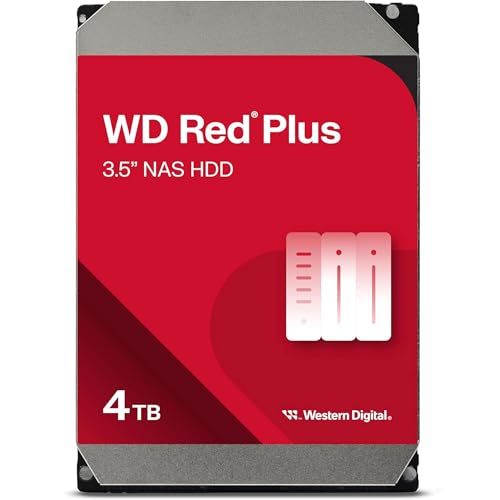
A 4TB CMR model rated for NAS systems with up to eight bays.
The WD Red Plus 4TB has a stated 180MB/s internal transfer rate and three-year limited warranty.

A 6TB CMR model that adds capacity without moving into the Red Pro workload class.
The WD Red Plus 6TB runs at 5400 RPM and has a stated 180MB/s internal transfer rate.

An 8TB CMR Red Plus with a stated internal transfer rate of up to 215MB/s.
The WD Red Plus 8TB provides additional capacity within the standard Red Plus workload tier.

A 7200 RPM CMR drive with a 550 TB per year workload rate and five-year limited warranty.
The WD Red Pro 4TB model WD4005FFBX is aimed at heavier duty than Red Plus. Its maximum internal transfer rate is stated as 267MB/s.
Start with usable capacity, then work backwards to the drives that fit your NAS and your backup plan. Allow room for growth rather than filling the storage pool immediately. A media archive may grow steadily, while shared project files, camera footage and workstation backups can change much faster. The useful question is not simply which drive is larger. It is how quickly your data grows and how disruptive another upgrade would be.
Next, match the drive class to the workload. The standard IronWolf and WD Red Plus models suit ordinary home and small-office duties. The IronWolf Pro and WD Red Pro models publish higher workload limits and longer warranty periods, so they make more sense when several users write substantial amounts of data or the NAS stays busy for long periods. The Exos X18 is an enterprise model. Treat it as a specialist alternative and confirm the exact part number, firmware and compatibility before choosing it for a home enclosure.
Recording method matters. CMR (conventional magnetic recording) writes tracks side by side. SMR (shingled magnetic recording) overlaps them. Western Digital says CMR offers consistent writes for NAS use, while SMR can slow under sustained writing. That is why this collection concentrates on CMR models. Capacity alone does not tell you how a drive will behave during a long copy, rebuild or repeated update workload.
Compare the market price on each card, but also compare warranty length, published workload limit, transfer rate and power figures for the exact model number. Faster spindle speeds and higher transfer figures can suit active work, but headline specifications should not replace a compatibility check. If you are still selecting the enclosure, see our two-bay NAS comparison or four-bay NAS comparison. If the NAS mainly serves Plex (media server software), see our Plex NAS drive advice.
Check your NAS maker’s compatibility list using the complete drive part number, not just the family name and capacity. For a 2025 Synology DiskStation Plus model running DSM 7.3 (Synology’s operating system), Synology says third-party hard drives can be used to create storage pools, while drives on its compatibility list remain the recommended choice. That change covers hard drives only, not M.2 NVMe SSDs, and policies vary across product generations, so check the page for your exact enclosure before ordering.
For Australian buyers, keep the invoice and the drive’s part number. The ACCC explains how a maker’s warranty works in addition to your consumer guarantees on its warranties page.
Write down your NAS model, free drive bays, current stored data and expected growth. Open the maker’s compatibility list, remove any drive whose exact part number is unsupported or unclear, then compare the remaining cards by capacity, workload limit and warranty. Before installation, update the NAS software, label each drive with its purchase date and part number, and confirm that your separate backup is current.
Ask us anything about NAS, storage, or infrastructure. We reply by email.
Message sent!
We'll be in touch soon.