Jellyfin is the better choice for most home NAS users who want a free, private media server with no ongoing subscription costs. And the gap between Jellyfin and Plex has closed significantly in 2025 and 2026. Plex still leads on polished mobile apps, social features, and the breadth of its TV client ecosystem. This comparison covers every relevant axis: transcoding performance on NAS hardware, client app quality, hardware transcoding support, remote access setup, and the real-world cases where each platform wins. Australian NAS pricing and ACL warranty notes are in the AU section below.
In short: If you want zero ongoing costs, full privacy, and are comfortable with Docker, Jellyfin on a NAS provides the core self-hosted media-server functions, including hardware transcoding, without a subscription, but it does not replicate every Plex feature or client experience. If you want a polished out-of-the-box experience with better mobile apps and don’t mind paying for Plex Pass, Plex is more user-friendly for families. On stock DSM, the DS225+ does not expose the graphics driver required for dependable Plex or Jellyfin hardware transcoding. The TS-464 supports hardware-accelerated transcoding, but simultaneous-stream capacity varies with the media, output settings, subtitles, tone mapping and other workloads. If you only direct-play content on your local network (no transcoding), even a current entry-level direct-play NAS such as the Asustor Drivestor 2 Pro Gen2 (AS3302T v2) may suit, provided the client devices can play the files natively.
Why This Comparison Matters
Between rising streaming subscription costs and the reality that personal video libraries don't fit neatly into streaming catalogues, running a local media server has become a primary NAS use case for home users. The choice between Plex and Jellyfin is not just a technical one. It comes down to how much setup friction you are willing to tolerate, and whether you want to pay for Plex Pass (US$6.99/month, US$69.99/year, or US$749.99 lifetime as at September 2026).
The decision is not purely technical. It comes down to how much setup friction you are willing to tolerate, whether you need reliable remote streaming over Australian internet connections, and whether the Plex Pass price is justified by the convenience it delivers. Both platforms run on Docker on a NAS, both support hardware transcoding on compatible Intel-based NAS devices when the NAS operating system exposes supported graphics hardware and drivers, and both serve media to TVs, phones, tablets, and browsers. The differences are in the details. And those details matter more than most comparison articles acknowledge.
Plex vs Jellyfin Feature Comparison
Plex vs Jellyfin. Feature Comparison for NAS Users
| Plex | Jellyfin | |
|---|---|---|
| Cost | Free (limited) / US$6.99/mo / US$69.99/yr / US$749.99 lifetime (Plex Pass; checked September 2026) | Free. Fully open source, no paid tier |
| Hardware Transcoding | Plex Pass required (Intel QSV, NVIDIA NVENC) | Free. Intel QSV, VAAPI, NVIDIA NVENC supported |
| Account Required | Generally required for normal claimed-server use, remote access and many official clients. Limited unclaimed or LAN no-auth configurations exist, and cached local connections can work during temporary outages. | No. Fully self-hosted, no external accounts |
| Mobile Apps | Polished iOS/Android apps, offline sync (Plex Pass) | The official Jellyfin iOS and Android apps support media downloads for offline use, although their download workflow and feature set differ from Plex Downloads. |
| Smart TV Apps | Native apps on most smart TVs, Roku, Apple TV, Fire TV, Chromecast | Official Jellyfin TV clients are available for Android TV/Fire TV, Roku, LG webOS and Samsung Tizen. Jellyfin offers Swiftfin as an official beta client for tvOS; third-party Apple TV clients such as Infuse are also available. |
| Remote Access | Built-in relay service (works through CGNAT in most cases) | Manual setup required. Prefer a private VPN or a properly secured reverse proxy; directly forwarding Jellyfin’s port to the internet is not recommended. |
| Docker Support on NAS | Official Docker image, also native Synology/QNAP packages | Official container images; community-maintained native packages exist for some NAS platforms, including Synology. |
| Library Management | Excellent metadata, auto-matching, watch status sync | Good metadata, improving rapidly, local-only watch status |
| Music Streaming | Plexamp is free for basic music streaming; Plex Pass unlocks advanced features including downloads, lyrics, Guest DJ and sonic-analysis tools. | Basic music playback, no dedicated app |
| Live TV / DVR | Supported with Plex Pass + compatible tuner | Supported with compatible tuner (free) |
| Privacy | Telemetry and aggregate server/library statistics are collected, but Plex says personal servers do not upload complete library lists or personal-content titles. | Jellyfin is self-hosted and requires no vendor account or internet connection to run. However, normal metadata fetching contacts external providers such as TMDb and OMDb unless those providers are disabled. |
| Plugin / Extension Support | Limited. Plex removed its Plugin Directory in 2018 and phased out browsable channels, although manual installation of some server plug-ins remains documented. | Open plugin system, active community development |
Plex Pass vs Free Jellyfin: What You Actually Get
Free Plex Media Server includes local-network playback of personal video through supported Plex apps. Hardware transcoding, downloads, DVR recording and various premium features require Plex Pass, while remote personal-video playback requires Plex Pass, Remote Watch Pass, or a server administrator whose Plex Pass covers server users. Plex Pass is required for hardware transcoding, Plex Downloads, advanced Plexamp features, skip intro, lyrics and DVR recording. Basic Plexamp and live over-the-air viewing with a compatible tuner are free. Plex raised the price of a new Lifetime Plex Pass to US$749.99 on 1 July 2026; exact Australian-dollar pricing may vary and should be checked at Plex’s Australian checkout. The monthly, annual and lifetime figures on this page must use one currency and a single current pricing date.
Jellyfin provides hardware transcoding, live TV/DVR support, plugins, multiple users and parental controls without a paid tier, but it does not provide exact equivalents to every Plex Pass feature. Hardware transcoding, live TV, plugins, multiple user profiles, parental controls. Everything. There is no paid tier, no premium features, and no corporation deciding which features to gate behind a subscription. The trade-off is that you do the work: Jellyfin’s mobile apps are less polished, smart TV support is more limited, and there is no managed relay service for remote access. You are the sysadmin.
Plex Pros and Cons
Pros
- Best-in-class mobile apps with offline sync (Plex Pass)
- Native apps on virtually every smart TV, streaming stick, and console
- Built-in remote access relay that works through CGNAT without manual config
- Plexamp is a genuinely excellent music streaming app
- Excellent automatic metadata matching and library organisation
- Native Synology and QNAP packages available (no Docker required)
Cons
- A Plex account and internet connection are required for full sign-ins and account-dependent features, but cached local connections can work during temporary outages and specific LAN ranges can be allowed without authentication outside Plex Home.
- Hardware transcoding requires Plex Pass (currently US$749.99 lifetime; monthly and annual plans are also available)
- Plex collects server, device and usage telemetry. Optional watch-state and rating sync sends title identifiers and playback-state data after opt-in, but Plex says personal servers do not upload complete library lists or content titles.
- Plugin ecosystem gutted since 2019
- Increasing push toward ad-supported content and non-server features
- A permanent Plex service shutdown could affect account-dependent functions, but the exact outcome is unknown; Plex currently supports cached offline connections and optional unauthenticated LAN access in some configurations.
Jellyfin Pros and Cons
Pros
- Completely free with no paid tiers or feature gating
- No vendor account is required; Jellyfin uses local user accounts and has no tracking or phone-home telemetry.
- Hardware transcoding (Intel QSV, VAAPI) included for free
- Open plugin system with active community development
- No vendor lock-in. If the project forks or changes direction, your data stays local
- Transparent, open-source codebase you can audit
Cons
- Mobile apps are functional but less polished than Plex
- Jellyfin has official clients for Roku, LG webOS and Samsung Tizen, although availability and feature parity can vary by platform.
- No managed remote-access relay. Use a private VPN or a properly secured reverse proxy; direct internet port forwarding is not recommended.
- Official Jellyfin mobile apps support downloads, but their download workflow and offline-library behavior differ from Plex Downloads.
- Music experience significantly behind Plexamp
Hardware Transcoding on NAS: The Feature That Matters Most
Hardware transcoding is the single most important technical consideration when choosing between Plex and Jellyfin on a NAS. Transcoding converts video from one format or resolution to another in real time. For example, converting a 4K HEVC file to 1080p H.264 so it plays on an older TV or streams smoothly over a limited internet connection. Without hardware transcoding, video conversion is performed by the CPU; capacity varies with the processor, codec, resolution, bitrate, subtitles and tone mapping, and many low-power NAS processors struggle with demanding 4K workloads.
Intel-based NAS devices with Quick Sync Video (QSV) handle hardware transcoding efficiently. The QNAP TS-464 uses an Intel Celeron N5095 and the Asustor AS5404T uses an Intel Celeron N5105; both processors support Intel Quick Sync Video, but NAS operating-system and graphics-driver support must still be verified. The DS223 and TS-233 do not provide Intel Quick Sync and are poor choices for this article’s transcoding workload. Do not generalise that limitation to all ARM systems: Jellyfin supports hardware acceleration on selected Rockchip ARM SoCs, particularly RK3588/RK3588S. Avoid these if transcoding is part of your use case.
On most Plex Media Server systems, hardware transcoding requires Plex Pass; Plex documents exceptions for NVIDIA Shield and the WD My Cloud Pro PR2100/PR4100. Without Plex Pass, most Plex Media Server systems use software video transcoding; whether a 4K stream succeeds depends on the processor and the particular media and output workload. Jellyfin enables hardware transcoding for free. For budget-conscious Australian buyers, this is the single biggest cost difference between the two platforms.
4K, HDR and Dolby Vision: Format Support Compared
If your media library includes 4K HDR or Dolby Vision content, the format support gap between Plex and Jellyfin matters more than any other feature.
Jellyfin handles 4K HDR direct play and tone mapping without a subscription. On Intel Quick Sync-enabled NAS hardware, Jellyfin 10.9 and later supports GPU-accelerated HDR tone mapping, converting HDR10 to SDR on the fly without melting the CPU. GPU-accelerated tone mapping requires compatible codec hardware, drivers, operating-system support and correct Jellyfin configuration. A Quick Sync-capable CPU alone does not establish NAS compatibility; notably, stock DS225+ and DS425+ installations do not expose the required graphics driver.
Plex requires Plex Pass for HDR tone mapping and 4K hardware transcoding. Without Plex Pass, most systems use software video transcoding; 4K performance depends on the NAS processor, codec, bitrate, subtitles, tone mapping and output settings. If your household streams 4K regularly, this is the single strongest argument for Jellyfin over Plex.
Dolby Vision support is more nuanced. Jellyfin supports Dolby Vision profiles 5 and 8 tone mapping to SDR on supported hardware and software configurations. Plex can tone-map HDR10 and Dolby Vision content that is backward-compatible with HDR10; Dolby Vision profile 5 is not supported by Plex Transcoder and can play only when a compatible client and file configuration can avoid video transcoding. For most home libraries, both platforms handle the content you actually own.
Atmos and DTS:X passthrough: Both Plex and Jellyfin support bitstream passthrough of Dolby Atmos (TrueHD) and DTS:X if your client device and receiver support it. The NAS itself does not decode these formats. Audio handling is client-specific. Apple TV 4K decodes supported formats and outputs uncompressed PCM or Dolby MAT, so it should not be described as a generic TrueHD Atmos or DTS:X bitstream-passthrough client. Check your client's audio output settings before assuming the format is unsupported.
Docker Installation on NAS: Setup Reality
Both Plex and Jellyfin run as Docker containers on a NAS, which is the preferred installation method for flexibility and easy updates. Synology’s Container Manager (formerly Docker), QNAP’s Container Station, and Asustor’s Portainer interface all support pulling the official images. Plex also offers native Synology and QNAP packages; current builds are available from Plex and can be installed through DSM Package Center or QNAP App Center’s manual-install workflow.
Official Jellyfin container images are the broadly portable NAS option, while community-maintained native packages exist for some platforms, including Synology. The Docker Compose setup is straightforward: pull the jellyfin/jellyfin image, map your media folders, and pass through the /dev/dri device for Intel QSV hardware transcoding. Setup time varies substantially depending on the NAS platform, permissions, network configuration, and any hardware-acceleration troubleshooting required.
For Plex on Docker, the process is nearly identical: pull linuxserver/plex or the official plexinc/pms-docker image, map media folders, and pass through /dev/dri for hardware transcoding (Plex Pass required). The key friction point with Plex is account sign-in for the normal claimed-server experience, remote access and many official clients; a limited unclaimed LAN configuration is possible. During initial setup, the Plex container must be able to reach Plex’s authentication servers. If your internet drops during setup, the process stalls.
Remote Access: CGNAT, NBN Upload Limits, and the Australian Reality
Remote access is where Australian internet infrastructure creates real friction for self-hosted media servers. Two problems dominate: CGNAT and upload bandwidth. Understanding both is essential before committing to either platform for remote streaming. For a deeper dive, see our NAS remote access and VPN guide.
CGNAT: The Silent Blocker
Carrier-Grade NAT (CGNAT) is used by many Australian ISPs. CGNAT use is provider- and plan-specific: Starlink documents CGNAT by default, while some Australian NBN providers use it and others do not, regardless of the NBN access technology. Under IPv4 CGNAT, customers share public IPv4 addressing, so ordinary inbound IPv4 port forwarding to the NAS is unavailable; IPv6 or an ISP-provided public IP may offer alternatives where supported.
Plex handles CGNAT reasonably well. Plex’s relay service routes remote streams through Plex’s servers when direct connections fail. The relay caps bandwidth at 2 Mbps (roughly 720p), which is watchable but not ideal for high-quality streaming. If you have a public IP, Plex establishes a direct connection and the relay is bypassed.
Jellyfin has no relay service. If you are behind CGNAT, options include a private mesh VPN such as Tailscale, a self-managed VPN with a reachable endpoint, or a reverse proxy through a VPS. Cloudflare Tunnel public-hostname routes require an appropriate paid service for video delivery; private-network routes are treated differently. These solutions work well but require technical setup. Tailscale is the easiest option. Install it on the NAS and your mobile devices, and it creates a private mesh network that bypasses CGNAT entirely. For detailed setup options, see our remote access guide.
NBN Upload Bandwidth
Even with a public IP and port forwarding configured, Australian upload speeds limit what you can stream remotely. Current eligible FTTP/HFC wholesale tiers include Home Fast 500/50, Home Superfast 750/50, Home Ultrafast 1000/100 and Home Hyperfast 2000/200 on FTTP or 2000/100 on HFC. Whether a 40-80 Mbps 4K remux can stream remotely depends on the customer’s actual sustained upload, file peaks, overhead and competing traffic; it is not categorically impossible without transcoding. This is a platform-agnostic limitation. It affects Plex and Jellyfin equally. For more on optimising your NAS network performance, see our NAS networking guide.
Mobile Apps and Client Experience
If mobile streaming matters to your household, Plex wins decisively. The Plex iOS and Android apps are mature, fast, and well-designed. Offline sync (Plex Pass) lets you download media to your phone before a flight or commute. Jellyfin's official mobile apps also support downloads, although their workflow and offline feature set differ from Plex Downloads. Plex also has native apps on Apple TV, Roku, Samsung Tizen, LG webOS, Fire TV, Chromecast, Xbox, and PlayStation. You will not find a mainstream streaming device that Plex does not support.
Jellyfin’s mobile apps are functional but noticeably less polished. The Android app is further ahead than iOS. Jellyfin has official clients for Android TV/Fire TV, Roku, LG webOS and Samsung Tizen, although platform availability and feature parity can vary. This is workable but adds friction for less technical household members. If your partner or kids need to “just open the app and hit play,” Plex delivers that experience more reliably.
Library Management and Metadata
Plex’s metadata engine is best-in-class. It automatically identifies movies and TV shows, downloads artwork, cast information, ratings, and organises your library with minimal manual intervention. The Plex agent system handles edge cases well. Watch status syncs across all devices via your Plex account.
Jellyfin uses open metadata providers (TheMovieDB, TheTVDB, MusicBrainz) and does a good job with standard libraries. Jellyfin matching depends on the selected metadata providers, file naming, language and title; provider identifiers can improve identification when automatic matching is unsuccessful. Watch status is tracked locally on the Jellyfin server. There is no cloud sync, which means it works the same way whether you have internet or not. For most Australian users with standard movie and TV libraries, Jellyfin’s metadata handling is more than adequate.
Which NAS Hardware Suits Each Platform
Hardware requirements differ by platform and workload. Both benefit from compatible GPU acceleration, but Intel Quick Sync is only one option and NAS operating-system and driver support must be checked per model. Jellyfin currently recommends 8GB RAM for an average deployment and says 4GB may suffice for headless Linux; Plex says 4GB is typically more than sufficient. The NAS choice is driven by your transcoding needs and budget, not by the software platform. For a full breakdown of NAS hardware suited to media serving, see our best NAS for Plex guide, which applies equally to Jellyfin.
Budget: 1-2 Streams, Mostly Direct Play

| Model | Synology DiskStation DS225+ |
|---|---|
| CPU | Intel Celeron (2.0GHz quad-core) |
| RAM | 2GB DDR4 (expandable) |
| Bays | 2 |
| Network | 2.5GbE + 1GbE |
| AU Price (Scorptec) | $599 |
| AU Price (PLE) | $599 |
| AU Price (Mwave) | $689 |
On stock DSM, the DS225+ does not expose the graphics driver needed for Plex or Jellyfin hardware transcoding. Quick Sync can only be restored through an unofficial workaround, so the DS225+ should not be recommended for dependable hardware transcoding without prominently disclosing that limitation. For households that mostly direct-play content on the local network (meaning the client device plays the file natively without conversion), this is the sweet spot. Synology’s Container Manager makes Docker deployment straightforward even for first-time users.
Mid-Range: 3-4 Streams, Regular Transcoding
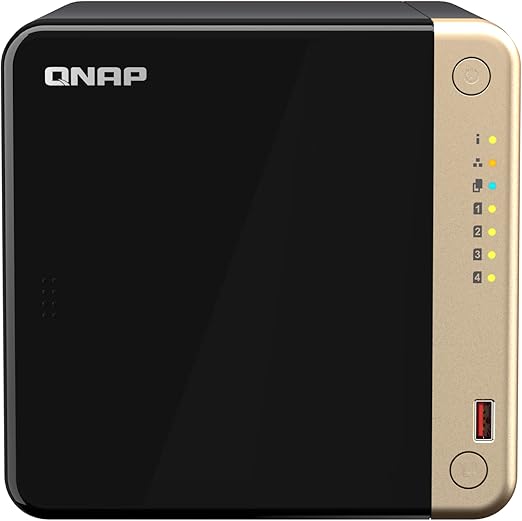
| Model | QNAP TS-464-8G |
|---|---|
| CPU | Intel Celeron N5095 (2.0GHz quad-core, burst to 2.9GHz) |
| RAM | 8GB DDR4 |
| Bays | 4 |
| Network | Dual 2.5GbE |
| AU Price (Scorptec) | $1,049 |
| AU Price (PLE) | $1,129 |
The TS-464 supports hardware-accelerated transcoding, but its Celeron N5095 is an Intel N-series processor in the class Jellyfin currently advises new buyers to avoid because legacy QSV support is being deprecated. The TS-464 supports Intel Quick Sync hardware transcoding, but simultaneous-stream capacity varies with source codec and bitrate, output settings, HDR tone mapping, subtitle burn-in and other NAS workloads. No authoritative fixed rating of 3-4 simultaneous 1080p transcodes was established. The 8GB RAM gives breathing room for Docker containers, and QNAP’s Container Station makes deployment simple. The four bays allow a RAID 5 configuration with meaningful storage capacity. This is the NAS to buy if you have family members streaming remotely while others watch locally.
Value Alternative

| Model | Asustor AS5404T (Nimbustor 4 Gen2) |
|---|---|
| CPU | Intel Celeron N5105 (2.0GHz quad-core) |
| RAM | 4GB DDR4 |
| Bays | 4 |
| Network | Dual 2.5GbE |
| AU Price (Mwave) | $943 |
| AU Price (Scorptec) | $749 |
The AS5404T uses an Intel Celeron N5105, while the QNAP TS-464 uses an Intel Celeron N5095. Asustor’s ADM operating system supports Docker through Portainer, and The Celeron N5105 supports Intel Quick Sync, but its actual transcoding capacity depends on the source codec and bitrate, output settings, drivers, HDR tone mapping, subtitles and other workloads. The trade-off is a smaller community and less polished software interface compared to Synology and QNAP. The AS5404T supports hardware-accelerated transcoding, but its Celeron N5105 is an older Intel N-series processor that Jellyfin’s current buying guidance advises against because legacy QSV support is being deprecated.
Direct play vs transcoding: If every device on your local network can direct-play the complete file-including its video, audio, container and subtitle formats-you do not need a powerful CPU for video transcoding. An ARM-based NAS like the Synology DS223 ($489 at Mwave/Scorptec) or QNAP TS-233 (A$369 at Scorptec, checked 17 September 2026) works fine for direct play. Transcoding only matters for remote streaming, format incompatibilities, or subtitle burn-in.
The Vendor Lock-In Question
Plex requires a Plex account for authentication. Plex requires internet access for full sign-ins, remote access and some features, but most local functions can continue during temporary outages using cached connections. Administrators can also allow specific LAN ranges without authentication, with security and Plex Home limitations. The result of a hypothetical permanent Plex shutdown cannot be stated as established fact. Plex the company has also been shifting focus toward ad-supported free streaming content, live TV aggregation, and features unrelated to personal media serving. Plex's account dependency creates continuity risk for account-dependent features, but the effect of a future business-model change or permanent service shutdown on local servers is not established.
Jellyfin’s core server and local authentication do not depend on a vendor account, although metadata retrieval and some optional client functions use external services. It runs on your server and authenticates locally, so its core operation does not depend on a vendor account; continued compatibility and maintenance still depend on the software, clients and optional external services in use. Your media files remain standard formats in standard folder structures. There is nothing to migrate away from because there is no proprietary layer sitting between you and your files. For users who have invested years building a media library, this independence is Jellyfin’s most compelling long-term advantage.
What About Emby? The Third Option
Emby is the platform Jellyfin forked from in 2018, when Emby's developers shifted to a closed-source model. Emby Premiere is listed at US$4.99 per month, US$54 per year or US$119 lifetime for the standard single-household licence; app-store and converted Australian pricing may differ. It sits between Plex and Jellyfin: more polished than Jellyfin, cheaper than Plex Pass over three or more years.
For most people, Emby is not the right answer. Jellyfin has largely caught up on polish since the 2018 fork and remains fully free. Plex beats Emby on mobile app quality and remote streaming reliability. Emby's genuine use case is narrow: you tried Jellyfin, found the app roughness frustrating, but cannot justify Plex Pass for your household's usage pattern.
On NAS hardware, all three platforms run as Docker containers. Installation complexity varies by NAS platform, installation method, permissions, networking and hardware-acceleration requirements. The decision is purely about features and cost. This guide focuses on Plex and Jellyfin because they represent the clearest trade-off: best apps versus no cost. Emby exists in the middle but solves a narrower problem.
Decision Framework: Which Platform Suits Which User
Plex suits you if: You want the most polished app experience across every device in your household, you value offline mobile sync for travel, you stream remotely and are behind CGNAT (Plex’s relay helps), you use Plexamp for music, or you have less technical family members who need a Netflix-like interface. The US$749.99 lifetime Plex Pass is a reasonable one-time cost for what you get.
Jellyfin suits you if: You want zero ongoing costs, you value privacy and self-sovereignty over convenience, you are comfortable with Docker and basic networking, your primary use case is local network streaming, you dislike mandatory cloud accounts for local services, or you want an open platform with an active plugin ecosystem. The setup takes longer, but the long-term maintenance is minimal.
Run both: There is nothing stopping you from running Plex and Jellyfin side by side on the same NAS, pointing at the same media folders. One option is to run Jellyfin as the primary server and keep Plex installed for its broader client support and relay-based remote access. Running both adds CPU, memory and storage-I/O load; the impact varies with library activity, container limits and whether either server is transcoding. This is the pragmatic approach if you cannot decide.
🇦🇺 Australian Buyers: NAS Purchasing and Consumer Rights
Under Australian Consumer Law, when you purchase a NAS from an Australian retailer, the retailer is responsible for remedies when a product fails a consumer guarantee; those rights can continue for a reasonable time and may apply after a manufacturer’s warranty has expired. Australian Consumer Law consumer guarantees may continue after a manufacturer’s warranty expires, but there is no fixed three-to-five-year entitlement for a NAS. Reasonable durability depends on factors including the product’s nature, price, representations, expected use and other circumstances. Consumers should initially contact the selling retailer about a remedy. This applies regardless of the manufacturer warranty. The selling retailer cannot refuse to help by directing you to the manufacturer; for some consumer guarantees, a remedy may also be sought from the manufacturer.
Recommended Retailers
For Synology Plus-series NAS (verify model-specific graphics hardware and DSM driver support before relying on Plex/Jellyfin hardware transcoding): Scorptec, Mwave, PLE, and DeviceDeal. For QNAP TS-464 (Intel Celeron, excellent for both platforms): same retailers. Australian NBN note: remote Plex/Jellyfin streaming requires upload bandwidth. Check the NBN Remote Access Checker to confirm your connection supports inbound connections.
Related reading: our NAS buyer's guide.
Two related guides: our Best NAS for 4K Streaming guide covers hardware requirements for smooth playback, and our Plex Hardware Transcoding guide explains native hardware transcoding support by NAS model.
Our Plex Stream Planner calculates how many simultaneous streams your NAS can handle, and our NAS Power Cost Calculator estimates annual running cost at your AU state electricity rate. Useful for comparing a always-on media server against cloud streaming.
Use our free Plex Media Planner to check if your NAS can handle your library.
Related reading: our Synology vs QNAP comparison.
Use our free NAS Sizing Wizard to get a personalised NAS recommendation.
See also: our complete Synology NAS Australia guide.
See also: our complete QNAP NAS Australia guide.
See also: our full Plex and Media guide.
Related reading: our best UGREEN NAS for Plex, and which models handle transcoding and our fixing Plex buffering on a NAS.
Does Jellyfin support 4K HDR and Dolby Vision?
Yes. Jellyfin supports 4K HDR direct play and HDR-to-SDR tone mapping without a subscription. Jellyfin supports GPU-accelerated tone mapping on compatible Intel Quick Sync systems when the required codecs, drivers and configuration are present. The TS-464 and AS5404T can expose compatible graphics hardware, but stock DS225+ DSM does not expose the required graphics driver without an unofficial workaround. Jellyfin supports Dolby Vision profiles 5 and 8 tone mapping to SDR on supported hardware and software configurations; it should not be described as tone mapping those profiles to HDR10. Plex requires Plex Pass for the equivalent functionality. If 4K HDR is your primary use case, Jellyfin has a meaningful advantage over the free tier of Plex.
What is the difference between Plex, Jellyfin and Emby?
Plex is a commercial media server with a free tier and a paid Plex Pass (US$69.99/year or US$749.99 lifetime on Plex's web pricing as at September 2026; local-currency checkout pricing may vary) that unlocks hardware transcoding, mobile sync, and live TV. Jellyfin is a free, open-source fork of the original Emby codebase, with no subscription and no locked features. Emby is the platform Jellyfin forked from in 2018 when Emby moved to a closed-source model. Emby Premiere is listed at US$119 lifetime for the standard single-household licence; app-store and local-currency pricing may differ. For most home NAS users, the choice is binary: Jellyfin for zero cost, or Plex for the best mobile and remote streaming experience.
Can I run Plex or Jellyfin on an ARM-based NAS?
You can run both on ARM-based NAS devices like the Synology DS223 or QNAP TS-233, but only for direct play. Where the client device plays the file natively without conversion. ARM processors do not support Intel Quick Sync hardware transcoding. The DS223 and TS-233 are best treated as direct-play servers for this workload. Do not generalise that limitation to every ARM system, because Jellyfin supports hardware acceleration on selected Rockchip RK3588/RK3588S platforms. For transcoding, choose a NAS with verified operating-system and graphics-driver support. Stock DS225+ DSM does not expose the required graphics driver, while QNAP lists hardware-accelerated transcoding support for the TS-464.
Is Plex Pass worth it in Australia?
The lifetime Plex Pass, currently listed at US$749.99 on Plex's website with local-currency checkout pricing potentially varying, is worth it if you need hardware transcoding for remote streaming, want offline mobile sync, or use Plexamp for music. On most Plex Media Server systems, hardware transcoding requires Plex Pass; documented exceptions exist, and CPU-only transcoding performance depends on the NAS processor and workload. If you only direct-play on your local network and do not stream remotely, free Plex or Jellyfin (which includes hardware transcoding for free) covers your needs without spending anything.
How do I access Jellyfin remotely if my ISP uses CGNAT?
The easiest solution is Tailscale, a mesh VPN that works through CGNAT by creating a private network between your devices. Install Tailscale on your NAS and your phone or laptop, and you can access Jellyfin as if you were on your home network. Cloudflare Tunnel can publish Jellyfin through a browser-accessible hostname without opening inbound ports, but it is not a suitable free route for Jellyfin video streaming: Cloudflare requires Free, Pro and Business customers using public-hostname routes to use an appropriate paid service to serve video or other large files, and may redirect or restrict non-compliant traffic. Use Tailscale or another private-network VPN instead; Cloudflare says this video-delivery restriction does not apply to Tunnel private-network routes. A reverse proxy through a VPS is another option that gives you a public URL with HTTPS; pricing varies by provider and region. See our NAS remote access guide for detailed setup instructions.
Can I stream 4K content remotely over Australian NBN?
Remote 4K direct play depends on the connection's actual sustained upload, the file's bitrate peaks, protocol overhead and competing traffic. Current eligible FTTP/HFC wholesale tiers include 500/50, 750/50 and 1000/100, plus 2000/200 on FTTP and 2000/100 on HFC, so transcoding is not categorically required in every case. If sustained upload capacity or remote-client compatibility is insufficient for the source file, the server may need to transcode 4K content to a lower bitrate or resolution; suitable acceleration is not limited to Intel hardware. For local streaming over gigabit or 2.5GbE, 4K direct play can work when the client supports the container, video, audio and subtitles and the network sustains the file’s bitrate peaks.
What happens to my Plex server if Plex the company shuts down?
A permanent shutdown could disrupt account-dependent authentication, discovery and remote-access features, but complete loss of local access is not established. Plex currently supports cached offline connections and optional unauthenticated LAN ranges in some configurations. A permanent shutdown could disrupt account-dependent authentication, discovery and remote-access features, but complete loss of local access is not established. Your media files remain untouched on your NAS. You can point Jellyfin at the same media folders, but installation, permissions, library scanning and client setup time vary by NAS and library size. This is one of the core reasons users run Jellyfin as a backup or switch entirely.
Do I need a powerful NAS if I only stream on my local network?
Not if your devices support direct play. Many current clients support common H.264 and H.265/HEVC formats, but direct play depends on the device generation and the file’s profile, level, bit depth, resolution, bitrate, container, audio and subtitles. In this scenario, the NAS is just serving files over the network. Even an entry-level ARM-based NAS like the QNAP TS-233 (A$369 at Scorptec, checked 18 September 2026) handles this without breaking a sweat. You only need an Intel CPU with hardware transcoding if you stream to older devices, use subtitle burn-in, or stream remotely where bandwidth forces lower-resolution transcoding.
Can I migrate from Plex to Jellyfin without losing my library?
Yes. Your media files do not change. Both platforms read from the same folder structures. Install Jellyfin via Docker on your NAS, point it at your existing media folders, and let it scan your library. Metadata will be re-downloaded from open sources (TheMovieDB, TheTVDB). Watch history may be migrated with compatible third-party tools. Jellyfin's Trakt plugin can help when the relevant watch state is already available through Trakt; otherwise a separate export/import process is required. Migration time varies with library size, storage performance, network speed, metadata downloads and whether watch history is migrated.
Need a NAS that handles Plex or Jellyfin? See our full hardware breakdown with AU pricing.