The best NAS for a home lab is the one that runs what you need without forcing you to fight the hardware. For most Australian home labbers, that means an x86 processor (for Docker compatibility), at least 4 bays (for storage capacity and RAID options), and a PCIe slot (for 10GbE if you’ve already got a fast switch). What it doesn’t mean is the most expensive unit on the shelf. The QNAP TS-464 at$989-$1442 and UGREEN DXP4800 Pro at comparable pricing hit the home lab sweet spot better than units costing twice as much.
In short: Best overall. QNAP TS-464 (currently from about $999). Best value 6-bay. Synology DS1525+ (about $1,739). UGREEN’s DXP6800 Pro has strong specs for 6-bay homelab use but is not currently sold via UGREEN Australia’s own store. Worth checking ai-au.ugreen.com if that changes. Best for Synology ecosystem. Synology DS925+ (currently about $999). Best TrueNAS / DIY. Custom build with QNAP or custom hardware. See full breakdowns below.
What a Home Lab NAS Actually Needs
Home lab requirements differ from typical household NAS needs in a few key ways. File sharing and photo backup are usually secondary. The NAS is a platform for running services. That changes what specs matter:
- x86 processor: Container-image architecture support varies by project and tag; verify every required image for your NAS architecture. ARM NAS units can run Docker, but with compatibility restrictions that regularly block the image you need. An x86-64 processor can reduce architecture-related compatibility issues, but image, operating-system and vendor support still need to be checked.
- RAM headroom: Running Nextcloud, Home Assistant, Portainer, a VPN container, and Pi-hole simultaneously chews through RAM. 8GB is a reasonable minimum; 16GB gives comfortable room to grow. Check whether your target NAS has one or two RAM slots, and what the ceiling is.
- PCIe slot: If you have a 10GbE switch or plan to add one, a PCIe expansion slot lets you upgrade the NAS’s network adapter without replacing the whole unit.
- Storage bays: 4 bays minimum for a home lab. RAID 5 across four drives gives you one drive’s worth of redundancy with three drives’ worth of usable space. RAID 6 is available on some four-bay NAS models, including the DS925+; six bays leave more usable capacity after two-drive parity.
Best NAS for Home Lab Australia 2026. Top Picks
1. QNAP TS-464. Best Overall Home Lab NAS
The QNAP TS-464 is a current 4-bay x86 NAS with dual 2.5GbE and PCIe expansion. It runs an Intel Celeron N5095 (x86, 4-core, 2.9GHz burst), ships with 8GB DDR4, has two M.2 NVMe cache slots, a PCIe 3.0 x2 expansion slot for 10GbE, and dual 2.5GbE ports. QTS gives you Container Station (full Docker), Virtualisation Station (lightweight VMs), and the full QNAP app ecosystem. At current advertised prices of about $999 at Scorptec, $1,099 at PLE and $1,431.95 at Mwave, its value should be reassessed against current alternatives.
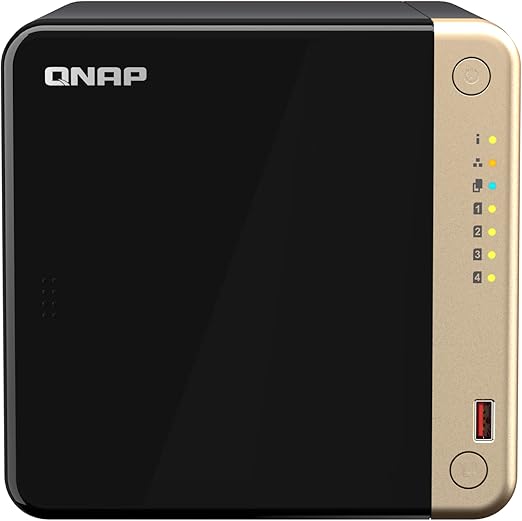
| CPU | Intel Celeron N5095 (4-core, up to 2.9GHz) |
|---|---|
| RAM | 8GB DDR4 (2 slots, max 16GB) |
| Bays | 4x SATA (hot-swap) + 2x M.2 NVMe |
| Network | 2x 2.5GbE + 1x PCIe 3.0 x2 (10GbE card) |
| AU Price | about $999-$1,431.95 (Scorptec, PLE, Mwave) |
| Key feature | PCIe slot + dual 2.5GbE + x86 Docker + M.2 cache |
The PCIe 3.0 x2 slot is a differentiator at this price. Pair it with a QNAP QXG-10G1T 10GbE card (~$150-$200 AU) With the TS-464 currently starting at about $999 before drives, adding a 10GbE card takes the total above $1,000. That’s a compelling proposition for anyone with a 10GbE switch already in the rack. Read our full QNAP TS-464 review Australia for a detailed teardown.
2. Synology DS925+. Best for Synology Ecosystem
The Synology DS925+ is the right home lab NAS if you’re invested in Synology’s ecosystem. Synology Photos, Drive, Active Backup, and Hyper Backup. And want a 4-bay unit with two built-in M.2 NVMe slots. It runs an AMD Ryzen V1500B (quad-core, 2.2GHz), has 4GB DDR4 ECC memory expandable to 32GB, two built-in M.2 NVMe slots, and no PCIe expansion slot. The DS925+ is currently listed at about $999 by Scorptec. Pricier than the TS-464. But brings DSM’s superior first-party app integration.
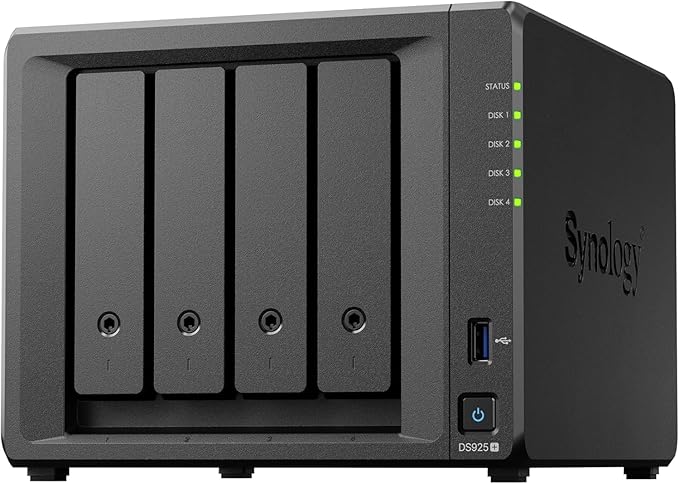
| CPU | AMD Ryzen V1500B (4-core/8-thread, 2.2GHz) |
|---|---|
| RAM | 4GB DDR4 (2 slots, max 32GB) |
| Bays | 4x SATA (hot-swap) + 2x built-in M.2 NVMe |
| Network | 2x 2.5GbE; no PCIe expansion slot |
| AU Price | about $999 (Scorptec; verify current Mwave pricing) |
| Key feature | DSM ecosystem + AMD Ryzen + 32GB max RAM |
The DS925+ has two built-in 2.5GbE ports and no PCIe expansion slot, so it does not support Synology’s PCIe 10GbE upgrade cards. This is a real trade-off versus the QNAP TS-464, which has dual 2.5GbE built in and a PCIe slot for 10GbE on top. For Synology loyalists, the DS925+ still wins on DSM quality. Read the full Synology DS925+ review Australia for more detail.
3. UGREEN DXP6800 Pro. Strong 6-Bay Specs (Not Currently AU-Available)
For home lab users who need 6-bay capacity, the UGREEN DXP6800 Pro’s spec sheet is genuinely competitive: an Intel Core i5-1235U, 8GB DDR5 expandable to 64GB, dual 10GbE, two M.2 NVMe slots, and a PCIe expansion slot supporting x4 or x1 cards. More PCIe bandwidth than the TS-664’s PCIe Gen3 x2 slot. UGOS Pro provides a Docker app with Docker Compose support; third-party container compatibility still depends on the image and configuration. It is not currently sold via UGREEN Australia’s own store. Check ai-au.ugreen.com for current availability, or consider the Synology DS1525+ below as the AU-available 5-bay alternative in this tier.
The caveat is UGOS’s relative immaturity vs DSM or QTS. For a home lab user primarily running Docker containers rather than NAS-specific apps, this is less of a limitation. The DXP6800 Pro review covers the UGOS software in detail.
4. QNAP TS-664. 6-Bay QNAP for Power Users
The QNAP TS-664 is the established 6-bay QNAP home lab unit, running an Intel Celeron N5095 with 8GB DDR4 (up to 16GB), a PCIe 3.0 x2 slot, and dual 2.5GbE. It’s a mature QTS platform with excellent Container Station and Virtualisation Station support. Compared with the DXP6800 Pro, the TS-664 has a 16GB maximum memory capacity, dual 2.5GbE rather than dual 10GbE, and a PCIe Gen3 x2 slot rather than x4. For Australians who want proven QNAP support infrastructure via Dicker Data over UGREEN’s newer AU service, the TS-664 is the safer enterprise pick.
5. Synology DS1525+. 5-Bay Synology for Serious Homelabs
The Synology DS1525+ has five SATA bays, an AMD Ryzen V1500B, 8GB DDR4 ECC memory expandable to 32GB, two built-in M.2 NVMe slots, dual 2.5GbE, and a PCIe Gen3 x2 network-upgrade slot. It’s positioned for SMB and serious home lab users who want DSM’s mature ecosystem at higher capacity. Available from Mwave and Scorptec in Australia, it is currently listed at about $1,699-$1,750 by Scorptec and Mwave. Competitive with the DXP6800 Pro but with Synology’s software advantage. For homes that need 5 bays with Synology, this is the benchmark.
What About TrueNAS for Home Lab?
TrueNAS Scale (the Linux-based, app-friendly version) is a legitimate home lab option for users who want to build their own system or repurpose existing server hardware. TrueNAS Scale runs Docker apps natively, has excellent ZFS support, and is free. The trade-off is complexity: it requires more configuration than any turnkey NAS OS, and hardware selection matters more because there’s no vendor-tested compatibility list.
Unraid is another popular platform for home lab users who want flexible per-disk storage management without traditional RAID striping constraints. Unraid supports different-sized drives in one array, but every data drive must be no larger than the smallest parity drive. If you are running Unraid, three calculators cover the key planning decisions: the Unraid Rebuild & Parity Check Estimator, the Unraid Cache Pool & SSD Endurance Calculator, and the Unraid Write Path Estimator.
For Australian home lab users, the practical case for TrueNAS Scale is strongest if you already have compatible hardware (mini PC, old workstation) or are building from scratch and want maximum control. If you’re buying new, the TS-464 offers turnkey QTS and Container Station support, while TrueNAS Community Edition requires users to select and configure compatible x86-64 hardware. See our full TrueNAS Australia guide for a detailed comparison.
Home Lab NAS Comparison Table
Best Home Lab NAS Australia 2026. At a Glance
|
QNAP TS-464
|
Synology DS925+
|
UGREEN DXP6800 Pro |
 Synology DS1525+
|
|
|---|---|---|---|---|
| AU Price | $999-$1,431.95 | $1,081 (market price) | Not sold (AU) | $1,739 (market price) |
| Bays | 4 | 4 | 6 | 5 |
| CPU | Celeron N5095 (x86) | Ryzen V1500B (x86) | Core i5-1235U (x86) | Ryzen V1500B (x86) |
| Max RAM | 16GB | 32GB | 64GB | 32GB |
| PCIe slot | Yes (x2 Gen 3) | No | Yes (supports x4 or x1 cards) | Yes (x2 Gen 3 network upgrade slot) |
| M.2 cache | 2x NVMe | 2x NVMe | 2x NVMe | 2x NVMe |
| Base network | 2x 2.5GbE | 2x 2.5GbE | 2x 10GbE | 2x 2.5GbE |
| Software | QTS (mature) | DSM (best-in-class) | UGOS (newer) | DSM (best-in-class) |
| Docker support | Full x86 | Full x86 | Full x86 (Dockge) | Full x86 |
Australian Considerations for Home Lab NAS
CGNAT and remote access. Many Australian home lab setups involve remote access to self-hosted services. If you’re on CGNAT (Aussie Broadband, TPG, and others), port forwarding won’t work and you’ll need either Tailscale, WireGuard via a VPS, or Synology’s QuickConnect relay. Synology’s relay is the most turnkey; Tailscale supports several NAS platforms, but installation method and feature support vary by vendor and model. Our NAS remote access Australia guide covers CGNAT solutions in detail.
Power costs. A NAS running 24/7 at 20-30W costs about $53-$92 per year at $0.30-$0.35/kWh; at 35-45W, the cost is about $92-$138 per year. This is modest for a home lab, but worth factoring if you’re running multiple NAS units or supplementary equipment. HDD hibernation can reduce power use, but the saving depends on drive count, workload and how long the disks remain spun down.
Retailer availability. The QNAP TS-464 is stocked at Mwave, PLE Computers, and Scorptec. The Synology DS925+ is at Mwave and Scorptec. Both models carry 3-year manufacturer hardware warranties; buyers should confirm retailer-specific claim handling. UGREEN’s DXP6800 Pro is not currently sold via UGREEN Australia’s own store. Check ai-au.ugreen.com directly for current availability. See our where to buy NAS in Australia guide for a full retailer breakdown.
What to Look for in a Home Lab NAS. Checklist
- ✅ x86 processor (Intel Celeron N5105 or better, or AMD Ryzen)
- ✅ At least 8GB RAM base, expandable to 16GB+
- ✅ 4+ drive bays for RAID 5/6 flexibility
- ✅ PCIe slot for 10GbE upgrade (if you have or plan a 10GbE switch)
- ✅ M.2 NVMe cache slots (for random I/O acceleration)
- ✅ Docker support with x86 Container Station or equivalent
- ✅ AU retailer stock with 2-year local warranty
See our full comparison of NAS units suitable for Docker, home automation, and self-hosted services in Australia.
Related reading: our NAS buyer's guide.
Use our free NAS Sizing Wizard to get a personalised NAS recommendation.
Want a complete home lab build plan? Our QNAP TS-464 Home Lab Build Plan covers NVMe cache setup, Docker networking, VM configuration, and network isolation. Everything you need from hardware to running containers. $39 AUD, instant PDF.
See also: our complete UGREEN NAS Australia guide.
See also: our complete Synology NAS Australia guide.
See also: our complete QNAP NAS Australia guide.
What is the best NAS for a home lab in Australia?
The QNAP TS-464 is the best overall home lab NAS in Australia for 2026. At current Australian pricing starting around $999, it offers an Intel Celeron N5095 (x86), 8GB DDR4 RAM, dual 2.5GbE, two M.2 NVMe cache slots, and a PCIe expansion slot for 10GbE. All in a 4-bay unit running QTS with full Docker (Container Station) support. For Synology ecosystem users, the DS925+ is the alternative, currently listed at about $999 by Scorptec.
Does a home lab NAS need an x86 processor?
For most home lab use cases, yes. Container-image support varies by project and tag; current Nextcloud and Portainer images include arm64 builds, so check the specific images you plan to run. An x86 NAS can reduce architecture-related compatibility friction, but each image and NAS platform still requires compatibility checking. Container compatibility on ARM NAS models depends on the NAS operating system and whether each required image publishes a matching ARM build.
Can I use a NAS for TrueNAS or Proxmox in a home lab?
TrueNAS Scale can run on consumer NAS hardware in some cases, but it’s generally better suited to custom-built or repurposed server hardware where you control the full component selection. Proxmox is typically installed on a dedicated mini PC or server, not a NAS unit. QNAP’s Virtualisation Station can run lightweight VMs natively on the TS-464 and similar units, which covers most home lab VM use cases without needing a separate Proxmox box.
How do I access my home lab NAS remotely in Australia when I have CGNAT?
CGNAT blocks standard port forwarding. For home lab NAS remote access on CGNAT (common on Aussie Broadband, TPG, Leaptel, and others), the two most practical options are: (1) Tailscale. A WireGuard-based service that can provide CGNAT-compatible remote access on supported NAS platforms, with installation method and feature support varying by vendor and model; or (2) Synology’s QuickConnect relay (Synology-only), which provides CGNAT-compatible access via Synology’s relay infrastructure without port forwarding. Tailscale supports multiple NAS brands and platforms, but compatibility and installation method must be checked for the specific model.
How many drive bays does a home lab NAS need?
Four bays is the recommended minimum for a home lab NAS in Australia. Four bays allows RAID 5 (one drive fault tolerance with three drives’ usable capacity) or RAID 10 (typically two drives’ usable capacity in a four-drive array; it can survive multiple failures only when no mirrored pair fails completely). Two-bay NAS units limit you to RAID 1 (mirroring) which is fine for backup but constrains capacity. RAID 6 provides two-drive fault tolerance and is available on some four-bay models; six bays leave more usable capacity after two-drive parity.