Synology remains Australia's most popular NAS brand in 2026. And for most buyers, the range still delivers excellent value, mature software, and reliable availability through Australian retailers. After a turbulent 2025 driven by the drive compatibility controversy and its subsequent reversal, the current lineup is stronger than ever, spanning entry-level home NAS units from $539 through to enterprise rackmount systems above $8,000. This guide covers every current Synology model available in Australia, with real AU retail pricing, honest analysis, and clear guidance on which model fits your use case.
In short: For most Australian home and small business buyers, the DS225+ ($539), DS425+ ($799), or DS925+ ($995) covers 90% of use cases. The DS225+ suits two-drive personal backup and media; the DS425+ is the home power user's NAS; the DS925+ is the SMB workhorse. All three run DSM 7. The most approachable NAS operating system available. Synology reversed third-party drive restrictions in October 2025 (DSM 7.3), so WD and Seagate drives work again on Plus series desktop models.
Drive compatibility note (2026): Synology reversed most third-party drive restrictions with DSM 7.3 in October 2025. Seagate IronWolf and WD Red drives now work on desktop Plus series models. However, M.2 NVMe SSDs still require drives from Synology's compatibility list, and enterprise/rackmount models (RS, FS, XS series) maintain stricter restrictions. Always check the Synology Hardware Compatibility List before buying drives for rackmount or XS models.
Why Synology Dominates the Australian NAS Market
Synology holds the top position in the Australian consumer and prosumer NAS market for one primary reason: DSM (DiskStation Manager) is the most approachable NAS operating system available. Where QNAP's QTS can overwhelm less technical buyers with its breadth of features, DSM presents the same underlying capabilities. Docker, virtualisation, backup, file sharing, media serving. Through an interface that doesn't require an IT background to navigate.
The deliberately narrow Synology product catalogue is also a practical advantage in Australia. Distributed locally by BlueChip (BCIT) and Multimedia Technology (MMT). Both with dedicated senior product managers who have maintained their Synology relationships for years. Availability is consistently good. Australian retailers can stock most of the range simultaneously. Consumer models are almost always in stock at major retailers including Scorptec, PLE, Mwave, and Umart. This contrasts with QNAP resellers who must pick and choose from a much larger catalogue, making niche models harder to source.
Pricing is another area where Synology performs well. The global pricing team manages Australian pricing with unusual stability. You won't see the wild swings that make purchase timing stressful with some other brands. Australian pricing currently runs around 10-15% above US pricing, in line with the broader market driven by lower stock allocations and higher freight costs. For non-urgent purchases, requesting a formal quote from your retailer is worthwhile. Resellers can request pricing support from distributors, and discounts that don't appear on the website are routinely available for quoted deals.
The 2025 Drive Compatibility Controversy: What Happened and Where Things Stand
In April 2025, Synology announced that all Plus series models released from 2025 onward would require either Synology-branded drives or third-party drives specifically certified on the Synology Hardware Compatibility List. Non-approved drives were blocked from creating new storage pools and lost access to drive health monitoring. The enthusiast community. Historically one of Synology's strongest advocates. Felt betrayed. Long-time users began evaluating QNAP, TrueNAS, and Asustor alternatives. The move was widely perceived as a lock-in strategy to push Synology-branded drives (essentially Seagate and Toshiba drives with custom firmware at a 5-20% premium).
Synology reversed course with DSM 7.3 in October 2025, restoring support for third-party 3.5-inch HDDs and 2.5-inch SATA SSDs on desktop Plus series models. Storage pool creation and health monitoring were restored for mainstream NAS drives from WD and Seagate.
What the DSM 7.3 reversal covers: WD Red, WD Red Plus, Seagate IronWolf, and IronWolf Pro drives now work fully on the DS225+, DS425+, DS925+, DS1525+, DS1825+, and other desktop Plus series models. What it does NOT cover: M.2 NVMe SSDs still require compatibility list approval; enterprise rackmount and XS models still enforce stricter compatibility. The reputational damage with the enthusiast community is real and ongoing. Synology must sustain this open approach over time to rebuild trust fully.
Current Synology Range: AU Retail Prices and Quick Reference
The following prices are sourced from Australian retailers as of March 2026. Prices vary between retailers by 5-10%. The figures shown are starting prices (typically Umart or MSY). All models are diskless unless noted. Pricing data from Mwave, Umart, MSY, CPL Online, Scorptec, and PLE Computers.
Synology Home and Prosumer Range. AU Retail Prices (March 2026)
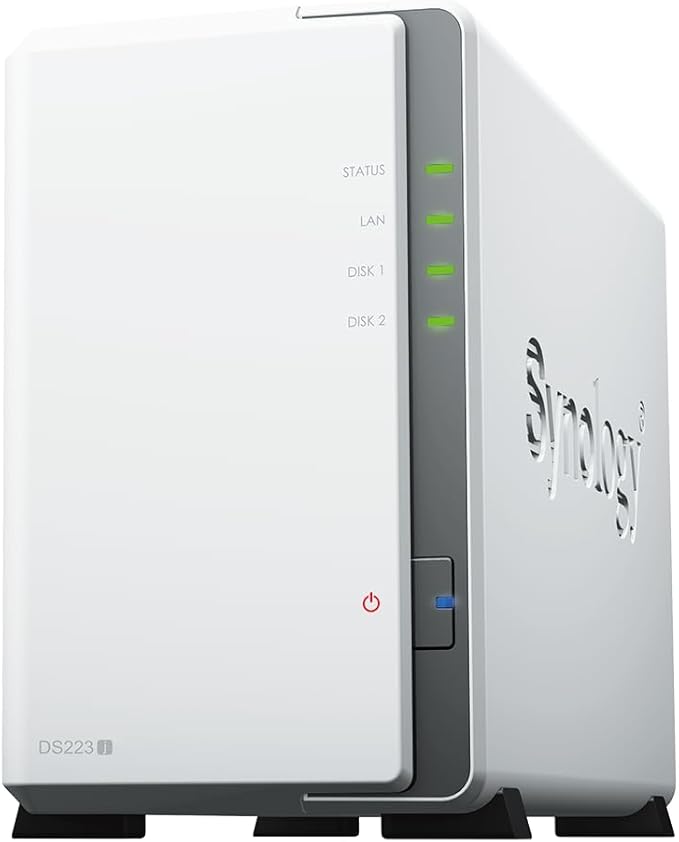 DS223J
|
 DS223
DS223
|
 DS225+
|
 DS423
DS423
|
 DS425+
|
 DS925+
|
 DS1525+
|
|
|---|---|---|---|---|---|---|---|
| Drive Bays | 2 | 2 | 2 | 4 | 4 | 4 | 5 |
| CPU Type | Realtek RTD1619B | Realtek RTD1619B | Intel Celeron J4125 | Realtek RTD1619B | Intel Celeron J4125 | AMD Ryzen R1600 | AMD Ryzen V1500B |
| RAM | 1GB DDR4 | 2GB DDR4 | 2GB DDR4 | 2GB DDR4 | 2GB DDR4 | 4GB DDR4 ECC | 8GB DDR4 ECC |
| Network | 1x 1GbE | 1x 1GbE | 1x 2.5GbE + 1x 1GbE | 2x 1GbE | 1x 2.5GbE + 1x 1GbE | 1x 2.5GbE + 1x 1GbE | 2x 2.5GbE + 2x 1GbE |
| NVMe Cache Slots | None | None | None | None | None | 2x M.2 2280 | 2x M.2 2280 |
| Expansion (max drives) | 2 | 2 | 2 | 4 + 5 = 9 | 4 + 5 = 9 | 4 + 5 = 9 | 5 + 15 = 20 |
| AU Price (from) | $318 | $479 (PLE Computers) | $599 (PLE Computers) | $635 (Scorptec) | $819 (Scorptec) | $995 | $1,285 (Mwave) |
| Warranty | 3 yr | 3 yr | 3 yr | 3 yr | 3 yr | 3 yr | 3 yr |
Prices last verified: 18 March 2026. Always check retailer before purchasing.
Synology Power User and SMB Range. AU Retail Prices (March 2026)
| DS723+ |
 DS725+
|
DS1821+ |
 DS1825+
|
 DS1823XS+
|
|
|---|---|---|---|---|---|
| Drive Bays | 2 (to 7) | 2 (to 7) | 8 | 8 | 8 + 2x NVMe |
| CPU | AMD Ryzen R1600 | AMD Ryzen R1600 | AMD Ryzen V1500B | AMD Ryzen V1500B | AMD Ryzen V1780B |
| RAM | 2GB DDR4 ECC | 4GB DDR4 ECC | 4GB DDR4 ECC | 8GB DDR4 ECC | 8GB DDR4 ECC |
| Network | 1x 2.5GbE + 1x 1GbE | 1x 2.5GbE + 1x 1GbE | 4x 1GbE | 4x 1GbE | 4x 1GbE + 1x 10GbE |
| PCIe Upgradeable | Yes (1x PCIe 3.0) | Yes (1x PCIe 3.0) | Yes (2x PCIe 3.0) | Yes (2x PCIe 3.0) | Yes (1x PCIe 3.0) |
| Built-in 10GbE | No | No | No | No | Yes |
| AU Price (from) | $682 | $869 | $1,899 | $1,765 (Mwave) | $3,312 (Mwave) |
| Warranty | 3 yr | 3 yr | 3 yr | 3 yr | 5 yr |
DS225+: Best Two-Bay Synology NAS for Australian Home Users
The DS225+ is Synology's current flagship two-bay consumer NAS and represents one of the strongest value propositions in the lineup. The Intel Celeron J4125 CPU (the same chip used in the DS425+) gives it meaningfully more processing power than the Realtek-based DS223. Enough for smooth 4K transcoding via Plex, real-time encryption, and running multiple DSM packages simultaneously without sluggishness.
| CPU | Intel Celeron J4125 quad-core, 2.0GHz (burst 2.7GHz) |
|---|---|
| RAM | 2GB DDR4 (non-ECC, upgradeable to 6GB) |
| Drive Bays | 2x 3.5"/2.5" SATA |
| Network | 1x 2.5GbE + 1x 1GbE |
| USB | 2x USB 3.2 Gen 1 |
| Max Drives | 2 (no expansion) |
| Power (operating) | ~25W |
| Power (HDD hibernation) | ~11W |
| AU Price (Umart/MSY) | $539 |
| AU Price (Scorptec/PLE) | $599 |
| Warranty | 3 years |
Pros
- Intel Celeron CPU handles hardware transcoding and real-time encryption without bottleneck
- 2.5GbE port enables local transfers well above typical NAS HDD throughput
- Full DSM 7 ecosystem: Synology Drive, Hyper Backup, Surveillance Station, Docker, Active Backup
- Compact form factor. Minimal desk space, quiet in residential environments
- Excellent AU availability. In stock at 10+ Australian retailers from $539
- WD Red and Seagate IronWolf drives fully supported post-DSM 7.3
Cons
- Two bays is the ceiling. No expansion port, cannot add drives later
- Only 2GB RAM base. Plex and Docker users should budget for a RAM upgrade
- No M.2 NVMe cache slots
- Not suitable as a primary SMB NAS. DS425+ or larger needed for teams
The DS225+ suits home users who want reliable personal backup, a Synology Photos library, and remote access from anywhere in Australia or overseas. With a WD Red Plus 4TB or Seagate IronWolf 4TB in each bay (currently around $200-$230 each at Australian retailers), a complete two-bay personal NAS setup lands around $950-$1,000. That gets you 4TB usable storage in RAID 1 (see RAID explained for NAS), automatic Hyper Backup offsite to Backblaze, and DSM's full app ecosystem. Power consumption is low enough that 24/7 operation adds only $15-$25 per year to an electricity bill at typical Australian rates.
Don't buy the DS225+ if: you need more than 2 bays now or within the next 2-3 years (get the DS425+ instead); you need RAID 5 or RAID 6 (minimum 3 and 4 drives required respectively); or you're planning to run a Plex server for multiple simultaneous 4K streams (the J4125 handles 1-2 streams with transcoding, but struggles beyond that).
DS425+: The Home Power User's Four-Bay NAS
The DS425+ is the four-bay sibling of the DS225+. Same Intel Celeron J4125 CPU, same 2.5GbE networking, same DSM 7 software. But with four bays and expandability to nine drives via a DX517 eSATA expansion unit. This is the NAS the Need to Know IT team would recommend to most Australian home users who are thinking about storage growth over the next 3-5 years.
| CPU | Intel Celeron J4125 quad-core, 2.0GHz (burst 2.7GHz) |
|---|---|
| RAM | 2GB DDR4 (non-ECC, upgradeable to 6GB) |
| Drive Bays | 4x 3.5"/2.5" SATA |
| Expansion | 1x eSATA (DX517 adds 5 bays. 9 total) |
| Network | 1x 2.5GbE + 1x 1GbE |
| USB | 2x USB 3.2 Gen 1 |
| Power (operating) | ~35W |
| Power (HDD hibernation) | ~15W |
| AU Price (Umart/MSY) | $799 |
| AU Price (PLE/Scorptec) | $999 |
| Warranty | 3 years |
Pros
- Four bays support RAID 5/6 for larger usable capacity with drive redundancy
- Expandable to 9 drives via DX517 eSATA expansion unit
- 2.5GbE + 1GbE networking. Same as DS225+, meaningfully faster than older 1GbE NAS
- Full DSM 7 ecosystem including Docker, Active Backup for Business, Surveillance Station
- Strong AU availability. In stock at major retailers from $799
- Synology Hybrid RAID (SHR) allows mixed drive sizes without waste
Cons
- Same 2GB RAM base as DS225+. Light for a 4-bay unit under concurrent load
- J4125 CPU is shared with DS225+. No additional processing power per bay
- No M.2 NVMe cache slots
- For heavy Plex or VM workloads, the DS925+ with Ryzen CPU is more appropriate
DS925+: The SMB Workhorse and Enthusiast's NAS
The DS925+ brings AMD Ryzen R1600 dual-core CPU to the four-bay form factor, along with 4GB ECC RAM, two M.2 NVMe cache slots, a PCIe 3.0 expansion slot, and expandability to nine drives. This is the model to choose when the J4125 isn't enough. For demanding Plex setups, multiple simultaneous users, or small business file server use with 3-10 staff accessing concurrently.
| CPU | AMD Ryzen R1600 dual-core, 2.6GHz (burst 3.2GHz) |
|---|---|
| RAM | 4GB DDR4 ECC (upgradeable to 32GB) |
| Drive Bays | 4x 3.5"/2.5" SATA |
| M.2 Slots | 2x M.2 2280 NVMe (cache. Synology compatibility list required) |
| Expansion | 1x eSATA (DX517: 5 additional bays, 9 total) |
| Network | 1x 2.5GbE + 1x 1GbE |
| PCIe Slot | 1x PCIe 3.0 x2 (for 10GbE or additional NVMe) |
| Power (operating) | ~42W |
| AU Price (Umart/MSY/Scorptec) | $995 |
| Warranty | 3 years |
Pros
- AMD Ryzen R1600 provides significantly more CPU performance than the Celeron J4125
- ECC RAM protects against memory errors. Important for NAS data integrity
- M.2 NVMe cache slots dramatically improve random I/O for mixed workloads
- PCIe 3.0 slot allows 10GbE upgrade for demanding LAN environments
- Expandable to 9 bays. Meaningful headroom over 3-5 year ownership
- Recommended current-generation 4-bay for SMB and power users
Cons
- M.2 NVMe SSDs must be from Synology's compatibility list (restriction persists post-DSM 7.3)
- Price premium vs DS425+ ($200) requires genuine workload justification
- Ryzen R1600 is dual-core. Outstanding for I/O but not VM-heavy or compute-intensive workloads
- 4GB ECC base RAM. Heavy Docker or VM use will push toward a 16GB upgrade
Use the NTKIT RAID Calculator to plan your DS925+ storage configuration. Find out how much usable space you get with your chosen drive sizes across RAID 1, RAID 5, SHR, and SHR-2.
Open RAID Calculator →DS1525+: Five-Bay Scalable NAS for Serious Home Labs and SMB
The DS1525+ steps up to five bays and the AMD Ryzen V1500B quad-core CPU with 8GB ECC RAM. A significant leap from the DS425+/DS925+ tier. Five bays give excellent RAID 5 efficiency (4 drives for storage, 1 for parity) or RAID 6 coverage (3 drives usable, 2 for dual parity). Three eSATA expansion ports support up to 15 additional bays via DX517 units, giving a maximum of 20 drives. Enough for most serious home lab or small business deployments. Available from $1,234 at Umart and MSY.
| CPU | AMD Ryzen V1500B quad-core, 2.2GHz |
|---|---|
| RAM | 8GB DDR4 ECC (upgradeable to 32GB) |
| Drive Bays | 5x 3.5"/2.5" SATA |
| M.2 Slots | 2x M.2 2280 NVMe (cache. Synology compatibility list required) |
| Expansion | 3x eSATA (up to three DX517 units: 20 drives total) |
| Network | 2x 2.5GbE + 2x 1GbE |
| PCIe Slot | 1x PCIe 3.0 x8 |
| AU Price (Umart/MSY) | $1,234 |
| AU Price (Scorptec) | $1,399 |
| Warranty | 3 years |
Pros
- V1500B quad-core handles 5-15 concurrent users with comfortable headroom
- 8GB ECC RAM. Better baseline than the DS925+ for demanding workloads
- Dual 2.5GbE enables link aggregation for up to 5Gbps effective throughput
- Massive expansion ceiling: up to 20 drives with DX517 expansion units
- PCIe 3.0 x8 allows high-bandwidth 10GbE or additional NVMe storage cards
Cons
- Significant price step from DS925+ (approximately $240 more at launch pricing)
- DX517 expansion units cost $400+ each, making the maximum 20-bay configuration expensive
- Five-bay configurations are less common in RAID planning resources. Most assume even bay counts
- V1500B quad-core is not the fastest in Synology's portfolio. DS1823XS+ (V1780B) is the premium step
DS1825+ and DS1821+: Eight-Bay SMB NAS Options
The DS1825+ is Synology's current eight-bay tower NAS for SMB deployments. AMD Ryzen V1500B quad-core, 8GB ECC RAM, four 1GbE ports (upgradeable via two PCIe slots), and M.2 NVMe cache slots. Available from $1,699 at Umart, MSY, and CPL Online. The older DS1821+ ($1,899 at Umart/MSY) is still sold at some retailers. It uses the same V1500B CPU but is the previous generation with slightly different I/O layout. For new purchases, the DS1825+ is the recommended choice between the two.
| Model | DS1825+ |
|---|---|
| CPU | AMD Ryzen V1500B quad-core, 2.2GHz |
| RAM | 8GB DDR4 ECC (upgradeable to 32GB) |
| Drive Bays | 8x 3.5"/2.5" SATA |
| M.2 Slots | 2x M.2 2280 NVMe (cache) |
| Network | 4x 1GbE |
| PCIe Slots | 2x PCIe 3.0 (one x8, one x4) |
| AU Price (Umart/MSY) | $1,699 |
| AU Price (Scorptec) | $1,799 |
| Warranty | 3 years |
DS1823XS+: Synology's Desktop Enterprise Flagship
The DS1823XS+ targets small enterprise and demanding power users who need maximum desktop NAS performance. Eight bays plus two dedicated M.2 NVMe bays, AMD Ryzen V1780B quad-core CPU (faster than the V1500B in the DS1825+), 8GB ECC RAM, built-in 10GbE RJ45 networking alongside four 1GbE ports, and a PCIe 3.0 slot for further expansion. Available in Australia from $3,199 at Umart, MSY, Scorptec, and Computer Alliance. Its 5-year warranty reflects its enterprise positioning.
| CPU | AMD Ryzen V1780B quad-core, 3.35GHz |
|---|---|
| RAM | 8GB DDR4 ECC (upgradeable to 32GB) |
| Drive Bays | 8x 3.5"/2.5" SATA |
| Dedicated NVMe Bays | 2x M.2 2280 NVMe (storage pool or cache) |
| Network | 1x 10GbE RJ45 + 4x 1GbE |
| PCIe Slot | 1x PCIe 3.0 |
| Expansion | 2x eSATA |
| AU Price (Umart/MSY) | $3,199 |
| AU Price (Scorptec/Computer Alliance) | $3,299 |
| Warranty | 5 years |
The DS1823XS+ is the right choice when built-in 10GbE is a first-class requirement. Video editors working with 4K+ footage on local storage, small businesses with 15-25 concurrent users, or environments where NVMe-backed storage pools need to coexist with spinning disk pools. The $1,500 premium over the DS1825+ is justified when PCIe slot allocation is constrained or when 10GbE is an immediate requirement rather than a future upgrade.
Synology Rackmount Range: RS-Series for Server Room Deployments
Synology's rackmount range covers SMB-to-enterprise rack deployments. For most Australian small businesses deploying their first rack-mounted NAS, the RS422+ or RS822+ are the practical starting points. The RS1221+ and RS1221RP+ represent the step into genuine enterprise territory, both carrying 5-year warranties.
Synology Rackmount Range. AU Retail Prices (March 2026)
| RS422+ | RS822+ | RS822RP+ | RS1221+ | RS1221RP+ | |
|---|---|---|---|---|---|
| Form Factor | 1U | 1U | 1U (redundant PSU) | 2U | 2U (redundant PSU) |
| Drive Bays | 4 | 4 | 4 | 8 | 8 |
| CPU | AMD Ryzen R1600 | AMD Ryzen V1500B | AMD Ryzen V1500B | AMD Ryzen V1500B | AMD Ryzen V1500B |
| RAM | 2GB DDR4 ECC | 2GB DDR4 ECC | 2GB DDR4 ECC | 4GB DDR4 ECC | 4GB DDR4 ECC |
| Network | 2x 1GbE | 4x 1GbE | 4x 1GbE | 4x 1GbE | 4x 1GbE |
| Redundant PSU | No | No | Yes | No | Yes |
| AU Price (from) | $1,484 (Mwave) | $2,086 (Mwave) | $2,575 (Mwave) | $2,366 (Mwave) | $3,200 (Mwave) |
| Warranty | 3 years | 3 years | 3 years | 5 years | 5 years |
Rackmount stock and lead times: Rackmount NAS units are rarely held in retailer stock in Australia. Even when listed as "in stock," expect 2-3 days for the retailer to process through their distributor's dropship channel. For business-critical deployments, request a formal quote and confirm actual stock availability and lead time before committing. The RS1221+ and RS1221RP+ carry 5-year warranties that reflect their enterprise positioning.
Rackmount drive compatibility: Enterprise and rackmount Synology models (RS, FS, SA, XS series) maintain strict drive compatibility requirements even after the DSM 7.3 reversal. Only drives from Synology's official Hardware Compatibility List can be used to create new storage pools on these models. Budget for Synology-certified drives when pricing an RS-series deployment.
Which Synology NAS Should You Buy? Decision Matrix by Use Case
Synology NAS Recommendation by Use Case (2026)
| Recommended Model | AU Price (from) | Key Reason | |
|---|---|---|---|
| Personal backup, 1-2 users | DS225+ | $539 | Intel Celeron, 2.5GbE, compact |
| Home media server (1-2 4K streams) | DS225+ or DS425+ | $539-$799 | J4125 handles hardware transcode |
| Home power user (RAID 5, Docker) | DS425+ or DS925+ | $799-$995 | Four bays, expandable to 9 |
| SMB 1-10 users (file server, ABB) | DS925+ or DS1525+ | $995-$1,234 | Ryzen CPU, ECC RAM, scalable |
| SMB 10-25 users (primary storage) | DS1525+ or DS1825+ | $1,234-$1,699 | V1500B quad-core, multiple 2.5GbE |
| SMB rack deployment | RS422+ or RS822+ | $1,469-$1,999 | 1U/2U, AMD Ryzen, 4x 1GbE |
| Small enterprise, 10GbE built-in | DS1823XS+ | $3,199 | V1780B, built-in 10GbE, 5yr warranty |
| Enterprise rack, redundant PSU | RS1221RP+ | $3,148 | 8-bay, dual PSU, 5yr warranty |
| Large storage (12+ bays) | DS2422+ or DS3622XS+ | $3,699-$5,299 | 12-bay tower, Ryzen or Xeon |
DSM 7: What Synology's Software Gives You
The core reason to buy Synology over competitors at the same price point is DSM (DiskStation Manager). DSM 7 is the most polished, approachable NAS operating system available. It handles the full range from personal backup to business workloads without overwhelming new users. Key capabilities that matter for Australian buyers:
Hyper Backup supports backup to USB, network shares, another Synology NAS, and cloud providers including Backblaze B2, Amazon S3, Microsoft Azure, and Wasabi. For Australian users building a 3-2-1 backup strategy, Hyper Backup handles both the local and offsite components without additional licensing costs.
Synology Drive is a full self-hosted Dropbox/Google Drive equivalent. Desktop sync clients for Windows and macOS, mobile apps for iOS and Android, team folders with permission controls, and version history going back to the DSM retention limits you configure. For small businesses wanting to reduce cloud storage subscription costs, Synology Drive on a DS925+ or DS1525+ replaces a significant portion of Microsoft 365 or Google Workspace storage spend with a one-time hardware investment.
Active Backup for Business is included free with DSM and has no per-device licensing fees. It backs up Windows PCs, Macs, VMware virtual machines, Hyper-V VMs, and physical servers to the NAS with deduplication to keep storage use manageable. For SMBs with 5-20 machines to protect, this alone can justify the Synology premium over bare-bones NAS alternatives.
Remote access via QuickConnect is Synology's relay-based remote access service. It works without port forwarding, which is critical for Australian NBN connections where many providers implement CGNAT. On NBN 100 plans with 56Mbps typical upload, QuickConnect delivers usable remote file access performance. For bulk file transfers over the internet, direct connections through port forwarding or a VPN will significantly outperform relay connections. Use the NBN Remote Access Checker to determine whether your connection supports direct access, and the NAS Remote Access guide for configuration options.
Surveillance Station supports up to 2 IP cameras free, with additional camera licenses available for purchase. Combined with a Synology NAS already used for file storage, this eliminates the need for a separate NVR system. Use the NVR Storage Calculator to estimate how much NAS capacity your camera feeds will consume.
Synology vs QNAP, Asustor, and UGREEN: How to Choose in 2026
The Synology vs QNAP question is one of the most common NAS buying questions in Australia. The full analysis is in the Synology vs QNAP Australia guide, but the practical framework is straightforward:
Choose Synology when: your primary use cases are backup, file sharing, and media serving; you want a gentle learning curve; non-technical household members may need to use the NAS; simplicity and time savings are priorities over feature depth; or you want the most polished and consistently updated NAS experience available.
Choose QNAP when: you want deeper technical capabilities. Virtualisation, software development, or advanced video production environments; the deployment is in a commercial setting where QTS/QuTS enterprise features add genuine operational value; you're comfortable with a steeper learning curve; or your use case requires features outside Synology's more focused catalogue.
Synology vs Asustor: If a buyer's requirements are strictly backup and basic file access. Essentially a network-attached RAID enclosure. Asustor delivers comparable core storage at a lower price. The value of Synology is in DSM and its mature software ecosystem. Don't pay the Synology premium for functionality you won't use.
Synology vs UGREEN: UGREEN NAS hardware is competitive in the 2-4 bay segment, but the UGOS software ecosystem is less mature than DSM. UGREEN doesn't yet have an official Australian distributor. Warranty claims go through international channels until that changes. For buyers who prioritise software maturity and local warranty support, Synology remains the safer choice in 2026. Full comparison in the Best NAS Australia guide. If you're new to NAS, start with the What is a NAS guide. For a full analysis of NAS against cloud storage economics, see the NAS vs Cloud Storage Australia guide.
Buying Synology in Australia: Retailers, Warranty, and ACL
Major AU retailers stocking Synology include Scorptec, PLE Computers, Mwave, Umart, MSY, Computer Alliance, CPL Online, and i-Tech. Pricing is remarkably uniform across these retailers. Most operate on 3-5% NAS margin, leaving little room for meaningful price differences. Rather than shopping on price alone, choose on support capability: who will help you if something goes wrong with a NAS that holds your data?
For business and government purchases, always request a formal quote. Resellers can request pricing support from BlueChip and MMT for project deals. These discounts never appear on the website but are routinely available for quoted commercial deals. Details on the Australian NAS retail landscape are in the Where to Buy NAS in Australia guide.
ACL and warranty context: When buying from an Australian retailer, your warranty rights are governed by Australian Consumer Law (ACL) and are enforced by the place of purchase. Not Synology directly. Synology has no service centres in Australia. Warranty claims go through your retailer to BlueChip or MMT to Synology in Taiwan. The standard resolution is replacement (not repair), and the process typically takes 2-3 weeks minimum. A dead NAS is a minor failure under ACL. The retailer can offer repair or replacement; they are not obligated to provide an immediate refund. Ask about advanced replacement options before you need them. This is general guidance only. See accc.gov.au for official ACL information.
Planning Tools for Your Synology NAS
Before purchasing, use these NTKIT tools to size your Synology NAS correctly and avoid the most common buying mistakes:
- RAID Calculator. Calculate usable capacity across all Synology RAID types including SHR and SHR-2
- NAS Sizing Wizard. Personalised model recommendation based on use case, user count, and budget
- NAS Power Calculator. Estimate annual running cost at current Australian electricity rates
- Cloud vs NAS Calculator. Compare 5-year cost of a Synology NAS versus cloud storage subscriptions
- Backup Calculator. Estimate how long offsite backup to Backblaze takes on your NBN connection
- NAS vs PC Cost Calculator. Compare Synology ownership cost against a custom PC NAS build
Related reading: our Synology BeeStation review, our Synology DS725+ review, and our DS425+ vs QNAP TS-464.
Related reading: our Synology SHR explained.
See also: our complete Synology ecosystem guide.
Can I use WD Red or Seagate IronWolf drives in a Synology NAS in 2026?
Yes. Synology restored full support for third-party 3.5-inch HDDs including WD Red, WD Red Plus, Seagate IronWolf, and IronWolf Pro on desktop Plus series models with DSM 7.3 in October 2025. Storage pool creation and health monitoring work fully with these drives on models including the DS225+, DS425+, DS925+, DS1525+, DS1825+, and DS1823XS+. However, M.2 NVMe SSDs still require drives from Synology's compatibility list on all models, and enterprise/rackmount models (RS, FS, XS series) maintain stricter compatibility requirements. Always check the Synology Hardware Compatibility List before buying drives for rackmount or XS models.
Which Synology NAS is best for a home user in Australia?
For most Australian home users, the DS225+ ($539 at Umart/MSY) or DS425+ ($799) covers all common use cases. Personal backup, photo storage, media serving via Plex, and remote access via Synology QuickConnect. The DS225+ suits two-drive personal storage with no expansion needed. The DS425+ is the better long-term choice if you anticipate needing more capacity: four bays support RAID 5, the unit expands to nine drives via DX517, and the incremental cost is modest. If you plan to run Plex for multiple 4K streams or Docker containers alongside NAS functions, step up to the DS925+ ($995) for its AMD Ryzen CPU and ECC RAM.
Does Synology QuickConnect work on Australian NBN with CGNAT?
Yes. Synology QuickConnect is designed to work through NAT environments including CGNAT (Carrier-Grade NAT), which some Australian NBN providers implement on fixed wireless and certain plan types. QuickConnect routes traffic through Synology's relay servers when a direct connection isn't possible. However, relay connections are slower than direct connections. For bandwidth-intensive use (4K streaming, large file transfers), a connection without CGNAT will perform significantly better with direct port forwarding or a VPN. Use the NTKIT NBN Remote Access Checker to determine whether your connection supports direct access. Full remote access configuration options are in the NAS Remote Access guide.
What is the warranty process for Synology NAS in Australia?
Synology has no service centres or phone support in Australia. Warranty claims go through your retailer to their distributor (BlueChip or Multimedia Technology) to Synology in Taiwan. The standard resolution is replacement. Not repair. And the full process typically takes 2-3 weeks minimum. A dead NAS constitutes a minor failure under Australian Consumer Law, meaning the retailer can offer repair, replacement, or a suitable resolution. They are not obligated to provide an immediate refund. For production environments, ask your retailer about their specific warranty process and advanced replacement options before purchasing. This is general guidance only. See accc.gov.au for official ACL information.
Is Synology more expensive in Australia than overseas?
Yes. Australian Synology pricing currently runs approximately 10-15% above US pricing, in line with the broader NAS market. This is driven by lower stock allocations (Australia's smaller market receives smaller shipments), higher air freight costs, and slower stock turnover. Buying internationally is possible, but third-party overseas purchases lose Australian Consumer Law protections and local warranty support. The warranty process via the local distribution chain (BlueChip and MMT) is materially better than dealing with overseas warranty claims directly. For a device that stores your data, the local warranty support is generally worth the pricing premium.
Should I buy a DS225+ (2-bay) or DS425+ (4-bay)?
The DS225+ (2-bay, $539) suits users with limited storage needs now and for the foreseeable future. Personal backup, photos, and basic media. It cannot be expanded beyond two drives. The DS425+ (4-bay, $799) is the better long-term choice for most buyers: four bays support RAID 5, the unit expands to nine drives via a DX517, and the $260 price difference is modest relative to the additional flexibility. If storage is likely to grow, or if you want RAID 5 efficiency (3 drives for storage + 1 for redundancy vs RAID 1's 50% efficiency), start with the DS425+ rather than outgrowing the DS225+ within two years.
What is the difference between DS925+ and DS923+?
The DS925+ is Synology's current-generation four-bay AMD Ryzen NAS; the DS923+ is the predecessor model still sold through some Australian retailers (Austin Computers, MSY, Umart) at similar pricing around $999. Both use AMD Ryzen-class CPUs with ECC RAM and M.2 NVMe cache slots. The DS925+ is the newer model with a more current CPU revision and updated firmware support. If both are available at similar prices, the DS925+ is the better long-term choice. The DS923+ is a valid option at a meaningful discount.
Can a Synology NAS run Plex?
Yes. Synology supports Plex Media Server installation through the DSM Package Center. Performance depends on the CPU: Intel Celeron J4125 models (DS225+, DS425+) handle hardware-accelerated transcoding for 1-2 simultaneous 4K streams; AMD Ryzen models (DS925+, DS1525+, DS1825+) handle 3-4 streams with transcoding. For larger Plex deployments, ensure clients support Plex Direct Play for the source codec. This eliminates transcoding entirely and allows even the DS225+ to serve many simultaneous streams. Note: Plex hardware transcoding requires an active Plex Pass subscription.
Which Synology NAS suits a small business with 5-10 staff?
For a 5-10 person business requiring file sharing, PC backup via Active Backup for Business, and Synology Drive for document sync, the DS925+ ($995) or DS1525+ ($1,234) are the appropriate starting points. The DS925+ handles this workload with headroom on a 4-bay footprint; the DS1525+ provides better capacity growth and the V1500B quad-core for heavier concurrent use. For businesses planning Active Directory integration, server virtualisation, or concurrent 4K video editing workflows, the DS1525+ or DS1825+ with a PCIe 10GbE card are more appropriate. Request a formal quote from your preferred retailer. Business pricing support from distributors is regularly available.
How much does it cost to run a Synology NAS in Australia annually?
Synology NAS units are designed for 24/7 operation and are generally energy-efficient. The DS225+ draws approximately 25W under load and 11W in HDD hibernation; the DS925+ draws approximately 42W under load. At the current NSW residential electricity rate of approximately 32-36 cents per kWh, a DS225+ running 24/7 costs roughly $55-$70 per year in electricity. Use the NTKIT Power Calculator for an estimate based on your actual electricity tariff and expected duty cycle. The NAS Power Consumption guide covers Synology model consumption in detail.
Ready to size your Synology NAS? The NTKIT NAS Sizing Wizard gives a personalised model recommendation based on your use case, number of users, and budget. Pair it with the RAID Calculator to confirm your storage configuration before buying.
Open NAS Sizing Wizard →