The best QNAP NAS for most Australians in 2026 is the TS-464 at $999-$1,099. It delivers a quad-core Intel Celeron N5095 CPU, 8GB RAM, dual 2.5GbE ports, two NVMe M.2 SSD slots, and PCIe expandability in a four-bay unit that handles Plex transcoding, Docker containers, and virtualisation. If you need a budget entry point, the TS-233 at $399 is a capable two-bay starter. Buyers who want AMD Ryzen muscle for heavy workloads should look at the TS-473A at $1,369-$1,489. Below, every current QNAP NAS model ranked and priced from Australian retailers.
In short: Best all-rounder: TS-464 ($999-$1,099). Best budget: TS-233 ($399). Best 2-bay with fast networking: TS-233 ($469-$499). Best for Plex and Docker: TS-464. Best for virtualisation and heavy workloads: TS-473A ($1,369-$1,489). Best 6-bay: TS-664 ($1,549-$1,649). Best for 10GbE and business: TS-h973AX ($1,699-$2,567). Every model reviewed with AU pricing below.
How QNAP Fits the Australian NAS Market
QNAP targets the more technical end of the NAS market. Where Synology focuses on capturing the mainstream buyer with simplicity, QNAP takes the opposite approach: a comprehensive product catalogue with a solution for almost every use case. That larger range is both a strength and a weakness. Buyers with specific requirements (Thunderbolt, 10GbE, mixed HDD/SSD bays, virtualisation) can often find a QNAP model that fits better than anything else, but less technical buyers can find the sheer number of models overwhelming. For a direct brand comparison, see our Synology vs QNAP guide.
IT providers often default to Synology for general SMB deployments and bring QNAP into the conversation when a client has a specific requirement. Thunderbolt for video editing, high-speed networking, or virtualisation. That pattern tells you exactly where each brand fits. If you already know what you need, QNAP probably has a model that matches it precisely. If you are not sure, our Best NAS Australia guide covers all brands.
In Australia, QNAP is distributed primarily through BlueChip and Dicker Data. BlueChip holds the deepest QNAP stock in the country. Almost every model available at any time, with air freight from Taiwan filling gaps in 2-3 weeks. Pricing is remarkably uniform across retailers because most operate on 3-5% NAS margins. The real difference is stock depth, pre-sales knowledge, and what happens when something goes wrong. For first-time buyers, a specialist retailer like Scorptec or PLE will provide genuine pre-sales guidance that Amazon cannot.
Stock warning: QNAP is 3-6 months behind on production for some models due to global chip and RAM shortages. If you are looking at a high-end QNAP NAS, check stock before committing. A February order might not arrive until April or later. Popular consumer models (2-4 bay) are generally held in stock by major retailers.
All QNAP NAS Models Ranked. AU Pricing
Prices are pulled nightly from PLE, Scorptec, and Mwave. The three retailers that consistently stock the widest QNAP range in Australia. All models listed below are desktop/tower units currently available from at least one major AU retailer. For rackmount and enterprise models, see the business section further down. QNAP pricing has increased nearly 100% since 2020-2021, so if you are replacing an older QNAP NAS, expect the current equivalent to cost roughly double what you originally paid.
QNAP Desktop NAS Models. AU Pricing (February 2026)
| TS-133 | TS-233 | TS-233 | TS-264 | TS-433 | TS-462 | TS-464 | TS-473A | TS-664 | TS-673A | TS-h973AX | |
|---|---|---|---|---|---|---|---|---|---|---|---|
| Bays | 1 | 2 | 2 | 2 | 4 | 4 | 4 | 4 | 6 | 6 | 5+4 (HDD+SSD) |
| CPU | ARM Cortex-A55 4-core 1.8GHz | ARM Cortex-A55 4-core 2.0GHz | ARM Cortex-A55 4-core 2.0GHz | Intel Celeron N5095 4-core 2.9GHz | ARM Cortex-A55 4-core 2.0GHz | Intel Celeron N4505 2-core 2.9GHz | Intel Celeron N5095 4-core 2.9GHz | AMD Ryzen V1500B 4-core 2.2GHz | Intel Celeron N5095 4-core 2.9GHz | AMD Ryzen V1500B 4-core 2.2GHz | AMD Ryzen V1500B 4-core 2.2GHz |
| RAM | 2GB | 2GB | 4GB | 8GB | 4GB | 4GB | 8GB | 8GB | 8GB | 8GB | 8GB / 32GB |
| Network | 1x 1GbE | 1x 1GbE | 2x 2.5GbE | 2x 2.5GbE | 1x 2.5GbE | 1x 2.5GbE | 2x 2.5GbE | 2x 2.5GbE | 2x 2.5GbE | 2x 2.5GbE | 1x 10GbE + 2x 2.5GbE |
| PCIe Slot | No | No | No | Yes (Gen 3) | No | Yes (Gen 3) | Yes (Gen 3) | Yes (Gen 3) | Yes (Gen 3) | Yes (Gen 3) | No |
| Plex Transcoding | No | No | No | Yes (hardware) | No | Limited | Yes (hardware) | Yes (hardware) | Yes (hardware) | Yes (hardware) | Yes (hardware) |
| AU Price (from) | $259 | $399 | $399 (PLE Computers) | $819 | $639 (Scorptec) | $889 | $989 (Scorptec) | $1,489 (PLE Computers) | $1,549 | $1,699 | $1,699 |
Prices last verified: 28 March 2026. Always check retailer before purchasing.
Best Budget QNAP NAS: TS-133 and TS-233
TS-133. Single Bay Entry Point ($259)
The TS-133 is the cheapest way into the QNAP ecosystem. At $259 from PLE ($299 at Scorptec), it gives you a single drive bay, an ARM quad-core CPU, and 2GB RAM. This is a basic file server and backup target. Nothing more. There is no hardware transcoding, no PCIe slot, and only a single 1GbE port. If all you need is a network-attached backup drive that you can access remotely, the TS-133 does the job. Don’t buy this if you want to run Docker containers, stream media through Plex, or store more than one drive’s worth of data. A single-bay NAS also means no RAID redundancy. If the drive fails, your data is gone unless you have a separate backup.

| CPU | ARM Cortex-A55 quad-core 1.8GHz |
|---|---|
| RAM | 2GB (not expandable) |
| Drive Bays | 1x 3.5" SATA |
| Network | 1x 1GbE RJ45 |
| USB | 1x USB 3.2 Gen 1, 1x USB 2.0 |
| AU Price (PLE) | $259 |
| AU Price (Scorptec) | $299 |
Pros
- Cheapest QNAP NAS available in Australia
- Simple backup appliance for a single drive
- Runs full QTS with app support
- Low power consumption
Cons
- Single bay means no RAID redundancy
- Only 1GbE networking. No 2.5GbE
- No hardware transcoding for Plex
- 2GB RAM limits multitasking and Docker use
- No PCIe expansion
TS-233. Best Budget Two-Bay ($399)
The TS-233 at $399 (PLE, Scorptec, and Mwave) is QNAP’s most popular entry-level NAS in Australia. Two bays mean you can run RAID 1 for drive mirroring, and the ARM quad-core 2.0GHz CPU handles basic file serving, backup, and light app usage comfortably. Like the TS-133, there is no hardware transcoding and only 1GbE networking, so this is not a Plex machine. The 2GB RAM is also not expandable, limiting Docker and multitasking. But for a simple, affordable two-bay NAS for home backup and file sharing, the TS-233 does exactly what it should. If you are looking at NAS options under $500, this is the QNAP to consider.

| CPU | ARM Cortex-A55 quad-core 2.0GHz |
|---|---|
| RAM | 2GB (not expandable) |
| Drive Bays | 2x 3.5" SATA |
| Network | 1x 1GbE RJ45 |
| USB | 1x USB 3.2 Gen 1, 2x USB 2.0 |
| AU Price (PLE) | $399 |
| AU Price (Scorptec) | $399 |
| AU Price (Mwave) | $487 |
Pros
- Affordable two-bay NAS with RAID 1 capability
- Solid for basic backup, file sharing, and light apps
- Low power consumption and quiet operation
- Full QTS software suite
Cons
- Only 1GbE. Capped at ~110 MB/s transfers
- No hardware transcoding
- 2GB non-expandable RAM is limiting
- No PCIe expansion slot
Best Two-Bay with Fast Networking: TS-233 and TS-264
TS-233. Budget 2.5GbE Two-Bay ($469-$499)
The TS-233 fills an important gap in QNAP’s lineup. A two-bay NAS with dual 2.5GbE ports at a price that does not require an Intel CPU tax. At $469 from Scorptec ($499 at PLE), you get 4GB RAM and 2.5GbE networking that is 2.5x faster than the TS-233’s gigabit port. The ARM CPU still means no hardware transcoding, but for file transfers, backup, and general NAS duties where network speed matters, the TS-233 is a significant step up from the budget models. If your home network already has a 2.5GbE switch or router, this NAS can actually use that bandwidth. Pair it with a quality NAS drive and you have a fast, affordable storage solution.

| CPU | ARM Cortex-A55 quad-core 2.0GHz |
|---|---|
| RAM | 4GB (not expandable) |
| Drive Bays | 2x 3.5" SATA |
| Network | 2x 2.5GbE RJ45 |
| USB | 2x USB 3.2 Gen 2 (10Gbps), 1x USB 2.0 |
| M.2 Slots | 2x M.2 2280 SATA (SSD caching) |
| AU Price (Scorptec) | $469 |
| AU Price (PLE) | $499 |
Pros
- Dual 2.5GbE for fast network transfers at a budget price
- 4GB RAM. Double the entry models
- M.2 slots for SSD caching
- USB 3.2 Gen 2 (10Gbps) ports
Cons
- ARM CPU. No hardware transcoding for Plex
- RAM not expandable
- No PCIe expansion slot
- Only two drive bays
TS-264. Two-Bay Intel Powerhouse ($819-$949)
The TS-264 is QNAP’s premium two-bay NAS, and it is a genuinely powerful machine. The Intel Celeron N5095 quad-core CPU delivers hardware transcoding for Plex, the 8GB RAM (expandable to 16GB) handles Docker containers and multiple apps, and dual 2.5GbE ports provide fast connectivity. Add a PCIe Gen 3 expansion slot and two M.2 NVMe slots, and this two-bay NAS punches well above its bay count. At $819 from PLE ($949 at Scorptec, $917 at Mwave), it costs more than double the TS-233. But the Intel CPU, expandable RAM, and PCIe slot make it a fundamentally different class of device. The TS-264 suits buyers who want a compact two-bay form factor but need real processing power for media streaming, Docker, or as a small business file server.

| CPU | Intel Celeron N5095 quad-core 2.9GHz (burst 2.9GHz) |
|---|---|
| RAM | 8GB DDR4 (expandable to 16GB) |
| Drive Bays | 2x 3.5" SATA |
| M.2 Slots | 2x M.2 2280 NVMe PCIe Gen 3 |
| Network | 2x 2.5GbE RJ45 |
| PCIe | 1x PCIe Gen 3 x2 (low-profile) |
| HDMI | 1x HDMI 2.0 (4K 60Hz) |
| AU Price (PLE) | $819 |
| AU Price (Mwave) | $917 |
| AU Price (Scorptec) | $949 |
Pros
- Intel CPU with hardware transcoding for Plex
- 8GB expandable RAM. Handles Docker and virtualisation
- PCIe Gen 3 slot for 10GbE or other expansion cards
- HDMI 2.0 for direct 4K media playback
- Dual 2.5GbE out of the box
Cons
- Only two drive bays. Limited raw storage capacity
- Expensive for a 2-bay NAS
- PCIe slot is x2 only (limits expansion card bandwidth)
- Overkill if you just need basic file storage
Best Four-Bay QNAP NAS: TS-433, TS-462, TS-464, and TS-473A
Four bays remain the sweet spot for most home and small business NAS buyers. Four drives let you run RAID 5 (one drive of fault tolerance with usable capacity from three drives) or RAID 10 (mirrored pairs for performance and redundancy). QNAP offers four distinct four-bay models at very different price points. For a broader four-bay comparison across all brands, see our dedicated guide.
TS-433. Budget Four-Bay with 2.5GbE ($649-$699)
The TS-433 is QNAP’s entry-level four-bay NAS and the cheapest way to get four bays with 2.5GbE networking. At $649 from Scorptec ($699 at PLE), the ARM quad-core CPU and 4GB RAM handle basic file serving and backup duties well. But the ARM processor means no hardware transcoding, no virtualisation, and limited Docker capability. This NAS suits buyers who want four bays for raw storage capacity and RAID redundancy without paying for Intel/AMD processing power they do not need. It is a storage appliance, not a compute platform. If you need transcoding or Docker, step up to the TS-462 or TS-464.

| CPU | ARM Cortex-A55 quad-core 2.0GHz |
|---|---|
| RAM | 4GB (not expandable) |
| Drive Bays | 4x 3.5" SATA |
| Network | 1x 2.5GbE RJ45 |
| USB | 2x USB 3.2 Gen 1 |
| AU Price (Scorptec) | $649 |
| AU Price (PLE) | $699 |
Pros
- Cheapest four-bay QNAP with 2.5GbE
- Four bays for RAID 5 redundancy
- Low power consumption
- Compact and quiet
Cons
- ARM CPU. No hardware transcoding
- Only single 2.5GbE port (no link aggregation)
- 4GB non-expandable RAM
- No PCIe slot
- Limited Docker and virtualisation capability
TS-462. Mid-Range Intel Four-Bay ($889-$919)
The TS-462 sits between the budget TS-433 and the flagship TS-464. The Intel Celeron N4505 is a dual-core CPU. It handles hardware transcoding for Plex and basic Docker containers, but the two cores limit heavy multitasking compared to the TS-464’s quad-core N5095. At $889 from Scorptec ($919 at PLE) with 4GB RAM (expandable to 16GB), the TS-462 suits buyers who want Intel transcoding capability without paying the premium for the TS-464. The single 2.5GbE port is a limitation. The TS-464 gets dual 2.5GbE. If Plex transcoding and basic Docker are your primary use cases, the TS-462 is a solid mid-range option. If you plan to run multiple containers, VMs, or need link aggregation, spend the extra $100-$110 on the TS-464.

| CPU | Intel Celeron N4505 dual-core 2.9GHz |
|---|---|
| RAM | 4GB DDR4 (expandable to 16GB) |
| Drive Bays | 4x 3.5" SATA |
| M.2 Slots | 2x M.2 2280 NVMe PCIe Gen 3 |
| Network | 1x 2.5GbE RJ45 |
| PCIe | 1x PCIe Gen 3 x2 |
| HDMI | 1x HDMI 2.0 |
| AU Price (Scorptec) | $889 (out of stock) |
| AU Price (PLE) | $919 |
Pros
- Intel CPU with hardware transcoding
- Expandable RAM (up to 16GB)
- PCIe slot for 10GbE or other expansion
- HDMI output for direct media playback
- M.2 NVMe slots for SSD caching
Cons
- Only dual-core. Limited multitasking vs TS-464
- Single 2.5GbE port (no dual-port link aggregation)
- Only $100-$110 less than the significantly better TS-464
- Stock availability has been inconsistent
TS-464. Best All-Round QNAP NAS ($999-$1,099)
The TS-464 is the QNAP NAS to buy for most Australians in 2026. The Intel Celeron N5095 quad-core CPU handles hardware transcoding for Plex, runs Docker containers comfortably, and even supports light virtualisation. With 8GB RAM (expandable to 16GB), dual 2.5GbE ports, two M.2 NVMe SSD slots, a PCIe Gen 3 expansion slot, and HDMI 2.0 output, the TS-464 is a complete NAS platform at a competitive price. At $999 from Scorptec ($1,099 at PLE), it sits at the heart of the under-$1,000 to just-over-$1,000 sweet spot where you get genuine performance without enterprise pricing.
The TS-464 competes directly with the Synology DS925+ in the four-bay space. The QNAP trades Synology’s polished DSM interface for more raw connectivity options and a wider app ecosystem. If you want HDMI output, PCIe expansion, and the option to install QuTS Hero with ZFS for data integrity, the TS-464 is the clear choice. If you want set-and-forget simplicity, the DS925+ is easier to live with. Both are excellent four-bay NAS units.

| CPU | Intel Celeron N5095 quad-core 2.0GHz (burst 2.9GHz) |
|---|---|
| RAM | 8GB DDR4 (expandable to 16GB) |
| Drive Bays | 4x 3.5" SATA |
| M.2 Slots | 2x M.2 2280 NVMe PCIe Gen 3 |
| Network | 2x 2.5GbE RJ45 |
| PCIe | 1x PCIe Gen 3 x2 |
| HDMI | 1x HDMI 2.0 (4K 60Hz) |
| USB | 2x USB 3.2 Gen 2 (10Gbps), 1x USB 2.0 |
| AU Price (Scorptec) | $999 |
| AU Price (PLE) | $1,099 |
| AU Price (Mwave) | Not currently listed |
Pros
- Quad-core Intel with hardware transcoding. Excellent for Plex
- 8GB expandable RAM handles Docker and VMs
- Dual 2.5GbE for link aggregation or network separation
- PCIe Gen 3 slot. Add 10GbE, Wi-Fi, or other cards
- HDMI 2.0 for direct 4K media output
- M.2 NVMe slots for SSD caching or tiered storage
- Supports both QTS and QuTS Hero (ZFS)
Cons
- Four bays may not be enough for growing storage needs
- PCIe slot is x2 bandwidth only
- N5095 is ageing. Adequate but not cutting-edge
- QTS interface has a steeper learning curve than Synology DSM
TS-473A. AMD Ryzen Workhorse ($1,369-$1,489)
The TS-473A steps up to an AMD Ryzen V1500B quad-core CPU with 8 threads. A significant jump in processing power over the Celeron-based TS-464. At $1,369 from Scorptec ($1,489 at PLE), it targets buyers who plan to run virtualisation workloads, multiple Docker containers simultaneously, or heavier compute tasks alongside storage duties. The Ryzen V1500B is an embedded server-class CPU with AES-NI encryption acceleration, making it particularly strong for encrypted volumes and VPN performance. The 8GB RAM is expandable to 64GB, which makes this a viable platform for QuTS Hero with ZFS and inline deduplication.
The TS-473A suits technical users and small businesses that treat their NAS as both storage and a lightweight server. The Ryzen CPU also delivers strong hardware transcoding for Plex. If four bays with maximum processing headroom is the goal, the TS-473A is QNAP’s best offer at this bay count.

| CPU | AMD Ryzen V1500B quad-core 2.2GHz (8 threads) |
|---|---|
| RAM | 8GB DDR4 (expandable to 64GB) |
| Drive Bays | 4x 3.5" SATA |
| M.2 Slots | 2x M.2 2280 NVMe PCIe Gen 3 |
| Network | 2x 2.5GbE RJ45 |
| PCIe | 2x PCIe Gen 3 x4 |
| USB | 3x USB 3.2 Gen 1, 2x USB 2.0 |
| AU Price (Scorptec) | $1,369 |
| AU Price (PLE) | $1,489 |
Pros
- AMD Ryzen server-class CPU with 8 threads
- Up to 64GB RAM. Ideal for QuTS Hero/ZFS and VMs
- Two PCIe Gen 3 x4 slots. More expansion than any other 4-bay
- AES-NI hardware encryption
- Strong Plex transcoding performance
Cons
- Significant price premium over the TS-464
- Ryzen V1500B is a 2019 chip. Powerful but not new
- No HDMI output
- Higher power consumption than Celeron models
- Overkill for basic home NAS use
Best Six-Bay and Beyond: TS-664, TS-673A, and TS-h973AX
TS-664. Six-Bay Celeron ($1,549-$1,649)
The TS-664 is essentially a six-bay version of the TS-464, sharing the same Intel Celeron N5095 CPU, 8GB expandable RAM, and dual 2.5GbE connectivity. At $1,549 from PLE ($1,649 at Scorptec), the extra two bays let you run RAID 5 across six drives for significantly more usable capacity while maintaining one drive of fault tolerance, or RAID 6 for two drives of protection at the cost of some capacity. The TS-664 suits growing households or small offices that have outgrown four bays and want room to expand without replacing the entire NAS. If you are starting fresh and think you might eventually need more than four drives of storage, buying the six-bay upfront saves money compared to migrating later.

| CPU | Intel Celeron N5095 quad-core 2.9GHz |
|---|---|
| RAM | 8GB DDR4 (expandable to 16GB) |
| Drive Bays | 6x 3.5" SATA |
| M.2 Slots | 2x M.2 2280 NVMe PCIe Gen 3 |
| Network | 2x 2.5GbE RJ45 |
| PCIe | 1x PCIe Gen 3 x2 |
| AU Price (PLE) | $1,549 |
| AU Price (Scorptec) | $1,649 |
Pros
- Six bays for high-capacity RAID configurations
- Same proven Celeron platform as the TS-464
- Hardware transcoding, Docker, and light VM capability
- Room to grow without replacing the NAS
Cons
- Same N5095 CPU as the cheaper TS-464. Not more powerful, just more bays
- PCIe slot is still x2 bandwidth
- Significant price jump over four-bay models
TS-673A. Six-Bay AMD Ryzen ($1,699)
The TS-673A mirrors the TS-473A’s AMD Ryzen V1500B platform in a six-bay chassis. At $1,699 from PLE, it targets serious prosumers and businesses that need six bays of storage with the processing power to run virtualisation, heavy Docker workloads, and enterprise features like QuTS Hero with ZFS. The 8GB RAM is expandable to 64GB, and two PCIe Gen 3 x4 slots offer more expansion bandwidth than the Celeron models. This is QNAP’s most capable six-bay desktop NAS before stepping into specialist territory. The TS-673A suits deployments where the NAS is a central business server handling storage, VMs, and network services simultaneously.

| CPU | AMD Ryzen V1500B quad-core 2.2GHz (8 threads) |
|---|---|
| RAM | 8GB DDR4 (expandable to 64GB) |
| Drive Bays | 6x 3.5" SATA |
| M.2 Slots | 2x M.2 2280 NVMe PCIe Gen 3 |
| Network | 2x 2.5GbE RJ45 |
| PCIe | 2x PCIe Gen 3 x4 |
| AU Price (PLE) | $1,699 |
Pros
- Ryzen server-class CPU with 8 threads in a 6-bay chassis
- Up to 64GB RAM for ZFS and heavy workloads
- Two PCIe Gen 3 x4 slots for serious expansion
- Strong virtualisation and Docker platform
Cons
- Only available from PLE at time of writing
- Significant price premium for the Ryzen upgrade
- No HDMI output
- Higher power consumption
TS-h973AX. 9-Bay Hybrid with 10GbE ($1,699-$2,567)
The TS-h973AX is one of QNAP’s most distinctive NAS units. It combines five 3.5” HDD bays, two 2.5” SSD bays, and two M.2 NVMe slots in a single chassis, with the AMD Ryzen V1500B CPU and. Critically. A built-in 10GbE RJ45 port alongside dual 2.5GbE. The “h” in the model name means it runs QuTS Hero with ZFS by default, delivering enterprise-grade data integrity, inline deduplication, and self-healing capabilities. At $1,699 from PLE for the 32GB version (the 8GB version is $2,029-$2,444 at Scorptec and Mwave respectively. Check current availability), this NAS targets businesses and advanced users who need 10GbE connectivity without buying a separate expansion card.
The hybrid bay configuration is ideal for tiered storage. Hot data on SSDs, bulk data on HDDs, with ZFS managing it all. For video editors, surveillance deployments, and any workload where 10GbE bandwidth matters, the TS-h973AX delivers connectivity that would cost extra on other models. This is where QNAP starts challenging much more expensive enterprise storage from Dell, HPE, and Lenovo.

| CPU | AMD Ryzen V1500B quad-core 2.2GHz (8 threads) |
|---|---|
| RAM | 8GB or 32GB DDR4 (expandable to 64GB) |
| Drive Bays | 5x 3.5" HDD + 2x 2.5" SSD + 2x M.2 NVMe |
| Network | 1x 10GbE RJ45 + 2x 2.5GbE RJ45 |
| OS | QuTS Hero (ZFS) by default |
| AU Price (PLE, 32GB) | $1,699 |
| AU Price (Scorptec, 8GB) | $2,029 (out of stock) |
| AU Price (Mwave, 32GB) | $2,567 |
Pros
- Built-in 10GbE. No expansion card needed
- Hybrid bay configuration for tiered storage
- QuTS Hero with ZFS for data integrity and deduplication
- Up to 64GB RAM for heavy enterprise workloads
- Unique form factor not available from other brands
Cons
- Complex bay configuration may confuse first-time buyers
- ZFS requires adequate RAM to perform well (16GB+ recommended)
- Stock availability varies across retailers
- Premium pricing for a desktop NAS
Enterprise and High-End Models
QNAP’s range extends well beyond desktop NAS into rackmount, Thunderbolt, and enterprise-grade territory. These models are rarely held in retailer stock in Australia. Even when listed as “in stock,” expect 2-3 days for the retailer to process through their distributor’s dropship process. For these units, always request a formal quote rather than buying at listed retail price. Resellers can request pricing support from distributors and vendors, who may discount to help secure the deal.
TVS-672XT. Thunderbolt 3 Six-Bay ($3,057-$3,799)
The TVS-672XT is QNAP’s Thunderbolt 3 NAS. A six-bay unit with an Intel Core i3 CPU, 8GB RAM, 10GbE, and Thunderbolt 3 connectivity. At $3,799 from PLE ($3,057 at Mwave), it targets video editors and content creators who need direct-attached-storage speeds over Thunderbolt while also serving as a network NAS for the rest of the team. Thunderbolt 3 delivers up to 40Gbps. Faster than 10GbE. Making it viable for editing 4K and even some 8K workflows directly from the NAS. No other NAS brand offers Thunderbolt in a NAS form factor at this price point.

| CPU | Intel Core i3-8100T quad-core 3.1GHz |
|---|---|
| RAM | 8GB DDR4 (expandable to 64GB) |
| Drive Bays | 6x 3.5" SATA + 2x M.2 NVMe |
| Network | 1x 10GbE + 2x 1GbE |
| Thunderbolt | 2x Thunderbolt 3 (40Gbps) |
| AU Price (Mwave) | $3,057 |
| AU Price (PLE) | $3,799 |
TS-932PX. 9-Bay Budget Business ($1,089-$1,263)
The TS-932PX offers nine bays (five 3.5” HDD + four 2.5” SSD) with an ARM quad-core CPU, 4GB RAM, and built-in 10GbE SFP+ and 2.5GbE connectivity. At $1,089 from PLE ($1,263 at Mwave), it is one of the cheapest ways to get 10GbE and nine bays in a QNAP NAS. The ARM CPU limits compute capability, but for pure storage and file serving at 10GbE speeds, the TS-932PX is surprisingly capable. It suits businesses that need high-capacity storage with fast networking but do not require transcoding or virtualisation.
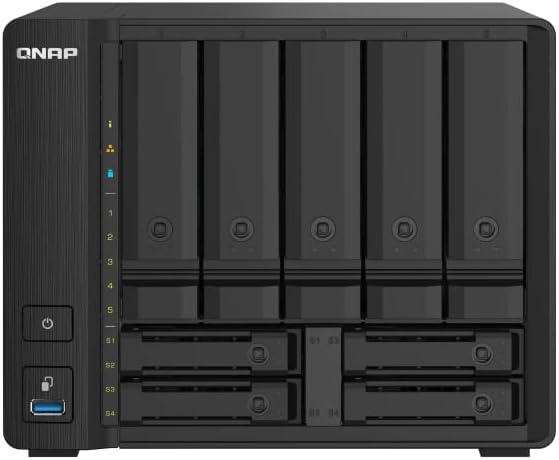
| CPU | Alpine AL-324 quad-core 1.7GHz |
|---|---|
| RAM | 4GB DDR4 (expandable to 16GB) |
| Drive Bays | 5x 3.5" HDD + 4x 2.5" SSD |
| Network | 2x 10GbE SFP+ + 2x 2.5GbE RJ45 |
| AU Price (PLE) | $1,089 |
| AU Price (Mwave) | $1,263 |
QTS vs QuTS Hero. Which Operating System?
Unlike Synology which runs a single OS (DSM), QNAP offers two operating systems. The choice matters because switching between them requires a full reinitialisation. All data must be backed up first.
QTS (standard) uses the ext4 file system and suits most home users, prosumers, and general SMB deployments. It works efficiently on NAS models with less than 8GB RAM and includes Qtier auto-tiering, SSD caching with write cache, and a wide range of apps.
QuTS Hero uses the ZFS file system (128-bit) and targets businesses and advanced users who need enterprise-grade data integrity. ZFS provides end-to-end checksums, self-healing of silent data corruption, copy-on-write snapshots, inline deduplication, and RAID-TP (triple parity. Tolerates three simultaneous drive failures). The trade-off: ZFS needs minimum 8GB RAM to install, 16GB+ for deduplication, and 32GB+ for heavy workloads. Don’t install QuTS Hero on a 4GB NAS and expect miracles.
Simple rule: If your NAS has 8GB+ RAM and you value data integrity or run virtualisation workloads, consider QuTS Hero. Otherwise, stick with QTS. For more detail on running VMs and containers, see our Docker and virtualisation guide.
Networking and NBN Considerations
One of QNAP’s biggest differentiators is networking. Every Intel-based QNAP NAS reviewed here ships with at least 2.5GbE, and several models include 10GbE out of the box. This matters for two reasons: local network performance when transferring files between devices, and remote access performance when using your NAS from outside your home.
For local transfers, 2.5GbE delivers approximately 280 MB/s. 2.5x faster than standard gigabit Ethernet. If your PC, laptop, or switch supports 2.5GbE, the speed difference when copying large files (video, photo libraries, backups) is immediately noticeable. QNAP also makes their own 2.5GbE and 10GbE network switches (the QSW series). A single-vendor NAS and switch solution that no other NAS brand offers.
For remote access, your upload speed is the bottleneck. On a typical NBN 100 plan, real-world upload is around 20-40 Mbps (2.5-5 MB/s). That limits remote NAS performance regardless of how fast your NAS hardware is. CGNAT (Carrier-Grade NAT) on some NBN connections can block incoming connections entirely, making remote access more complex to configure. If remote access is a priority, check whether your ISP supports getting a static or dynamic public IP. For detailed remote access options, see our guides on QNAP NAS Australia.
Warranty and Australian Consumer Law
ACL protection: Australian Consumer Law protections apply when purchasing from Australian retailers. Your warranty claim goes to the retailer, not the manufacturer. QNAP does not have service centres in Australia. The standard NAS warranty process runs through the full chain: retailer to distributor to vendor in Taiwan, then back again. Expect 2-3 weeks minimum for a resolution. Always buy from an Australian authorised retailer for full ACL coverage.
Consumer QNAP NAS models (under $1,000) carry a standard 3-year warranty. Mid-range and enterprise models typically offer 3 years extendable to 5. A dead NAS is classified as a minor failure under ACL. Even if it interrupts your business. Which means the retailer can offer repair or replacement and is not obligated to provide an immediate refund.
Advanced replacements are generally not available through standard warranty processes. Some resellers will let you buy a replacement at full price and refund you when the faulty unit is returned. But ask about this before you need it, not after. Before buying, ask your retailer: “If this fails, what is your process? Can I get an advanced replacement?” The answer tells you more about the value of buying from that retailer than the price on the sticker.
A NAS alone is not a backup. ACL protects your hardware purchase, not your data. If your NAS fails during a warranty dispute, the data is at risk. Plan for hardware failure, plan for a 2-3 week replacement window, and build your data protection strategy around the assumption that your NAS will eventually fail.
Where to Buy QNAP NAS in Australia
Full-range specialists that list most QNAP models and have some NAS expertise include Scorptec, PLE, DeviceDeal, QNAP Shop, and NAS Marketplace. Consumer-focused retailers with a limited QNAP range include Mwave, Umart, and Centre Com. Amazon AU has started holding NAS stock directly in 2026, often at prices below local retailers. But their support model means you are on your own if a unit fails with your data inside it.
If you are buying a NAS for the first time, buy from a specialist where you can get genuine pre-sales guidance. For business, education, and government purchases, always request a formal quote. Resellers love these sales and will sharpen pricing. Distributors and vendors may discount further to secure the deal. Quote pricing is often at or near sale pricing, so the effort is always worthwhile. For more detail on every retailer option, see our guide to QNAP NAS in Australia.
Tip: Gone are the days of waiting for Black Friday to buy tech. Australian retailers run rolling sale events throughout the year. If you need a NAS now, buy it now. The price will not be dramatically different in six months, and in 2026, the stock might not be there.
QNAP Security. What You Need to Know
QNAP has had several high-profile security incidents, including ransomware attacks targeting NAS devices exposed to the internet. These incidents should be noted honestly: they happened, and they affected real users. However, most affected customers recovered their data, QNAP’s helpdesk was able to unlock affected devices free of charge in many cases, and the incidents drove adoption of QNAP’s snapshot technology as a defence mechanism.
The important takeaway is that any NAS exposed to the internet is a potential target. Regardless of brand. Proper security practices are essential: use VPN access instead of exposing ports directly, disable UPnP, keep firmware updated, use strong unique credentials, and enable snapshots for ransomware recovery. Don’t let QNAP’s past incidents scare you off the brand. Let them motivate you to secure whatever NAS you buy properly.
Which QNAP NAS Should You Buy?
Here is the simplified decision framework based on use case and budget:
Basic home backup on a budget: TS-233 ($399). Two bays, RAID 1, simple and affordable.
Home NAS with fast networking: TS-233 ($469-$499). Dual 2.5GbE, 4GB RAM, M.2 SSD caching. The best value if you do not need transcoding.
Plex, Docker, and all-round home/office use: TS-464 ($999-$1,099). The best QNAP NAS for most buyers. Intel transcoding, 8GB RAM, dual 2.5GbE, PCIe expansion.
Heavy virtualisation and business workloads: TS-473A ($1,369-$1,489). Ryzen server-class CPU, up to 64GB RAM, two PCIe slots.
Six bays for growing storage needs: TS-664 ($1,549-$1,649) for Celeron, or TS-673A ($1,699) for Ryzen power.
10GbE and hybrid storage: TS-h973AX ($1,699-$2,567). Built-in 10GbE, mixed HDD/SSD bays, QuTS Hero with ZFS.
Video editing with Thunderbolt: TVS-672XT ($3,057-$3,799). No other brand offers this combination.
Do not forget to budget for drives. All QNAP NAS units ship diskless. NAS-grade drive prices have risen significantly from early 2025 levels, so factor in $200+ per drive for quality NAS HDDs. See our best NAS hard drive guide for current recommendations and pricing.
Related reading: our AU retailer guide.
Use our free NAS Sizing Wizard to get a personalised NAS recommendation.
See also: our complete QNAP ecosystem guide.
Is QNAP better than Synology for home use in Australia?
It depends on what you value. QNAP offers more hardware features per dollar. Faster networking, HDMI output, PCIe expansion, and more model options. Synology offers a more polished, simpler software experience through DSM. For technical users who want to customise their NAS, QNAP is often the better choice. For set-and-forget simplicity, Synology wins. Both brands are sold through the same Australian retailers with comparable warranty support. See our full Synology vs QNAP comparison for a detailed breakdown.
What is the best QNAP NAS for Plex in Australia?
The TS-464 ($999-1,099) is the best QNAP NAS for Plex. The Intel Celeron N5095 CPU provides hardware transcoding that handles multiple simultaneous 4K-to-1080p transcode streams. The 8GB RAM and dual 2.5GbE ports ensure smooth streaming to multiple devices. If you need more processing headroom, the TS-473A ($1,369-1,489) with its Ryzen CPU also delivers strong transcoding. Avoid ARM-based models (TS-133, TS-233, TS-433, TS-233) as they cannot hardware-transcode. For a full rundown, see our best NAS for Plex guide.
Do QNAP NAS units come with hard drives?
No. All QNAP NAS units ship diskless. You need to purchase hard drives separately. This is standard across all NAS brands (Synology, Asustor, UGREEN, TerraMaster). NAS-grade drives like the Seagate IronWolf and WD Red are specifically designed for 24/7 NAS operation with vibration tolerance and workload ratings suited to multi-drive enclosures. Budget for $200-$350 per drive depending on capacity. See our best NAS hard drive guide for current AU pricing and recommendations.
Should I choose QTS or QuTS Hero?
Choose QTS if your NAS has less than 8GB RAM, or if you are using it for home backup, file sharing, and general apps. QTS uses the ext4 file system and works efficiently on all QNAP models. Choose QuTS Hero if your NAS has 8GB+ RAM and you need enterprise-grade data integrity (ZFS), inline deduplication, RAID-TP (triple parity), or WORM compliance. QuTS Hero needs 16GB+ RAM for deduplication and 32GB+ for heavy workloads. Switching between QTS and QuTS Hero requires a full reinitialisation, so decide before setting up your NAS.
Is QNAP safe to use after the ransomware attacks?
Yes. QNAP’s past ransomware incidents targeted NAS devices that were directly exposed to the internet without proper security. Any NAS from any brand is vulnerable if exposed this way. QNAP has since improved security features in QTS and QuTS Hero. To protect your QNAP NAS: access it remotely via VPN only (not port forwarding), disable UPnP, keep firmware updated, use strong unique passwords, enable two-factor authentication, and set up snapshots for ransomware recovery. With proper security practices, QNAP NAS devices are safe to use.
What warranty do QNAP NAS units have in Australia?
Consumer QNAP NAS models (under $1,000) carry a standard 3-year warranty. Mid-range and enterprise models offer 3 years extendable to 5 years through QNAP’s extended warranty programme. In Australia, warranty claims go to the retailer (place of purchase), not QNAP directly. There are no QNAP service centres in Australia. The process runs: retailer to distributor to QNAP in Taiwan and back. Expect 2-3 weeks minimum. Australian Consumer Law protections apply when purchasing from Australian retailers, providing additional coverage beyond the manufacturer warranty.
Can I use a QNAP NAS for surveillance cameras?
Yes. QNAP’s QVR Pro and QVR Elite surveillance station software turns any compatible QNAP NAS into a network video recorder (NVR). The number of cameras supported depends on the NAS model and CPU. Intel-based models like the TS-464 handle more simultaneous camera streams than ARM-based models. QNAP includes free camera licences with most NAS units. Typically 2-8 depending on the model. For dedicated surveillance use, pair your NAS with surveillance-rated hard drives designed for 24/7 recording workloads.
Looking at all NAS brands, not just QNAP? Our comprehensive guide covers Synology, QNAP, Asustor, UGREEN, and TerraMaster with live AU pricing.
Read Best NAS Australia 2026 →