UGREEN NASync offers the most hardware per dollar in the current NAS market. Intel Core i5 processors and 16GB DDR5 at prices that undercut Synology and QNAP by $200-400 at equivalent bay counts. The trade-off is a younger software ecosystem, no official Australian distributor, and a warranty situation that requires active management. This guide covers every NASync model, UGOS software capabilities, Australian purchasing reality, and an honest comparison against Synology and QNAP for Australian buyers.
In short: UGREEN NASync NAS devices are available in Australia via Amazon AU and the official UGREEN AU store, with the DH2300 (2-bay) from $340 and DH4300 Plus (4-bay) from $595. The DXP range (prosumer, Intel i5-based) carries import-variable pricing from approximately $550-1,500 depending on model. UGREEN has no official Australian distributor as of March 2026, which means warranty claims do not follow the established Synology/QNAP retailer-to-distributor chain. A significant consideration for any deployment where downtime matters.
Who Is UGREEN?
UGREEN is a Chinese technology brand that built its reputation on cables, chargers, hubs, and accessories. The kind of product found at every desk upgrade or MacBook setup. What separates UGREEN from the generic accessory brands is scale: they are a publicly listed company operating at a level that funds genuine R&D investment, not just rebranding commodity components.
The decision to enter the NAS market with a full product lineup. The NASync range. Reflects a deliberate strategic expansion rather than an opportunistic product launch. UGREEN has invested in both the hardware platform (custom chassis designs, Intel and Celeron CPU selection, DDR5 memory in the DXP range) and the software layer (UGOS, their in-house NAS operating system). This is not a company experimenting with NAS. It is a company that has chosen to compete directly with Synology, QNAP, and Asustor on hardware value.
From an Australian market perspective, UGREEN sits in an interesting position. The brand is well-known to Australian consumers for accessories, but the NASync NAS range has not yet reached mainstream AU retail channels. No official Australian distributor had been signed as of March 2026, though that is expected to change as the range matures and UGREEN pursues SMB market share in the region.
The UGREEN NASync Range. Every Model Explained
The NASync lineup is divided into two series: the DH entry-level range and the DXP prosumer/performance range. The DH series prioritises affordability and simplicity; the DXP series is where UGREEN's hardware ambition is most visible, with Intel Core i5 processors and DDR5 memory in models that would carry a significantly higher price tag from Synology or QNAP.
Entry-Level: UGREEN NASync DH Series
The DH series targets first-time NAS buyers and home users who want reliable storage, basic media serving, and simple file access without paying a Synology or QNAP premium. These models run ARM-based processors and are the most accessible part of the UGREEN lineup. Both in price and complexity. They are also the models available with confirmed AU retail pricing through the official UGREEN AU store.
UGREEN NASync DH2300 (2-Bay)
The DH2300 is UGREEN's entry point. A 2-bay NAS designed for home users who need shared storage, basic photo backup, and occasional media streaming. Available from the official UGREEN AU store at $340, it undercuts the Synology DS223 ($489 at Mwave) by $149 and the DS225+ ($585) by~$538 for a comparable bay count. For buyers who want a functional home NAS at minimum cost, the DH2300 is the most direct entry in the market.

| Bays | 2 × 3.5"/2.5" SATA |
|---|---|
| CPU | Cortex-A55 quad-core 1.7GHz |
| RAM | 4GB DDR4 |
| Network | 1GbE |
| USB | USB 3.0 × 2 |
| AU Price (UGREEN AU) | $340 |
| OS | UGOS 5 |
The ARM processor handles UGOS 5 and basic Docker containers, but it is not a transcoding unit. Plex users who need hardware transcoding should look at the DXP range. The DH2300's value proposition is clear: more storage capacity per dollar than anything Synology or QNAP offers at this price, with confirmed AU availability and an official AU store warranty path.
UGREEN NASync DH4300 Plus (4-Bay)
The 4-bay version of the DH series. Priced at $595 from the UGREEN AU store, it competes with the Synology DS423 ($699 at Mwave) and the Asustor entry 4-bay range. The DH4300 Plus adds 2.5GbE networking over the DH2300. A meaningful upgrade for home networks that have already moved beyond 1GbE, and a feature that Synology charges significantly more for in equivalent models.
| Bays | 4 × 3.5"/2.5" SATA |
|---|---|
| CPU | Cortex-A55 quad-core 1.7GHz |
| RAM | 4GB DDR4 |
| Network | 2.5GbE |
| USB | USB 3.0 × 2 |
| AU Price (UGREEN AU) | $595 |
| OS | UGOS 5 |
The 2.5GbE port is a genuine differentiator at this price point. The Synology DS423 ships with only 1GbE at $699. For a home user with a 2.5GbE switch or router who wants fast local file transfer speeds, the DH4300 Plus delivers above its price class. The ARM CPU remains the limiting factor for compute-heavy workloads.
Mid-Range to Prosumer: UGREEN NASync DXP Series
The DXP series is where UGREEN's engineering investment is most visible. Intel N100 and Core i5 processors, DDR5 RAM, M.2 NVMe SSD slots, and PCIe expansion make these units technically superior to similarly-priced Synology and QNAP alternatives at almost every tier. The DXP range targets home prosumers, content creators, and technically sophisticated small business users. There is no fixed AU RRP from mainstream retailers. Units are sourced via Amazon AU and international import, with prices that vary based on the AUD/USD rate and import costs.
UGREEN NASync DXP2800 (2-Bay)
The DXP2800 is a 2-bay Intel-based NAS with specs that significantly exceed what Synology and QNAP offer at a comparable price point. The Intel N100 processor handles hardware transcoding, Docker workloads, and lightweight VM use cases that an ARM chip cannot touch. Two M.2 NVMe slots allow SSD caching without adapter cards. A feature that Synology charges $327+ extra for via the M2D20 adapter.

| Bays | 2 × 3.5"/2.5" SATA + 2 × M.2 NVMe |
|---|---|
| CPU | Intel N100 quad-core (up to 3.4GHz) |
| RAM | 8GB DDR5 (expandable to 16GB) |
| Network | 2.5GbE × 2 |
| PCIe | PCIe 3.0 × 1 slot |
| USB | USB 3.2 Gen2 × 2, USB-C × 1 |
| AU Price | ~$550-650 (Amazon AU/import) |
| OS | UGOS Pro |
On paper, the DXP2800 outspecifies the Synology DS225+ ($585 at Mwave) substantially. Intel N100 vs Celeron J4125, DDR5 vs DDR4, two M.2 NVMe slots vs none, dual 2.5GbE vs single 1GbE, PCIe slot vs none. At approximately the same price imported, the hardware advantage is stark. The software maturity gap and warranty situation (covered below) are the reason the DS225+ still makes sense for many buyers.
UGREEN NASync DXP4800 (4-Bay)
The standard 4-bay DXP model runs the same Intel N100 platform as the DXP2800 with two additional drive bays. This is the most direct competitor to the Synology DS425+ ($899 at Mwave) and QNAP TS-453E (~$1139 at Mwave) in the 4-bay prosumer category. Two M.2 NVMe slots and dual 2.5GbE are standard across the DXP4800 range.
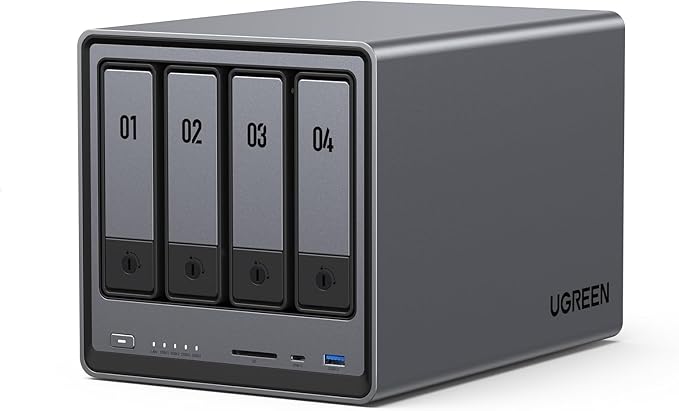
| Bays | 4 × 3.5"/2.5" SATA + 2 × M.2 NVMe |
|---|---|
| CPU | Intel N100 quad-core (up to 3.4GHz) |
| RAM | 8GB DDR5 (expandable) |
| Network | 2.5GbE × 2 |
| PCIe | PCIe 3.0 × 1 slot |
| AU Price | ~$700-800 (Amazon AU/import) |
| OS | UGOS Pro |
At approximately $700-800 imported versus $899 for the DS425+, the hardware advantage is again significant. The DXP4800's PCIe slot allows a 10GbE network card addition. The kind of expansion that QNAP charges a large premium to access at NAS level. For a home lab builder or prosumer willing to manage the import and warranty trade-offs, this is one of the most value-dense 4-bay NAS units available in 2026.
UGREEN NASync DXP4800 Plus (4-Bay, Core i5)
The DXP4800 Plus steps up from the Intel N100 to an Intel Core i5-1235U. A 10-core (2P+8E) laptop-class processor with substantially more compute throughput. This model targets users running heavy Docker workloads, multiple simultaneous Plex 4K streams, or light AI inference tasks on the NAS hardware. DDR5 RAM is doubled to 16GB standard, and the PCIe slot steps up to PCIe 4.0.

| Bays | 4 × 3.5"/2.5" SATA + 2 × M.2 NVMe |
|---|---|
| CPU | Intel Core i5-1235U (10-core, up to 4.4GHz) |
| RAM | 16GB DDR5 (expandable) |
| Network | 2.5GbE × 2 |
| PCIe | PCIe 4.0 × 1 slot |
| AU Price | ~$900-1,100 (Amazon AU/import) |
| OS | UGOS Pro |
The i5-1235U delivers processing power comparable to what Synology offers in the DS925+ ($1,029 at Mwave), but with DDR5, better single-threaded performance, and an M.2 NVMe setup that doesn't require a~$980 adapter card. For anyone running a local LLM, intensive video transcoding, or a large Docker stack on their NAS, this model offers genuine compute at a price that sits competitively against Synology's premium 4-bay offering.
UGREEN NASync DXP480T Plus (4-Bay, Thunderbolt 4)
The DXP480T Plus is a specialised 4-bay unit built around dual Thunderbolt 4 ports, targeting video editors and creative professionals who need high-throughput direct-attach storage alongside network-attached access. Thunderbolt 4 delivers up to 40Gbps direct connectivity. A category where few NAS brands have offered a competitive product at consumer-accessible pricing.
| Bays | 4 × 3.5"/2.5" SATA + 2 × M.2 NVMe |
|---|---|
| CPU | Intel Core i5-1340PE (12-core, P+E design) |
| RAM | 16GB DDR5 (expandable) |
| Network | 2.5GbE × 2 + Thunderbolt 4 × 2 |
| AU Price | ~$1,100-1,400 (Amazon AU/import) |
| OS | UGOS Pro |
For video editors working with 4K RAW or high-bitrate footage, the Thunderbolt 4 connection allows the NAS to act as an ultra-fast direct-attach drive during editing. Sustained write speeds that 2.5GbE cannot approach. This is a genuinely differentiated product for a specific professional workflow. Confirm that your editing workstation has Thunderbolt 4 ports (not just USB-C) before purchasing. Many PCs have USB-C without Thunderbolt.
UGREEN NASync DXP6800 Pro (6-Bay)
The 6-bay DXP6800 Pro targets prosumers and small businesses who need six drive bays with Intel Core i5 performance. Six bays open up RAID 6 configurations that provide double-parity protection. Two simultaneous drive failures tolerated. Which is important for any deployment where data integrity matters more than raw usable capacity.

| Bays | 6 × 3.5"/2.5" SATA + 2 × M.2 NVMe |
|---|---|
| CPU | Intel Core i5-1235U (10-core, up to 4.4GHz) |
| RAM | 16GB DDR5 (expandable) |
| Network | 2.5GbE × 2 |
| PCIe | PCIe 4.0 × 1 slot |
| AU Price | ~$1,000-1,200 (Amazon AU/import) |
| OS | UGOS Pro |
Six bays, Core i5, and 16GB DDR5 at $1,000-1,200 imported is the kind of value proposition that would not have been possible from a NAS brand 3 years ago. The Synology DS1525+ with Ryzen V1500B and 8GB RAM retails at $1,285 at Mwave. The DXP6800 Pro offers more bays, a faster single-threaded CPU, and more RAM for less money. The distribution and software trade-offs remain, but on hardware alone, the value gap is compelling.
UGREEN NASync DXP8800 Plus (8-Bay)
UGREEN's current flagship NAS. An 8-bay unit targeting prosumers and technically sophisticated small business users who need maximum storage capacity with strong compute performance. Eight bays support RAID 5, RAID 6, or RAID 10, and the Intel Core i5 processor handles concurrent workloads that would bottleneck an ARM-based unit. See the RAID explained guide for a full breakdown of RAID levels and which configuration suits which use case.

| Bays | 8 × 3.5"/2.5" SATA + 2 × M.2 NVMe |
|---|---|
| CPU | Intel Core i5-1235U (10-core, up to 4.4GHz) |
| RAM | 16GB DDR5 (expandable) |
| Network | 2.5GbE × 2 |
| PCIe | PCIe 4.0 × 1 slot |
| AU Price | ~$1,200-1,500 (Amazon AU/import) |
| OS | UGOS Pro |
At approximately $1,200-1,500 imported, the DXP8800 Plus competes with the Synology DS1825+ ($1,799 at Scorptec) and QNAP TS-873A. It outspecifies both on RAM and CPU generation, and includes the M.2 NVMe slots that Synology charges extra for via adapter cards. For a technically sophisticated buyer with a solid backup strategy who can accept the current distribution situation, this is the strongest 8-bay value in the Australian market.
UGOS. UGREEN's NAS Operating System
Every UGREEN NAS runs UGOS. UGREEN's own Linux-based NAS operating system. The entry DH models run UGOS 5; the DXP prosumer range runs UGOS Pro. Both share the same general design language: a clean, modern web interface that prioritises simplicity over complexity. UGOS is a newer system and the gap with DSM and QTS is real. But the trajectory is forward, and for Docker-centric users, the current version is already functional.
What UGOS Does Well
UGOS Pro's interface is genuinely clean. Arguably less cluttered than QNAP QTS's feature-dense UI. Initial setup is straightforward. Docker support via Container Manager is well-implemented for the DXP range. Core file sharing (SMB, NFS, AFP), cloud sync, and photo management work reliably. For users whose primary workflow is Docker. Running containerised applications rather than native NAS apps. UGOS Pro is a reasonable platform because Docker handles the application layer and the NAS operating system becomes primarily a hardware and storage management layer.
Where UGOS Falls Short
UGOS cannot yet match DSM or QTS in application breadth or ecosystem depth. Synology's native application library. Active Backup for Business, Surveillance Station, Hybrid Share, Virtual Machine Manager, and the full range of Cloud Sync connectors. Represents a decade of development investment. QNAP QTS has comparable depth, particularly for network management, multimedia, and surveillance applications. UGOS is improving with each release, but the gap as of early 2026 is significant for users who need specific native NAS applications.
UGOS application gap: If your workflow depends on specific NAS applications. Synology Active Backup, Surveillance Station, or QNAP's QVR Pro. UGOS does not have native equivalents. Plan to run these workloads via Docker containers, or reconsider the platform. UGOS is strongest for Docker-centric workflows where the NAS operating system is primarily a management and storage layer.
🇦🇺 Australian Buyers: Where to Buy and How
This is where UGREEN's Australian story gets complicated. Unlike Synology, QNAP, Asustor, and TerraMaster, UGREEN had no official Australian NAS distributor as of March 2026. This single fact shapes every purchasing decision for Australian buyers. From where you can buy to what happens when something goes wrong.
Current AU Availability
As of March 2026, UGREEN NASync devices are available to Australian buyers through three main channels: the official UGREEN AU online store (nas-au.ugreen.com), Amazon AU (typically sourced from US or European markets), and international marketplace sellers. The official UGREEN AU store stocks the DH2300 ($340) and DH4300 Plus ($595) with confirmed availability. DXP range pricing through Amazon AU varies with exchange rate movements. Typical ranges are shown in the comparison table below, but verify at time of purchase.
Traditional Australian IT retailers. Mwave, Scorptec, PLE Computers, Umart, Centre Com. Do not stock UGREEN NAS devices as of this writing. These retailers matter because they carry stock, provide pre-sales advice, handle warranty claims through established distributor channels, and have contactable support staff. The absence of UGREEN from this channel is the core limitation for Australian buyers who want the full local retail experience.
AU Pricing. What UGREEN NAS Actually Costs Here
DH series pricing is confirmed through the official UGREEN AU store. DXP series pricing from Amazon AU fluctuates with the AUD/USD exchange rate and import costs. The table below shows typical ranges observed in early 2026. Verify current pricing at time of purchase, particularly for DXP models.
UGREEN NASync Range. AU Pricing vs Comparable Synology/QNAP Models
| UGREEN NASync | Comparable Synology | Comparable QNAP | |
|---|---|---|---|
| 2-Bay Entry (ARM) | DH2300 $340 (UGREEN AU) | DS223 $489 (Mwave) | TS-233 ~$399 (Mwave) |
| 4-Bay Entry (ARM, 2.5GbE) | DH4300 Plus $595 (UGREEN AU) | DS423 $699 (Mwave) | TS-433 ~$629 (Mwave) |
| 2-Bay Intel N100 | DXP2800 ~$550-650 (import) | DS225+ $585 (Mwave) | TS-262 ~$669 (Mwave) |
| 4-Bay Intel N100 | DXP4800 ~$700-800 (import) | DS425+ $899 (Mwave) | TS-453E ~$799 (Mwave) |
| 4-Bay Core i5 / 16GB DDR5 | DXP4800 Plus ~$900-1,100 (import) | DS925+ $1,029 (Mwave) | TS-464 ~$1,149 (Mwave) |
| 6-Bay Core i5 | DXP6800 Pro ~$1,000-1,200 (import) | DS1525+ $1,285 (Mwave) | TS-673A ~$1,399 (Mwave) |
| 8-Bay Core i5 | DXP8800 Plus ~$1,200-1,500 (import) | DS1825+ $1,799 (Scorptec) | TS-873A ~$1,599 (Mwave) |
The pricing pattern is consistent: UGREEN undercuts established brands by $100-300+ per device across the range, with the advantage most pronounced in the 6-bay and 8-bay tiers where Synology and QNAP command significant premiums. DH models have the added advantage of confirmed AU retail availability at fixed pricing. DXP import pricing is subject to the exchange rate variability noted above.
Pricing tip: DXP range prices on Amazon AU reflect US market pricing adjusted for the current exchange rate. When AUD is weak against USD, DXP models can be 10-15% more expensive than the typical ranges shown above. Always verify current pricing at checkout. The comparison table above reflects early 2026 typical pricing only.
Warranty and Support. The Real Trade-Off
This is the section that matters most for Australian UGREEN buyers. Hardware specs and pricing are compelling. The warranty and support situation is significantly less so. And understanding it honestly is what separates a good purchasing decision from a regrettable one.
How NAS Warranty Works in Australia for Established Brands
For Synology, QNAP, and Asustor, the warranty chain in Australia is well-established: you buy from an Australian retailer, the retailer handles the claim, returns the unit to the distributor (BlueChip for Synology/QNAP, Dicker Data for Asustor), and the distributor manages the vendor relationship and replacement stock. In Australia, your warranty claim goes to the retailer, not the manufacturer. Synology and QNAP do not have service centres here. But the chain works because distributors like BlueChip hold replacement stock and have established processes. A warranty claim through Scorptec or Mwave on a Synology unit typically resolves in 2-3 weeks.
UGREEN's Warranty Situation in Australia
UGREEN has no official Australian distributor, which means the established warranty chain does not exist behind UGREEN purchases. When you buy through the UGREEN AU store or Amazon AU, your warranty claim is handled directly with UGREEN support or through Amazon's own returns process. Both paths can work. But neither provides the replacement-speed guarantee that distributor-backed brands offer, and neither gives you access to the specialist NAS retailers who can advocate on your behalf within an established channel.
Warranty reality check: A dead NAS is classified as a minor failure under Australian Consumer Law. The retailer chooses the remedy (repair, replacement, or refund), not you. For Amazon AU purchases, this typically means a refund rather than an advanced replacement unit. If your NAS dies mid-deployment, you may have a refund and no NAS while you source and configure a replacement. ACL protects your hardware purchase, not your data. If the NAS fails during a warranty dispute, your data is not Amazon or UGREEN's responsibility. For any deployment where downtime is unacceptable, this is a critical consideration.
The single best piece of advice before buying any NAS: have the warranty conversation with your place of purchase before you need it. Ask what their process is if the unit fails, whether an advanced replacement is available, and what happens if your exact model is no longer in stock. For UGREEN AU store purchases and Amazon AU purchases, understanding these answers before you commit is especially important given the absence of the distributor safety net.
UGREEN vs Synology vs QNAP. Honest Comparison for Australian Buyers
The comparison below reflects the Australian purchasing context specifically. Not just global specs and benchmarks. The right answer depends on your technical confidence, deployment criticality, and whether the software ecosystem matters more than the hardware specification at your price point.
UGREEN NASync. Strengths and Weaknesses
Pros
- Superior hardware specs per dollar vs Synology and QNAP across the full range
- Intel Core i5 with DDR5 in DXP models at prices where Synology offers weaker Ryzen platforms
- M.2 NVMe slots standard on DXP range. Synology charges $327+ for the same via adapter cards
- Thunderbolt 4 option (DXP480T Plus) for direct-attach video editing workflows
- DH series available from official UGREEN AU store at fixed AU pricing
- 2.5GbE standard across DXP range; Synology and QNAP often charge more for this
Cons
- No official Australian distributor. Established warranty chain does not exist
- UGOS is significantly less mature than DSM and QTS in native application depth
- DXP range pricing from Amazon AU varies with AUD/USD exchange rate. No fixed AU RRP
- Not stocked by any mainstream Australian IT retailer as of March 2026
- Community support. Forums, third-party guides. Is thin compared to Synology's ecosystem
- Wrong choice for first-time NAS buyers or business-critical deployments
Who Should Buy a UGREEN NAS in Australia?
The UGREEN NASync range suits a specific type of Australian buyer well. And is a poor fit for others. The honest answer depends more on your technical confidence and risk tolerance than on hardware specifications.
UGREEN Suits You If:
You are technically confident. You are comfortable with Docker, understand Linux file permissions, and can troubleshoot NAS issues with limited community documentation. UGOS Pro's Docker support is strong; its native application ecosystem is not. If Docker is your primary deployment method, UGREEN delivers excellent hardware for the price.
You prioritise hardware value. For media labs, homelabs, and prosumer storage builds where raw processing power, storage capacity, and I/O expandability matter more than native app depth, UGREEN's DXP range has no peer at its price point among NAS brands available in Australia.
You have a robust backup strategy. Your data exists in at least two locations. Ideally following a 3-2-1 backup strategy. So a NAS failure means a temporary inconvenience, not a data loss event. RAID protects against drive failure; it does not protect against the NAS device itself failing. Plan for both.
You are an informed early adopter. UGREEN is a newer entrant to the NAS market. UGOS will improve. Australian distribution will likely formalise. Buying now means accepting current software and distribution limitations in exchange for hardware value that more cautious buyers will pay more for when the ecosystem matures.
UGREEN Is Not the Right Choice If:
This is your first NAS. The UGREEN ecosystem is thin on community support, YouTube walkthroughs, and third-party guides. First-time NAS buyers benefit significantly from Synology's enormous DSM documentation library and active global user community. When you need help. And you will at some point. Choose the platform where help is abundant. See the best NAS Australia guide for the full comparison at every price point.
The NAS is business-critical. For small business deployments where the NAS serves active users and downtime carries a real cost, the absence of an official AU distributor is an operational risk. The established warranty chains behind Synology and QNAP. Through BlueChip or Dicker Data to retailers like Scorptec, Mwave, or PLE. Exist because business users need reliable replacement timelines. UGREEN cannot yet provide this in Australia.
You need specific native NAS applications. Synology Active Backup for Business, Surveillance Station, Hybrid Share, and QNAP's QVR Pro are mature applications with no UGOS equivalents. If your deployment depends on them, UGREEN is not the right platform yet. This will change as UGOS matures. But it is the reality in 2026.
You need reliable remote access with minimal configuration. Synology QuickConnect and QNAP myQNAPcloud provide easy, reliable remote access with minimal setup. Critical if you are accessing the NAS over an Australian NBN connection, particularly if your ISP uses CGNAT. UGOS remote access works but requires more configuration and has a shorter track record. See the NAS remote access Australia guide for the full picture on CGNAT and remote access options.
The Distribution Question. What Comes Next for UGREEN in Australia
UGREEN's lack of an official Australian distributor is the single biggest limitation of the brand in this market. Every major NAS brand that achieved mainstream AU presence did so through established distributor relationships: Synology via BlueChip and MMT, QNAP via BlueChip and Dicker Data, Asustor via Dicker Data. These relationships drive retailer stocking decisions, warranty chain infrastructure, and AU-specific pricing stability.
UGREEN is expected to address this as the NASync range matures. When an official Australian distributor is signed, it will likely trigger stocking decisions at Scorptec, Mwave, PLE, and other specialist retailers. At that point, the UGREEN value proposition becomes significantly stronger. The hardware advantage will remain, and the warranty disadvantage will be resolved. Buyers who purchase UGREEN today are accepting distribution risk in exchange for hardware value; buyers who wait for official AU distribution will pay slightly more in relative terms but gain the full warranty and support safety net.
Hard Drive Recommendations for UGREEN NAS
UGREEN NASync devices use standard 3.5" and 2.5" SATA drives. The same drives that work in every other consumer and prosumer NAS. Seagate IronWolf and Western Digital Red Plus are the standard recommendations for 2-8 bay NAS deployments. IronWolf Pro and WD Red Pro are appropriate for higher-intensity or 24/7 business deployments. NAS-grade drive prices have risen significantly since early 2025, with 4TB models now consistently above $200 at Australian retailers. See the best NAS hard drives Australia guide for current pricing and capacity recommendations.
For DXP models with M.2 NVMe slots: unlike Synology. Which restricts many models to approved Synology-brand SSDs in M.2 slots. UGREEN's compatibility approach is more permissive. Standard consumer NVMe SSDs (Samsung 970 EVO Plus, WD Black SN770, Kingston NV3) generally work in UGREEN NASync M.2 slots for caching. Verify against the official UGREEN compatibility list for your specific model before purchasing cache drives.
For power consumption context when planning a UGREEN NAS deployment, the NAS Power Calculator provides AU electricity cost estimates across all bay counts and workload profiles. The NAS power consumption guide covers the full picture for Australian electricity rates and running cost comparisons.
For choosing between UGREEN and an established brand: the NAS Sizing Wizard matches the right model to your use case, bay count, and budget. Comparing brands side by side? See Synology NAS Australia, QNAP NAS Australia, and Asustor NAS Australia for full brand-by-brand context. The best NAS Australia guide covers the full market across all price points and use cases.
Related reading: our UGREEN DH2300 review, our UGREEN DH4300 review, and our UGREEN DXP2800 review.
Related reading: our all UGREEN models compared.
Is UGREEN NAS available from Australian retailers like Scorptec, Mwave, or PLE?
No. As of March 2026, UGREEN NAS devices are not stocked by mainstream Australian IT retailers. The DH2300 ($340) and DH4300 Plus ($595) are available through the official UGREEN AU store (nas-au.ugreen.com). DXP range models are typically sourced via Amazon AU. Traditional retailers like Scorptec, Mwave, and PLE do not yet carry UGREEN NAS, as no official Australian distributor has been appointed. This is expected to change as UGREEN pursues distribution partnerships in the Australian market.
What happens if my UGREEN NAS fails under warranty in Australia?
Your warranty claim is handled by your place of purchase. Not by UGREEN directly. For Amazon AU purchases, Amazon handles the claim under their returns process, typically resulting in a refund rather than an advanced replacement unit. For UGREEN AU store purchases, UGREEN's own support process applies. Unlike Synology or QNAP. Which have Australian distributors (BlueChip, Dicker Data) that buffer the warranty process. There is no distributor layer behind UGREEN in Australia. Under Australian Consumer Law, you have protections regardless of brand, but the remedy (repair, replacement, or refund) is the retailer's choice. For business-critical deployments, this distinction is significant.
Can UGREEN NAS run Plex, Docker, and other third-party applications?
Yes. The DXP range runs Docker via UGOS Pro's Container Manager, supporting the full Docker ecosystem. Plex Media Server, Jellyfin, Home Assistant, and other containerised applications run well on DXP models, particularly those with Intel N100 or Core i5 processors which support hardware transcoding. The DH series (ARM processors) supports Docker but with limited compute for transcoding-intensive tasks. UGOS Pro does not have the native application breadth of DSM or QTS. Plan to run most services via Docker rather than native UGOS apps.
Is UGOS as good as Synology DSM or QNAP QTS?
Not yet for most use cases. UGOS provides a clean interface, solid Docker support, and functional file sharing. But lacks the application depth of DSM and QTS. Synology DSM includes Active Backup for Business, Surveillance Station, Hybrid Share, and Virtual Machine Manager as mature native applications. QNAP QTS has comparable depth for multimedia and network management. The gap is real as of early 2026. UGOS is strongest for Docker-centric workflows where the NAS operating system is primarily a hardware management and storage layer, with applications delivered via containers.
Will UGREEN NAS work with my Australian NBN connection for remote access?
UGOS Pro includes remote access functionality, but it requires more manual configuration than Synology QuickConnect or QNAP myQNAPcloud. If your NBN service uses CGNAT. Common on some ISP plans, particularly mobile broadband and some fixed wireless NBN services. Standard port forwarding does not work regardless of brand. You will need a VPN, DDNS, or reverse proxy solution. Check whether your ISP assigns you a public IP before relying on any remote access setup. See the NAS remote access Australia guide for CGNAT checks and recommended workarounds.
Should I wait for UGREEN to get an official Australian distributor before buying?
It depends on your use case and risk tolerance. If the warranty situation is a concern. And it should be for business or data-critical deployments. Waiting for official AU distribution makes the purchase significantly safer and more predictable. When UGREEN appoints an Australian distributor, the NAS range should become available through Scorptec, Mwave, PLE, and similar retailers with full warranty chain support. For technically confident home users and prosumers with solid backup strategies, the current distribution situation is a manageable trade-off in exchange for genuine hardware value. For everyone else: wait.
How does UGREEN NAS pricing compare to Synology and QNAP in Australia?
UGREEN consistently undercuts both brands by $100-300+ per device across equivalent bay counts and CPU tiers. The DH2300 at $340 sits $149 below the Synology DS223. The DXP4800 Plus (Core i5, 16GB DDR5) imports at approximately $900-1,100 versus the DS925+ at $1,029 and the QNAP TS-464 at approximately $1,149. With better hardware specifications. DXP pricing variability from exchange rate movement is the key caveat; DH pricing from the official AU store is fixed and transparent.
Does UGREEN NAS support RAID, and which RAID levels are available?
Yes. UGOS and UGOS Pro support JBOD, RAID 0, RAID 1, RAID 5, RAID 6, and RAID 10 depending on bay count. RAID 5 requires a minimum of 3 drives; RAID 6 requires 4 drives and tolerates 2 simultaneous drive failures. Remember that RAID is not a backup. It protects against drive failure, not accidental deletion, ransomware, or NAS device failure. Always maintain at least one off-device backup copy. See the RAID explained guide for a full breakdown of RAID levels, recovery scenarios, and rebuild times.
Can I use standard NVMe SSDs in UGREEN NASync DXP M.2 slots?
Generally yes. UGREEN's M.2 compatibility is more permissive than Synology's, which restricts many models to approved Synology-brand SSDs. Standard M.2 2280 NVMe SSDs from consumer brands (Samsung 970 EVO Plus, WD Black SN770, Kingston NV3) work in UGREEN DXP NASync M.2 slots for caching purposes. Always verify against the official UGREEN compatibility list for your specific model before purchasing, particularly for newer models where the compatibility database may be less comprehensive than established brands.
Not sure which UGREEN NAS model fits your use case, or weighing UGREEN against Synology or QNAP? The NAS Sizing Wizard matches storage needs to the right model by bay count, budget, and workload. Or explore the full brand comparisons for the complete picture.
Use the NAS Sizing Wizard →