Synology is the safer, more established choice with the best NAS software ecosystem on the market. TerraMaster is the value play that delivers stronger hardware specs per dollar but with a less mature operating system and limited Australian support infrastructure. For most Australian home users and small businesses, Synology remains the default recommendation because DSM is genuinely easier to live with day-to-day. But if your primary need is raw storage and backup on a tight budget, TerraMaster deserves serious consideration in 2026 -- particularly the F4-425 at $659 from Scorptec, which undercuts the Synology DS425+ by~$786.
For a broader overview of this topic, see our complete Synology ecosystem guide.
In short: Choose Synology if you want the most polished NAS software experience, broad app support, and a proven Australian distribution channel. Choose TerraMaster if you want more hardware for less money and you are comfortable with a less refined operating system. Synology wins on software and support; TerraMaster wins on price-to-specs. For first-time NAS buyers, Synology is the lower-risk option.
Synology vs TerraMaster: The Core Difference
The fundamental difference between Synology and TerraMaster is not hardware -- it is software maturity. Synology's DiskStation Manager (DSM) has been refined over more than a decade into one of the most user-friendly NAS operating systems available. TerraMaster's TOS (TerraMaster Operating System) is functional and improving rapidly, but it lacks the depth, polish, and third-party app ecosystem that makes DSM the benchmark for consumer NAS software.
Hardware-wise, TerraMaster consistently offers more CPU power, more RAM, and more drive bays per dollar than Synology. A TerraMaster F4-425 with an Intel Celeron N5095 quad-core CPU costs $659 at Scorptec. The closest Synology equivalent, the DS425+, starts at $899 from Mwave. That is a $240 gap for what is, on paper, comparable or better hardware from TerraMaster. The question is whether the gap in software and ecosystem justifies the Synology premium -- and for many buyers, it does.
Quick Comparison: Popular Models at a Glance
Synology vs TerraMaster: 2-Bay and 4-Bay Models (AU Pricing, February 2026)
 Synology DS225+
|
 TerraMaster F2-425
|
 Synology DS425+
|
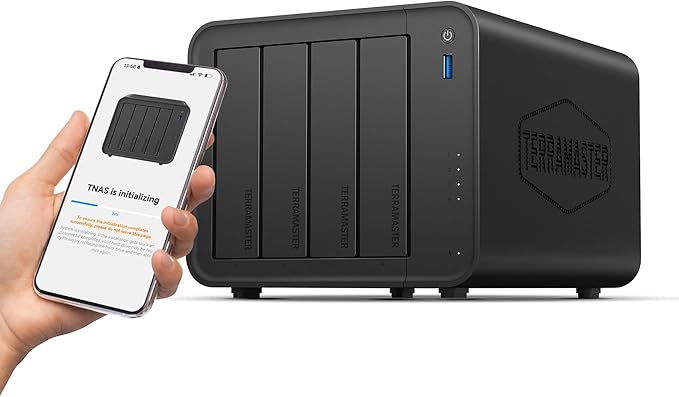 TerraMaster F4-425
|
|
|---|---|---|---|---|
| Bays | 2 | 2 | 4 | 4 |
| CPU | Intel Celeron (4-core) | Intel Celeron N5095 (4-core) | Intel Celeron (4-core) | Intel Celeron N5095 (4-core) |
| RAM | 2 GB DDR4 | 4 GB DDR4 | 2 GB DDR4 | 8 GB DDR4 |
| Network | 1x 2.5GbE + 1x 1GbE | 1x 2.5GbE | 1x 2.5GbE + 1x 1GbE | 2x 2.5GbE |
| M.2 Slots | 2x NVMe | 1x NVMe | 2x NVMe | 2x NVMe |
| Operating System | DSM 7.x | TOS 6 | DSM 7.x | TOS 6 |
| AU Price | $599 (PLE Computers) | $459 (Scorptec) | $819 (Scorptec) | $699 (Scorptec) |
| Price Difference | - | $126 cheaper | - | $240 cheaper |
Prices last verified: 16 March 2026. Always check retailer before purchasing.
The pricing tells a clear story. TerraMaster undercuts Synology by $126 at the 2-bay level and $240 at the 4-bay level, while offering double the RAM in both cases. If you are purely comparing spec sheets, TerraMaster looks like the obvious winner. But NAS buying is not a spec sheet exercise -- the software you interact with every day matters more than the CPU you will never directly use.
Software: DSM vs TOS
This is where Synology justifies its premium. DSM is the gold standard for consumer NAS software. The interface is clean, responsive, and logically organised. First-time NAS users can set up shared folders, configure backups, and install apps without reading a manual. Synology's first-party apps -- Synology Drive, Hyper Backup, Active Backup for Business, Synology Photos, and Surveillance Station -- are polished, regularly updated, and deeply integrated into DSM. Docker support via Container Manager is straightforward enough that non-developers can deploy containers without command-line expertise.
TerraMaster's TOS has improved significantly in recent years, but it is still noticeably behind DSM in user experience. The interface can feel clunky in places, app selection is thinner, and documentation is less comprehensive. Where DSM feels like a product designed around the user, TOS can feel like a product designed around the hardware. For experienced Linux users or those comfortable with command-line management, this gap narrows. For everyone else, DSM's polish is a meaningful daily advantage.
If you want to explore the broader NAS software landscape, our Docker and virtualisation guide covers container support across all major NAS brands.
Hardware and Expandability
TerraMaster's hardware advantage is real and measurable. The F4-425 ships with 8 GB of DDR4 RAM compared to the DS425+'s 2 GB. The TerraMaster F4-424 Pro goes further with an Intel Core i3 processor and 32 GB of RAM for $1,099 at Scorptec -- a spec level that Synology does not offer until you step up to rackmount or enterprise models costing substantially more. For workloads that are genuinely CPU or RAM-intensive -- running multiple Docker containers, transcoding video, or hosting virtual machines -- TerraMaster's hardware headroom is tangible.
Synology's hardware is not weak, but it is conservative by design. Synology optimises for efficiency, low power consumption, and the specific demands of DSM. The DS925+ at $1,029 from Mwave is the sweet spot in their 4-bay Plus range, offering a quad-core CPU with 4 GB of expandable RAM. It is not the fastest hardware at its price point, but DSM is lightweight enough that it does not need to be. Synology's approach is to let the software do the heavy lifting while keeping the hardware efficient and quiet.
TerraMaster also offers hybrid bay configurations that Synology does not match. The F2-425 Plus ($599, Scorptec) includes both 3.5-inch and 2.5-inch M.2 bays in a compact 2-bay form factor, and the F4-425 Plus ($899, Scorptec) extends this to a 3+4 hybrid configuration. These hybrid designs are appealing for users who want SSD caching or tiered storage without sacrificing HDD bays.
Drive Compatibility
This is a topic that still stings for Synology. In April 2025, Synology restricted Plus series models to Synology-branded or certified drives only. The backlash was severe, and Synology reversed course with DSM 7.3 in October 2025, restoring third-party 3.5-inch HDD and 2.5-inch SATA SSD support on desktop Plus series models. However, M.2 NVMe SSDs still require drives from Synology's official Hardware Compatibility List, and enterprise/rackmount models maintain stricter restrictions.
TerraMaster has no drive restrictions whatsoever. Any standard SATA HDD, SATA SSD, or NVMe SSD works without compatibility checks or firmware lockouts. For buyers who value hardware freedom -- particularly those who already own drives or want to shop for the best deal on NAS-grade storage -- TerraMaster's open approach is a genuine advantage. For more on choosing the right drives, see our best NAS hard drives guide.
Australian Distribution and Support
This is one of the most significant practical differences for Australian buyers and one that spec sheets do not capture. Synology is distributed in Australia by BlueChip and Multimedia Technology (MMT), two established distributors who hold deep stock across the range. Both have dedicated senior product managers for Synology with years of tenure. Consumer models are almost always readily available from Australian retailers like Mwave, Scorptec, and PLE. When a model is out of stock, distributors can typically air-freight from Taiwan within 2-3 weeks.
TerraMaster is distributed in Australia by DSTech, a smaller distributor with limited market presence compared to BlueChip or MMT. Stock levels are thinner, model availability is less consistent, and the retailer footprint is narrower. Scorptec carries the best range of TerraMaster products in Australia, but even they show several models as out of stock at any given time. If you need a specific TerraMaster model urgently, you may face longer wait times than you would with Synology.
For warranty claims, both brands follow the same basic chain: customer contacts retailer, retailer escalates to distributor, distributor escalates to vendor. Neither Synology nor TerraMaster has a service centre or support office in Australia. But Synology's established distributor relationships mean the warranty process is more predictable and typically faster. TerraMaster's thinner Australian infrastructure can make warranty resolution slower and less certain. For a deeper look at where to buy and what matters, read our where to buy NAS in Australia guide.
Australian Consumer Law note: ACL protections apply when purchasing from Australian retailers regardless of brand. Your warranty claim goes to the retailer, not the manufacturer. Before buying, ask your retailer: "If this unit fails, what is your warranty process?" The answer tells you more about the value of buying from that retailer than the price on the website. For official information on your consumer rights, visit accc.gov.au.
Pricing Breakdown: Model by Model
Australian NAS pricing is relatively uniform across major retailers because margins are tight -- most operate at 3-5%, leaving little room for significant price wars. The meaningful differences between retailers are stock depth, pre-sales knowledge, and post-sales support rather than price. That said, here is how the two brands stack up at each tier.
2-Bay Entry Level
| Synology DS223 | $489 (Mwave) -- Realtek quad-core, 2 GB RAM, 1GbE |
|---|---|
| TerraMaster F2-425 | $459 (Scorptec) -- Intel N5095 quad-core, 4 GB RAM, 2.5GbE |
| Price Difference | TerraMaster saves $30 with stronger specs |
At the entry 2-bay level, the TerraMaster F2-425 is priced below the Synology DS223 while offering a significantly faster Intel CPU, double the RAM, and 2.5GbE networking versus 1GbE. On hardware alone, this is not a close contest. But the DS223 runs DSM, which means access to Synology's full app ecosystem including Synology Photos, Synology Drive, and Hyper Backup. If those apps matter to you, the DS223 is worth the small premium.
2-Bay Plus/Mid-Range
| Synology DS225+ | $585 (Mwave) -- Intel Celeron 4-core, 2 GB RAM, 2.5GbE + 1GbE, 2x M.2 |
|---|---|
| TerraMaster F2-425 Plus | $599 (Scorptec) -- Intel N150, 3+2 hybrid bays, NVMe support |
| Price Difference | Synology is $14 cheaper |
This is the most interesting matchup. The DS225+ and F2-425 Plus are within $14 of each other. At near-identical pricing, the Synology DS225+ is the stronger recommendation for most buyers. DSM's maturity, app ecosystem, and the established Australian support chain make the DS225+ the lower-risk choice when the price gap is negligible. The TerraMaster's hybrid bay design is interesting if you specifically want integrated SSD and HDD storage in a 2-bay form factor, but it is a niche advantage.
4-Bay Mid-Range
| Synology DS425+ | $899 (Mwave) -- Intel Celeron 4-core, 2 GB RAM, 2.5GbE + 1GbE, 2x M.2 |
|---|---|
| TerraMaster F4-425 | $659 (Scorptec) -- Intel N5095 4-core, 8 GB RAM, 2x 2.5GbE, 2x M.2 |
| Price Difference | TerraMaster saves $240 with 4x the RAM |
The 4-bay tier is where TerraMaster's value proposition becomes hardest to ignore. A $240 saving with four times the RAM and dual 2.5GbE ports is substantial. For buyers who primarily need file storage, backup, and basic media serving, the F4-425 delivers everything required at a significantly lower price. If your NAS requirements are straightforward -- backup, shared folders, perhaps a media server -- paying $240 more for DSM becomes a harder sell.
4-Bay Performance/Pro

| Synology DS925+ | $1,029 (Mwave) -- Quad-core CPU, 4 GB RAM (expandable), 2x M.2 |
|---|---|
| TerraMaster F4-424 Pro | $1,099 (Scorptec) -- Intel Core i3, 32 GB RAM, 4-bay |
| Price Difference | TerraMaster costs $70 more but with 8x the RAM and a faster CPU |
At the performance tier, the TerraMaster F4-424 Pro offers raw hardware that Synology simply cannot match at this price point. An Intel Core i3 with 32 GB of RAM for $1,099 is extraordinary value. For workloads like running multiple Docker containers, virtual machines, or heavy Plex transcoding, the F4-424 Pro's hardware is in a different league. However, this is also where DSM's software maturity matters most -- if you are pushing a NAS this hard, you are likely relying on features like Active Backup for Business, Synology Drive sync, or Container Manager that have no equivalent in TOS. The DS925+ at $1,029 from Mwave is a better all-round choice for most prosumers because the software does more with less hardware. For a detailed look at the DS925+, read our Synology DS925+ review.
6-Bay and Beyond
TerraMaster offers the F6-424 Max, a 6-bay hybrid NAS with an Intel Core i5 and 8 GB of RAM, at $1,699 from Scorptec. Synology's closest equivalent is the DS1525+ 5-bay at $1,285 from Mwave, which trades one HDD bay and raw CPU power for DSM's ecosystem. For businesses needing 6+ bays, Synology's range extends into rackmount territory with significantly higher price points. TerraMaster currently has limited options above 6 bays in the Australian market.
Backup, Apps, and Ecosystem
Synology's app ecosystem is a genuine competitive moat. Hyper Backup provides versatile, versioned backups to external drives, remote Synology NAS units, and cloud services. Active Backup for Business offers agent-based backup for Windows PCs, Macs, servers, and virtual machines -- functionality that competing brands struggle to match. Synology Drive provides Dropbox-style file sync and sharing. Synology Photos is a capable Google Photos alternative. These are not basic utilities -- they are full-featured applications that many users rely on daily.
TerraMaster offers equivalent functionality in many areas but with less refinement. TOS includes backup tools, file sync, and media serving capabilities. The platform supports Docker for extending functionality. But the first-party app selection is narrower, community support is thinner, and documentation is less comprehensive. If your NAS workflow depends heavily on first-party apps, Synology is the clear winner. If you plan to run Docker containers and build your own stack, the gap narrows because both platforms support Docker effectively.
For buyers focused on backup strategy, our 3-2-1 backup strategy guide covers how to structure your data protection regardless of NAS brand.
Network Performance and NBN Considerations
Both brands offer 2.5GbE networking on their mid-range and above models, which is the practical ceiling for most Australian home networks in 2026. The difference is that TerraMaster more frequently includes dual 2.5GbE ports at lower price points, enabling link aggregation or network separation without additional cost. Synology's DS225+ and DS425+ include one 2.5GbE and one 1GbE port, which is adequate for most setups but less flexible than dual 2.5GbE.
For remote access over NBN, both brands are equally affected by Australia's upload speed limitations. A typical NBN 100 plan delivers around 20 Mbps upload (with some plans offering 40 Mbps), which caps remote file access speeds regardless of your NAS hardware. CGNAT (Carrier-Grade NAT) on some NBN connections can also block direct remote access entirely, requiring either a VPN solution or relay-based access. Synology's QuickConnect relay service handles CGNAT gracefully. TerraMaster's TNAS Connect offers similar functionality but is less widely tested in the Australian market. For a detailed walkthrough, see our NAS remote access and VPN guide.
Synology Pros and Cons
Pros
- DSM is the most polished and user-friendly NAS operating system available
- Best-in-class first-party apps: Synology Drive, Hyper Backup, Active Backup, Photos
- Strong Australian distribution through BlueChip and MMT with deep stock levels
- Stable, predictable pricing in the Australian market
- Extensive community support, guides, and third-party resources
- Smaller product catalogue means easier decision-making for buyers
Cons
- Consistently more expensive than TerraMaster for comparable hardware specs
- Conservative hardware -- less RAM and CPU power per dollar
- 2025 drive compatibility controversy damaged enthusiast trust
- M.2 NVMe drives still restricted to Synology's compatibility list
- No local phone support or service centre in Australia
- 2 GB base RAM on Plus series models feels tight for multi-container workloads
TerraMaster Pros and Cons
Pros
- Significantly cheaper than Synology for equivalent or superior hardware
- More RAM and CPU power per dollar across the entire lineup
- No drive restrictions -- any standard HDD, SSD, or NVMe works without lockouts
- Hybrid bay configurations offer unique flexibility for mixed storage setups
- F4-424 Pro with Core i3 and 32 GB RAM at $1,099 is exceptional value
- Docker support enables extensibility beyond first-party apps
Cons
- TOS is noticeably less polished and less intuitive than DSM
- Thinner first-party app ecosystem with fewer features and less frequent updates
- Limited Australian distribution through DSTech -- stock availability less reliable
- Smaller community and fewer third-party guides and resources
- Warranty process in Australia is less established than Synology's
- Brand reputation and trust still maturing compared to Synology's decade-plus track record
Who Should Buy Synology
Synology suits buyers who want the most polished, lowest-friction NAS experience. If you are a first-time NAS buyer who does not want to troubleshoot configuration issues, Synology is the safer choice. If your workflow depends on specific apps like Synology Drive for file sync, Active Backup for centralised PC and server backup, or Synology Photos as a private cloud photo library, no other NAS brand matches this integrated experience at the consumer level.
Synology also suits small businesses that need reliable, low-maintenance storage and backup with a predictable support chain. The DS225+ at $585 from Mwave is an excellent 2-bay starting point, and the DS925+ at $1,029 is the sweet spot for a 4-bay prosumer or small business deployment. If you want to explore the broader Synology lineup, see our Synology NAS Australia guide and best Synology NAS roundup.
Who Should Buy TerraMaster
TerraMaster suits budget-conscious buyers who want maximum storage hardware per dollar and are comfortable with a less polished software experience. If your primary need is a reliable network storage and backup appliance -- shared folders, Time Machine backups, basic media serving -- you do not need DSM to achieve this. The TerraMaster F4-425 at $659 from Scorptec delivers four bays, 8 GB of RAM, and dual 2.5GbE for $240 less than the closest Synology equivalent.
TerraMaster also appeals to technically confident users who plan to extend their NAS through Docker containers rather than relying on first-party apps. If you are running Nextcloud, Plex, Jellyfin, or Home Assistant in Docker, the underlying NAS operating system becomes less critical -- and TerraMaster's stronger hardware gives those containers more room to breathe. The F4-424 Pro at $1,099 with 32 GB of RAM is a compelling Docker host at a price Synology cannot touch. For a deeper look at the brand, check our TerraMaster NAS Australia guide.
Who Should Look Elsewhere
If you need deep virtualisation features, advanced RAID options, or the widest possible product range, QNAP is worth evaluating -- particularly for commercial environments where QTS offers genuine enterprise features at competitive pricing. If your budget is extremely tight and you just need basic backup, Asustor's Drivestor line starts below $360 and delivers reliable storage without either the Synology premium or TerraMaster's less established presence. For buyers interested in how all the major brands compare, our best NAS Australia guide covers the full market.
The Bottom Line
Synology vs TerraMaster is not a close fight on software -- Synology wins decisively. It is not a close fight on hardware value -- TerraMaster wins decisively. The question is which dimension matters more to you.
For the majority of Australian home users and small businesses, Synology remains the default recommendation. DSM's ease of use, app ecosystem, and established Australian distribution channel make it the lower-risk, lower-friction choice. The premium is real, but so is the daily experience of using software that has been refined for over a decade.
For buyers who are clear-eyed about their needs -- storage, backup, and perhaps Docker containers -- TerraMaster delivers more hardware for less money. The F4-425 at $659 is the standout value pick in the Australian NAS market in 2026, and the F4-424 Pro at $1,099 is unmatched for raw performance at its price point. Just go in understanding that the software will require more patience and the Australian support chain is thinner than what Synology offers.
Buying tip: Australian NAS pricing is remarkably uniform across retailers due to tight 3-5% margins. Shop based on stock availability and after-sales support, not price. For business purchases, always request a formal quote -- resellers can access distributor and vendor pricing support that never appears on the website.
Use our free NAS Sizing Wizard to get a personalised NAS recommendation.
Related reading: our Synology vs QNAP comparison.
Is TerraMaster a reliable NAS brand in Australia?
TerraMaster is a legitimate NAS manufacturer that has been operating since 2010. Their hardware quality is generally solid, and TOS has improved significantly. However, their Australian distribution through DSTech is more limited than Synology's established BlueChip and MMT channels. Stock availability can be inconsistent, and the warranty process is less predictable. TerraMaster is reliable hardware backed by a thinner Australian support infrastructure. Buy from an established Australian retailer like Scorptec for full ACL protection.
Can I use any hard drive in a TerraMaster NAS?
Yes. TerraMaster imposes no drive restrictions. Any standard 3.5-inch SATA HDD, 2.5-inch SATA SSD, or M.2 NVMe SSD will work without compatibility checks or firmware lockouts. This is a genuine advantage over Synology, which still restricts M.2 NVMe drives to its official Hardware Compatibility List on Plus series models. For HDD recommendations, see our best NAS hard drives Australia guide.
Is the Synology DS425+ worth the extra money over the TerraMaster F4-425?
It depends on what you value. The DS425+ costs $240 more at $899 (Mwave) versus $659 (Scorptec) for the F4-425, and has less RAM (2 GB vs 8 GB). But it runs DSM, which provides a significantly better user experience, stronger first-party apps, and a more established Australian support chain. If you will actively use DSM's apps and value a polished daily experience, the premium is justified. If your needs are primarily storage and backup, the F4-425 delivers more hardware for less money.
Does TerraMaster support Docker and Plex?
Yes. TerraMaster supports Docker on models with Intel CPUs, and Plex Media Server is available as both a native TOS app and a Docker container. The F4-424 Pro with its Intel Core i3 and 32 GB of RAM is particularly capable for Plex transcoding and running multiple Docker containers simultaneously. For more on NAS media serving, check our best NAS for Plex guide.
What happens if my TerraMaster NAS fails in Australia?
Your warranty claim goes to the retailer you purchased from, not TerraMaster directly. Under Australian Consumer Law, the retailer is responsible for managing the warranty process. They will escalate through their distributor (DSTech) to TerraMaster. Expect the process to take 2-3 weeks minimum, potentially longer due to TerraMaster's thinner Australian distribution network compared to Synology's. Always ask your retailer about their warranty process before buying, and ensure you have a backup strategy that can tolerate being without your NAS during the claim period.
Should a first-time NAS buyer choose Synology or TerraMaster?
Synology is the safer choice for first-time buyers. DSM's intuitive interface, comprehensive setup wizards, and extensive community resources make the learning curve gentler. TerraMaster's TOS is functional but less forgiving for beginners. If your budget is tight and you are willing to invest time learning, TerraMaster can work. But for the "I just want it to work" buyer, Synology's polish and broader support ecosystem reduce the risk of frustration. Our best NAS for beginners guide covers entry-level options across all brands.
Can I access my TerraMaster or Synology NAS remotely over NBN?
Yes, both brands support remote access. Synology's QuickConnect relay service is well-established and handles CGNAT gracefully, which is important because some Australian NBN connections use CGNAT that blocks direct port forwarding. TerraMaster's TNAS Connect provides similar relay-based remote access but is less widely tested. Both are constrained by NBN upload speeds -- a typical NBN 100 plan delivers around 20 Mbps upload, which limits remote file transfer speeds regardless of your NAS hardware. For full setup instructions, see our NAS remote access guide.
Still deciding which NAS brand is right for you? Our comprehensive best NAS Australia guide compares all major brands with current AU pricing.
Read the Full NAS Guide