Running a UGREEN NAS 24/7 in Australia costs between roughly $15 and $130 per year in electricity, depending on the model and how many drives you install. That range spans the compact two-bay DH2300 at idle with a single drive through to the eight-bay DXP8800 Plus loaded with spinning hard drives under sustained load. For most home users and small businesses choosing between the DH2300, DH4300, DXP2800, or DXP4800, the annual electricity bill for the NAS unit itself lands comfortably under $60. A figure that rarely justifies choosing a lower-powered model purely on running costs. Where the numbers get more interesting is when you factor in the drives themselves: hard drives consume significantly more than the NAS enclosure, and eight populated bays at full spin can push yearly costs toward $100 or more even on efficient hardware.
In short: At the Australian average residential electricity rate of around $0.32-$0.36 per kWh, most UGREEN NAS models cost $20-$60 per year to run in typical home or small business use. The drives inside the NAS contribute as much to your electricity bill as the NAS itself. Sometimes more. Factor both into your total running cost calculation.
How This Guide Works
This article calculates estimated annual electricity costs for every current UGREEN NASync model available in Australia as of March 2026. Calculations use three scenarios: idle (drives spun down or in standby), typical home/office use (light file access, background sync, moderate activity), and sustained load (continuous read/write, RAID rebuild, transcoding). Drive power consumption is added separately so you can estimate your own configuration.
The Australian residential electricity rate used throughout this guide is $0.34 per kWh. A midpoint between the national average floor and ceiling that reflects what most households in NSW, VIC, QLD, and SA are paying in 2026. If you're in WA or TAS, your rate may differ. The formula is simple: Watts ÷ 1000 × 8,760 hours × $0.34 = annual cost. All figures are rounded to the nearest dollar.
UGREEN NAS Model Lineup. Current AU Pricing
UGREEN currently offers seven NASync models in the Australian market, ranging from the entry-level two-bay DH2300 at $360 through to the eight-bay DXP8800 Plus at $2,700. Note that several models are currently listed as out of stock on the UGREEN AU website. Stock availability has been inconsistent since UGREEN does not yet have an official Australian distributor. As of March 2026, all purchases route through UGREEN's Australian web store or Amazon AU marketplace sellers. The two models most reliably in stock are the DH2300 ($360) and DH4300 Plus ($630).

| DH2300 (2-bay) | $360. UGREEN AU (In Stock) |
|---|---|
| DH4300 Plus (4-bay) | $630. UGREEN AU (In Stock) |
| DXP2800 (2-bay) | $630. UGREEN AU (Out of Stock) |
| DXP4800 (4-bay) | $990. UGREEN AU (Out of Stock) |
| DXP480T Plus (4-bay, 10GbE) | $1,800. UGREEN AU (Out of Stock) |
| DXP6800 Pro (6-bay) | $2,160. UGREEN AU (Out of Stock) |
| DXP8800 Plus (8-bay) | $2,700. UGREEN AU (Out of Stock) |
Stock note: UGREEN does not yet have an official Australian distributor, meaning warranty claims and stock replenishment currently route through international channels. This is expected to change in 2026, but until then, out-of-stock models may have extended wait times and warranty resolution may take longer than competing brands like Synology or QNAP which have established local distribution through BlueChip and Dicker Data.
UGREEN NAS Power Consumption by Model
UGREEN publishes TDP and maximum power figures for each NASync model. The figures below reflect the NAS enclosure only. Without drives installed. Real-world consumption sits between idle and maximum depending on workload, drive spin-up events, and CPU activity. For running cost purposes, the Need to Know IT team uses a weighted average of approximately 60-70% of maximum rated power for a typical 24/7 home or small business workload, with drives factored in separately.
| Model | Bays | Idle (W, no drives) | Typical (W, no drives) | Max TDP (W) | CPU Platform |
|---|---|---|---|---|---|
| DH2300 | 2 | ~8W | ~12W | ~25W | Intel Celeron N100 |
| DH4300 Plus | 4 | ~10W | ~16W | ~30W | Intel Celeron N100 |
| DXP2800 | 2 | ~10W | ~15W | ~35W | Intel Core i5-1235U |
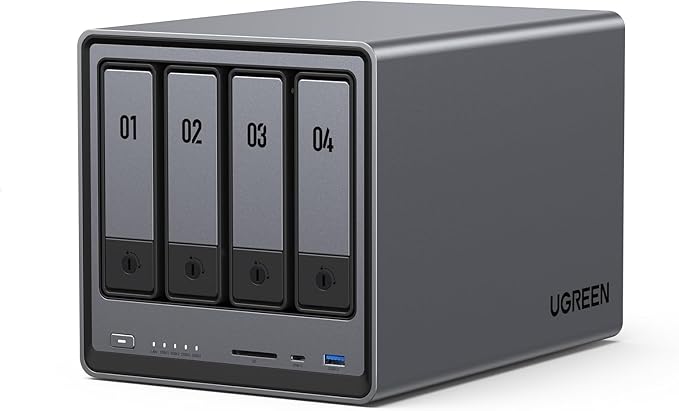
| DXP4800 | 4 | ~12W | ~20W | ~45W | Intel Core i5-1235U |
| DXP480T Plus | 4 | ~14W | ~22W | ~50W | Intel Core i5-1235U |
| DXP6800 Pro | 6 | ~18W | ~28W | ~65W | Intel Core i7-1255U |
| DXP8800 Plus | 8 | ~22W | ~35W | ~80W | Intel Core i7-1255U |
The DH2300 and DH4300 Plus sit on the efficient Intel Celeron N100 platform. A quad-core chip with a 6W TDP that sips power at idle. The DXP series steps up to Intel Core i5 and i7 processors (the 12th-generation Alder Lake-U series), which bring significantly more compute performance for transcoding, virtualisation, and containerised workloads, but at higher power draw. For users whose primary use case is file storage and backup, the Celeron-based DH series delivers very similar storage performance at materially lower electricity cost.
Adding Drive Power: Why the Drives Matter More Than You Think
Hard drives are power-hungry relative to NAS enclosures. A single 4TB NAS-grade HDD (such as a Seagate IronWolf or WD Red Plus) consumes approximately 5-7W during read/write and 4-5W at idle. SSDs consume far less. Typically 1-3W under load and under 0.5W at rest. The table below shows approximate drive power per bay, which you add on top of the NAS platform figures above.
| Drive Type | Idle Power (W) | Active Power (W) | Typical 24/7 Average (W) |
|---|---|---|---|
| 3.5" NAS HDD (4TB-8TB) | ~4W | ~6.5W | ~5W |
| 3.5" NAS HDD (10TB-16TB) | ~5W | ~8W | ~6W |
| 3.5" NAS HDD (18TB-20TB) | ~5.5W | ~9W | ~7W |
| 2.5" NAS HDD | ~1.5W | ~2.5W | ~2W |
| 2.5" SATA SSD | ~0.5W | ~2W | ~1W |
| M.2 NVMe SSD (cache) | ~1W | ~3.5W | ~1.5W |
A practical example: a DXP4800 loaded with four 8TB IronWolf drives draws roughly 20W (NAS) + 20W (four drives × 5W average) = approximately 40W continuously. Annualised: 40W ÷ 1000 × 8,760 hours × $0.34 = ~$119/year. The same NAS with four SSDs instead drops to around 24W total. Just over $71/year. That $48 annual difference won't justify the price premium of SSDs on running cost alone, but it does illustrate how drive choice shapes your electricity bill.
Note that hard drive prices have risen significantly since early 2025. NAS-grade 4TB drives that were under $160 are now consistently above $200. Factor that into your total cost of ownership when comparing HDD vs SSD configurations.
Annual Electricity Cost by Model and Drive Count
The tables below calculate estimated annual electricity cost in Australian dollars for each current UGREEN NAS model across different drive counts and drive types. All figures assume 24/7 operation at $0.34/kWh. The NAS platform wattage used is the weighted typical figure from the model table above. Drive wattage adds 5W per 3.5" HDD bay (mid-range 4TB-8TB drives) or 1W per SSD bay.
DH2300 (2-Bay, Celeron N100). Annual Running Cost
| Configuration | Total Draw (W) | Annual kWh | Annual Cost (AUD) |
|---|---|---|---|
| No drives (NAS only) | 12W | 105 kWh | ~$36 |
| 1 × 3.5" HDD | 17W | 149 kWh | ~$51 |
| 2 × 3.5" HDD | 22W | 193 kWh | ~$66 |
| 1 × SATA SSD | 13W | 114 kWh | ~$39 |
| 2 × SATA SSD | 14W | 123 kWh | ~$42 |
DH4300 Plus (4-Bay, Celeron N100). Annual Running Cost
| Configuration | Total Draw (W) | Annual kWh | Annual Cost (AUD) |
|---|---|---|---|
| No drives (NAS only) | 16W | 140 kWh | ~$48 |
| 2 × 3.5" HDD | 26W | 228 kWh | ~$77 |
| 4 × 3.5" HDD | 36W | 315 kWh | ~$107 |
| 2 × SATA SSD | 18W | 158 kWh | ~$54 |
| 4 × SATA SSD | 20W | 175 kWh | ~$60 |
DXP2800 (2-Bay, Core i5-1235U). Annual Running Cost
| Configuration | Total Draw (W) | Annual kWh | Annual Cost (AUD) |
|---|---|---|---|
| No drives (NAS only) | 15W | 131 kWh | ~$45 |
| 1 × 3.5" HDD | 20W | 175 kWh | ~$60 |
| 2 × 3.5" HDD | 25W | 219 kWh | ~$74 |
| 1 × SATA SSD | 16W | 140 kWh | ~$48 |
| 2 × SATA SSD | 17W | 149 kWh | ~$51 |
DXP4800 (4-Bay, Core i5-1235U). Annual Running Cost
| Configuration | Total Draw (W) | Annual kWh | Annual Cost (AUD) |
|---|---|---|---|
| No drives (NAS only) | 20W | 175 kWh | ~$60 |
| 2 × 3.5" HDD | 30W | 263 kWh | ~$89 |
| 4 × 3.5" HDD | 40W | 350 kWh | ~$119 |
| 2 × SATA SSD | 22W | 193 kWh | ~$66 |
| 4 × SATA SSD | 24W | 210 kWh | ~$71 |
DXP480T Plus (4-Bay 10GbE, Core i5-1235U). Annual Running Cost
| Configuration | Total Draw (W) | Annual kWh | Annual Cost (AUD) |
|---|---|---|---|
| No drives (NAS only) | 22W | 193 kWh | ~$66 |
| 2 × 3.5" HDD | 32W | 280 kWh | ~$95 |
| 4 × 3.5" HDD | 42W | 368 kWh | ~$125 |
| 2 × SATA SSD | 24W | 210 kWh | ~$71 |
| 4 × SATA SSD | 26W | 228 kWh | ~$77 |
DXP6800 Pro (6-Bay, Core i7-1255U). Annual Running Cost
| Configuration | Total Draw (W) | Annual kWh | Annual Cost (AUD) |
|---|---|---|---|
| No drives (NAS only) | 28W | 245 kWh | ~$83 |
| 3 × 3.5" HDD | 43W | 377 kWh | ~$128 |
| 6 × 3.5" HDD | 58W | 508 kWh | ~$173 |
| 3 × SATA SSD | 31W | 272 kWh | ~$92 |
| 6 × SATA SSD | 34W | 298 kWh | ~$101 |
DXP8800 Plus (8-Bay, Core i7-1255U). Annual Running Cost
| Configuration | Total Draw (W) | Annual kWh | Annual Cost (AUD) |
|---|---|---|---|
| No drives (NAS only) | 35W | 307 kWh | ~$104 |
| 4 × 3.5" HDD | 55W | 482 kWh | ~$164 |
| 8 × 3.5" HDD | 75W | 657 kWh | ~$223 |
| 4 × SATA SSD | 39W | 342 kWh | ~$116 |
| 8 × SATA SSD | 43W | 377 kWh | ~$128 |
Cross-Model Comparison: Fully Loaded with HDDs
Annual Electricity Cost. All UGREEN Models, All Bays Filled with 3.5" HDDs
 DH2300
|
DH4300 Plus |
 DXP2800
|
 DXP4800
|
DXP480T Plus |
 DXP6800 Pro
|
DXP8800 Plus
|
|
|---|---|---|---|---|---|---|---|
| Bays | 2 | 4 | 2 | 4 | 4 | 6 | 8 |
| NAS Unit Price (AU) | $360 | $630 | $630 | $990 | $1,800 | $2,160 | $2,700 |
| CPU Platform | N100 | N100 | i5-1235U | i5-1235U | i5-1235U | i7-1255U | i7-1255U |
| Total Draw (all HDD) | 22W | 36W | 25W | 40W | 42W | 58W | 75W |
| Annual Cost (all HDD) | ~$66 | ~$107 | ~$74 | ~$119 | ~$125 | ~$173 | ~$223 |
| Annual Cost (all SSD) | ~$42 | ~$60 | ~$51 | ~$71 | ~$77 | ~$101 | ~$128 |
What These Numbers Actually Mean for Australian Households
The electricity cost of running a UGREEN NAS is genuinely modest for most users. A DH2300 with two HDDs running 24/7 costs about the same as leaving a single LED light bulb on continuously. Around $66/year. Even the fully loaded DXP8800 Plus with eight spinning drives at $223/year works out to roughly $18.50/month, which is reasonable for eight bays of always-on redundant storage serving a household or small business.
What matters more than the NAS-vs-NAS comparison is understanding the total picture. The drives themselves account for roughly half the electricity bill in a populated enclosure. Someone running a DXP4800 with four 8TB IronWolves is spending about $50/year on the NAS platform and $70/year on the drives. And that split worsens if you're running large-capacity 18TB or 20TB HDDs, which draw closer to 7W average each.
Drive spin-down (HDD hibernation) can materially reduce costs if your NAS has long idle periods. With spin-down enabled and a typical home usage pattern where the NAS is only actively accessed for 4-6 hours per day, effective power draw drops to something close to idle for the majority of the day. On a DH4300 Plus with four drives, enabling spin-down on a light-use schedule could reduce annual costs from ~$107 to closer to $70. The UGREEN UGOS software supports HDD hibernation scheduling. Worth configuring if you don't need the NAS on immediate standby around the clock.
Remote Access, NBN, and Whether Your NAS Needs to Run 24/7
One factor that affects running cost decisions is how you access the NAS. If you're using it purely as a local network file server with scheduled backups, you can implement aggressive power scheduling. Shut it down overnight, spin up at 6am. Most UGREEN models support wake-on-LAN and scheduled power on/off, which can cut effective run time from 8,760 hours per year to 4,000-5,000 hours with minimal inconvenience for a home user.
However, if you rely on remote access over the internet. Accessing your NAS from work, syncing with a mobile device on the go, or running Plex for remote streaming. The NAS typically needs to remain on and connected. On a standard Australian NBN 100 connection, typical upload speeds sit around 20-56Mbps depending on your plan and the time of day, which is adequate for remote file access and 1080p Plex streaming but marginal for 4K. More relevant is whether your NBN connection is behind CGNAT (Carrier-Grade NAT), which is common on NBN with budget providers and blocks direct inbound connections to your home network. Meaning remote access apps like UGREEN's own RemoteAccess service or third-party solutions like Tailscale become essential, rather than simple port forwarding. If CGNAT is a concern, check with your ISP before assuming direct remote access will work.
DH2300 vs DXP2800: Same Bay Count, Very Different Running Costs
The DH2300 ($360) and DXP2800 ($630) are both two-bay units, but they're built around completely different hardware platforms. The DH2300 runs on the Intel Celeron N100. A 6W TDP chip designed for efficiency. The DXP2800 uses the Intel Core i5-1235U, a 12-28W chip with dramatically more performance, particularly for tasks like 4K video transcoding, running Docker containers, and virtualisation.
From a running cost perspective, the DXP2800 costs approximately $74/year fully loaded with two HDDs versus $66/year for the DH2300. A difference of about $8 per year. Over three years (the standard warranty period), that's a $24 electricity saving that doesn't even come close to offsetting the $270 price gap. The DH2300 suits users whose workload is primarily file storage, backup, and perhaps Plex with hardware transcoding. The DXP2800 suits users who need compute headroom. Don't choose between them on electricity cost. Choose based on what you actually need the NAS to do.
Pros
- DH2300 and DH4300 Plus run on the efficient Celeron N100. Among the lowest power draw in the UGREEN lineup
- All models support HDD hibernation/spin-down to further reduce idle consumption
- Scheduled power on/off available on all models. Useful for reducing overnight run time
- Annual electricity cost under $70/year for most typical home configurations with the DH series
- SSDs instead of HDDs can reduce annual running costs by $20-$50 depending on bay count
Cons
- DXP8800 Plus with eight HDDs can exceed $200/year in electricity. A material ongoing cost that should factor into purchase decisions
- 10GbE NICs (DXP480T Plus, DXP8800 Plus) add a small but measurable baseline power overhead
- UGREEN lacks an official Australian distributor. Warranty and support processes are less predictable than Synology or QNAP
- Published TDP figures are for the SoC only. Real-world system power varies with drive count, fan activity, and RAM
Tips to Reduce Your UGREEN NAS Electricity Bill
Enable HDD hibernation. Under UGOS, navigate to the drive management settings and enable HDD sleep/standby after a defined idle period. For a home NAS that's only actively accessed a few times per day, a 20-30 minute spin-down timer is a reasonable starting point. Each 3.5" HDD in standby saves approximately 4-5W, which adds up meaningfully across a fully populated enclosure.
Use scheduled power on/off. If your NAS doesn't need to be accessible overnight, use the scheduled power feature to turn it off from 11pm to 6am. That cuts runtime by roughly 30%, reducing a $107/year DH4300 Plus bill to around $75.
Consider SSD for cache or primary storage. If your workload involves many small file operations (photo libraries, code repositories, frequently-accessed documents), SSDs in a cache or all-flash configuration reduce power draw and eliminate the performance penalty of HDD seek times. The running cost difference at the DH4300 level is around $47/year (HDD vs SSD fully loaded). Negligible financially, but SSDs also run cooler and quieter.
Right-size your NAS. Buying an eight-bay NAS and running two drives wastes money on the enclosure and still draws baseline platform power. If you genuinely only need two bays for the foreseeable future, the DH2300 or DXP2800 is the right product. Scalability is worth something, but not if it means running an oversized platform at elevated idle power for years before you need the extra bays.
Solar and off-peak tariffs: If your home has solar panels, a NAS scheduled to run intensive tasks (RAID scrubs, backup sync) during daylight hours can effectively run for near-zero marginal electricity cost. Similarly, if you're on a time-of-use tariff with cheaper off-peak rates overnight, scheduling RAID rebuilds and backup jobs for off-peak windows makes sense even if the NAS runs 24/7.
Total Cost of Ownership: NAS + Drives + Electricity Over 3 Years
Electricity is a small component of total NAS ownership cost when you look at the three-year picture. The table below illustrates a realistic three-year TCO for two representative configurations. A budget home setup and a prosumer small business setup. Including the NAS unit, drives (at current 2026 pricing), and electricity.
| Cost Component | DH2300 + 2× 4TB HDD | DXP4800 + 4× 8TB HDD |
|---|---|---|
| NAS unit | $360 | $990 |
| Drives (current 2026 pricing, approx.) | $440 (2× ~$220) | $1,000 (4× ~$250) |
| Electricity × 3 years | $198 | $357 |
| 3-Year Total (approx.) | ~$998 | ~$2,347 |
| Electricity as % of TCO | ~20% | ~15% |
Electricity represents roughly 15-20% of total three-year cost of ownership for typical configurations. Drive pricing. Which has increased substantially since early 2025. Is now the dominant variable cost. At the DXP4800 level, drives cost as much as the NAS itself. Anyone optimising primarily on electricity is looking at the wrong line item.
That said, for a NAS running in a location where power is expensive or capacity is constrained (remote property, off-grid, caravan park annexe on metered power), the efficiency difference between the Celeron N100-based DH series and the Core i7-based DXP8800 Plus is meaningful. The DH2300 fully loaded with SSDs at approximately $42/year is about as efficient as a 24/7 home NAS gets at this price point.
Australian Consumer Law note: Australian Consumer Law protections apply when purchasing UGREEN NAS devices from Australian retailers. Your warranty claim goes to the place of purchase, not to UGREEN directly. Since UGREEN does not currently have an official Australian distributor, the warranty resolution chain is less established than for Synology or QNAP. Before purchasing, ask your retailer about their specific warranty process for UGREEN products. For official guidance on your consumer rights, visit accc.gov.au. This article does not constitute legal advice.
Use our free NAS Power Calculator to calculate your exact running costs.
Related reading: our NAS buyer's guide, our NAS power consumption guide, and our UGREEN brand guide.
How much does a UGREEN NAS cost to run per year in Australia?
At the Australian average residential electricity rate of around $0.34/kWh, a UGREEN NAS costs roughly $36-$66/year for the two-bay DH2300, $48-$107/year for the four-bay DH4300 Plus (depending on drive count and type), and up to $223/year for the eight-bay DXP8800 Plus fully loaded with 3.5" hard drives. SSD configurations cost meaningfully less than HDD configurations. Most home users running a two or four-bay NAS with HDDs will spend $60-$120/year total including drives.
Does enabling drive spin-down significantly reduce electricity costs on a UGREEN NAS?
Yes, for lightly-used NAS units that spend long periods idle, HDD spin-down can reduce annual electricity costs by 20-35%. Each spinning 3.5" HDD draws approximately 4-6W during active read/write and drops to under 1W when fully spun down. On a four-bay NAS with four HDDs running 24/7, the drives alone account for around 20W of the total draw. If the NAS is only actively accessed for 6-8 hours per day and drives spin down for the remainder, you effectively halve the drive-related electricity cost. UGREEN's UGOS software supports configurable HDD hibernation. It's worth enabling if you don't need the NAS on instant-access standby around the clock.
Is the UGREEN DH2300 or DH4300 Plus more power-efficient than the DXP series?
Yes, meaningfully so. The DH2300 and DH4300 Plus use the Intel Celeron N100, a quad-core efficiency chip with a 6W TDP that idles at around 8-10W for the NAS platform. The DXP2800, DXP4800, and DXP480T Plus use the Intel Core i5-1235U (12-28W TDP), while the DXP6800 Pro and DXP8800 Plus use the Core i7-1255U. The real-world idle platform power of the DXP models is roughly 10-15W higher than the DH models, which equates to approximately $30-$45 extra per year in electricity. That said, the DXP series offers substantially more compute performance for workloads like 4K transcoding, virtual machines, and Docker containers. The power gap is real but small. Choose based on workload requirements, not electricity cost.
Should I buy a UGREEN NAS from the UGREEN AU website or a third-party retailer?
As of March 2026, UGREEN's own Australian web store (nas-au.ugreen.com) is the most reliable source for in-stock models, with the DH2300 at $360 and DH4300 Plus at $630 confirmed in stock. Several higher-end models (DXP2800, DXP4800, DXP480T Plus, DXP6800 Pro, DXP8800 Plus) are currently listed as out of stock. UGREEN does not yet have an official Australian distributor, which means warranty resolution currently routes through international channels rather than through a local distributor chain the way Synology or QNAP warranty claims do. Before purchasing. Particularly for more expensive models. Ask your retailer about their specific warranty and replacement process. Australian Consumer Law protections apply regardless of where you purchase within Australia, but the practical warranty experience will vary by retailer.
How does NAS electricity cost compare to running a cloud storage subscription?
At $60-$120/year for electricity on a typical home UGREEN NAS setup, cloud storage subscriptions at equivalent capacity cost significantly more. A 2TB Google One plan runs approximately AU$130/year. A 6TB plan is around AU$300/year. Comparable NAS storage capacity (say, 8TB raw in a two-bay mirror) would cost $66/year in electricity on a DH2300 plus a one-time drive and hardware cost. Over three years, the NAS typically reaches break-even versus cloud storage somewhere between year one and year two, after which ongoing costs are electricity only. The NAS also gives you local network speeds, no data egress fees, and no dependency on internet connectivity for internal access. But comes with hardware management responsibilities that cloud storage doesn't.
Can I reduce UGREEN NAS running costs by using a smart plug to schedule power?
Smart plug scheduling works for a NAS, but UGREEN's built-in UGOS scheduled power on/off feature is a cleaner solution. The UGOS power scheduling allows the NAS to safely shut down its OS before cutting power, rather than hard-cutting power mid-operation. Using a smart plug to cut power while the NAS OS is still running risks file system corruption, especially on RAID volumes. If you want to schedule power cycles, use the NAS software's built-in scheduling rather than an external smart plug, unless the plug is only restoring power (wake-up) rather than cutting it. Wake-on-LAN is another option. Keep the NAS fully powered off and wake it on demand from your network.
What's the warranty situation for UGREEN NAS in Australia?
UGREEN NAS devices carry a standard warranty, but the process in Australia is less straightforward than for brands with established local distribution. Unlike Synology (distributed via BlueChip) or QNAP (also BlueChip in 2026), UGREEN does not currently have an official Australian distributor. This means warranty claims go through the place of purchase, and the retailer's ability to source a replacement depends on their own stock and international supply chain rather than a local distributor stock pool. Expect the process to take longer than a Synology or QNAP warranty claim. UGREEN is expected to establish an Australian distribution arrangement in 2026, which should improve this. In the meantime, factor the support risk into your decision. Especially for production or business-critical deployments. Australian Consumer Law still applies: your claim is against your retailer, not UGREEN directly.
Comparing UGREEN to Synology or QNAP on running cost and total ownership? The Need to Know IT NAS comparison guides cover all major brands with Australian pricing.
Read the Australian NAS Buying Guide →