TerraMaster is the budget-hardware contender in the Australian NAS market. Delivering Intel Core i3 and i5 processors at prices where Synology and QNAP offer Celeron chips. The trade-off is a less mature software ecosystem, a smaller Australian distribution footprint, and a community that's a fraction of the size you'll find with the major brands. For technically confident buyers who want raw hardware value and are comfortable with a steeper learning curve, TerraMaster is a legitimate option. For buyers who want a polished plug-and-play experience with deep app ecosystems, the established brands still lead.
In short: TerraMaster NAS devices are available in Australia through Scorptec and Mwave, priced from $459 for a 2-bay to $1,699 for a 6-bay Core i5 unit. Hardware specs punch well above their price point. You get significantly more CPU and RAM per dollar than Synology or QNAP. However, TOS (TerraMaster Operating System) is less refined, the Australian support chain is limited via distributor DSTech, and the app ecosystem is narrower. TerraMaster suits technically confident home users, Plex/media enthusiasts, and small businesses who value hardware per dollar over software polish.
Who Is TerraMaster?
TerraMaster is a Shenzhen-based storage hardware manufacturer that has been producing NAS and DAS (Direct Attached Storage) enclosures since 2010. They entered the Australian market as a value-oriented alternative to the three established NAS brands. Synology, QNAP, and Asustor. And have carved out a niche by offering significantly more powerful hardware at lower price points.
In Australia, TerraMaster is distributed by DSTech, a smaller distributor with a limited presence compared to BlueChip (Synology, QNAP) or Dicker Data (Asustor, QNAP). This means stock depth is shallower, retailer range is narrower, and the after-sales support chain is less established than what you'd experience with a Synology or QNAP purchase. As of March 2026, the two primary Australian retailers stocking TerraMaster NAS models are Scorptec and Mwave.
TerraMaster's product range spans consumer NAS, SMB NAS, all-SSD NAS units, and a strong lineup of USB DAS enclosures. They also manufacture an expanding range of hybrid NAS models that combine 3.5" HDD bays with built-in M.2 SSD slots. A design philosophy that's become central to their 2025-2026 product strategy.
TerraMaster TOS. The Software Story
TerraMaster runs TOS (TerraMaster Operating System), a Linux-based NAS operating system that competes with Synology's DSM, QNAP's QTS, and Asustor's ADM. TOS has improved significantly over the past three years, but it remains the least mature of the four major NAS operating systems available in Australia.
TOS 6 (the current major version) introduced a redesigned interface, better Docker support, improved snapshot capabilities, and a cleaner file management experience. The basics are solid: file sharing (SMB, NFS, AFP), user management, RAID configuration, and remote access all work as expected. Docker support is a standout. TerraMaster devices generally have the CPU headroom to run multiple containers comfortably, and TOS makes container management reasonably accessible.
Where TOS falls short compared to Synology DSM or QNAP QTS:
- First-party app ecosystem: Synology's suite (Photos, Drive, Surveillance Station, Active Backup) is significantly more polished and feature-complete. TerraMaster's equivalents exist but lack the depth and integration.
- Mobile apps: TerraMaster's mobile apps are functional but lag behind Synology and QNAP in design, responsiveness, and feature coverage.
- Community and documentation: The TerraMaster user community and knowledge base are a fraction of Synology's. Troubleshooting often means searching forums with fewer answers.
- Remote access: TNAS.online (TerraMaster's remote access relay) works, but is less reliable and less feature-rich than Synology's QuickConnect or QNAP's myQNAPcloud. On Australian NBN connections subject to CGNAT (common on fixed wireless and some fibre-to-the-node connections), configuring reliable remote access to any NAS requires either a static IP, DDNS with port forwarding, or a VPN/relay service. TerraMaster's relay service handles this, but with less polish than the competition.
NBN and remote access: If you're on an NBN connection with CGNAT (carrier-grade NAT). Common on fixed wireless, satellite, and some FTTN plans. You won't be able to port-forward to your NAS. You'll need to rely on TerraMaster's TNAS.online relay, a Tailscale/WireGuard VPN, or contact your RSP about getting a static IP. Typical NBN 100 plans deliver around 20 Mbps upload, which limits remote file transfer speeds regardless of your NAS hardware.
Every Current TerraMaster NAS Model Available in Australia
The following models are currently stocked by Australian retailers as of March 2026. TerraMaster's AU range is smaller than Synology or QNAP, but covers the key price points from entry-level home NAS through to SMB-grade hybrid units.
TerraMaster F2-425. 2-Bay Entry NAS

| CPU | Intel Celeron N5095 (4-core, up to 2.9 GHz) |
|---|---|
| RAM | 8 GB DDR4 |
| Drive Bays | 2x 3.5"/2.5" SATA |
| Network | 2x 2.5GbE |
| M.2 Slots | None |
| USB | USB 3.2 Gen 1 |
| AU Price (Scorptec) | $459 |
The F2-425 is TerraMaster's entry point for Australian NAS buyers. At $459 from Scorptec, it's competitive with the Synology DS225+ ($585-$599) while offering a faster CPU and more RAM. The Celeron N5095 handles Plex transcoding, Docker containers, and general file serving without breaking a sweat. Dual 2.5GbE ports are a welcome inclusion at this price. Synology's DS225+ offers only one 2.5GbE port plus one 1GbE.
This model suits home users wanting a capable media server, personal cloud, or Time Machine backup target. Don't buy this if you need more than two drive bays for redundancy. A 2-bay NAS in RAID 1 gives you the usable capacity of only one drive.
TerraMaster F2-425 Plus. 2-Bay Hybrid NAS
| CPU | Intel N150 (4-core, up to 3.6 GHz) |
|---|---|
| RAM | 8 GB DDR5 |
| Drive Bays | 2x 3.5" SATA + 3x M.2 NVMe SSD |
| Network | 2x 2.5GbE |
| USB | USB 3.2 Gen 2 |
| AU Price (Scorptec) | $599 |
The F2-425 Plus is a hybrid design. Two standard 3.5" HDD bays plus three M.2 NVMe SSD slots. Available for $599 at Scorptec, it positions the M.2 slots for SSD caching or as a high-speed storage tier alongside the slower HDD bays. The Intel N150 is a newer chip than the N5095 in the standard F2-425, with DDR5 memory offering improved bandwidth.
This hybrid approach is a TerraMaster differentiator. Synology doesn't offer comparable hybrid designs at this price. You'd need to add an M.2 adapter card to a Synology Plus model. The F2-425 Plus suits users who want SSD-speed access for frequently used files while storing bulk data on HDDs.
TerraMaster F4-425. 4-Bay Home NAS
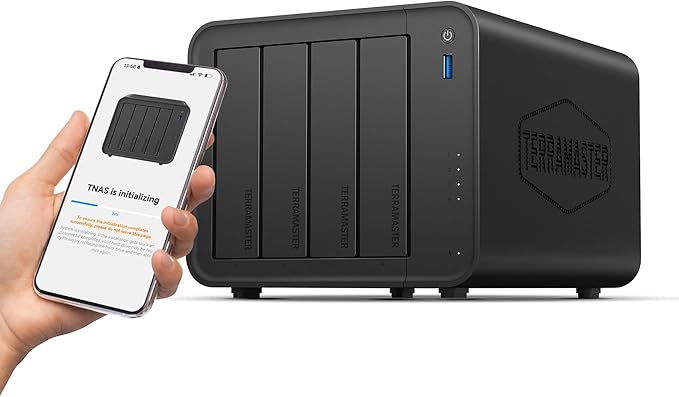
| CPU | Intel Celeron N5095 (4-core, up to 2.9 GHz) |
|---|---|
| RAM | 8 GB DDR4 |
| Drive Bays | 4x 3.5"/2.5" SATA |
| Network | 2x 2.5GbE |
| M.2 Slots | None confirmed |
| USB | USB 3.2 Gen 1 |
| AU Price (Scorptec) | $699 |
At $699 from Scorptec, the F4-425 is the most interesting value proposition in TerraMaster's AU lineup. Compare this to the Synology DS425+ at $819-$899 (which ships with only 2 GB RAM) or the QNAP TS-464 at $989-$1,099 (8 GB RAM). The F4-425 undercuts both while delivering 8 GB of RAM and dual 2.5GbE.
Four bays is the sweet spot for most home and small office NAS deployments. RAID 5 across four drives gives you the capacity of three drives with single-drive fault tolerance. The F4-425 handles Plex, Docker, file serving, and basic virtualisation without issue. This is where TerraMaster's hardware-per-dollar advantage is most visible.
TerraMaster F4-425 Plus. 4-Bay Hybrid NAS
| CPU | Intel N150 (4-core, up to 3.6 GHz) |
|---|---|
| RAM | 8 GB DDR5 |
| Drive Bays | 3x 3.5" SATA + 4x M.2 NVMe SSD |
| Network | 2x 2.5GbE |
| USB | USB 3.2 Gen 2 |
| AU Price (Scorptec) | $899 |
The F4-425 Plus extends the hybrid concept to four M.2 NVMe slots alongside three 3.5" HDD bays, priced at $899 from Scorptec. Seven total storage slots in a compact chassis is impressive. No other brand offers this combination at this price in Australia. The DDR5 memory and Intel N150 provide a modern platform for mixed workloads.
This model makes sense for users who want to run their operating system and Docker containers on fast NVMe storage while keeping media libraries and archives on larger, cheaper HDDs. Note that RAID across mixed drive types requires careful planning. TOS allows separate storage pools for HDD and SSD tiers.
TerraMaster F4-424 Pro. 4-Bay SMB NAS

| CPU | Intel Core i3-N305 (8-core, up to 3.8 GHz) |
|---|---|
| RAM | 32 GB DDR5 |
| Drive Bays | 4x 3.5"/2.5" SATA |
| M.2 Slots | 2x M.2 NVMe |
| Network | 2x 2.5GbE |
| USB | USB 3.2 |
| AU Price (Scorptec) | $1,099 |
| AU Price (Mwave) | $1,100 |
The F4-424 Pro is TerraMaster's flagship 4-bay unit and arguably the most compelling model in their entire AU lineup. An 8-core Intel Core i3-N305 with 32 GB of DDR5 RAM for $1,099 at Scorptec or $1,100 at Mwave. This is genuinely remarkable hardware for the money.
To put this in context: Synology's DS925+ ships with a quad-core AMD Ryzen R1600 and 4 GB of RAM for $995-$1,029. The TerraMaster F4-424 Pro delivers double the cores and eight times the RAM for roughly the same price. If your workload is CPU or memory intensive. Heavy Plex transcoding, multiple Docker containers, virtual machines, or concurrent multi-user file access. The hardware advantage is significant.
The catch, as always, is software. DSM 7 on a Synology DS925+ provides a more polished, more reliable, and better-supported experience than TOS on the F4-424 Pro. The question every buyer needs to answer: is the hardware gap worth the software trade-off?
TerraMaster F6-424 Max. 6-Bay Hybrid SMB NAS

| CPU | Intel Core i5-1235U (10-core/12-thread, up to 4.4 GHz) |
|---|---|
| RAM | 8 GB DDR4 (expandable) |
| Drive Bays | 6x 3.5"/2.5" SATA + M.2 NVMe slots |
| Network | 2x 2.5GbE |
| USB | USB 3.2 |
| AU Price (Scorptec) | $1,699 |
| AU Price (Mwave) | $1,700 |
The F6-424 Max is the most powerful NAS TerraMaster sells in Australia, priced at $1,699 from Scorptec and $1,700 from Mwave. An Intel Core i5-1235U is a full laptop-class processor. This is not a NAS chip but a genuine 10-core/12-thread CPU with performance and efficiency hybrid cores.
Six HDD bays plus M.2 SSD slots make this a serious storage platform for small businesses, creative professionals, or enthusiast home labs. It handles simultaneous 4K Plex streams, heavy Docker workloads, and virtualisation without complaint. The 8 GB base RAM is the only weak point. Upgrading to 16 GB or 32 GB is recommended for any workload beyond basic file serving.
At this price, it competes with the Synology DS1525+ ($1,285-$1,399, 5-bay, Ryzen V1500B, 8 GB) and the QNAP TS-664 ($1,549-$1,599, 6-bay, Celeron N5095, 8 GB). On raw hardware alone, the TerraMaster wins convincingly. On software maturity, ecosystem depth, and community support, it doesn't.
TerraMaster F4 SSD and F8 SSD Plus. All-SSD Models
TerraMaster also lists two all-SSD NAS models in Australia:
- F4 SSD. 4-bay 2.5" SSD NAS with Intel N95, $699 at Scorptec (currently out of stock)
- F8 SSD Plus. 8-bay 2.5" SSD NAS with Intel i3-N305 and 16 GB RAM, $1,299 at Scorptec / $1,300 at Mwave (currently out of stock at Scorptec)
These units are designed for all-flash storage pools. Ideal for database workloads, high-IOPS applications, or environments where noise and vibration from spinning drives are unacceptable. However, stock availability has been inconsistent in Australia for both models.
TerraMaster's Full AU NAS Range at a Glance
TerraMaster NAS Models. Australian Pricing (March 2026)
|
F2-425
|
F2-425 Plus
|
F4-425
|
F4-425 Plus
|
F4-424 Pro
|
F6-424 Max
|
|
|---|---|---|---|---|---|---|
| Bays (HDD + SSD) | 2 HDD | 2 HDD + 3 M.2 | 4 HDD | 3 HDD + 4 M.2 | 4 HDD + 2 M.2 | 6 HDD + M.2 |
| CPU | Celeron N5095 | Intel N150 | Celeron N5095 | Intel N150 | Core i3-N305 | Core i5-1235U |
| RAM | 8 GB DDR4 | 8 GB DDR5 | 8 GB DDR4 | 8 GB DDR5 | 32 GB DDR5 | 8 GB DDR4 |
| Network | 2x 2.5GbE | 2x 2.5GbE | 2x 2.5GbE | 2x 2.5GbE | 2x 2.5GbE | 2x 2.5GbE |
| AU Price From | $459 | $459 (Scorptec) | $699 | $699 (Scorptec) | $760 (Mwave) | $1000 (Mwave) |
| Retailer | Scorptec | Scorptec | Scorptec | Scorptec | Scorptec, Mwave | Scorptec, Mwave |
Prices last verified: 13 March 2026. Always check retailer before purchasing.
TerraMaster DAS Enclosures in Australia
Beyond NAS, TerraMaster has a strong presence in the Australian DAS (Direct Attached Storage) enclosure market. These USB-connected enclosures don't run an operating system. They're external drive enclosures that connect to a PC, Mac, or NAS for additional storage. Stock availability is generally better for DAS enclosures than NAS units.
Current DAS models available in Australia include:
- D1 SSD Plus. Single SSD enclosure, $199 (Scorptec)
- D2-320. 2-bay USB 3.2 Gen 2, $249 (Scorptec) / $260 (Mwave)
- D4-320. 4-bay USB 3.2 Gen 2, $329 (Scorptec) / $330 (Mwave)
- D4 SSD. 4-bay SSD enclosure, $499 (Scorptec)
- D5 Hybrid. 5-bay hybrid RAID enclosure, $379 (Scorptec) / $400 (Mwave)
- D5-310. 5-bay USB enclosure, $419 (Scorptec)
- D6-320. 6-bay USB 3.2 Gen 2, $499 (Scorptec) / $500 (Mwave)
- D8 Hybrid. 8-bay hybrid RAID enclosure, $499 (Scorptec) / $500 (Mwave)
- D9-320. 9-bay enclosure, $759 (Scorptec)
These DAS units are excellent for expanding the raw storage attached to an existing NAS or workstation, or for providing large-capacity backup targets. The D5 Hybrid and D8 Hybrid models support hardware RAID, which is useful for direct-attached redundancy without needing a NAS operating system.
TerraMaster vs Synology, QNAP, and Asustor. How It Stacks Up
The comparison between TerraMaster and the three established brands comes down to a consistent trade-off: hardware power versus software ecosystem. Here's how it breaks down across the factors that matter most to Australian buyers.
Hardware Value
TerraMaster wins this category decisively. At every price point, TerraMaster delivers more CPU cores, more RAM, and more storage flexibility than the competition. The F4-424 Pro at $1,099 with an 8-core i3 and 32 GB DDR5 is the clearest example. The nearest Synology equivalent (DS925+) costs roughly the same but ships with a quad-core Ryzen and 4 GB of RAM. QNAP's TS-464 at $989 offers a Celeron N5095 with 8 GB. Better than Synology's base spec but still well behind TerraMaster.
Software and Ecosystem
Synology's DSM leads the NAS software market by a wide margin. Synology Photos, Synology Drive, Active Backup for Business, and Surveillance Station are polished, well-documented, and deeply integrated. QNAP's QTS is more complex but highly capable, with stronger virtualisation features. Asustor's ADM is the closest competitor to TOS in terms of maturity, but ADM has a longer track record and a larger community.
TOS is functional and improving. Docker support is solid, basic NAS operations work reliably, and TOS 6 brought meaningful UI improvements. But it lacks the depth of first-party applications, the breadth of third-party integrations, and the community knowledge base that Synology and QNAP have built over decades.
Australian Support and Distribution
This is TerraMaster's weakest area in Australia. Distributed by DSTech. A smaller operation compared to BlueChip (which holds the deepest NAS stock in Australia for Synology and QNAP) or Dicker Data (Asustor, QNAP). TerraMaster's Australian supply chain is thinner. Fewer retailers stock TerraMaster, stock depth is limited, and new model availability can lag behind international launches.
For warranty claims, the process follows the same general pattern as other brands. Retailer to distributor to vendor. But with a less established chain. NAS vendors don't have service centres in Australia; the standard warranty resolution is replacement rather than repair, with a typical turnaround of 2-3 weeks minimum. With a smaller distributor and fewer retail partners, TerraMaster's warranty process may take longer or require more persistence from the buyer.
Australian Consumer Law note: ACL protections apply when purchasing from Australian retailers regardless of the brand's country of origin. Your warranty claim goes to the retailer, not TerraMaster directly. Before purchasing, ask your retailer about their warranty process: 'If this unit fails, what's your process? Can I get an advanced replacement?' The answer tells you more about the value of buying from that retailer than the price on the website. For official ACL information, visit accc.gov.au.
4-Bay Price Comparison. TerraMaster vs the Field
4-Bay NAS Comparison. AU Pricing (March 2026)
|
TerraMaster F4-425
|
TerraMaster F4-424 Pro
|
 Synology DS425+
|
 Synology DS925+
|
 QNAP TS-464
|
 Asustor AS5404T
|
|
|---|---|---|---|---|---|---|
| CPU | Celeron N5095 | Core i3-N305 | Intel Celeron | AMD Ryzen R1600 | Celeron N5095 | Celeron N5105 |
| CPU Cores | 4 | 8 | 4 | 4 | 4 | 4 |
| RAM (as shipped) | 8 GB | 32 GB | 2 GB | 4 GB | 8 GB | 4 GB |
| Network | 2x 2.5GbE | 2x 2.5GbE | 1x 2.5GbE + 1x 1GbE | 2x 2.5GbE | 2x 2.5GbE | 2x 2.5GbE |
| AU Price From | $699 | $760 (Mwave) | $819 | $995 | $989 | $879 (Mwave) |
| OS | TOS | TOS | DSM 7 | DSM 7 | QTS 5 | ADM 4 |
Who Should Buy a TerraMaster NAS?
Pros
- Significantly more CPU power and RAM per dollar than Synology, QNAP, or Asustor
- Dual 2.5GbE networking standard across the range. Not an upsell
- Hybrid NAS models (HDD + M.2 SSD) offer unique storage flexibility at accessible prices
- Solid Docker support for running containers. The hardware headroom makes a real difference
- Competitive DAS enclosure lineup with strong Australian availability
- Good choice for Plex media servers. Hardware transcoding capability across most models
Cons
- TOS software ecosystem is less mature than DSM, QTS, or ADM
- Smaller Australian distribution footprint (DSTech) means fewer retailers and thinner stock
- Mobile apps lag behind Synology and QNAP in polish and features
- Smaller user community. Less troubleshooting help available online
- Remote access relay (TNAS.online) less reliable than Synology QuickConnect
- Warranty process may be slower due to smaller AU support chain
- First-party backup apps not as comprehensive as Synology Active Backup or QNAP Hybrid Backup Sync
TerraMaster Suits These Buyers
Technically confident home users who are comfortable configuring Docker, troubleshooting Linux-based systems, and don't rely on polished first-party apps. If you're the type to SSH into your NAS and configure things manually, TerraMaster's hardware advantage pays off.
Plex and media enthusiasts who want maximum transcoding headroom. The i3-N305 in the F4-424 Pro handles multiple simultaneous 4K transcodes. A task that would strain a Synology DS925+ or QNAP TS-464.
Docker and home lab enthusiasts who plan to run multiple containers. More RAM and more CPU cores translate directly to more containers running smoothly. The F4-424 Pro's 32 GB of DDR5 is overkill for file serving but perfect for a container-heavy deployment.
Budget-conscious small businesses that need NAS storage but can't justify Synology or QNAP pricing for equivalent hardware. The F4-424 Pro at $1,099 with 32 GB RAM is a credible small-office file server.
TerraMaster Doesn't Suit These Buyers
First-time NAS buyers who want a plug-and-play experience. Synology's DSM is dramatically easier to set up and manage. The guided setup wizard, polished mobile apps, and comprehensive first-party app suite mean less time troubleshooting and more time actually using the NAS.
Businesses needing reliable surveillance station software. Synology Surveillance Station is the benchmark. TerraMaster's surveillance features are basic by comparison.
Users who depend on vendor-provided backup solutions. Synology Active Backup for Business (free with Synology NAS) backs up PCs, Macs, VMs, file servers, and Microsoft 365/Google Workspace. TerraMaster has nothing equivalent in scope or polish.
Anyone in a CGNAT environment who needs hassle-free remote access. Synology's QuickConnect relay is more reliable and easier to configure than TNAS.online. If reliable remote access without manual VPN configuration is a priority, Synology is the safer choice.
Buying a TerraMaster NAS in Australia. Practical Advice
TerraMaster's Australian retail presence is limited to two primary retailers: Scorptec (widest range, 19 TerraMaster products listed including NAS and DAS) and Mwave (11 products, focused on NAS and DAS). Neither retailer is likely to have deep stock for every model. Business models and higher-end units may be ordered on demand from the distributor.
Most Australian NAS retailers operate on 3-5% margin, keeping pricing fairly uniform between stores. Don't expect to find dramatic discounts by shopping around. The real difference between retailers is pre-sales knowledge and after-sales support. For a product that stores your data, buying from a retailer you trust is more important than saving $20.
For business purchases, always request a formal quote. Resellers can request pricing support from distributors and vendors. Discounts that never appear on the website but are routinely available for quoted deals. Business, education, and government buyers should never pay listed retail price without at least asking.
Drive Compatibility and Pricing Context
TerraMaster NAS units are sold diskless. You need to purchase hard drives separately. Standard NAS-rated drives (Seagate IronWolf, WD Red Plus) are recommended. Note that NAS-grade drive prices have risen significantly from early 2025 levels. 4 TB NAS drives that were comfortably under $160 are now consistently above $200. Factor drive costs into your total budget: a 4-bay NAS with four 8 TB drives could add $800-$1,200 to the unit cost.
TerraMaster maintains a hardware compatibility list (HCL) on their website, but it's less comprehensive than Synology's or QNAP's. In practice, standard SATA NAS drives from Seagate and Western Digital work without issues. For M.2 NVMe drives in hybrid models, check TerraMaster's community forums for confirmed working models.
Essential Setup Considerations for Australian Users
Backup strategy: A NAS is not a backup. It's a storage device. If the NAS fails, your data is at risk. Plan for hardware failure with a 3-2-1 backup strategy: three copies of data, on two different media types, with one copy offsite. TerraMaster supports rsync and cloud sync for offsite replication, though the options are more limited than Synology's Hyper Backup or QNAP's Hybrid Backup Sync.
UPS protection: Australian power quality varies, and sudden power loss can corrupt RAID arrays. Always connect a NAS to an uninterruptible power supply (UPS). TerraMaster NAS units support UPS monitoring via USB. Configure automatic safe shutdown when battery runs low.
Network setup: To take advantage of the dual 2.5GbE ports across TerraMaster's range, you'll need a 2.5GbE switch or at least a 2.5GbE adapter in your PC. A standard 1GbE connection caps real-world transfer speeds at around 110 MB/s. Well below what these NAS units can deliver. QNAP's QSW-1105-5T 5-port 2.5GbE switch is available from $159 at Scorptec and is a cost-effective way to add 2.5GbE to your home network.
The Future of TerraMaster in Australia
TerraMaster's trajectory is positive. TOS software has improved meaningfully with each release, and the hardware value proposition continues to strengthen. The hybrid NAS concept. Combining HDD bays with M.2 SSD slots. Is a genuine innovation that none of the major competitors have matched at equivalent price points.
The biggest unknown is whether TerraMaster will invest in expanding Australian distribution. A move to a larger distributor (such as BlueChip or Dicker Data) would immediately improve stock availability, retailer coverage, and warranty turnaround times. Until that happens, Australian buyers are working with a thinner support chain than they'd get with Synology, QNAP, or Asustor.
TerraMaster also faces new competition from UGREEN, which entered the NAS market in 2025 with its NASync range. UGREEN's DH2300 (from $340) and DH4300 Plus (from $595) target the same value-oriented buyer that TerraMaster has been serving. The NAS market is becoming more competitive at the budget end. Which is ultimately good news for Australian buyers.
Use our free NAS Sizing Wizard to get a personalised NAS recommendation.
Related reading: our NAS buyer's guide and our Synology vs QNAP comparison.
Where can I buy a TerraMaster NAS in Australia?
TerraMaster NAS devices are primarily available from Scorptec and Mwave in Australia. Scorptec carries the widest range including both NAS and DAS models. Prices start from $459 for the 2-bay F2-425 and go up to $1,699 for the 6-bay F6-424 Max. Some models may also appear on Amazon AU, but buying from an established Australian retailer provides better after-sales support and clearer ACL protections.
Is TerraMaster as reliable as Synology or QNAP?
TerraMaster hardware is generally well-built, and reliability at the hardware level is comparable to the competition. The hardware components. Intel CPUs, standard DDR4/DDR5 RAM, SATA controllers. Are the same industry-standard parts used across all NAS brands. Where TerraMaster falls behind is software maturity: TOS has fewer years of refinement than DSM or QTS, and the smaller user community means issues may take longer to be identified and resolved. For a NAS storing important data, the reliability of your backup strategy matters more than the brand of the NAS.
Does TerraMaster NAS support Plex?
Yes, all current TerraMaster NAS models support Plex Media Server and hardware-accelerated transcoding via Intel Quick Sync. The Intel CPUs across the range (Celeron N5095, N150, Core i3-N305, Core i5-1235U) all support Quick Sync, which handles 4K transcoding efficiently. The F4-424 Pro with its 8-core i3-N305 and 32 GB of RAM is particularly well-suited to heavy Plex workloads with multiple simultaneous streams.
What is the warranty on TerraMaster NAS in Australia?
TerraMaster typically offers a 2-year manufacturer warranty on consumer NAS models. Under Australian Consumer Law, your warranty claim is handled by the place of purchase. The retailer, not TerraMaster. NAS vendors don't have service centres in Australia; the standard resolution is replacement rather than repair, with a typical turnaround of 2-3 weeks minimum via the retailer → distributor (DSTech) → vendor chain. Ask your retailer about their warranty process before purchasing. For official ACL information, visit accc.gov.au.
Can I use TerraMaster NAS with Time Machine for Mac backups?
Yes, TerraMaster NAS units support Apple Time Machine backups over the network. TOS includes built-in support for AFP and SMB file sharing protocols used by Time Machine. Set up a dedicated shared folder with a quota (to prevent Time Machine from consuming your entire NAS), and your Mac should detect it as an available Time Machine backup destination.
How does TerraMaster NAS handle remote access on Australian NBN?
TerraMaster provides TNAS.online, a relay service that allows remote access without manual port forwarding. Similar to Synology's QuickConnect. This is particularly relevant for Australian NBN users on connections with CGNAT (carrier-grade NAT), which blocks inbound connections and prevents traditional port forwarding. TNAS.online works but is less reliable and less feature-rich than QuickConnect. For more robust remote access, consider setting up a VPN using Tailscale or WireGuard on the NAS. The powerful CPUs in TerraMaster units handle VPN encryption without performance issues. Typical NBN 100 plans deliver around 20 Mbps upload, which limits remote file transfer speeds regardless of your NAS hardware.
What's the difference between TerraMaster's standard and 'Plus' hybrid models?
TerraMaster's 'Plus' models (F2-425 Plus, F4-425 Plus) add M.2 NVMe SSD slots alongside the standard 3.5" HDD bays, creating a hybrid storage platform. The standard models (F2-425, F4-425) have HDD bays only. The Plus models also tend to use newer-generation Intel CPUs (N150 vs N5095) and DDR5 memory instead of DDR4. The hybrid design allows you to run your NAS operating system and Docker containers on fast NVMe SSDs while storing bulk data on cheaper, larger HDDs. A genuinely useful configuration that no other brand offers at these price points.
Should I buy a TerraMaster NAS or a Synology for my first NAS?
For first-time NAS buyers, Synology remains the safer choice. DSM's guided setup, polished mobile apps, comprehensive first-party applications (Photos, Drive, Active Backup), and massive community knowledge base make the learning curve much gentler. TerraMaster offers significantly more hardware for the money, but the software experience requires more technical confidence. If you're comfortable troubleshooting Linux-based systems and prefer raw power over app polish, TerraMaster is worth considering. If you want it to just work out of the box, the premium for Synology buys you that peace of mind.
Does TerraMaster support Docker?
Yes, Docker support is one of TerraMaster's strengths. TOS provides a container management interface for deploying and managing Docker containers, and the powerful hardware across the range (particularly the i3 and i5 models) gives you ample headroom to run multiple containers simultaneously. Popular containers like Home Assistant, Pi-hole, Portainer, Nextcloud, and many others run well on TerraMaster hardware. The hybrid models are particularly effective. Run containers on NVMe storage for fast performance while keeping data on HDDs.
Are TerraMaster NAS prices in Australia competitive?
TerraMaster NAS prices in Australia are competitive, though Australian NAS pricing generally runs 10-20% above US levels across all brands. TerraMaster's value proposition is not about being the cheapest NAS. The QNAP TS-233 at $399 or Asustor AS1202T at $356 are cheaper 2-bay options. TerraMaster's advantage is delivering significantly more hardware at a given price point. The F4-425 at $699 offers 8 GB RAM and dual 2.5GbE where competitors at similar prices ship with 2-4 GB RAM. The F4-424 Pro at $1,099 with 32 GB DDR5 has no equivalent at that price from any other brand.
Can I expand storage on a TerraMaster NAS later?
TerraMaster does not currently sell dedicated expansion units (like Synology's DX525 or QNAP's TR-004) for their NAS models. If you outgrow your bay count, you'd need to either replace drives with larger ones or migrate to a larger NAS. TerraMaster's DAS enclosures (D-series) can add USB-connected storage, but this is direct-attached storage rather than NAS-managed expansion. You can't extend your NAS storage pool across a USB DAS. If future storage expansion is a priority, this is a meaningful advantage for Synology and QNAP, both of which offer formal expansion unit support.
Looking for the right NAS for your setup? Browse our buying guides and comparison articles to find the best match for your needs, budget, and Australian network environment.
Explore NAS Guides →