Netgear ReadyNAS is no longer a viable NAS platform for Australian buyers in 2026. Netgear officially wound down its ReadyNAS product line over 2020-2022, ceasing development of new models and eventually ending firmware updates for most units. No ReadyNAS models are currently stocked by any major Australian retailer. Mwave, Scorptec, PLE, and other specialist NAS retailers carry zero ReadyNAS inventory. If you're researching ReadyNAS in Australia today, you're either looking at a legacy unit you already own or considering a second-hand purchase. This guide covers the full picture: what happened to ReadyNAS, what it means for existing owners, and where to go next.
In short: Netgear ReadyNAS is discontinued. No new models, no Australian retail stock, and firmware support has ended for most units. Existing owners should plan a migration to Synology, QNAP, Asustor, or another actively supported NAS platform. Do not buy a ReadyNAS in 2026. New or second-hand. Unless you fully accept the risks of running unsupported hardware.
What Happened to Netgear ReadyNAS?
Netgear built a respectable NAS business through the 2010s with its ReadyNAS line, targeting home users and small businesses. At its peak, ReadyNAS competed directly with Synology's Value and Plus series and QNAP's entry-to-mid-range models. The ReadyNAS 200, 300, and 400 series offered a reasonable feature set with Netgear's proprietary ReadyNAS OS. A Linux-based operating system that handled storage management, user access, and basic app services.
However, Netgear's NAS division struggled to keep pace with the rapid software development cycles of Synology (DSM) and QNAP (QTS). By the late 2010s, the gap in software features. Particularly around cloud sync, mobile apps, Docker support, and surveillance integration. Had become significant. Netgear made a strategic decision to refocus its business on networking products (Nighthawk routers, Orbi mesh systems, and managed switches) and quietly exited the NAS market.
The wind-down happened gradually:
- 2019-2020: No new ReadyNAS hardware models were announced. The existing lineup (including the ReadyNAS 212, 214, 424, 524X, 526X, 528X, 628X, and rackmount models) continued to be sold through remaining channel inventory.
- 2020-2021: ReadyNAS OS updates slowed to a trickle. Security patches became infrequent.
- 2022: Netgear officially confirmed end-of-life for the ReadyNAS product line. Remaining firmware updates focused exclusively on critical security vulnerabilities.
- 2023-2026: No further firmware development. The ReadyNAS community forums were archived. Support documentation remains available on Netgear's website, but active support is minimal.
ReadyNAS in Australia. The Current Situation
As of March 2026, no major Australian NAS retailer. Including Mwave, Scorptec, PLE, Centre Com, Umart, or DeviceDeal. Stocks any Netgear ReadyNAS models. The product line has been completely removed from Australian distribution channels. BlueChip, Dicker Data, and other Australian distributors no longer hold ReadyNAS inventory.
This means:
- No new units available through authorised Australian retailers
- No warranty support through Australian distribution channels. The retailer-to-distributor-to-vendor chain that handles warranty claims for Synology, QNAP, and Asustor simply doesn't exist for ReadyNAS anymore
- No spare parts or replacement units available through normal channels
- Second-hand units occasionally appear on eBay, Gumtree, and Facebook Marketplace, but these carry significant risks (covered below)
Warranty and ACL note: Australian Consumer Law protections apply when purchasing from Australian retailers. However, since no Australian retailer currently stocks ReadyNAS, new purchases are not possible through standard channels. Second-hand purchases from private sellers are not covered by ACL. If you find old-new-stock ReadyNAS units from an Australian business, ACL applies. But practical warranty support is effectively nonexistent because the product is end-of-life with no distributor or vendor support chain in Australia. For official information on your consumer rights, visit accc.gov.au.
Should You Keep Running an Existing ReadyNAS?
Many Australians still have ReadyNAS units running in their homes and small offices. If yours is still working, the immediate question is: how long can you safely keep it running?
Security Risks
This is the most pressing concern. A NAS connected to your network. And potentially exposed to the internet. That no longer receives security patches is a liability. NAS devices have historically been targets for ransomware and cryptomining malware. Synology, QNAP, and Asustor all issue regular security patches precisely because vulnerabilities are discovered frequently. A ReadyNAS unit running outdated firmware is an unpatched target.
If your ReadyNAS is exposed to the internet (via port forwarding, UPnP, or Netgear's ReadyCLOUD remote access service), you should treat migration as urgent. ReadyCLOUD's status is uncertain. The service may be degraded or discontinued entirely, and any cloud relay service that is no longer actively maintained is a potential attack vector.
If your ReadyNAS is local-only (no internet exposure, no port forwarding, no remote access), the risk is lower but not zero. Malware on any device on your local network could potentially exploit an unpatched NAS. For a local-only unit used primarily as a file share, you have more time. But migration should still be on your roadmap.
Hardware Longevity
Most ReadyNAS units still in service were purchased between 2015 and 2020, making them 6-11 years old. NAS hardware is designed for 24/7 operation, but electronic components degrade over time. Capacitors dry out, fans fail, and power supplies develop issues. Particularly in units running in warm Australian conditions without air conditioning. A NAS is not a backup. If your ReadyNAS fails, and you have no replacement unit and no offsite backup, your data is at risk.
The drives inside your ReadyNAS are also ageing. A NAS-class HDD has a rated workload life of 3-5 years under normal use. Drives that have been running for 7+ years are well past their expected service life. RAID is not a backup. It protects against a single drive failure, not against the NAS unit itself failing, fire, theft, or multiple simultaneous drive failures.
The Practical Advice
If you're still running a ReadyNAS in 2026:
- Immediately ensure you have a complete offsite backup of all data on the NAS. Cloud backup, an external USB drive stored offsite, or both. This is non-negotiable.
- Disable all internet-facing access. No port forwarding, no UPnP, no ReadyCLOUD. If you need remote access to files, use a VPN on your router instead.
- Plan a migration to a currently supported NAS platform within the next 6-12 months. The longer you wait, the higher the risk of hardware failure with no replacement path.
- Monitor drive health using the SMART data available in ReadyNAS OS. Replace any drives showing warning signs before they fail entirely.
Don't Buy a Second-Hand ReadyNAS
It can be tempting to pick up a cheap ReadyNAS on the second-hand market. Particularly the higher-end models like the ReadyNAS 524X or 528X that originally sold for over $1,000. In 2026, these units sometimes appear for $100-$300 on Australian classifieds sites.
Don't do it. Here's why:
- No security updates. You're buying a device that will never receive another security patch. Every known and future vulnerability will remain exploitable.
- No warranty. Private sales aren't covered by ACL, and even if you bought from a business selling old stock, there is no distributor or vendor support chain to process a warranty claim.
- No spare parts. If a power supply or motherboard fails, you cannot source a replacement through any normal channel.
- Outdated hardware. Even the newest ReadyNAS models are based on 2017-2018 era hardware. They lack features now standard in modern NAS devices: 2.5GbE networking, M.2 NVMe cache slots, hardware transcoding for current video codecs, and Docker/container support.
- No software ecosystem. ReadyNAS OS has no active development. No new apps, no new integrations, no improvements. The app library that exists is frozen in time.
The $200-$400 you'd spend on a second-hand ReadyNAS is better put toward a new entry-level NAS from an actively supported brand. A Synology DS124 starts at $269 from Scorptec, and an Asustor Drivestor 2 Lite (AS1102TL) starts at $299 from PLE and Scorptec. Both offer current firmware, active security patching, modern software ecosystems, and full Australian warranty support.
Migration Path. Moving From ReadyNAS to a Modern Platform
If you're migrating from ReadyNAS, the process depends on your RAID configuration and the NAS platform you're moving to. Unfortunately, ReadyNAS used either Flex-RAID (a proprietary RAID implementation based on standard Linux mdadm RAID) or X-RAID (Netgear's proprietary auto-expanding RAID), and neither transfers directly to another vendor's NAS.
You cannot simply pull drives from a ReadyNAS and insert them into a Synology, QNAP, or Asustor NAS. Each vendor uses its own volume management, file system configuration, and RAID implementation. A migration requires copying data from the old NAS to the new one over the network, then reformatting the drives for the new platform.
Recommended Migration Steps
- Purchase your new NAS and fresh drives. Do not reuse drives from an ageing ReadyNAS in a new unit. They're likely well past their rated lifespan.
- Set up the new NAS on your local network alongside the existing ReadyNAS.
- Copy data over the network using SMB/CIFS file shares. Both the ReadyNAS and the new NAS will support standard network file sharing. For large datasets, this can take days over a Gigabit Ethernet connection. Avoid copying over Wi-Fi. Use wired Ethernet.
- Verify the copy. Confirm all files are present and accessible on the new NAS before decommissioning the ReadyNAS.
- Reconfigure shares, users, and permissions on the new NAS. ReadyNAS user accounts and share permissions do not transfer. You'll need to recreate them.
- Set up offsite backup on the new NAS immediately. Synology's Hyper Backup, QNAP's Hybrid Backup Sync, or Asustor's built-in backup tools all support cloud backup destinations.
- Decommission the ReadyNAS. Securely erase the old drives before disposing of them.
NBN upload speed consideration: If you're setting up cloud backup or remote access on your new NAS, keep in mind that a typical NBN 100 connection delivers only about 20-40 Mbps upload (with some plans offering 50 Mbps). Initial cloud backup of a large dataset can take weeks. CGNAT (Carrier-Grade NAT) on some NBN connections. Particularly 4G/5G fixed wireless and some fibre-to-the-node plans. May also block direct remote access to your NAS. Check with your ISP or use your NAS vendor's relay service (Synology QuickConnect, QNAP myQNAPcloud, or Asustor EZ-Connect) as a workaround.
What to Replace a ReadyNAS With. Current Alternatives in Australia
The NAS market in Australia in 2026 is well-served by Synology, QNAP, Asustor, TerraMaster, and the newer entrant UGREEN. Here's how to map your ReadyNAS usage to a current alternative.
For Home Users and Personal File Storage
If your ReadyNAS was a 2-bay unit used for basic file storage, media streaming, and Time Machine backups, the following models suit the same use case with vastly better software and ongoing support:
2-Bay NAS Alternatives for ReadyNAS Home Users
 Synology DS225+
|
 QNAP TS-233
|
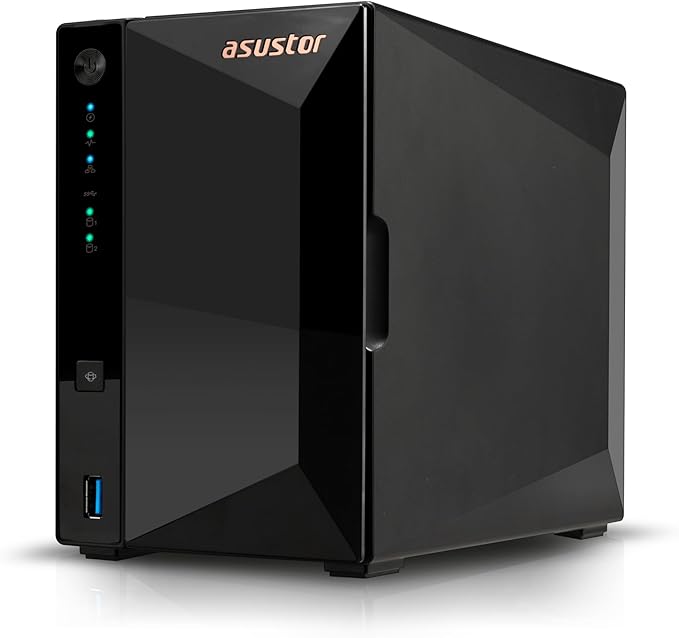 Asustor AS3302T V2
|
|
|---|---|---|---|
| Bays | 2 | 2 | 2 |
| CPU | Intel Celeron (Quad-Core) | ARM Cortex-A55 (Quad-Core) | Realtek RTD1619B (Quad-Core) |
| RAM | 2 GB DDR4 | 2 GB DDR4 | 2 GB DDR4 |
| Network | 2.5GbE + 1GbE | 1GbE | 2.5GbE |
| AU Price (from) | $599 (PLE Computers) | $399 (PLE) | $439 (Mwave) |
| Best For | Synology ecosystem, Plex, Docker | Budget file storage | Media playback, HDMI out |
Prices last verified: 16 March 2026. Always check retailer before purchasing.
The Synology DS225+ at $585 from Mwave is the closest spiritual successor to the ReadyNAS experience for users who want a polished, reliable software platform with minimal fuss. Synology's DSM operating system is widely regarded as the most user-friendly NAS OS on the market. A significant upgrade from ReadyNAS OS. For budget-conscious buyers, the QNAP TS-233 at $399 from PLE or the Asustor AS3302T V2 at $379 from Scorptec offer solid value with 2.5GbE networking included.
For Small Business and Office Use
If your ReadyNAS was a 4-bay or 6-bay unit serving a small office. Shared files, user accounts, perhaps running as an iSCSI target or basic virtualisation host. The following models are strong replacements:
4-Bay NAS Alternatives for ReadyNAS Business Users
 Synology DS925+
|
 QNAP TS-464
|
 Asustor AS6704T
|
 TerraMaster F4-424 Pro
|
|
|---|---|---|---|---|
| Bays | 4 | 4 | 4 | 4 |
| CPU | AMD Ryzen (Quad-Core) | Intel Celeron N5095 (Quad-Core) | Intel Celeron N5105 (Quad-Core) | Intel Core i3 |
| RAM | 4 GB DDR4 | 8 GB DDR4 | 4 GB DDR4 | 32 GB DDR4 |
| Network | 2.5GbE | Dual 2.5GbE | Dual 2.5GbE | 2.5GbE |
| M.2 Slots | 2x NVMe | 2x NVMe | 2x NVMe | 2x NVMe |
| AU Price (from) | $995 (Scorptec) | $989 (Scorptec) | $1,013 (Mwave) | $760 (Mwave) |
| Best For | SMB file server, Hyper Backup | VMs, containers, multimedia | Multimedia, gaming library | Raw performance, Docker |
For business environments, the Synology DS925+ at $995 from Scorptec is the most popular choice in Australia. Active Directory integration, Synology's snapshot and backup ecosystem, and strong Australian support through BlueChip and MMT distribution make it a safe bet. The QNAP TS-464 at $989 from Scorptec offers more raw hardware (dual 2.5GbE, HDMI output, PCIe expandability) for users who need flexibility. The TerraMaster F4-424 Pro at $1,099 from Scorptec delivers impressive specs for the price. 32 GB RAM and an Intel Core i3. Though TerraMaster's software ecosystem and Australian support network are less mature than Synology or QNAP.
For Users Who Want Simplicity
If you liked ReadyNAS because it was simple and you don't want to manage a full NAS operating system, Synology's BeeStation is worth considering. The BeeStation is a single-bay, pre-configured NAS designed for users who just want cloud-like file access and backup without the complexity of DSM. The BeeStation 4TB starts at $489 from Mwave, and the BeeStation Plus 8TB is $769 from Mwave. It's the closest thing to a "plug in and forget" NAS storage appliance currently available in Australia.
UGREEN has also entered the Australian NAS market with the NASync DH2300 at $340 and DH4300 Plus at $595 from the UGREEN AU store. These are very new to the market and UGREEN doesn't yet have an official Australian distributor, which means warranty claims currently go through international channels. This is expected to change, but until it does, factor in the support risk. Particularly if you're migrating from ReadyNAS specifically because you're tired of dealing with limited vendor support.
Where to Buy a Replacement NAS in Australia
Most Australian NAS retailers operate on 3-5% margin, which means pricing is remarkably uniform across the major stores. The real difference between retailers is stock depth, pre-sales expertise, and what happens when something goes wrong.
Specialist NAS retailers. Scorptec, PLE, and DeviceDeal. Carry the widest range of models and have staff with some NAS-specific knowledge. These are generally the best places to buy, especially if you're migrating from ReadyNAS and need guidance on choosing the right replacement.
Amazon AU has started holding NAS stock directly in 2026, often at prices below local retailers. However, their support model means you're on your own if a unit fails with your data inside it. Amazon is great for returns and refunds, but if your NAS fails and you need a direct replacement, they may not have stock. Especially for older or high-end models. For a ReadyNAS migrator who has already experienced the pain of unsupported hardware, investing in a retailer with proper after-sales support is strongly recommended.
Business and government buyers should always request a formal quote rather than buying at listed retail price. Resellers can request pricing support from distributors and vendors. Discounts that never appear on the website but are routinely available for quoted deals.
Netgear's Remaining NAS Presence
While ReadyNAS is dead, Netgear hasn't completely left the storage-adjacent space. Netgear still sells managed and unmanaged switches. Including models with 10GbE and multi-gig ports that are commonly used in NAS deployments for high-speed storage networking. Netgear's networking products remain widely available through Australian retailers.
However, Netgear has shown no indication of re-entering the NAS market. Their focus is firmly on networking infrastructure, and the company has not announced any new storage products since the ReadyNAS wind-down. If you're hoping for a ReadyNAS revival, it's not coming.
Lessons from ReadyNAS. Choosing a NAS Platform That Will Last
The ReadyNAS discontinuation carries important lessons for anyone choosing a NAS in 2026:
1. Software ecosystem matters more than hardware specs. ReadyNAS hardware was perfectly adequate. What killed it was the inability to keep up with software development. When evaluating NAS platforms, look at the vendor's track record of firmware updates, new feature development, and security patching. Synology, QNAP, and Asustor all have active development teams with regular release cycles. Newer entrants like UGREEN and TerraMaster have improving software, but their track records are shorter.
2. Vendor commitment to the NAS market matters. Netgear was primarily a networking company that happened to make NAS devices. When the NAS division wasn't profitable enough, it was cut. Synology and QNAP are NAS-first companies. NAS is their core business, not a side project. This makes them far more likely to continue supporting their platforms long-term.
3. Australian distribution and support infrastructure matters. Synology and QNAP both have deep distribution through BlueChip and other Australian distributors. Asustor has secured Dicker Data as its exclusive Australian distributor. This infrastructure means that when something goes wrong, there's a warranty chain: retailer → distributor → vendor. ReadyNAS owners learned the hard way what happens when that chain disappears.
4. A NAS is not a backup. Plan for failure. If your ReadyNAS dies today, and the only copy of your data is on those drives, you have a serious problem. There are no replacement ReadyNAS units available through any normal channel in Australia. The standard NAS warranty process runs 2-3 weeks through the full chain at the best of times. For a discontinued product, there is no process at all. Build your data protection strategy around the assumption that your NAS will eventually fail.
Use our free NAS Sizing Wizard to get a personalised NAS recommendation.
Related reading: our NAS buyer's guide and our Synology vs QNAP comparison.
Is Netgear ReadyNAS discontinued?
Yes. Netgear ceased development of new ReadyNAS models around 2020 and officially ended the product line's life cycle by 2022. No new hardware is being produced, and firmware updates have effectively stopped. ReadyNAS is no longer available from any major Australian retailer.
Can I still get firmware updates for my ReadyNAS?
Unlikely. Netgear issued limited critical security patches through 2022-2023, but active firmware development has ceased. The last ReadyNAS OS updates addressed specific vulnerabilities rather than adding features or broad security improvements. Check Netgear's support site for the latest available firmware for your specific model, but do not expect any future updates.
Is it safe to keep using my ReadyNAS in 2026?
It depends on your configuration. If the unit is completely local (no internet exposure, no remote access, no port forwarding) and you have a complete offsite backup of all data, the risk is manageable in the short term. If the ReadyNAS is internet-facing in any way. Including via ReadyCLOUD. You should disable that access immediately and plan a migration. Running unpatched, internet-exposed NAS hardware is a significant security risk.
Can I move my ReadyNAS drives directly into a Synology or QNAP NAS?
No. ReadyNAS uses its own RAID and file system configuration (X-RAID or Flex-RAID on EXT4/Btrfs). Synology, QNAP, and Asustor each use their own volume management systems. You cannot simply move drives between different NAS platforms. The correct migration path is to copy data over the network from the old NAS to the new one, then format the drives for the new system.
What is the best replacement for a Netgear ReadyNAS in Australia?
For most home users migrating from a 2-bay ReadyNAS, the Synology DS225+ (from $585 at Mwave) offers the most polished experience with strong ongoing software support. For budget buyers, the QNAP TS-233 at $399 from PLE or the Asustor AS3302T V2 at $379 from Scorptec are solid alternatives. For small business users replacing a 4-bay ReadyNAS, the Synology DS925+ (from $995 at Scorptec) or QNAP TS-464 (from $989 at Scorptec) are the leading choices.
Should I buy a second-hand ReadyNAS?
No. A second-hand ReadyNAS is a device with no security updates, no warranty support, no spare parts availability, and hardware that is likely 6-10 years old. The money is far better spent on a new entry-level NAS from Synology, QNAP, or Asustor, which will include current firmware, active security patching, a modern software ecosystem, and full Australian warranty support.
Does Netgear still offer warranty support for ReadyNAS in Australia?
Practically, no. While Netgear may still have a warranty policy on paper for units within their original warranty period, there are no ReadyNAS units in Australian distribution channels, no distributor support chain, and no replacement units available. In Australia, warranty claims go to the retailer first. But since no Australian retailer stocks ReadyNAS, and the distributor-to-vendor escalation path no longer exists for this product, warranty support is effectively nonexistent. Australian Consumer Law protections apply to the original purchase, but the practical reality of getting a repair or replacement for a discontinued product line is extremely difficult.
Is ReadyCLOUD remote access still working?
ReadyCLOUD's status is uncertain. Netgear has not formally announced a shutdown date, but the service is no longer actively maintained. Even if it is still partially functional, using a cloud relay service that receives no security updates is a risk. If you need remote access to a NAS, use a VPN on your router or migrate to a platform with an actively maintained remote access service. Synology QuickConnect, QNAP myQNAPcloud, or Asustor EZ-Connect.
Will Netgear release a new NAS product?
There is no indication that Netgear plans to re-enter the NAS market. Netgear's public communications and product roadmap focus entirely on networking products. Routers, mesh systems, and managed switches. The NAS division was wound down as a strategic decision to refocus the company. Buyers should not wait for a new Netgear NAS; it is extremely unlikely to materialise.
How long will the ReadyNAS data migration take?
Over a Gigabit Ethernet connection (the fastest connection most ReadyNAS units support), expect roughly 10-12 hours per terabyte of data. A ReadyNAS with 8 TB of data would take approximately 4-5 days to copy to a new NAS over the network. Always use wired Ethernet for the migration. Never Wi-Fi. If your new NAS supports 2.5GbE, the bottleneck will be the ReadyNAS's Gigabit port, so the faster NAS won't help during the migration itself.
Looking for help choosing a replacement NAS? Browse our brand guides for Synology, QNAP, and Asustor to find the right platform for your needs.
Explore NAS Brand Guides →