UGREEN's NASync lineup offers some of the most capable hardware available for video editing workflows in Australia, with Intel Core and Celeron processors, 10GbE networking options, and NVMe cache support across several models. But stock availability from the UGREEN AU store is patchy, and the absence of an official Australian distributor adds a layer of support risk that buyers should factor in before committing. Whether you're a solo editor working with 4K ProRes footage or a small team sharing a central media store over a 10GbE switch, there's a NASync model that fits. Once you know which one to target and what to realistically expect from the Australian buying experience.
In short: For solo editors on a budget, the UGREEN NASync DXP2800 ($630 from UGREEN AU) delivers a capable dual-bay setup with an Intel N100 and dual 2.5GbE. Small teams needing shared 4K workflows should look at the DXP4800 Plus ($1,260 from UGREEN AU) with its Intel Core i5 and 10GbE option. Stock is currently limited across multiple models. Check the UGREEN AU store before planning your build around a specific unit.
Why a NAS for Video Editing?
Video editing puts unique demands on storage. Unlike general-purpose NAS use cases. Backups, documents, media playback. Video editing workflows require sustained sequential throughput, not just burst speed. A single 4K ProRes 422 HQ stream needs around 750Mbps of sustained read bandwidth. Multi-stream 4K or any 6K/8K RAW work pushes that well beyond what a standard 1GbE NAS connection can deliver.
A NAS built for video editing needs to solve three things simultaneously: enough raw throughput to keep editing software fed with frames, enough CPU headroom to handle transcoding and proxy generation without choking the network, and enough raw capacity to store footage archives without constant drive swapping. UGREEN's NASync devices are designed with exactly this kind of media-centric workload in mind. They're not repurposed business file servers. That positioning makes them genuinely interesting for Australian editors who want an alternative to Synology or QNAP.
The UGREEN NASync Lineup Available in Australia
As of March 2026, UGREEN sells the NASync range directly through the UGREEN AU store (nas-au.ugreen.com). A full range of eight models is listed, but several are currently out of stock. The table below covers every currently listed model and its AU price. Note that stock status changes frequently and several high-end units are not shipping at time of writing.
| Model | Bays | CPU | AU Price (UGREEN AU) | Stock Status |
|---|---|---|---|---|
| DH2300 | 2-bay (HDD) | Intel Celeron N5105 | $360 | In Stock |
| DH4300 Plus | 4-bay (HDD) | Intel Celeron N5105 | $630 | In Stock |
| DXP2800 | 2-bay (HDD+NVMe) | Intel Core i5 N100 | $630 | Out of Stock |
| DXP4800 | 4-bay (HDD+NVMe) | Intel Core i5 N100 | $990 | Out of Stock |
| DXP4800 Plus | 4-bay (HDD+NVMe) | Intel Core i5-1235U | $1,260 | Out of Stock |
| DXP480T Plus | 4-bay + Thunderbolt | Intel Core i5-1235U | $1,800 | Out of Stock |
| DXP6800 Pro | 6-bay (HDD+NVMe) | Intel Core i7 | $2,160 | Out of Stock |
| DXP8800 Plus | 8-bay (HDD+NVMe) | Intel Core i5-1235U | $2,700 | Out of Stock |
Stock warning: UGREEN does not yet have an official Australian distributor, so stock is purchased through the UGREEN AU direct store. Most DXP-series models are currently out of stock. If you're planning a workflow around one of the higher-end units, check current availability before committing. A local distributor arrangement is expected in 2026, which should improve stock reliability. But that hasn't materialised yet as of this writing.
Solo Editor Workflows: What You Actually Need
A solo video editor working from a dedicated edit suite or home office has fairly contained storage requirements compared to a team, but the throughput demands are just as real. The key variables are:
- Codec: H.264/HEVC proxy edits are forgiving. ProRes 422, ProRes 4444, or RAW formats are not.
- Resolution: 1080p is manageable on almost any NAS. 4K ProRes pushes the limits of 1GbE. 6K or 8K RAW requires 10GbE or Thunderbolt.
- Connection type: On a standard home or studio setup with 1GbE infrastructure, real-world throughput caps around 110MB/s. Fine for proxy workflows, marginal for native 4K ProRes.
- Proxy workflow vs native: Most editors working at 4K and above benefit from a proxy workflow where a NAS generates lower-resolution proxies for editing, with the NAS handling the transcoding load overnight or in the background.
UGREEN NASync DXP2800. Best for Solo Editors
The DXP2800 is a two-bay NAS with an Intel N100 processor, dual 2.5GbE ports, and two M.2 NVMe slots for cache or fast storage. At $630 from UGREEN AU, it sits at the same price as the DH4300 Plus but trades two HDD bays for significantly more processing power and a modern CPU architecture. For a solo editor, this trade-off makes sense: you're not archiving hundreds of terabytes, you're keeping active projects on fast storage and moving completed work to a separate cold store.
The Intel N100 handles hardware transcoding for H.264 and HEVC without sweating, and it provides enough headroom to generate ProRes proxies as a background task. Two M.2 NVMe slots let you run a fast working-set pool separate from the spinning disk archive. A genuinely useful architecture for editors who want their current project on NVMe while keeping completed footage on cheaper HDDs. Note: this model is currently out of stock at UGREEN AU. Check availability before planning your build.

| Model | UGREEN NASync DXP2800 |
|---|---|
| HDD Bays | 2x 3.5" SATA |
| M.2 NVMe Slots | 2x PCIe 3.0 |
| CPU | Intel Core i5 N100 (4-core, up to 3.4GHz) |
| RAM | 8GB DDR5 (expandable) |
| Network | 2x 2.5GbE |
| USB | USB 3.2 Gen 2 (front + rear) |
| AU Price (UGREEN AU) | $630 |
| Stock Status | Out of Stock (March 2026) |
Pros
- Intel N100 CPU handles proxy generation and hardware transcoding without bottlenecking
- Dual 2.5GbE gives link aggregation or multi-client throughput without needing a 10GbE switch
- Dual NVMe slots allow a fast working pool for active projects separate from archive drives
- Lowest-cost entry into the DXP (N100/i5 CPU) family
- Compact form factor suits a desk or studio rack shelf
Cons
- Only 2 HDD bays. Not suitable for editors with large raw footage archives
- Currently out of stock at UGREEN AU
- No 10GbE option. Limits multi-client throughput
- No official AU distributor means warranty support goes through international channels
UGREEN NASync DXP4800. Four Bays, More Capacity
The DXP4800 adds two more HDD bays over the DXP2800 at $990, keeping the same Intel N100 CPU and dual 2.5GbE ports. For a solo editor who has outgrown a two-bay setup. Or who works with large RAW camera files and needs to keep multiple active projects online simultaneously. The four-bay chassis is a meaningful step up. You can run RAID 5 across four drives for a good balance of capacity and redundancy, or JBOD if you're managing your own backup strategy externally.
The jump from $630 to $990 is significant, and the DXP4800 is also out of stock at time of writing. If you need four bays but don't need the upgraded Core i5-1235U processor of the DXP4800 Plus, this is the model to watch for restocking. But if you're in a hurry, the DXP4800 Plus is currently listed (also out of stock) at $1,260 with a meaningfully faster CPU.
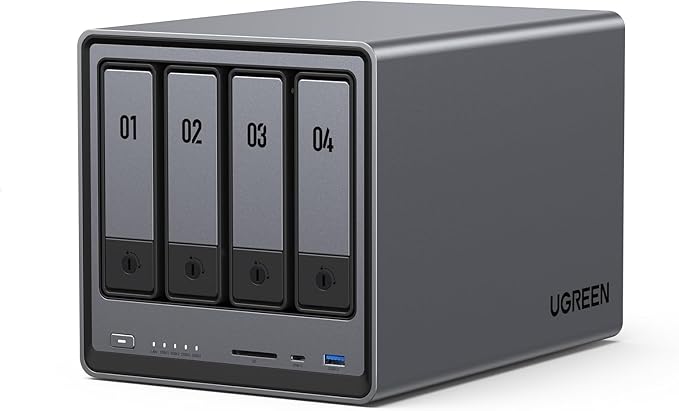
| Model | UGREEN NASync DXP4800 |
|---|---|
| HDD Bays | 4x 3.5" SATA |
| M.2 NVMe Slots | 2x PCIe 3.0 |
| CPU | Intel Core i5 N100 (4-core, up to 3.4GHz) |
| RAM | 8GB DDR5 (expandable) |
| Network | 2x 2.5GbE |
| AU Price (UGREEN AU) | $990 |
| Stock Status | Out of Stock (March 2026) |
Small Team Workflows: Where the Requirements Escalate
Once you move from a single editor to two or more working simultaneously from the same NAS, the calculus changes significantly. Two editors streaming 4K ProRes 422 HQ simultaneously need around 1.5Gbps of sustained read throughput. Well beyond what any 1GbE or even 2.5GbE single connection can deliver. The practical options are:
- 10GbE to each editor station: Each editor gets up to ~1,100MB/s dedicated bandwidth. This requires a 10GbE-capable NAS and a 10GbE switch (budget $400-800 AUD for a 5-8 port 10GbE switch).
- Link aggregation on 2.5GbE: Bonding dual 2.5GbE ports gives a theoretical 5Gbps aggregate. But only benefits multiple simultaneous clients, not a single fast editor. Good for 2-3 editors on proxy workflows.
- Thunderbolt direct attach: Point-to-point Thunderbolt gives one editor near-NVMe speeds with no network overhead. The DXP480T Plus supports this, at a price.
For most small Australian production teams (2-4 editors), the right answer is a 10GbE-capable NAS connected to a 10GbE switch, with each editing workstation on 10GbE. This is no longer boutique infrastructure. 10GbE network cards are under $100 and 5-port 10GbE switches from brands like QNAP and Netgear run $400-600 AUD.
UGREEN NASync DXP4800 Plus. Best for Small Teams
The DXP4800 Plus is the model that makes the most sense for a small video production team. It upgrades the CPU to an Intel Core i5-1235U. A 10-core (2P+8E) processor that handles simultaneous transcoding, proxy generation, and file serving without the bottlenecks that afflict lower-end NAS units running multiple tasks at once. Critically for team workflows, the DXP4800 Plus supports a 10GbE network card upgrade via its PCIe expansion slot, which changes the bandwidth picture entirely.
At $1,260 from UGREEN AU, the DXP4800 Plus competes directly with Synology DS925+ and QNAP TS-464 in the four-bay prosumer bracket. The UGREEN hardware spec is competitive. The i5-1235U outperforms the AMD Ryzen R1600 in the DS925+ on transcoding tasks. But the Synology DSM software ecosystem is more mature and the Synology warranty support through BlueChip in Australia is more straightforward than UGREEN's current direct-import model.
That said, UGOS Pro (UGREEN's operating system) has matured considerably since launch, and for teams running media-centric workflows rather than complex business applications, it covers the bases: SMB/AFP sharing, user permissions, snapshot support, and background transcoding. Don't buy this if you need deep integration with third-party business apps or a mature package ecosystem. Synology wins there. Do consider it if you want strong hardware at a competitive price for a media-focused shared storage role.

| Model | UGREEN NASync DXP4800 Plus |
|---|---|
| HDD Bays | 4x 3.5" SATA |
| M.2 NVMe Slots | 2x PCIe 4.0 |
| CPU | Intel Core i5-1235U (10-core, up to 4.4GHz) |
| RAM | 16GB DDR5 (expandable) |
| Network | 2x 2.5GbE + PCIe slot (10GbE card optional) |
| PCIe Expansion | PCIe 3.0 x4 (for 10GbE or additional NVMe) |
| AU Price (UGREEN AU) | $1,260 |
| Stock Status | Out of Stock (March 2026) |
Pros
- Intel Core i5-1235U handles multi-stream transcoding and simultaneous file serving without CPU bottleneck
- PCIe slot enables 10GbE upgrade. Essential for multi-editor 4K ProRes workflows
- Dual PCIe 4.0 NVMe slots for high-speed working storage alongside HDD archive
- 16GB DDR5 base RAM. More than adequate for shared media serving
- Competitive price point versus Synology and QNAP equivalents
Cons
- Currently out of stock at UGREEN AU
- UGOS Pro software ecosystem less mature than Synology DSM
- No official AU distributor. Warranty goes through international process
- 10GbE card is an additional purchase on top of already-premium price
- Four bays may be limiting for large teams with significant raw footage volumes
UGREEN NASync DXP480T Plus. For Teams Needing Thunderbolt
The DXP480T Plus at $1,800 adds Thunderbolt 4 connectivity to the DXP4800 Plus hardware foundation. Thunderbolt direct-attach delivers sustained throughput well above what even 10GbE can achieve when connecting a single editor's workstation directly to the NAS. Relevant for 8K RAW workflows or editors who refuse to work from proxies. The Thunderbolt port also enables daisy-chaining other Thunderbolt devices, which suits edit suites already built around Thunderbolt infrastructure.
The $540 premium over the DXP4800 Plus is substantial. It makes sense if you have one lead editor who needs maximum throughput and additional editors connecting over the standard 10GbE network. It doesn't make sense if your entire team is on Windows with no Thunderbolt on their workstations. In that case, save the $540 and put it toward better drives or a 10GbE switch. This model is also out of stock at UGREEN AU as of March 2026.
| Model | UGREEN NASync DXP480T Plus |
|---|---|
| HDD Bays | 4x 3.5" SATA |
| M.2 NVMe Slots | 2x PCIe 4.0 |
| CPU | Intel Core i5-1235U (10-core, up to 4.4GHz) |
| RAM | 16GB DDR5 (expandable) |
| Network | 2x 2.5GbE + Thunderbolt 4 |
| Thunderbolt 4 | Yes. Direct attach or daisy chain |
| AU Price (UGREEN AU) | $1,800 |
| Stock Status | Out of Stock (March 2026) |
High-Capacity Options: DXP6800 Pro and DXP8800 Plus
The six-bay DXP6800 Pro ($2,160) and eight-bay DXP8800 Plus ($2,700) are for production environments where raw storage volume is the primary constraint. Studios archiving large camera RAW libraries, post-production facilities managing multiple concurrent projects, or teams where the NAS also serves as the primary backup destination. Both are out of stock at UGREEN AU currently.
The DXP6800 Pro uses an Intel Core i7 processor. Useful if the NAS is also running transcoding services, containerised applications, or acting as a local media server alongside its shared storage role. The DXP8800 Plus returns to the i5-1235U but adds two more bays for sheer capacity. At eight bays with 20TB drives (which now consistently exceed $200 AUD per drive given current HDD market conditions), you're looking at up to 160TB raw. Enough for even a well-stocked documentary archive.
Don't buy either of these models if you're a solo editor or a two-person team. The capacity is overkill, the price premium is real, and the stock situation makes planning difficult. These are facility-grade purchases that suit production companies with specific volume requirements and the budget to match.
What About the DH2300 and DH4300 Plus? (Entry-Level HDD-Only Models)
The DH2300 ($360) and DH4300 Plus ($630) are the only models currently in stock at UGREEN AU. They use Intel Celeron N5105 processors. Capable enough for general NAS duties and light transcoding, but not the right choice for active video editing workflows. The N5105 lacks the headroom for simultaneous proxy generation and file serving under load, and neither model includes M.2 NVMe slots, which removes the fast-cache architecture that makes the DXP series useful for media work.
These are the right models for a general-purpose home NAS, media streaming to Plex or Jellyfin, or a small office file share. They are not the right tools for ProRes workflows, multi-editor shared storage, or any situation where sustained throughput above 100MB/s is required. If you're reading this article looking for a video editing NAS, the DH-series is not your answer. But it's worth knowing they're in stock if your needs are more modest than the headline suggests.
Drives not included: All UGREEN NASync units are sold diskless. Budget for NAS-grade HDDs separately. 4TB NAS drives have risen significantly in price through 2025-2026 and now consistently exceed $200 AUD per drive. For a four-bay RAID 5 build, factor in three or four drives at current market rates. Check Scorptec, PLE, or Mwave for current drive pricing before finalising your budget.
Network Infrastructure: Don't Bottleneck a Good NAS
The most common mistake editors make when setting up a NAS for video work is under-investing in network infrastructure. A $1,260 DXP4800 Plus connected via 1GbE will deliver the same throughput as a $300 entry-level NAS. Both cap at around 110MB/s real-world. The NAS hardware is irrelevant if the network is the bottleneck.
For a solo editor using proxy workflows: 2.5GbE is sufficient and doesn't require replacing your existing switch if you're running a modern home router with a 2.5GbE port. Most UGREEN NASync units have dual 2.5GbE, so a direct 2.5GbE connection from NAS to workstation (bypassing the switch entirely) is a simple way to double your bandwidth.
For a small team doing native 4K work: invest in a 10GbE switch. Budget $400-600 AUD for a five-port 10GbE managed switch, and $60-100 per editing workstation for a 10GbE NIC. This infrastructure cost is real but one-time, and it eliminates network throughput as a variable in your workflow for years.
On NBN connections, typical upload speeds on an NBN 100 plan average around 20Mbps real-world. Well below what you'd need to stream 4K footage remotely in real time. Cloud-based review workflows using Frame.io or LucidLink handle this through adaptive streaming, but don't expect to pull raw camera files over a standard NBN connection. Local network performance is what matters for active editing. Also note that some Australian NBN connections are behind CGNAT (particularly those on NBN Fixed Wireless or some HFC configurations), which blocks direct remote access to a NAS without a VPN or Tailscale setup. Plan accordingly if remote access is part of your workflow.
Buying UGREEN in Australia: What You Need to Know
UGREEN currently has no official Australian distributor for its NASync NAS range. All purchases go through the UGREEN AU direct store at nas-au.ugreen.com. This has practical implications for buyers:
- Warranty support: Without a local distributor, warranty claims are handled directly through UGREEN's international support channels. This is slower and less streamlined than brands like Synology, where BlueChip holds deep local stock and can facilitate faster hardware replacements.
- Stock volatility: Without distributor-held stock in Australia, supply depends entirely on what UGREEN ships directly. This explains why most DXP-series models are out of stock simultaneously. A single inbound shipment covers all models, and when it sells through, everything drops to zero at once.
- Price consistency: The upside of direct sale is price stability. UGREEN doesn't have retailer margin stacked on top, which is why the AU prices are competitive with equivalently-specced Synology and QNAP models sold through the retail channel.
- Amazon AU: Some UGREEN NAS models appear on Amazon AU through marketplace sellers. Amazon AU has started holding some NAS stock directly in 2026, and prices can be 10-15% below UGREEN AU direct in some cases. However, Amazon's support model means you're largely on your own if a unit fails with footage inside it. No advanced replacement, no technical support pathway.
A local distributor arrangement for UGREEN is expected to materialise in 2026, which should improve both stock availability and warranty support pathways. Until then, factor the support risk into your purchase decision. Particularly for business-critical deployments where downtime has a dollar cost.
Australian Consumer Law: When purchasing from the UGREEN AU store or any Australian-registered retailer, Australian Consumer Law protections apply. This includes statutory guarantees around acceptable quality and fitness for purpose that exist independently of the manufacturer's warranty period. Grey-market imports purchased from overseas sellers. Including some Amazon AU marketplace listings. May not carry full ACL coverage. Buy from Australian-registered retailers to ensure your rights are protected.
UGREEN NASync vs Synology and QNAP for Video Editing
4-Bay NAS for Video Editing: UGREEN vs Synology vs QNAP (AU Pricing, March 2026)
|
UGREEN DXP4800 Plus
|
 Synology DS925+
|
 QNAP TS-464
|
|
|---|---|---|---|
| CPU | Intel Core i5-1235U (10-core) | AMD Ryzen R1600 (2-core) | Intel Celeron N5105 (4-core) |
| RAM (base) | 16GB DDR5 | 4GB DDR4 | 8GB DDR4 |
| 10GbE | PCIe card option | PCIe card option | Built-in 2.5GbE, PCIe option |
| M.2 NVMe | 2x PCIe 4.0 | 2x PCIe 3.0 | 2x PCIe 3.0 |
| AU Price (unit only) | $1,260 (UGREEN AU) | $995 (Scorptec) | $989 (Scorptec) |
| Software ecosystem | UGOS Pro (maturing) | DSM (market-leading) | QTS (feature-rich) |
| AU distributor/warranty | No AU distributor (direct) | BlueChip (strong local support) | BlueChip (strong local support) |
| Stock reliability (AU) | Limited. Direct import only | Consistently available | Consistently available |
Prices last verified: 10 March 2026. Always check retailer before purchasing.
The UGREEN DXP4800 Plus has a genuine CPU advantage over the Synology DS925+ and QNAP TS-464 at its price point. For pure transcoding throughput and multi-threaded media processing, the i5-1235U leads the field in this comparison. What it gives up is software maturity and local support infrastructure. Synology DSM remains the benchmark for NAS software. Its Active Backup for Business, Surveillance Station, and media management tools are years ahead of what UGOS Pro offers today. If software depth matters to your workflow, Synology justifies its presence in the market. If you're running SMB shares and need raw CPU muscle for media work, UGREEN is a legitimate alternative worth considering once stock availability and distributor support normalise in Australia.
Drive Recommendations for Video Editing NAS Builds
UGREEN publishes a compatibility list for each NASync model. Always verify your chosen drives against it before purchasing. For video editing workloads, NAS-rated drives are non-negotiable: they're designed for 24/7 operation and handle the vibration from multiple spinning drives in the same enclosure far better than desktop-grade alternatives.
Current picks for NAS-grade HDD in Australia include the Seagate IronWolf and WD Red Plus families. As of early 2026, HDD pricing has risen significantly from 2024 lows. 4TB NAS drives that were comfortably under $160 in early 2025 now consistently exceed $200 AUD. Budget accordingly. For the NVMe cache slots in DXP-series units, any PCIe 3.0 or 4.0 NVMe SSD on the UGREEN compatibility list will work. The Samsung 980/990, WD Black SN770, and Seagate FireCuda series are all reliable options available at Australian retailers.
Use our free Transfer Speed Estimator to estimate how long large transfers will take over your connection.
Related reading: our NAS buyer's guide, our AU retailer guide, and our UGREEN brand guide.
Use our free NAS Sizing Wizard to get a personalised NAS recommendation.
Can I edit 4K ProRes footage directly from a UGREEN NASync over a standard network?
It depends on your network connection speed. 4K ProRes 422 HQ requires sustained throughput of around 750Mbps. Which exceeds what a 1GbE connection can deliver. On a 2.5GbE connection (available on all DXP-series units), real-world throughput is around 280MB/s (~2.2Gbps), which is enough for a single stream of 4K ProRes 422 HQ with headroom to spare. For native 4K ProRes editing with multiple simultaneous streams. Or any 6K/8K RAW work. You need a 10GbE connection. The DXP4800 Plus and DXP480T Plus support 10GbE via PCIe expansion card. On a 1GbE network, use a proxy workflow where the NAS generates lower-resolution proxies for editing.
How many editors can work simultaneously from a UGREEN NASync DXP4800 Plus?
With 10GbE installed in the DXP4800 Plus, two to three editors can work simultaneously on 4K ProRes 422 workflows without significant throughput contention, assuming the editing workstations are also on 10GbE. On 2.5GbE with link aggregation, two editors on proxy workflows (typically 100-200Mbps per stream) should be comfortable. Beyond three simultaneous editors, the four-bay HDD pool starts to become the bottleneck rather than the network. At which point NVMe cache helps, but a six-bay or eight-bay unit with more spindle count gives you more sustained sequential throughput.
Is UGOS Pro (UGREEN's NAS OS) ready for professional video production use?
UGOS Pro covers the core requirements for a video production NAS: SMB and AFP network shares, user and group permissions, snapshot-based data protection, and basic media management. It supports Docker for containerised apps, which opens up tools like Jellyfin, Plex, and Tdarr for media management and transcoding. What it doesn't offer (yet) is the depth of Synology DSM's package ecosystem, Active Backup for Business-style workstation backup, or Synology's mature Surveillance Station equivalent. For teams whose NAS role is purely shared media storage and file serving, UGOS Pro is adequate. For teams wanting the NAS to also run complex applications, handle domain integration, or serve multiple business roles simultaneously, DSM remains the more capable platform.
What happens if my UGREEN NASync needs warranty service in Australia?
UGREEN does not currently have an official Australian distributor, so warranty service is handled through UGREEN's direct support channels rather than through a local distributor network. In practice, this means slower turnaround compared to brands like Synology, where BlueChip facilitates local hardware replacement. Australian Consumer Law still applies if you purchased from the UGREEN AU store (an Australian-registered business), providing statutory protections beyond the manufacturer's warranty period. However, the practical support experience. Speed of replacement, availability of a loan unit, handling of a dead-on-arrival situation. Is likely to be less streamlined than with Synology or QNAP through their established AU distributor relationships. A local UGREEN distributor arrangement is expected to improve this situation in 2026.
Most UGREEN NASync models are out of stock. Should I wait or buy something else?
Stock status changes regularly and there's no reliable public timeline for UGREEN restocking in Australia. If your workflow is blocked right now and you need storage immediately, the pragmatic answer is to look at alternatives. Synology and QNAP equivalents are consistently available through Scorptec and PLE, with reliable local distributor support through BlueChip. If you have flexibility and specifically want UGREEN hardware for the CPU-per-dollar value, monitor the UGREEN AU store and sign up for restock notifications. Don't plan a production deployment around a purchase you can't make today. The stock situation makes it too unpredictable to build timelines around.
Can I access my UGREEN NAS remotely for review and collaboration?
Yes, with some caveats. UGOS Pro includes UGREEN's remote access functionality, which works similarly to Synology QuickConnect. A relay-based connection that doesn't require port forwarding. For reviewing footage, sharing cuts, or accessing project files over the internet, this covers most use cases. However, upload speeds on NBN connections are a real constraint: typical NBN 100 plans deliver around 20Mbps real-world upload, which means streaming high-bitrate ProRes remotely is impractical without transcoding to a lower-bitrate proxy first. For team review workflows, a tool like Frame.io handles this better than direct NAS access. Also note that some NBN connections. Particularly Fixed Wireless and some HFC services. Are behind CGNAT, which can block direct remote access. In those cases, Tailscale or a VPN service provides a workaround.
Check current UGREEN NASync pricing and stock availability at the UGREEN AU store, and compare with Synology and QNAP equivalents at Scorptec and PLE before making your decision.
Check UGREEN AU Store →