UGREEN's NASync lineup covers a wide performance range. From the entry-level DH2300 at $360 through to the DXP8800 Plus at $2,700. And which model suits a Plex setup depends almost entirely on how many streams you need and whether those streams can direct play or require transcoding. For most Australian households with a single 4K Plex stream running over a local network, the DXP2800 or DXP4800 will handle the job comfortably. If you're transcoding multiple streams simultaneously. Or running a shared server for family members across different connections. The calculus changes quickly.
In short: For a single 4K direct play stream, the UGREEN DH2300 ($360) is sufficient. For hardware-accelerated transcoding of 4K content, start at the DXP2800 ($630) which includes an Intel processor with Quick Sync. For multi-stream or multi-user Plex setups, the DXP4800 ($990) or higher is the appropriate starting point. Avoid expecting any UGREEN NAS to software-transcode 4K. No consumer NAS does this reliably.
Understanding Plex on a NAS: Direct Play vs Transcoding
Before selecting a UGREEN model, it's worth understanding what Plex actually asks of your NAS hardware. Because the difference between direct play and transcoding is the difference between needing a $360 device and a $990 one.
Direct play means the Plex client (your TV, phone, or computer) can natively decode the video file without the NAS doing any conversion. The NAS essentially acts as a file server. Minimal CPU load, minimal RAM pressure. Almost any NAS with a gigabit network connection handles direct play reliably, including the entry-level UGREEN DH2300.
Direct stream is a middle ground. The video codec is passed through unchanged, but the container or audio track is remuxed on the fly. This is light work for a NAS CPU.
Transcoding is the heavy operation. The NAS re-encodes the video in real time. Converting 4K HEVC to 1080p H.264 for a client that can't handle the original format, for example. Software transcoding of 4K content is essentially impossible on any consumer NAS. The CPU simply isn't fast enough. What makes modern Intel-based NAS units viable for transcoding is Intel Quick Sync. Hardware video decoding and encoding built into the Intel integrated GPU. Quick Sync offloads the transcode from the CPU cores to dedicated silicon, enabling smooth 4K transcoding at a fraction of the CPU cost.
This is the core reason Intel processor selection matters so much in a Plex NAS context. AMD Ryzen-based NAS units can transcode via their integrated graphics (AMD VCE), but Plex's hardware transcoding support has historically been stronger and more consistent with Intel Quick Sync.
UGREEN NASync Models Available in Australia (2026)
UGREEN currently sells its NASync range directly through the UGREEN AU online store. As of March 2026, the DH2300 and DH4300 Plus are in stock, while the DXP series models show as out of stock through the direct store. Availability through Amazon AU and marketplace sellers varies. One important note for Australian buyers: UGREEN does not yet have an official Australian distributor, which means warranty support currently runs through international channels rather than a local distributor network. This is expected to change in 2026, but until a local distributor arrangement is formalised, factor the support risk into your purchase decision. Particularly for higher-value units.
UGREEN NASync Plex Capability Overview. AU Prices (March 2026)
 DH2300
|
DH4300 Plus |
 DXP2800
|
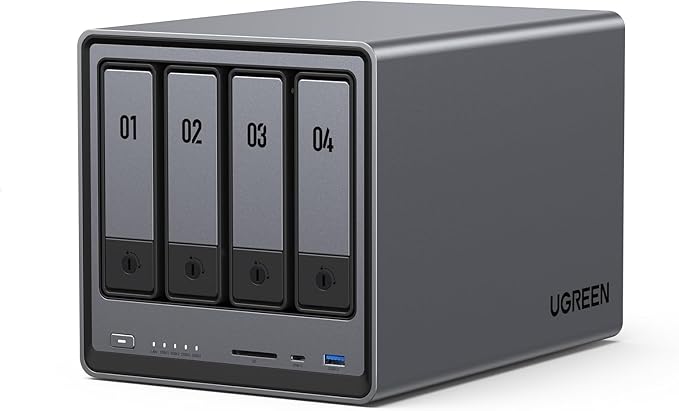 DXP4800
|
 DXP4800 Plus
|
 DXP6800 Pro
|
 DXP8800 Plus
|
|
|---|---|---|---|---|---|---|---|
| AU Price (UGREEN AU) | $360 | $630 | $630 | $990 | $1,260 | $2,160 | $2,700 |
| Drive Bays | 2-bay | 4-bay | 2-bay | 4-bay | 4-bay | 6-bay | 8-bay |
| Processor | Intel Celeron N100 | Intel Celeron N100 | Intel Core i5-1235U | Intel Core i5-1235U | Intel Core i5-1235U | AMD Ryzen R5 5600H | Intel Core i5-1235U |
| RAM | 8GB DDR5 | 8GB DDR5 | 16GB DDR4 | 16GB DDR4 | 16GB DDR4 | 32GB DDR4 | 32GB DDR4 |
| 4K Direct Play | Yes | Yes | Yes | Yes | Yes | Yes | Yes |
| 4K HW Transcode (Quick Sync) | Limited | Limited | Yes | Yes | Yes | AMD VCE | Yes |
| Simultaneous 4K Transcode Streams | 1 (720p/1080p only) | 1 (720p/1080p only) | 2-3 | 3-4 | 3-4 | 3-4 | 4-6 |
| M.2 NVMe Slots | 1 | 2 | 2 | 2 | 2 | 2 | 2 |
| 2.5GbE Ports | 1 | 2 | 2 | 2 | 2 | 2 | 2 |
UGREEN DH2300. Best for Direct Play Only ($360)
The DH2300 is UGREEN's entry-level 2-bay NAS, currently the most affordable in their lineup at $360 from the UGREEN AU store. It runs an Intel Celeron N100. A capable quad-core chip for general NAS tasks, but in Plex terms it sits in a specific lane: direct play is its strength, transcoding is its weakness.
The N100 does include Intel UHD Graphics with Quick Sync support, but the generation and implementation limits its practical 4K transcoding capability. Expect reliable 1080p hardware transcoding, and light 4K transcoding only if the source bitrate is moderate and the target resolution is lower. Attempting to transcode a full 4K HDR HEVC stream at 80Mbps down to 1080p will push this chip hard.
Where the DH2300 earns its place in a Plex context: if your household devices (smart TVs, Apple TV 4K, Nvidia Shield) can all direct play your content, this unit handles the job without complaint. The 8GB DDR5 RAM is generous for this class, and the single 2.5GbE port keeps network throughput adequate for one or two simultaneous streams.
Don't buy the DH2300 if: you have Plex clients that can't direct play your 4K library, you regularly stream to mobile devices on cellular, or you're planning to serve Plex to multiple users outside your home network.
| Model | UGREEN NASync DH2300 |
|---|---|
| Drive Bays | 2 x 3.5" SATA |
| Processor | Intel Celeron N100 (4-core, 3.4GHz burst) |
| RAM | 8GB DDR5 (expandable) |
| M.2 NVMe Slots | 1 x M.2 2280 |
| Network | 1 x 2.5GbE |
| USB | 2 x USB 3.2 Gen 1 |
| AU Price (UGREEN AU) | $360 (in stock) |
| Plex Verdict | Direct play up to 4K; limited 4K transcoding |
Pros
- Lowest entry price in the UGREEN range at $360
- Handles 4K direct play without issue
- 8GB DDR5 RAM is generous for this price point
- Compact 2-bay form factor suits home environments
- Intel N100 Quick Sync covers 1080p transcoding reliably
Cons
- 4K hardware transcoding is marginal. Not a reliable single-stream 4K transcode machine
- Single 2.5GbE port limits multi-user streaming scenarios
- Only 1 M.2 NVMe slot
- 2-bay capacity limits long-term storage growth
- No local Australian distributor warranty support currently
UGREEN DH4300 Plus. Four Bays, Same Processor ($630)
The DH4300 Plus steps up to a 4-bay chassis at $630 while retaining the same Intel Celeron N100 processor as the DH2300. For Plex, the practical performance ceiling is essentially identical. You're buying more storage capacity, dual 2.5GbE ports, and two M.2 NVMe slots, not more transcoding headroom.
Where the DH4300 Plus makes sense over the DH2300 is if your Plex library is growing and you need room for 4 drives in a RAID configuration. The dual 2.5GbE also opens the door to link aggregation if your switch supports it, which can marginally improve multi-client throughput.
At $630, it's in direct competition with the DXP2800. And this is where the decision gets interesting. The DXP2800 also costs $630 but brings an Intel Core i5-1235U with substantially stronger Quick Sync performance. For Plex users who need any transcoding at all, the DXP2800 is the better $630 spend. The DH4300 Plus makes more sense if storage capacity is the priority and your Plex clients all direct play.
| Model | UGREEN NASync DH4300 Plus |
|---|---|
| Drive Bays | 4 x 3.5" SATA |
| Processor | Intel Celeron N100 (4-core, 3.4GHz burst) |
| RAM | 8GB DDR5 (expandable) |
| M.2 NVMe Slots | 2 x M.2 2280 |
| Network | 2 x 2.5GbE |
| USB | 2 x USB 3.2 Gen 1 |
| AU Price (UGREEN AU) | $630 (in stock) |
| Plex Verdict | Direct play focus; same transcoding ceiling as DH2300 |
Pros
- Four drive bays for growing Plex media libraries
- Dual 2.5GbE enables link aggregation
- Two M.2 NVMe slots for SSD caching
- Same price as the DXP2800. Good if storage is the priority
Cons
- Same N100 processor as the DH2300. No transcoding advantage
- At $630, DXP2800 offers significantly better Plex transcoding performance
- Not the right choice if 4K transcoding is a requirement
- No local Australian distributor warranty support currently
UGREEN DXP2800. The Transcoding Sweet Spot ($630)
The DXP2800 is where UGREEN's Plex capability takes a meaningful jump. At $630 from the UGREEN AU store, it pairs a 2-bay chassis with an Intel Core i5-1235U. A 10-core processor (2P + 8E) with Intel Iris Xe graphics and a significantly more capable Quick Sync engine than the Celeron N100.
In practical Plex terms, the i5-1235U Quick Sync can handle multiple simultaneous 4K HEVC to 1080p H.264 transcodes without maxing out. Real-world testing from the global NAS community consistently puts this chip at 2-3 concurrent 4K transcode streams with headroom remaining. That's a substantial step up from the Celeron-based units.
The 16GB DDR4 RAM is appropriate for a Plex media server running moderate workloads. Plex Media Server itself isn't particularly RAM-hungry under normal conditions, but having 16GB means the operating system, Plex, and any concurrent transcoding buffers all have adequate room.
The 2-bay limitation is the main consideration. If your Plex library is already large or growing fast, two drive bays fills up quickly. Even with 20TB+ drives, you're capped at 40TB raw in a RAID 1 configuration (20TB usable). For purely Plex-focused deployments where transcoding matters more than raw capacity, the DXP2800 punches well above its weight class.
Don't buy the DXP2800 if: you have more than 4-5 active Plex users simultaneously, your library is already multi-tens-of-terabytes and growing, or you need the redundancy of 4+ drive bays.
| Model | UGREEN NASync DXP2800 |
|---|---|
| Drive Bays | 2 x 3.5" SATA |
| Processor | Intel Core i5-1235U (10-core, up to 4.4GHz) |
| RAM | 16GB DDR4 (expandable) |
| M.2 NVMe Slots | 2 x M.2 2280 |
| Network | 2 x 2.5GbE |
| USB | USB 3.2 Gen 2, USB-C |
| AU Price (UGREEN AU) | $630 (check availability) |
| Plex Verdict | Reliable 4K hardware transcoding; 2-3 simultaneous streams |
Pros
- Intel Core i5-1235U with strong Quick Sync. Proper 4K transcoding capability
- Same price as the DH4300 Plus but dramatically better Plex performance
- 16GB DDR4 RAM handles Plex Server and metadata operations comfortably
- Dual 2.5GbE and dual M.2 slots
- Best-value Plex transcoding unit in the UGREEN range
Cons
- Only 2 drive bays. Limits long-term storage capacity
- Currently showing out of stock at UGREEN AU. Check availability before planning a purchase
- No local Australian distributor warranty support currently
- 2-bay RAID 1 limits usable capacity significantly
UGREEN DXP4800. Four Bays, Full Transcoding Power ($990)
The DXP4800 at $990 combines the Intel Core i5-1235U processor with a 4-bay chassis. Giving you the transcoding capability of the DXP2800 with double the drive capacity. This is the unit that suits the majority of serious home Plex setups in Australia: enough bays for a growing library, enough CPU for multi-stream 4K transcoding, and enough RAM (16GB) for comfortable headroom.
For households sharing a Plex server with family members. Including those streaming from outside the home. The DXP4800 is the practical answer. Four Plex streams simultaneously, with hardware transcoding engaged, is within reach of the i5-1235U's Quick Sync capabilities.
The dual 2.5GbE ports are worth noting for Australian home network contexts. If your router or switch supports 2.5GbE, you're in a position to serve multiple simultaneous high-bitrate streams without the port becoming a bottleneck. On a standard gigabit network, a single 4K stream at 80Mbps only uses about 8% of the available bandwidth. So gigabit is fine for most home setups. But as you add streams and users, the 2.5GbE headroom is a useful buffer.
| Model | UGREEN NASync DXP4800 |
|---|---|
| Drive Bays | 4 x 3.5" SATA |
| Processor | Intel Core i5-1235U (10-core, up to 4.4GHz) |
| RAM | 16GB DDR4 (expandable) |
| M.2 NVMe Slots | 2 x M.2 2280 |
| Network | 2 x 2.5GbE |
| USB | USB 3.2 Gen 2, USB-C |
| AU Price (UGREEN AU) | $990 (check availability) |
| Plex Verdict | Multi-stream 4K transcoding with 4-bay capacity. The well-rounded option |
Pros
- Four drive bays. Meaningful capacity for large Plex libraries
- Intel Core i5-1235U handles 3-4 simultaneous 4K hardware transcode streams
- 16GB DDR4 with room to expand
- Dual 2.5GbE and dual M.2 NVMe slots
- Suits multi-user Plex setups including remote streaming
Cons
- Currently out of stock at UGREEN AU. Availability varies
- $360 more than the DXP2800 for the same CPU. You're paying for drive bays
- No local Australian distributor warranty support currently
- For very high user counts, the DXP4800 Plus or DXP8800 Plus is a better fit
UGREEN DXP4800 Plus and Higher. For Power Users ($1,260+)
Above the DXP4800, the UGREEN range expands into higher-tier hardware at significantly higher prices. The DXP4800 Plus ($1,260) retains the i5-1235U in a 4-bay chassis but adds enhanced specifications. The DXP6800 Pro ($2,160) moves to an AMD Ryzen R5 5600H with 32GB DDR4. A different transcoding path via AMD's VCE hardware acceleration rather than Intel Quick Sync. The DXP8800 Plus ($2,700) returns to the i5-1235U platform in an 8-bay configuration with 32GB DDR4.
For Plex specifically, the jump from the DXP4800 ($990) to the DXP4800 Plus ($1,260) is hard to justify on Plex performance alone. The CPU is the same. The DXP4800 Plus makes more sense for users who also need the extra capabilities it provides beyond Plex.
The DXP6800 Pro's AMD Ryzen platform is worth noting: AMD's VCE hardware acceleration does work with Plex, but Intel Quick Sync has a longer track record of compatibility and reliability with Plex Media Server's hardware transcoding path. If Plex is your primary workload, the Intel-based units are the safer recommendation.
The DXP8800 Plus at $2,700 is for users who need 8 bays of storage and still want strong Plex transcoding. A large household with 50TB+ of media and multiple concurrent users. At that price point, it's worth comparing against equivalent Synology or QNAP options that benefit from established Australian distributor relationships and local warranty support.
Stock and Warranty Note: As of March 2026, several UGREEN NASync models show as out of stock at the UGREEN AU direct store. UGREEN does not yet have an official Australian distributor, meaning warranty claims go through international channels. Australian Consumer Law protections apply when purchasing from Australian-registered retailers, but the practical experience of claiming warranty on a higher-value NAS through international channels is slower and less straightforward than dealing with a local distributor. This is expected to improve as UGREEN formalises its Australian distribution arrangement. But until then, weigh this against the purchase price, particularly for the DXP4800 Plus, DXP6800 Pro, and DXP8800 Plus.
Remote Access and Australian NBN: What Plex Users Need to Know
Running a home Plex server and streaming to family members outside your home adds a layer of complexity that's worth addressing specifically for Australian connections.
NBN upload speeds are the limiting factor for remote Plex streaming. A typical NBN 100/20 plan delivers around 18-20Mbps upload in practice. A single 4K stream transcoded to 1080p at ~8Mbps is entirely viable. Streaming a raw 4K HDR file at 40-80Mbps to an external client is not. The upload bandwidth isn't there. This is why transcoding matters for remote streaming: your NAS needs to transcode the 4K content down to a bitrate that fits within your NBN upload capacity before sending it to remote clients.
On higher NBN tiers. NBN 250 or NBN 1000. Upload speeds are proportionally better, but still asymmetric. An NBN 1000/50 plan gives around 45-50Mbps upload, which opens up higher-quality remote streams but still requires transcoding for large 4K files.
CGNAT is a separate issue. Some NBN providers, particularly those using the FTTP network, place residential connections behind Carrier Grade NAT. If your connection is behind CGNAT, Plex's relay server will be used for remote access by default, which caps stream quality and can introduce latency. Solutions include Plex Relay (automatic but limited), requesting a public IP from your ISP (sometimes free, sometimes a small monthly fee), or using a VPN to your home network. Check with your ISP before assuming direct remote access will work seamlessly.
For households where remote Plex access matters, the DXP2800 or DXP4800 with Quick Sync enabled is the appropriate starting point. The hardware transcoding capability is essential when your upload connection is the bottleneck, not the NAS itself.
Setting Up Plex on a UGREEN NASync
UGREEN's NAS units run UGOS Pro. The company's own Linux-based NAS operating system. Plex Media Server is available through the UGOS Pro app centre as a native installation, which simplifies setup considerably.
The key configuration steps for Plex on a UGREEN NASync are:
- Install Plex Media Server from the UGOS Pro app centre after initial NAS setup is complete.
- Enable hardware transcoding in Plex Media Server settings (requires Plex Pass subscription). Without Plex Pass, the NAS will software-transcode, which will struggle even on the i5-1235U for 4K content.
- Configure your media library paths to point to your HDD storage volumes. Not the M.2 NVMe slots, which are better used for metadata and system caching.
- Set transcoder quality in Plex Server settings to "Make my CPU work harder" if you want better quality transcodes. But monitor CPU and GPU load initially to understand your headroom.
- Port forwarding for remote access: If you want direct remote connections without Plex Relay, configure port forwarding (TCP 32400) on your router to the NAS's local IP. Check whether your ISP connection uses CGNAT before investing time here.
- Plex Pass consideration: Plex Pass is currently around $9 AUD/month or approximately $120/year for a single user. Hardware transcoding requires Plex Pass. For a NAS investment of $630-$990+, the Plex Pass cost is worth including in your total budget calculation.
Which UGREEN NAS for Plex: Quick Recommendation Guide
| Use Case | Recommended Model | AU Price |
|---|---|---|
| Single 4K stream, all clients direct play | DH2300 | $360 |
| 4-bay storage, all clients direct play | DH4300 Plus | $630 |
| 4K transcoding, 2-bay capacity is fine | DXP2800 | $630 |
| 4K transcoding, growing library, multi-user | DXP4800 | $990 |
| Large library, high user count, 4K transcode | DXP4800 Plus or DXP8800 Plus | $1,260-$2,700 |
Buying UGREEN in Australia: Retailer and Stock Notes
UGREEN sells its NASync range primarily through the UGREEN AU direct store (nas-au.ugreen.com). As of March 2026, the DH2300 ($360) and DH4300 Plus ($630) are in stock. The DXP series models. DXP2800, DXP4800, DXP4800 Plus, DXP6800 Pro, DXP8800 Plus, and DXP480T Plus. Are currently showing out of stock at the direct store.
Amazon AU carries some UGREEN NASync models and is worth checking for availability when the direct store is out of stock. Amazon's pricing can occasionally be 10-15% below local store pricing, but the trade-off is their support model: Amazon won't provide technical pre-sales guidance, won't manage a warranty claim for you, and if a unit fails with your Plex library inside it, you're largely on your own navigating the return process. For technically confident buyers, Amazon is a valid option. For first-time NAS buyers, buying from a specialist where you can get pre-sales guidance is the better path.
Scorptec and PLE, two of Australia's more capable NAS specialists, do not currently appear to stock the UGREEN NASync range. This reflects UGREEN's lack of an official Australian distributor. Without a distributor relationship, large specialist retailers can't easily list and support the range. This is expected to change as UGREEN's Australian distribution arrangements mature.
For pricing context: most Australian retailers operate on 3-5% NAS margin, which keeps pricing fairly uniform across the market. The meaningful differences between retailers are stock availability, pre-sales knowledge, and post-sales support. Not price. For a device that holds your Plex library and potentially all your personal data, the retailer relationship matters significantly if something goes wrong.
ACL Note: Australian Consumer Law protections apply when purchasing from Australian-registered retailers and the UGREEN AU direct store. These protections include remedies for goods that fail within a reasonable time, regardless of the warranty period stated by the manufacturer. If you purchase a UGREEN NAS through an international channel or a grey-market reseller, ACL protections may not apply in the same way. Buy from an Australian-registered business for full consumer protection.
Use our free Plex Media Planner to check if your NAS can handle your library.
Related reading: our NAS buyer's guide, our Synology vs QNAP comparison, and our AU retailer guide.
Related reading: our UGREEN brand guide.
Use our free NAS Sizing Wizard to get a personalised NAS recommendation.
Do I need Plex Pass to use hardware transcoding on a UGREEN NAS?
Yes. Hardware transcoding in Plex Media Server requires an active Plex Pass subscription. Without Plex Pass, Plex will software-transcode, which will struggle or fail on 4K content regardless of which UGREEN model you're using. Plex Pass is approximately $9 AUD/month or around $120/year for a single user. Factor this into your total cost of ownership when budgeting for a NAS-based Plex setup. A lifetime Plex Pass is also available and often makes financial sense for long-term Plex users.
Can the UGREEN DH2300 handle 4K Plex streaming?
Yes, for direct play. If your Plex client (Apple TV 4K, Nvidia Shield, LG TV with Plex app, etc.) can natively decode your 4K HEVC or H.264 file, the DH2300 simply serves the file and the CPU load is minimal. Where the DH2300 struggles is transcoding 4K content. Converting a 4K HEVC file to 1080p H.264 in real time is at the edge of what the Intel Celeron N100's Quick Sync can handle reliably. For clients that need transcoding, the DXP2800 or DXP4800 is the appropriate choice.
What's the difference between the DXP2800 and DH4300 Plus. They're both $630?
The DXP2800 ($630) has an Intel Core i5-1235U processor with strong Quick Sync hardware transcoding, 16GB DDR4 RAM, and 2 drive bays. The DH4300 Plus ($630) has an Intel Celeron N100 processor with limited transcoding capability, 8GB DDR5 RAM, and 4 drive bays. If Plex transcoding matters to you, the DXP2800 is significantly better for the money. If you only need direct play and want more storage capacity, the DH4300 Plus makes sense. It's a clear trade-off: transcoding performance versus drive bay count at the same price.
Can I stream Plex remotely from a UGREEN NAS over NBN?
Yes, but the practical experience depends on your NBN plan's upload speed and whether your connection uses CGNAT. A standard NBN 100/20 connection delivers roughly 18-20Mbps upload. Enough for one or two transcoded 1080p streams to remote clients. Direct remote 4K streaming at full bitrate typically isn't viable on NBN 100 due to upload constraints. On higher NBN tiers (250 or 1000), you have more upload headroom. If your connection is behind CGNAT (ask your ISP), you'll need to either request a public IP or use Plex Relay, which limits stream quality. Hardware transcoding on the DXP2800 or DXP4800 is essential for managing remote streams within your upload bandwidth.
Does UGREEN have a warranty service in Australia?
As of March 2026, UGREEN does not have an official Australian distributor, which means warranty claims are handled through UGREEN's international channels rather than a local service centre. Australian Consumer Law still applies when purchasing from the UGREEN AU direct store or Australian-registered retailers, giving you legal recourse for faulty goods. However, the practical process of claiming warranty. Shipping a faulty unit, waiting for a replacement. Is slower without a local distributor. This is expected to improve as UGREEN formalises its Australian distribution arrangement. Until then, it's a factor worth considering, particularly for higher-value units where the warranty support experience matters more.
How many simultaneous 4K Plex streams can the DXP4800 handle?
With hardware transcoding enabled (requires Plex Pass), the Intel Core i5-1235U in the DXP4800 can reliably handle 3-4 simultaneous 4K to 1080p transcode streams. Beyond that, you'll start to see frame drops or buffering as the Quick Sync engine approaches its ceiling. For direct play streams, the count is essentially unlimited within network bandwidth constraints. The NAS is just serving files. If you regularly have 5 or more simultaneous transcoding users, the DXP8800 Plus with its 32GB RAM and the same i5-1235U Quick Sync (or looking at higher-end alternatives) would be more appropriate.
Should I buy a UGREEN NAS for Plex or consider Synology or QNAP instead?
UGREEN's NASync range offers competitive hardware at good price points, and the Intel Core i5-1235U in the DXP series is a strong Plex transcoding platform. The primary consideration for Australian buyers is the current lack of a local distributor. Synology and QNAP both have established Australian distributor relationships (BlueChip distributes both), meaning warranty claims and support are handled locally. UGOS Pro is also newer and less mature than Synology's DSM or QNAP's QTS. For technically confident buyers comfortable with a newer ecosystem and international warranty support, UGREEN represents genuine value. For buyers who want the most established ecosystem and local support infrastructure, Synology remains the safer long-term choice.
Comparing UGREEN against Synology and QNAP for your Plex setup? The Need to Know IT NAS comparison guides break down the differences across platforms, price points, and Australian availability.
Read the Australian NAS Buying Guide →