UGREEN's NASync range is the most interesting new NAS lineup to arrive in Australia in years. Offering Intel-powered hardware, 2.5GbE networking, and competitive pricing from $360 AUD. The brand is best known for cables, chargers, and USB hubs, but the NASync series is a genuine attempt to take on Synology and QNAP in the home and small business NAS market. There are real strengths here, and a few things buyers should understand before committing. Including the current warranty situation in Australia.
In short: The UGREEN NASync DXP4800 ($990 from UGREEN AU) suits most home users and small offices wanting a capable 4-bay NAS with an Intel N100 processor and 2.5GbE. The DH2300 ($360) is the entry point for 2-bay NAS on a budget. The DXP8800 Plus ($2,700) is the top-tier 8-bay option for power users. UGREEN does not yet have an official Australian distributor. Warranty claims currently go through international channels, which is a meaningful consideration for business deployments.
Why UGREEN NAS in 2026?
UGREEN entered the NAS market with the NASync series in 2023, positioning it as a hardware-first alternative to the established players. The key differentiator is value: Intel N-series processors, 2.5GbE networking, and M.2 NVMe slots at prices that undercut comparable Synology and QNAP units. The operating system. UGOS Pro. Is built on a Linux base and has matured steadily since launch, though it remains less feature-rich than Synology's DSM or QNAP's QTS.
For Australian buyers in 2026, UGREEN NAS is available directly through the UGREEN AU online store at nas-au.ugreen.com. It's worth noting that UGREEN does not yet have an official Australian distributor. This means the distribution and warranty support chain that established brands like Synology (via BlueChip) and QNAP rely on does not exist for UGREEN yet. A local distributor arrangement is expected in 2026, but until it's confirmed, factor this into your purchasing decision. Particularly for business use.
Warranty note: UGREEN does not currently have an official Australian distributor. Warranty claims go through international channels rather than the standard retailer → distributor → vendor chain that Synology and QNAP buyers can rely on. Under Australian Consumer Law, your rights are against the place of purchase. In this case the UGREEN AU online store. Before purchasing, ask UGREEN AU directly about their warranty replacement process and expected turnaround times. For a device that holds your data, this is a critical question. See accc.gov.au for your rights.
UGREEN NASync Model Range. Full Overview
The NASync lineup divides into two families: the DH series (budget-focused, ARM-based or entry Intel, simpler hardware) and the DXP series (mainstream to enthusiast, Intel N-series processors, more expansion options). Here is every currently available model in Australia as of March 2026, sourced from the UGREEN AU store.
UGREEN NASync. All Models at a Glance (AU Pricing, March 2026)
| DH2300 | DH4300 Plus | DXP2800 | DXP4800 | DXP4800 Plus | DXP480T Plus | DXP6800 Pro | DXP8800 Plus | |
|---|---|---|---|---|---|---|---|---|
| AU Price (UGREEN AU) | $360 | $630 | $630 | $990 | $1,260 | $1,800 | $2,160 | $2,700 |
| Drive Bays | 2-bay | 4-bay | 2-bay | 4-bay | 4-bay | 4-bay (Thunderbolt) | 6-bay | 8-bay |
| Processor | Intel N100 | Intel N100 | Intel N100 | Intel N100 | Intel N100 | Intel N100 | Intel Core i5 | Intel N100 |
| RAM | 8GB DDR5 | 8GB DDR5 | 8GB DDR5 | 8GB DDR5 | 16GB DDR5 | 16GB DDR5 | 16GB DDR5 | 32GB DDR5 |
| Network | 2x 2.5GbE | 2x 2.5GbE | 2x 2.5GbE | 2x 2.5GbE | 2x 2.5GbE | 2x 2.5GbE + TB4 | 2x 2.5GbE | 2x 2.5GbE |
| M.2 NVMe Slots | 2 | 2 | 2 | 2 | 2 | 2 | 2 | 2 |
| USB Ports | USB 3.2 | USB 3.2 | USB 3.2 | USB 3.2 | USB 3.2 | TB4 + USB 3.2 | USB 3.2 | USB 3.2 |
| In Stock (Mar 2026) | Yes | Yes | No | No | No | No | No | No |
Stock situation (March 2026): Only the DH2300 ($360) and DH4300 Plus ($630) are currently listed as in stock at the UGREEN AU store. The DXP series models are listed as out of stock. Check the UGREEN AU store directly for current availability before planning a purchase. Stock situations can change quickly.
UGREEN NASync DH2300. The Entry-Level 2-Bay
The DH2300 is UGREEN's most affordable NAS at $360 AUD from UGREEN AU, and it's one of the more interesting entry-level options in the Australian market right now. Unlike many competing 2-bay NAS units at this price point. Which typically use ARM-based processors. The DH2300 runs an Intel N100 quad-core processor with 8GB of DDR5 RAM. That's a meaningful hardware advantage over Synology's DS223 ($489 at Scorptec, Realtek RTD1619B with 2GB RAM) or QNAP's TS-233 ($439 at Scorptec, ARM quad-core with 2GB RAM).
The dual 2.5GbE ports stand out at this price. On an Australian NBN 100 connection with typical upload speeds around 56Mbps, you won't saturate even a single 2.5GbE link via the internet. But for local network transfers (desktop backups, media streaming, multi-user file access) the extra headroom is genuinely useful. Two M.2 NVMe slots allow SSD caching or all-flash storage without occupying drive bays.

| Model | UGREEN NASync DH2300 |
|---|---|
| Drive Bays | 2 x 3.5"/2.5" SATA |
| Processor | Intel N100 (4-core, up to 3.4GHz) |
| RAM | 8GB DDR5 (expandable) |
| Network | 2 x 2.5GbE RJ45 |
| M.2 Slots | 2 x M.2 NVMe (PCIe 3.0) |
| USB | USB 3.2 Gen 1 |
| OS | UGOS Pro |
| AU Price (UGREEN AU) | $360 (in stock) |
| AU Price (UGREEN AU URL) | https://nas-au.ugreen.com/products/ugreen-nasync-dh2300-nas-storage |
Pros
- Intel N100 processor at a price point where competitors use ARM
- 8GB DDR5 RAM. Generous for entry-level
- Dual 2.5GbE networking standard
- Two M.2 NVMe slots for caching or SSD storage
- Competitive AU price of $360. In stock as of March 2026
Cons
- UGOS Pro is less mature than Synology DSM or QNAP QTS. Fewer third-party apps
- No official Australian distributor. Warranty via international channels
- 2-bay limits RAID options. RAID 1 only, no expansion path
- Limited community and ecosystem support compared to Synology/QNAP
- Don't buy this if you need robust third-party app support or Docker-heavy workloads
UGREEN NASync DH4300 Plus. The 4-Bay Budget Option
The DH4300 Plus steps up to four drive bays for $630 AUD from UGREEN AU and remains in stock as of March 2026. It shares the same Intel N100 processor and 8GB DDR5 RAM as the DH2300, adding two more drive bays and enabling RAID 5 and RAID 6 configurations. This is a meaningful upgrade for users who want data redundancy across more than two drives, or who need raw capacity beyond what two drives can provide.
At $630, the DH4300 Plus sits in competitive territory. The Synology DS423 is $635 at Scorptec but runs the slower Realtek RTD1619B with 2GB RAM. The QNAP TS-433 at $699 (Scorptec) also uses an ARM processor. The DH4300 Plus's Intel N100 advantage is real for CPU-intensive tasks like transcoding, encryption, or running containerised apps. The DH series suits home users and small offices who want capable hardware without paying for the DXP premium.
| Model | UGREEN NASync DH4300 Plus |
|---|---|
| Drive Bays | 4 x 3.5"/2.5" SATA |
| Processor | Intel N100 (4-core, up to 3.4GHz) |
| RAM | 8GB DDR5 (expandable) |
| Network | 2 x 2.5GbE RJ45 |
| M.2 Slots | 2 x M.2 NVMe (PCIe 3.0) |
| USB | USB 3.2 Gen 1 |
| OS | UGOS Pro |
| AU Price (UGREEN AU) | $630 (in stock) |
| AU Price (UGREEN AU URL) | https://nas-au.ugreen.com/products/ugreen-nasync-dh4300-plus-nas-storage |
Pros
- Intel N100 beats ARM-based competitors at similar price points
- 4-bay enables RAID 5/6 for drive failure protection
- 8GB DDR5 RAM out of the box. More than most competitors at this price
- Dual 2.5GbE standard
- In stock at time of writing. Better availability than DXP models
Cons
- UGOS Pro app ecosystem still maturing. Check app compatibility before buying
- No official AU distributor. Warranty support not as straightforward as Synology or QNAP
- Don't buy this if Plex transcoding or advanced virtualisation is a priority. Consider the DXP series instead
- HDD prices have risen significantly in 2025-2026. Factor 4 x NAS-grade drives into total cost
UGREEN NASync DXP2800. The Performance 2-Bay
The DXP2800 is priced at $630 AUD from UGREEN AU. The same as the DH4300 Plus. But offers only two drive bays. The premium is for the DXP platform's build quality, connectivity, and positioning within the ecosystem rather than a significant spec bump over the DH2300. It also runs the Intel N100 with 8GB DDR5, and the DXP series generally includes better build quality, more refined software support, and additional connectivity options.
The DXP2800 suits buyers who only need two bays but want the DXP platform features. Particularly if they plan to use M.2 NVMe drives exclusively for an all-flash, low-footprint setup. Note that the DXP2800 is currently listed as out of stock on the UGREEN AU store. If you need a 2-bay at this price today, the DH2300 at $360 delivers better value or the Synology DS225+ at $585-$599 offers DSM's mature ecosystem.

| Model | UGREEN NASync DXP2800 |
|---|---|
| Drive Bays | 2 x 3.5"/2.5" SATA |
| Processor | Intel N100 (4-core, up to 3.4GHz) |
| RAM | 8GB DDR5 (expandable) |
| Network | 2 x 2.5GbE RJ45 |
| M.2 Slots | 2 x M.2 NVMe (PCIe 3.0) |
| OS | UGOS Pro |
| AU Price (UGREEN AU) | $630 (out of stock, March 2026) |
| AU Price (UGREEN AU URL) | https://nas-au.ugreen.com/products/ugreen-nasync-dxp2800-nas-storage |
UGREEN NASync DXP4800. The Core 4-Bay
The DXP4800 at $990 AUD from UGREEN AU is the NAS that most home power users and small offices should be looking at. When it's in stock. It runs the Intel N100, 8GB DDR5, dual 2.5GbE, and two M.2 NVMe slots across four drive bays. The $990 price positions it interestingly against competitors: the Synology DS425+ is $819-$899 with a Celeron and 2GB RAM, while the QNAP TS-464 at $1,099 offers similar specs. The DXP4800 splits the difference with better RAM out of the box.
The DXP4800 is currently listed as out of stock. This is worth noting. The DXP series has experienced stock availability issues in Australia, likely reflecting UGREEN's current distribution situation. Without a local distributor, restocking timelines are less predictable than for Synology or QNAP, where BlueChip can air freight stock from Taiwan in 2-3 weeks. If the DXP4800 is out of stock when you're ready to buy, weigh whether waiting is practical or whether an alternative makes more sense.
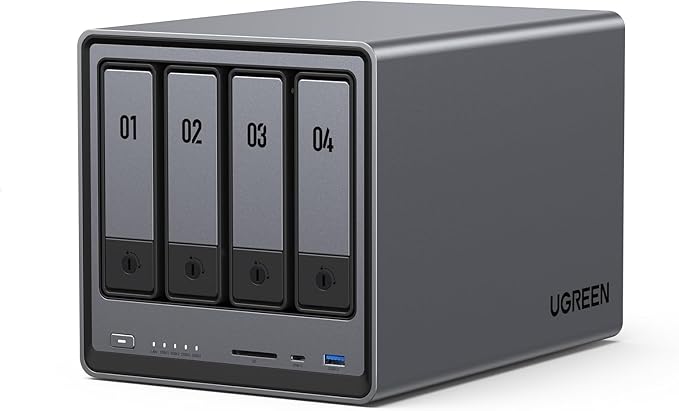
| Model | UGREEN NASync DXP4800 |
|---|---|
| Drive Bays | 4 x 3.5"/2.5" SATA |
| Processor | Intel N100 (4-core, up to 3.4GHz) |
| RAM | 8GB DDR5 (expandable) |
| Network | 2 x 2.5GbE RJ45 |
| M.2 Slots | 2 x M.2 NVMe (PCIe 3.0) |
| OS | UGOS Pro |
| AU Price (UGREEN AU) | $990 (out of stock, March 2026) |
| AU Price (UGREEN AU URL) | https://nas-au.ugreen.com/products/ugreen-nasync-dxp4800-nas-storage |
Pros
- Intel N100 with 8GB DDR5. Better spec baseline than Synology DS425+ at a similar price
- 4-bay RAID 5/6 capable with dual 2.5GbE and M.2 NVMe caching
- Good value when in stock compared to equivalent QNAP and Synology models
- UGOS Pro continues to mature. Adequate for home and light SMB use
Cons
- Out of stock at time of writing. No confirmed restock date
- No official AU distributor makes stock availability less predictable than competitors
- UGOS Pro third-party app support lags behind DSM and QTS
- Don't buy this for Docker-heavy or VM workloads. Consider the DXP4800 Plus or DXP6800 Pro instead
UGREEN NASync DXP4800 Plus. More RAM, Same Bays
The DXP4800 Plus steps the DXP4800 up to 16GB DDR5 RAM for $1,260 AUD from UGREEN AU. The additional RAM is the primary differentiator. The processor, drive bays, and connectivity remain the same. 16GB is more useful than it might seem: UGOS Pro can run Docker containers and lightweight VMs, and RAM is the first constraint users hit when running multiple services simultaneously. For a NAS doubling as a home server. Running media management, backups, and a few containers. 16GB provides meaningful headroom.
Currently out of stock. At $1,260, it competes with the Synology DS925+ ($995-$1,029) which offers an AMD Ryzen R1600 processor, though with only 4GB RAM. The extra RAM in the DXP4800 Plus may be worth the premium depending on your workload.

| Model | UGREEN NASync DXP4800 Plus |
|---|---|
| Drive Bays | 4 x 3.5"/2.5" SATA |
| Processor | Intel N100 (4-core, up to 3.4GHz) |
| RAM | 16GB DDR5 (expandable) |
| Network | 2 x 2.5GbE RJ45 |
| M.2 Slots | 2 x M.2 NVMe (PCIe 3.0) |
| OS | UGOS Pro |
| AU Price (UGREEN AU) | $1,260 (out of stock, March 2026) |
| AU Price (UGREEN AU URL) | https://nas-au.ugreen.com/products/ugreen-nasync-dxp4800-plus-nas-storage |
UGREEN NASync DXP480T Plus. The Thunderbolt 4 Model
The DXP480T Plus is the most distinctive unit in the lineup at $1,800 AUD from UGREEN AU. It adds Thunderbolt 4 connectivity. A rare feature on a NAS at any price. Alongside the standard dual 2.5GbE, Intel N100, and 16GB DDR5. Thunderbolt 4 enables direct attached storage speeds (up to 40Gbps) when connected to a single Mac or PC, while still functioning as a full network NAS for other devices on the LAN.
This suits creative professionals who need desktop-class transfer speeds for video editing workloads from a single workstation, while also sharing the NAS with other users over the network. It's a niche but genuine use case. Currently out of stock. At $1,800 it's priced well above the competition for a 4-bay unit, but no direct competitor offers Thunderbolt 4 at this price point.
| Model | UGREEN NASync DXP480T Plus |
|---|---|
| Drive Bays | 4 x 3.5"/2.5" SATA |
| Processor | Intel N100 (4-core, up to 3.4GHz) |
| RAM | 16GB DDR5 (expandable) |
| Network | 2 x 2.5GbE RJ45 + Thunderbolt 4 |
| M.2 Slots | 2 x M.2 NVMe (PCIe 3.0) |
| OS | UGOS Pro |
| AU Price (UGREEN AU) | $1,800 (out of stock, March 2026) |
| AU Price (UGREEN AU URL) | https://nas-au.ugreen.com/products/ugreen-nasync-dxp480t-plus-nas-storage |
UGREEN NASync DXP6800 Pro. The 6-Bay Powerhouse
The DXP6800 Pro at $2,160 AUD from UGREEN AU is where the NASync range makes a serious step up. It swaps the Intel N100 for an Intel Core i5 processor (12th generation), maintains 16GB DDR5 RAM, and adds two more drive bays for a total of six. The i5 is a substantially more capable processor for CPU-intensive workloads: hardware transcoding, VM hosting, encryption at scale, and running multiple containers simultaneously are all meaningfully better on an i5 than an N100.
Six bays enables RAID 6 (two drive failures tolerated) with usable capacity from four drives. Practical for a small business that wants redundancy without a more expensive 8-bay unit. Currently out of stock. At $2,160, it competes with the Synology DS1525+ 5-bay at $1,285-$1,399, though the UGREEN unit offers a stronger processor and more RAM. The Asustor Lockerstor 6 Gen3 at $2,599 is a 6-bay alternative with Ryzen V3C14 if the DXP6800 Pro remains unavailable.

| Model | UGREEN NASync DXP6800 Pro |
|---|---|
| Drive Bays | 6 x 3.5"/2.5" SATA |
| Processor | Intel Core i5 (12th Gen) |
| RAM | 16GB DDR5 (expandable) |
| Network | 2 x 2.5GbE RJ45 |
| M.2 Slots | 2 x M.2 NVMe (PCIe 4.0) |
| OS | UGOS Pro |
| AU Price (UGREEN AU) | $2,160 (out of stock, March 2026) |
| AU Price (UGREEN AU URL) | https://nas-au.ugreen.com/products/ugreen-nasync-dxp6800-pro-nas-storage |
Pros
- Intel Core i5 (12th Gen). Significantly stronger than N100 for CPU-intensive tasks
- 16GB DDR5 with room to expand
- 6-bay allows RAID 6 with two-drive-failure tolerance
- PCIe 4.0 M.2 slots. Faster NVMe caching than entry DXP models
- Strong hardware value proposition versus comparable 6-bay units
Cons
- Out of stock as of March 2026. Availability uncertain without local distributor
- UGOS Pro is the weak point. An i5 NAS deserves a richer app ecosystem
- No official AU distributor means warranty is less straightforward than Synology or QNAP
- Don't buy this if enterprise-grade software features (Active Directory, advanced replication) are required. Synology or QNAP are better choices
UGREEN NASync DXP8800 Plus. The 8-Bay Top Tier
The DXP8800 Plus is UGREEN's flagship at $2,700 AUD from UGREEN AU. Eight drive bays, Intel N100 (note: not the i5 of the DXP6800 Pro), 32GB DDR5 RAM, dual 2.5GbE, and two M.2 NVMe slots. The processor choice is worth understanding: UGREEN has prioritised RAM capacity over CPU performance for the 8-bay model, presumably targeting users who need maximum storage capacity and run memory-intensive services rather than CPU-heavy transcoding. For straight storage. Large file shares, backups, data archives. The N100 with 32GB is well suited.
At $2,700, the DXP8800 Plus is currently out of stock. Competitors at this tier include the Synology DS1825+ at $1,799 (Scorptec, 8-bay, Ryzen V1500B, 4GB RAM) and the Asustor Lockerstor 8 Gen3 at $2,683-$2,873. The UGREEN unit's 32GB RAM advantage is significant for users running memory-intensive workloads, though the Synology's DSM ecosystem is considerably more mature.

| Model | UGREEN NASync DXP8800 Plus |
|---|---|
| Drive Bays | 8 x 3.5"/2.5" SATA |
| Processor | Intel N100 (4-core, up to 3.4GHz) |
| RAM | 32GB DDR5 (expandable) |
| Network | 2 x 2.5GbE RJ45 |
| M.2 Slots | 2 x M.2 NVMe (PCIe 3.0) |
| OS | UGOS Pro |
| AU Price (UGREEN AU) | $2,700 (out of stock, March 2026) |
| AU Price (UGREEN AU URL) | https://nas-au.ugreen.com/products/ugreen-nasync-dxp8800-plus-nas-storage |
UGOS Pro. The Software Story
Every UGREEN NASync unit runs UGOS Pro, a Linux-based NAS operating system developed by UGREEN. It covers the fundamentals well: file sharing (SMB, NFS, AFP), user accounts, RAID management, Docker container support, cloud sync (OneDrive, Google Drive, Dropbox), remote access via UGREEN's mobile apps, and a basic media server. The web interface is clean and reasonably intuitive. Arguably easier to navigate than QNAP's QTS for first-time NAS users.
Where UGOS Pro falls short is the app ecosystem. Synology's DSM has hundreds of mature packages. Surveillance Station, Active Backup for Business, Hyper Backup, Virtual Machine Manager. Built and maintained by Synology itself. QNAP's QTS has a similarly deep library. UGOS Pro's app centre is smaller and leans heavily on Docker for extending functionality. That's not a bad approach for technically confident users, but it means more configuration work and less hand-holding than DSM provides.
UGOS Pro has been actively updated since the NASync launch. UGREEN releases firmware updates regularly, and the trajectory is positive. If you're evaluating UGREEN primarily on software, check the current state of UGOS Pro before purchasing. It has improved meaningfully since 2023 and will continue to do so.
UGREEN vs Synology vs QNAP. How Does It Stack Up?
The honest comparison: UGREEN wins on hardware value. At almost every price point, the NASync lineup offers more CPU and RAM than equivalent Synology or QNAP units. The Intel N100 with 8GB DDR5 at $360 (DH2300) is genuinely remarkable for the price. QNAP and Synology win on software maturity, ecosystem depth, and. Crucially for Australian buyers. Distribution and warranty support infrastructure.
Synology's BlueChip distribution relationship means almost every Synology model is available in Australia at any time, with air freight restocks in 2-3 weeks when stock runs low. QNAP operates through BlueChip similarly. When something goes wrong with a Synology or QNAP unit, the warranty chain (retailer → distributor → vendor) is well-established and understood. UGREEN, without a local distributor, cannot offer this. The UGREEN AU store is the single point of contact for everything. And until a local distributor is in place, this is a real limitation for businesses that need reliable warranty turnaround.
For home users who are technically confident and not dependent on a NAS for business continuity, UGREEN's hardware value is compelling. For small to medium business deployments, the software maturity gap and warranty situation are meaningful considerations that may favour Synology or QNAP despite the spec disadvantage at equivalent prices.
Buying Advice. Which UGREEN NAS Suits Which User?
The DH2300 ($360) suits first-time NAS buyers on a budget who want a capable 2-bay unit for home backups, photo storage, and basic file sharing. The Intel N100 and 8GB RAM make it more future-proof than ARM-based alternatives at similar prices, and it's currently in stock.
The DH4300 Plus ($630) suits home users and small offices who want four bays for RAID 5 protection and larger storage capacity, without paying the DXP premium. Also currently in stock. The best available option in the lineup right now if you need a 4-bay.
The DXP4800 ($990) suits home power users and small offices who want the full DXP platform experience with four bays. The step up from the DH4300 Plus is primarily build quality and platform positioning rather than a massive spec jump. Best to wait for in-stock confirmation before planning a purchase.
The DXP4800 Plus ($1,260) suits users running multiple Docker containers or lightweight VMs alongside file serving. The 16GB RAM gives meaningful headroom. Compare against Synology DS925+ before deciding.
The DXP480T Plus ($1,800) suits creative professionals (video editors, photographers) who need direct-attached Thunderbolt 4 speeds to a single workstation while also sharing the NAS with other users over the network. A niche but valid use case with no direct competition.
The DXP6800 Pro ($2,160) suits small businesses wanting 6-bay storage with a strong i5 processor for transcoding, containers, and multi-user workloads. The best hardware-value proposition in the range. When it's in stock.
The DXP8800 Plus ($2,700) suits users who prioritise maximum storage capacity (8 bays) and high RAM (32GB) over raw CPU performance. Large data archives, backup repositories, and memory-intensive services. Consider Synology DS1825+ as an alternative if DSM's ecosystem is important to you.
Warranty, ACL, and the Distribution Question
Australian Consumer Law protections apply when purchasing from UGREEN AU. It is an Australian online store, and your rights under ACL are against the place of purchase. A standard NAS warranty is 3 years for consumer models, which UGREEN aligns with. However, the practical warranty experience is different from buying a Synology or QNAP through a distributor-backed retailer.
With Synology or QNAP purchased from Scorptec, Mwave, or PLE, a faulty unit follows a clear chain: the retailer escalates to their distributor (BlueChip or Dicker Data), and the distributor escalates to the vendor. Most resolutions are replacements. Not repairs. And turnaround is typically 2-3 weeks. With UGREEN, the current chain is shorter: UGREEN AU, then directly to UGREEN's international support. There's no Australian distributor as an intermediary, and no established local stock pool to draw a replacement from.
This matters more for business deployments than for home use. A home NAS out for 3-4 weeks for a warranty claim is an inconvenience. A business NAS out for an indeterminate period is potentially a serious problem. If you're deploying a UGREEN NAS in a production environment, ask UGREEN AU directly about their warranty replacement process before purchasing. And as with any NAS at any brand: a NAS is not a backup. Build a proper backup strategy (ideally 3-2-1: three copies, two media, one offsite) that can tolerate the NAS being unavailable for an extended period. For official guidance on your consumer rights, visit accc.gov.au. The information in this article is general guidance only, not legal advice.
Pricing and Stock. What to Expect in 2026
All prices in this article are from the UGREEN AU store (nas-au.ugreen.com) as scraped in March 2026. Only the DH2300 ($360) and DH4300 Plus ($630) were in stock at time of writing. The DXP series. DXP2800, DXP4800, DXP4800 Plus, DXP480T Plus, DXP6800 Pro, and DXP8800 Plus. Were all listed as out of stock.
Stock availability for UGREEN in Australia is less predictable than for Synology or QNAP because there is no local distributor holding inventory. Without a distributor like BlueChip. Which can air freight Synology stock from Taiwan in 2-3 weeks when needed. UGREEN's restock timelines depend on direct shipments from their supply chain to Australia. This is expected to improve when a local distribution arrangement is formalised, but no confirmed timeline is available.
NAS-grade HDD prices have risen considerably from early 2025 levels, driven by NAND supply constraints and broader supply chain pressure. Factor drive costs into your total budget. Four NAS-grade 4TB drives will add $800-$1,000+ to any 4-bay purchase at current market prices. Australian NAS pricing is currently running approximately 10-20% above US pricing, driven by lower allocation volumes, higher freight costs, and smaller market size. This applies to all NAS brands in Australia, not just UGREEN.
Related reading: our AU retailer guide and our UGREEN brand guide.
Use our free NAS Sizing Wizard to get a personalised NAS recommendation.
Related reading: our best UGREEN NAS for Plex, our best UGREEN NAS for home backup, and our best UGREEN NAS for video editing.
See also: our NAS buying guide hub.
Where can I buy UGREEN NAS in Australia?
UGREEN NAS is available in Australia through the official UGREEN AU online store at nas-au.ugreen.com. As of March 2026, UGREEN does not have an official Australian distributor, so this is the primary legitimate retail channel. Some models may appear on Amazon AU or marketplace sellers. Check the seller's warranty and return policies carefully before purchasing from third-party sources, as ACL coverage and warranty support processes can vary significantly. UGREEN AU is the safest choice for warranty continuity.
How does UGREEN NASync compare to Synology for home use?
On raw hardware, UGREEN NASync generally offers more CPU and RAM for the money than equivalent Synology models. The Intel N100 processor with 8GB DDR5 in the DH2300 at $360 outspecifies the Synology DS223 ($489, Realtek RTD1619B, 2GB RAM) on paper. Where Synology wins is software: DSM is the most mature NAS operating system available, with deep app support, excellent mobile apps, and a large user community. UGOS Pro is functional and improving, but it is several years behind DSM in feature depth and ecosystem maturity. For technically confident users who are comfortable with Docker for extending functionality, UGREEN's hardware value is compelling. For users who want a polished, everything-just-works experience, Synology's DSM is still the benchmark.
Is UGREEN NAS good for Plex?
Yes, with some qualification. The Intel N100 in most NASync models supports Intel Quick Sync hardware transcoding, which means Plex can offload video transcoding to the GPU rather than relying on the CPU. This enables smooth 1080p transcoding for most content. The DXP6800 Pro with its Intel Core i5 handles heavier workloads. 4K transcoding, multiple simultaneous streams, large libraries. Check that UGOS Pro's Plex Media Server package is current before buying; the Docker-based approach to app installation means you may need to manually install and maintain Plex rather than using a one-click package installer as you would with Synology or QNAP.
What is the warranty on UGREEN NAS in Australia?
UGREEN NAS carries a standard warranty (typically 2-3 years depending on model). Under Australian Consumer Law, your warranty claim is against the place of purchase. In this case the UGREEN AU online store. Because UGREEN does not yet have an official Australian distributor, the warranty chain is shorter than for Synology or QNAP: UGREEN AU handles claims directly rather than through a distributor intermediary. Before purchasing, contact UGREEN AU to ask about their warranty replacement process and expected turnaround times. A dead NAS is a minor failure under ACL. The retailer chooses the remedy (repair, replacement, or refund) rather than you. For official guidance visit accc.gov.au. Note: NTKIT does not provide legal advice.
Can I access my UGREEN NAS remotely in Australia?
Yes. UGOS Pro includes UGREEN's remote access service, which allows you to access your NAS via the UGREEN mobile apps and web portal without needing to configure port forwarding. This matters in Australia because many NBN connections. Particularly those using CGNAT (Carrier Grade NAT). Do not support direct port forwarding, making traditional remote access methods unreliable. UGREEN's cloud relay service bypasses this limitation. If you're on an NBN 100 plan, typical upload speeds are around 56Mbps, which limits large remote transfers but is adequate for remote file access, photo backup, and light media streaming. For faster remote performance, check whether your ISP provides a dedicated public IP address.
How does UGREEN NAS handle drive compatibility?
UGREEN publishes a hardware compatibility list (HCL) for NASync drives and RAM. The major NAS-grade drive brands. Seagate IronWolf/IronWolf Pro and WD Red/Red Pro. Are generally compatible, but always verify your specific drive model against UGREEN's published HCL before purchasing drives. Given that NAS-grade drive prices have risen significantly through 2025-2026, it is worth checking current prices at Australian retailers including Scorptec, Mwave, and PLE before finalising your total budget. Four NAS-grade drives can add $800-$1,200 or more to the cost of a 4-bay setup at current market rates.
Should I buy UGREEN NAS for a small business?
With caution. UGREEN's hardware specifications represent strong value, but the combination of a maturing operating system, no official Australian distributor, and an untested local warranty replacement process creates risks that matter more in a business context than at home. For business deployments where NAS availability is important to operations, Synology or QNAP. With their established distributor relationships and mature enterprise software. Are lower-risk choices. If you're prepared to accept the warranty trade-off and can tolerate extended downtime should a unit fail, UGREEN's hardware value (particularly the DXP6800 Pro with i5 at $2,160) may justify the risk. Always request a formal quote from your preferred reseller for business NAS purchases. Distributors can sometimes sharpen pricing in ways that don't appear on public websites.
Comparing UGREEN to other NAS brands? The Need to Know IT team has covered Synology, QNAP, Asustor, and TerraMaster in depth. Including AU pricing and honest advice on which suits which use case.
See the Best NAS Australia Guide →