A network-attached storage device is one of the highest-value purchases you can make for a home or small business. But choosing the wrong one for your workload means paying for features you will never use, or buying underpowered hardware that bottlenecks the moment you add a second user. This guide breaks down the current Australian market by price tier, use case and ecosystem so you can match a model to your actual requirements, not a marketing checklist.
In short: For most home users the Synology DS225+ ($539-$599) is the strongest all-round choice. Capable CPU, expandable RAM, 2.5GbE and the most polished NAS software available. Budget buyers should look at the DS223j ($318-$319). QNAP's TS-464 ($599-$699) suits Plex and VM workloads best. UGREEN's DXP4800 (~$699) offers competitive Intel Core hardware at a lower price for users comfortable with a newer ecosystem. Asustor's AS5404T ($795-$799) is an outstanding-value 4-bay with 2.5GbE and M.2 slots. For serious prosumer or SMB needs, the Synology DS925+ ($994-$1,029) or DS1525+ ($1,234-$1,399) are the benchmarks.
Every model listed here has been assessed against AU retail availability as of early 2026. Prices are drawn from Scorptec, Mwave, PLE, Umart, MSY and Computer Alliance. The major Australian NAS stockists. All prices are AUD and diskless unless stated. The Need to Know IT team evaluates NAS hardware on processor performance, RAM expandability, network connectivity (particularly 2.5GbE availability), software ecosystem maturity, expansion options and value relative to workload. For a detailed breakdown of evaluation methodology, see the methodology page.
Top NAS Pick Per Category. Australia 2026
| Category | Model | Price (AUD) | Why | |
|---|---|---|---|---|
| Best Overall | Synology DS225+ | $539-$599 | 2.5GbE, expandable RAM, DSM ecosystem | |
| Best Budget | Synology DS223j | $318-$319 | Lowest entry price with DSM software | |
| Best for Plex / Media | QNAP TS-464 | $599-$699 | Intel N5105, hardware transcode, 2.5GbE ×2 | |
| Best for Business (SMB) | Synology DS1525+ | $1,234-$1,399 | 5-bay, expandable to 15, enterprise DSM features | |
| Best QNAP | QNAP TS-464 | $599-$699 | Best price-to-performance in the QNAP line | |
| Best Asustor | Asustor AS5404T | $795-$799 | 4-bay, 2.5GbE ×2, M.2 ×2, excellent value | |
| Best UGREEN | UGREEN DXP4800 | ~$699 | 4-bay, Intel Core i5, competitive specs | |
| Best TerraMaster | TerraMaster F4-425 | ~$599 | AMD Ryzen, dual 2.5GbE, affordable 4-bay |
How We Chose These NAS Drives
Selection criteria prioritise four factors: processor capability (does it handle your workload without thermal throttling?), network throughput (is 2.5GbE standard or an add-on?), software ecosystem maturity (how frequently updated, how large is the package library, how well-documented?), and Australian availability (can you buy it today and return it under Australian Consumer Law if it fails?). Models that appear only on grey-import listings or with no local warranty support are excluded. For a complete explanation of what a NAS is and whether you need one, see the What is a NAS guide.
Best NAS Under $500
The sub-$500 tier is entry-level by definition, but that does not mean it is incapable. For personal cloud storage, photo backup, basic media serving and single-user Plex libraries using direct play, these models cover the requirement. The typical trade-off is a slower ARM processor, fixed or limited RAM and 1GbE networking. Acceptable for light use, limiting if your workload grows to multiple simultaneous users or 4K transcoding.
Synology DS223j. Best Budget NAS
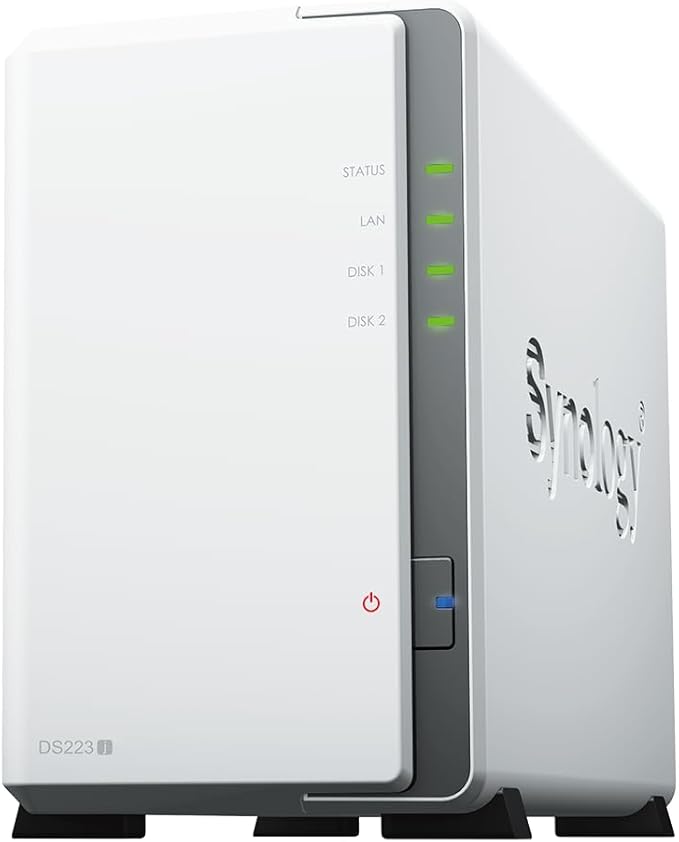
| Bays | 2 |
|---|---|
| CPU | Realtek RTD1619B (quad-core 1.7 GHz) |
| RAM | 1 GB DDR4 (fixed) |
| Network | 1GbE ×1 |
| M.2 Slots | None |
| USB | USB 3.2 Gen 1 ×2 |
| Price (AU) | $318-$319 (Umart, MSY, Scorptec, Mwave) |
| Warranty | 2 years (ACL extends this) |
Pros
- Lowest-cost entry to Synology DSM. The most polished consumer NAS OS
- Adequate for personal cloud, photo sync and basic media
- Strong app ecosystem (Synology Photos, Drive, Note Station)
- Widely available from major AU retailers
Cons
- Fixed 1 GB RAM. Cannot be upgraded
- 1GbE only. Network ceiling at approximately 110 MB/s
- No M.2 cache slots
- Realtek CPU is slower than ARM Cortex-A55 in higher-tier models
The DS223j suits single users who want reliable automatic backup and Synology's polished mobile apps without spending more than $320. It will not transcode 4K Plex streams on the fly and should not be assigned demanding workloads, but for its intended purpose. Personal cloud and photo backup. It performs consistently. The DS223j is the cheapest path into the Synology ecosystem available from Australian retailers.
Asustor AS1202T. Best Budget 2.5GbE NAS

| Bays | 2 |
|---|---|
| CPU | Intel Celeron N4505 (dual-core 2.0 GHz, Burst 2.9 GHz) |
| RAM | 4 GB DDR4 (expandable to 8 GB) |
| Network | 2.5GbE ×2 |
| M.2 Slots | None |
| USB | USB 3.2 Gen 1 ×2, USB 2.0 ×1 |
| Price (AU) | $356-$399 (Mwave, Scorptec, Computer Alliance) |
| Warranty | 2 years |
Pros
- Dual 2.5GbE under $400. No other 2-bay matches this on connectivity
- Intel Celeron with hardware video transcode (QuickSync)
- 4 GB expandable RAM
- ADM software is mature and improving
Cons
- ADM ecosystem smaller than Synology DSM
- No M.2 slots for SSD cache
- Fewer AU retailers stock Asustor
The AS1202T punches above its price class on connectivity. Dual 2.5GbE under $400 is genuinely unusual. Synology charges significantly more for equivalent network speed. The AS1202T suits home users who want fast local network throughput for video editing or Time Machine backups and are comfortable stepping outside the Synology ecosystem.
QNAP TS-133. Single-Bay 2.5GbE Entry Point

| Bays | 1 |
|---|---|
| CPU | Realtek RTD1619B (quad-core 1.7 GHz) |
| RAM | 2 GB DDR4 (fixed) |
| Network | 2.5GbE ×1 |
| M.2 Slots | None |
| USB | USB 3.2 Gen 1 ×2, USB 2.0 ×1 |
| Price (AU) | $259-$345 (Scorptec, Mwave, PLE, Computer Alliance, MegaBuy, Landmark) |
| Warranty | 2 years |
Pros
- Cheapest 2.5GbE NAS available in Australia
- QNAP QTS ecosystem with wide app library
- Suitable for single-drive personal cloud or backup target
Cons
- Single bay. No RAID, no redundancy whatsoever
- Fixed RAM with no upgrade path
- Single-bay limits any meaningful storage expansion
TerraMaster F2-425. Best Value 2-Bay Hardware

| Bays | 2 |
|---|---|
| CPU | AMD Ryzen R1600 (dual-core 2.6 GHz, Boost 3.1 GHz) |
| RAM | 4 GB DDR4 (expandable) |
| Network | 2.5GbE ×2 |
| M.2 Slots | 2 × M.2 NVMe |
| USB | USB 3.2 ×2, USB-C ×1 |
| Price (AU) | ~$299 (Scorptec) |
| Warranty | 2 years |
Pros
- AMD Ryzen CPU and dual 2.5GbE at sub-$300 is exceptional hardware value
- M.2 NVMe slots standard at this price point
- TOS 6 interface has improved substantially
- USB-C port included
Cons
- TOS software ecosystem is the smallest of the four major NAS brands
- Third-party app availability limited versus Synology or QNAP
- Fewer Australian retailers stock TerraMaster
The F2-425 delivers hardware specs that exceed its price tier. AMD Ryzen, dual 2.5GbE and M.2 NVMe slots at approximately~$459 is remarkable for any 2-bay unit. The caveat is TOS software: it works, but the app ecosystem and community documentation lag behind Synology and QNAP. The F2-425 suits technically capable users who prioritise raw hardware value and are comfortable managing a less mature software environment.
Best NAS $500-$1,000: The Sweet Spot
The $500-$1,000 bracket is where most serious home users and small office purchases land. At this tier you get capable ARM or Intel processors, upgradeable RAM, 2.5GbE as standard on most models, and M.2 SSD cache slots. The gap between a $540 unit and a $700 unit in this range is usually CPU architecture (ARM vs Intel x86) and software ecosystem depth. Not raw storage capacity.
Synology DS225+. Best Overall Home NAS

| Bays | 2 |
|---|---|
| CPU | Realtek RTD1700 (quad-core ARM Cortex-A55, 1.7 GHz) |
| RAM | 2 GB DDR4 (expandable to 6 GB) |
| Network | 2.5GbE ×1 |
| M.2 Slots | 2 × M.2 2280 NVMe (SSD cache) |
| USB | USB 3.2 Gen 1 ×2 |
| Price (AU) | $539-$599 (Umart, MSY, CPL, Scorptec, PLE, Computer Alliance) |
| Warranty | 2 years |
Pros
- Best-in-class NAS software. Synology DSM 7.2 is unmatched for reliability and ease of use
- M.2 NVMe SSD cache dramatically improves random I/O performance
- 2.5GbE standard. Near-gigabyte local transfer speeds
- Strong Synology Photos, Drive and Surveillance Station support
- Expandable RAM to 6 GB, widely available at six major AU retailers
Cons
- ARM CPU limits CPU-intensive tasks compared to Intel alternatives
- Two bays only. Storage ceiling without purchasing an expansion unit
- M.2 slots are SSD cache only in standard DSM config
The DS225+ suits two-user households and small home offices running Synology Photos, Drive, and Plex with direct play. The combination of 2.5GbE and M.2 SSD cache makes local file access fast and responsive. Workloads beyond two simultaneous users or active 4K Plex transcoding should step up to a 4-bay unit. See the Synology NAS Australia guide for a full breakdown of the DS-line across every tier.
Synology DS425+. 4-Bay DSM Workhorse

| Bays | 4 |
|---|---|
| CPU | Realtek RTD1700 (quad-core ARM Cortex-A55, 1.7 GHz) |
| RAM | 2 GB DDR4 (expandable to 6 GB) |
| Network | 2.5GbE ×1 |
| M.2 Slots | 2 × M.2 2280 NVMe |
| USB | USB 3.2 Gen 1 ×2, USB-C ×1 |
| Price (AU) | $799-$999 (Umart, MSY, CPL, Scorptec, Mwave, PLE) |
| Warranty | 2 years |
Pros
- 4 bays with DSM full feature set including Active Backup and Snapshot Replication
- 2.5GbE plus M.2 SSD cache is a strong home-office combination
- USB-C port for direct peripheral attachment
- Six AU retailers stocking. Easy to price-compare
Cons
- ARM CPU is the same generation as DS225+. Not a power-user chip
- Price range ($799-$999) overlaps with Intel-based competitors at lower prices
- 4-bay with ARM means concurrent heavy workloads can queue
QNAP TS-464. Best Plex and VM NAS

| Bays | 4 |
|---|---|
| CPU | Intel Celeron N5105 (quad-core 2.0 GHz, Burst 2.9 GHz) |
| RAM | 8 GB DDR4 (expandable to 16 GB) |
| Network | 2.5GbE ×2 |
| M.2 Slots | 2 × M.2 2280 PCIe Gen3 NVMe |
| PCIe | PCIe Gen3 ×2 expansion slot |
| USB | USB 3.2 Gen 2 ×2, USB 2.0 ×1, USB-C ×1 |
| Price (AU) | $599-$699 (Scorptec, Mwave, PLE, Umart) |
| Warranty | 2 years |
Pros
- Intel N5105 handles 4K Plex hardware transcode natively via QuickSync
- Dual 2.5GbE. Link aggregation or separate management network
- 8 GB RAM standard. Handles multiple VMs or containers without choking
- PCIe slot for 10GbE or additional NVMe if needed later
- Strong hardware value versus DS425+ at comparable or lower price
Cons
- QNAP QTS is more complex than Synology DSM. Steeper initial learning curve
- QNAP has had historical firmware security vulnerabilities. Keep patched
- More features means more configuration overhead for new NAS users
The TS-464 is the top recommendation for Plex-focused buyers. Intel N5105 provides hardware decode and encode for H.264 and HEVC 4K streams. ARM Synology units cannot match this. Dual 2.5GbE and a PCIe slot give genuine upgrade headroom for the life of the device. For buyers who want raw performance at this price point, the TS-464 outspecs the DS425+ on every measurable hardware dimension. The trade-off is QTS complexity vs DSM simplicity. See the Synology vs QNAP guide for a side-by-side software comparison.
Asustor AS5404T. Best 4-Bay Value

| Bays | 4 |
|---|---|
| CPU | Intel Celeron N5105 (quad-core 2.0 GHz, Burst 2.9 GHz) |
| RAM | 8 GB DDR4 (expandable to 32 GB) |
| Network | 2.5GbE ×2 |
| M.2 Slots | 2 × M.2 2280 NVMe (storage pool or cache) |
| HDMI | HDMI 2.0 ×1 |
| USB | USB 3.2 Gen 1 ×2, USB 2.0 ×1 |
| Price (AU) | $795-$799 (Mwave, CPL, Scorptec, PLE, Computer Alliance) |
| Warranty | 2 years |
Pros
- M.2 slots usable as storage pool. Not just cache, unlike Synology
- 32 GB RAM ceiling. Highest expandability in this price tier
- HDMI output for direct TV playback without a client device
- Intel N5105 hardware transcode
- Dual 2.5GbE plus excellent build quality at sub-$800
Cons
- ADM ecosystem is third in size behind Synology and QNAP
- Fewer AU retailers stock Asustor versus Synology or QNAP
- HDMI/Kodi media path less commonly used by Australian buyers
UGREEN DXP4800. Best Value Intel Core NAS
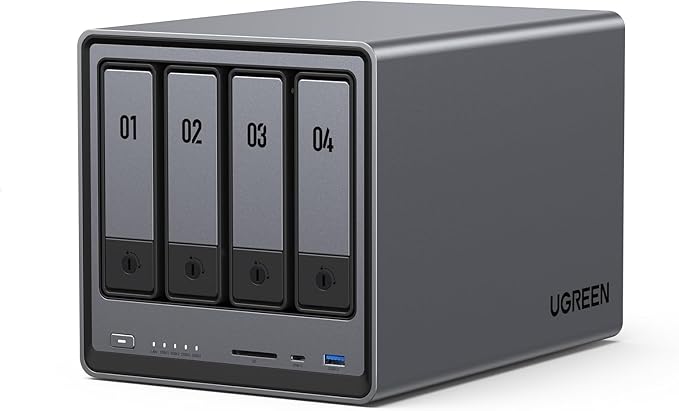
| Bays | 4 |
|---|---|
| CPU | Intel Core i5-1235U (10-core, up to 4.4 GHz) |
| RAM | 8 GB DDR4 (expandable to 32 GB) |
| Network | 2.5GbE ×2 |
| M.2 Slots | 2 × M.2 2280 NVMe |
| USB | USB 3.2 Gen 2 ×2, USB-C ×1 |
| Price (AU) | ~$699 (Scorptec AU) |
| Warranty | 2 years (AU local) |
Pros
- Intel Core i5-1235U is the most powerful CPU available at this price tier
- Competitive pricing for the hardware spec. No equivalent from Synology or QNAP
- Active UGOS software development with Docker/Portainer container support
- Available from Scorptec with local warranty
Cons
- UGOS ecosystem is the newest. Fewer third-party apps than Synology or QNAP
- Less community documentation and forum support available
- Brand track record significantly shorter than established competitors
The DXP4800 is compelling on hardware: an Intel Core i5-1235U at approximately $699 puts it ahead of every competitor on raw CPU performance at this price. UGOS (UGREEN's NAS OS) is functional and developing rapidly, with strong container support via Docker and Portainer built in. The DXP4800 suits technically experienced buyers who want maximum processing power for the money and are comfortable with a less mature software ecosystem. See the UGREEN NAS Australia guide for a full ecosystem review.
$500-$1,000 NAS Comparison. Australia 2026
| DS225+ | DS425+ | TS-464 | AS5404T | DXP4800 | |
|---|---|---|---|---|---|
| Bays | 2 | 4 | 4 | 4 | 4 |
| CPU Type | ARM Cortex-A55 | ARM Cortex-A55 | Intel N5105 | Intel N5105 | Intel Core i5-1235U |
| CPU Cores | 4 | 4 | 4 | 4 | 10 |
| RAM (base) | 2 GB | 2 GB | 8 GB | 8 GB | 8 GB |
| RAM (max) | 6 GB | 6 GB | 16 GB | 32 GB | 32 GB |
| Network | 2.5GbE ×1 | 2.5GbE ×1 | 2.5GbE ×2 | 2.5GbE ×2 | 2.5GbE ×2 |
| M.2 Slots | 2 (cache) | 2 (cache) | 2 (cache) | 2 (pool/cache) | 2 |
| PCIe Expansion | No | No | Yes (Gen3 ×2) | No | No |
| 4K HW Transcode | No | No | Yes (QuickSync) | Yes (QuickSync) | Yes |
| Price (AU) | $599 (PLE Computers) | $819 (Scorptec) | $989 (Scorptec) | $879 (Mwave) | ~$699 |
| Software Maturity | Excellent (DSM) | Excellent (DSM) | Very Good (QTS) | Good (ADM) | Developing (UGOS) |
Prices last verified: 28 March 2026. Always check retailer before purchasing.
Best NAS $1,000-$2,000: Prosumer and SMB
Above $1,000 the market shifts from home use to prosumer workstations, small business file servers and multi-user surveillance deployments. At this tier you expect Intel or AMD x86 processors, 10GbE upgrade paths (onboard or PCIe), larger bay counts for SHR2 or RAID 6 redundancy, and ECC RAM for data integrity over years of continuous operation. Software licencing for enterprise features. Active Directory integration, VMM, large-scale Active Backup. Becomes relevant.
Synology DS925+. Best Prosumer NAS

| Bays | 9 total (5× 3.5"/2.5" + 4× 2.5" SSD) |
|---|---|
| CPU | AMD Ryzen R1600 (dual-core 2.6 GHz, Boost 3.1 GHz) |
| RAM | 8 GB DDR4 ECC (expandable to 32 GB) |
| Network | 2.5GbE ×2 |
| M.2 Slots | 2 × M.2 2280 NVMe |
| PCIe | PCIe Gen3 ×4 (10GbE upgrade) |
| USB | USB 3.2 Gen 1 ×2, USB-C ×1 |
| Price (AU) | $994-$1,029 (CPL, MSY, Scorptec, Umart, Mwave) |
| Warranty | 3 years |
Pros
- AMD Ryzen with ECC RAM. Unusual reliability features at this price point
- 9 bays (5 large + 4 SSD) support RAID 6 and large storage pools with redundancy
- PCIe slot for 10GbE NIC when 2.5GbE becomes the bottleneck
- 3-year warranty (vs 2-year on consumer Synology range)
- Full DSM business features: Active Backup, Snapshot Replication, LDAP
Cons
- Dual-core Ryzen R1600. Capable for most workloads, but not fast for compute-heavy tasks
- Diskless starting price around $1,000
- PCIe 10GbE card is a significant additional purchase
Synology DS1525+. Best SMB NAS

| Bays | 5 (expandable to 15 via 2× DX525) |
|---|---|
| CPU | AMD Ryzen R1600 (dual-core 2.6 GHz, Boost 3.1 GHz) |
| RAM | 8 GB DDR4 ECC (expandable to 32 GB) |
| Network | 2.5GbE ×2 |
| M.2 Slots | 2 × M.2 2280 NVMe |
| PCIe | PCIe Gen3 ×4 |
| Expansion | Up to 2× DX525 expansion units (adds 5 bays each) |
| Price (AU) | $1,234-$1,399 (Umart, MSY, CPL, Scorptec, Mwave) |
| Warranty | 3 years |
Pros
- Expandable to 15 bays with DX525 units. Genuine SMB storage headroom
- ECC RAM standard. Protects against silent data corruption in long-running arrays
- Full Synology SMB stack: Surveillance Station, VMM, Active Backup for endpoints
- Dual 2.5GbE with PCIe upgrade path to 10GbE
- 3-year warranty
Cons
- Expensive starting point. Diskless above $1,200
- DX525 expansion units are a significant additional cost
- Dual-core CPU may queue under very heavy concurrent multi-user workloads
QNAP TS-473A. Best QNAP Prosumer 4-Bay

| Bays | 4 |
|---|---|
| CPU | AMD Ryzen V1500B (quad-core 2.2 GHz) |
| RAM | 8 GB DDR4 (expandable to 64 GB) |
| Network | 2.5GbE ×2 |
| M.2 Slots | 2 × M.2 2280 PCIe NVMe |
| PCIe | PCIe Gen3 ×4 (10GbE or 25GbE capable) |
| USB | USB 3.2 Gen 2 ×2, USB-C ×1 |
| Price (AU) | $849-$999 (Scorptec, Mwave, PLE) |
| Warranty | 2 years |
Pros
- AMD Ryzen V1500B quad-core. Best CPU in the QNAP 4-bay prosumer range
- 64 GB RAM maximum. Supports heavy virtualisation workloads
- PCIe Gen3 ×4. Genuine 10GbE or 25GbE upgrade path
- Strong QNAP Virtualization Station and Container Station support
Cons
- No hardware video transcode (AMD vs Intel QuickSync)
- QTS complexity versus Synology DSM
- 2-year warranty compared to Synology's 3-year on equivalent prosumer units
QNAP TVS-H474. Best Intel NAS Under $1,500
| Bays | 4 (3.5") + 2× M.2 NVMe |
|---|---|
| CPU | Intel Core i3-12100 (4-core/8-thread, up to 4.3 GHz) |
| RAM | 16 GB DDR4 ECC (expandable to 64 GB) |
| Network | 2.5GbE ×2 |
| PCIe | PCIe Gen4 ×16 (high-bandwidth expansion) |
| HDMI | HDMI 2.0 ×2 |
| USB | USB 3.2 Gen 2 ×4, USB-C ×1 |
| Price (AU) | $1,299-$1,499 |
| Warranty | 2 years |
Pros
- Intel Core i3-12th Gen with QuickSync. Outstanding 4K and 8K transcode capability
- PCIe Gen4 ×16 slot. Future-proofed for high-speed NVMe or next-gen network cards
- ECC RAM standard at 16 GB base
- Dual HDMI for direct connection or dual-display configuration
Cons
- Premium price for a 4-bay unit
- QTS Hero OS requires familiarity to get full value from features
- Higher idle power consumption than ARM or low-power Intel alternatives
UGREEN DXP6800 Pro. Best 6-Bay Value

| Bays | 6 |
|---|---|
| CPU | Intel Core i5-1235U (10-core, up to 4.4 GHz) |
| RAM | 16 GB DDR4 (expandable) |
| Network | 2.5GbE ×2 |
| M.2 Slots | 2 × M.2 NVMe |
| USB | USB 3.2 ×2, USB-C ×1 |
| Price (AU) | ~$1,099 (Scorptec AU) |
| Warranty | 2 years (AU) |
Pros
- 6 bays at approximately $1,099. Strong bay-per-dollar ratio at this tier
- Intel Core i5 handles heavy simultaneous workloads well
- Competitive entry into 6-bay storage territory without Synology pricing
Cons
- UGOS ecosystem still maturing. Fewer apps than Synology or QNAP at this tier
- Less established AU business support infrastructure than Synology or QNAP
$1,000-$2,000 NAS Comparison. Australia 2026
| DS925+ | DS1525+ | TS-473A | TVS-H474 | DXP6800 Pro | |
|---|---|---|---|---|---|
| Bays | 9 | 5 (to 15) | 4 | 4 | 6 |
| CPU | Ryzen R1600 | Ryzen R1600 | Ryzen V1500B | Core i3-12100 | Core i5-1235U |
| CPU Cores | 2 | 2 | 4 | 4/8T | 10 |
| RAM (base) | 8 GB ECC | 8 GB ECC | 8 GB | 16 GB ECC | 16 GB |
| RAM (max) | 32 GB | 32 GB | 64 GB | 64 GB | - |
| Network | 2.5GbE ×2 | 2.5GbE ×2 | 2.5GbE ×2 | 2.5GbE ×2 | 2.5GbE ×2 |
| PCIe Slot | Gen3 ×4 | Gen3 ×4 | Gen3 ×4 | Gen4 ×16 | No |
| 4K HW Transcode | No | No | No | Yes (QuickSync) | Yes |
| Expansion Units | Via DX517 | Via DX525 ×2 | Via TR-004U | No | No |
| Price (AU) | $994-$1,029 | $1,285 (Mwave) | $1,489 (PLE Computers) | $1,299-$1,499 | ~$1,099 |
| Warranty | 3 years | 3 years | 2 years | 2 years | 2 years |
Best NAS Over $2,000: High-Performance and Enterprise-Class
Above $2,000 you enter high-performance storage territory: 8-bay units with 10GbE capability, Thunderbolt options, current-generation Intel and AMD processors with ECC RAM, and storage engines designed for around-the-clock operation under heavy load. These devices are appropriate for video production studios, multi-site businesses and anyone running intensive virtualisation or containerised application stacks.
Synology DS1825+. Reference 8-Bay Platform

| Bays | 8 (expandable to 18 via DX517) |
|---|---|
| CPU | AMD Ryzen V1500B (quad-core 2.2 GHz) |
| RAM | 8 GB DDR4 ECC (expandable to 32 GB) |
| Network | 2.5GbE ×2 |
| PCIe | PCIe Gen3 ×4 |
| M.2 Slots | 2 × M.2 2280 NVMe |
| Expansion | Up to 2× DX517 expansion units (5 bays each) |
| Price (AU) | $1,699-$1,799 (MSY, CPL, Umart, Scorptec, Mwave) |
| Warranty | 3 years |
The DS1825+ is the reference point for 8-bay Synology deployments. With two DX517 expansion units it reaches 18 bays. Sufficient for multi-petabyte storage pools. AMD Ryzen V1500B with ECC RAM handles Surveillance Station at scale (up to 40 IP cameras on licence), VMM virtual machines and Active Backup for large endpoint fleets. The 3-year warranty and proven DSM reliability make it the conservative choice for business buyers who require maximum uptime and support accountability. For power cost modelling across 8 spinning drives, use the NAS power calculator.
QNAP TVS-H874. High-Performance 8-Bay

| Bays | 8 (3.5") + 2× M.2 NVMe |
|---|---|
| CPU | Intel Core i5-12400 (6-core/12-thread, up to 4.4 GHz) |
| RAM | 32 GB DDR4 ECC (expandable to 128 GB) |
| Network | 2.5GbE ×2 |
| PCIe | PCIe Gen4 ×16 + PCIe Gen3 ×4 |
| USB | USB 3.2 Gen 2 ×4, USB-C ×2 |
| Price (AU) | $2,499-$2,999 |
| Warranty | 2 years |
The TVS-H874 is QNAP's flagship high-performance 8-bay unit. Intel Core i5-12th Gen with 6 cores and 12 threads handles simultaneous 4K Plex transcoding, containerised applications and heavy VM workloads without queuing. Dual PCIe slots (Gen4 ×16 and Gen3 ×4) allow both a 25GbE network card and additional NVMe expansion to be installed simultaneously. At $2,499-$2,999, the TVS-H874 primarily suits creative professionals and SMB environments where CPU throughput directly affects productivity.
QNAP TVS-H874T. Thunderbolt NAS
| Bays | 8 (3.5") + 2× M.2 NVMe |
|---|---|
| CPU | Intel Core i7-12700H (14-core, up to 4.7 GHz) |
| RAM | 32 GB DDR5 ECC (expandable to 96 GB) |
| Network | 10GbE ×2 (RJ45) + Thunderbolt 4 ×2 |
| USB | USB 3.2 Gen 2 ×4, USB4 Type-C ×2 |
| Price (AU) | Flagship pricing. Contact Scorptec or QNAP AU for quote |
| Warranty | 2 years |
The TVS-H874T is QNAP's Thunderbolt NAS: dual Thunderbolt 4 plus dual 10GbE onboard, Intel Core i7-12700H with 14 cores, and DDR5 ECC RAM. This device targets video editing studios running direct-attach workflows where Thunderbolt 4 delivers 40 Gbps to a single connected workstation while 10GbE serves the rest of the network simultaneously. At this tier it competes with dedicated SAN solutions rather than typical NAS alternatives.
Which Brand Should You Choose?
Synology is the default recommendation for the majority of buyers. Home users, small offices and anyone who wants the most polished, best-documented NAS OS available. DSM 7.2 is genuinely excellent software: reliable, frequently updated, with a large community and extensive Australian retailer support. The trade-off is that Synology's hardware specifications are often conservative relative to the price. ARM CPUs at price points where Intel competitors deliver x86. For users who want software quality above all else, Synology wins consistently. See the Synology NAS Australia guide.
QNAP delivers more hardware per dollar at every tier. More RAM, faster CPUs, PCIe slots and dual 2.5GbE appear at lower price points than Synology equivalents. QTS is capable and feature-rich but more complex to configure. QNAP suits technically experienced users, Plex enthusiasts, and anyone who needs virtualisation or containerised applications without paying the Synology premium. Keep QNAP devices updated. The platform has had historical firmware security issues. See the Synology vs QNAP guide for a full breakdown.
UGREEN entered the NAS market recently with a value-hardware proposition: Intel Core series processors at competitive prices, with UGOS providing a clean modern interface. The DXP series is available from Scorptec with local warranty. The risk is ecosystem immaturity. Fewer apps, less community documentation and a shorter track record. UGREEN suits buyers who are comfortable with newer platforms and prioritise maximum hardware for the money. See the UGREEN NAS Australia guide.
Asustor occupies a useful niche. Intel Celeron hardware with dual 2.5GbE at prices that undercut Synology equivalents. The AS5404T in particular offers excellent value. ADM software is mature enough for home and small office deployment. Asustor suits buyers who want Intel hardware and dual 2.5GbE without paying Synology pricing, and who do not require the largest possible third-party app ecosystem.
TerraMaster targets the value-conscious buyer who wants maximum hardware specs for the money. TOS software is functional but the ecosystem is the smallest of the five brands covered in this guide. TerraMaster suits technically capable users who can navigate around software gaps and prioritise CPU performance and build quality at the lowest possible entry price. For a detailed look at how the TerraMaster F-series compares to QNAP budget models, see the TerraMaster NAS Australia guide.
What to Look for When Buying a NAS in Australia
Bay Count
Two bays are sufficient for personal cloud storage and single-user home backup. Four bays are the minimum for small offices, multi-user homes and anyone running RAID 5 for usable capacity with single-drive redundancy. Five or more bays are required for RAID 6 (dual parity) or storage pools approaching 20 TB+ usable. Buying one bay more than you currently need is generally sound advice. Adding drives is cheaper than replacing a unit in two years. Use the NAS sizing wizard to estimate the right bay count based on your data volume and redundancy requirements.
Processor and RAM
ARM-based processors handle personal cloud, photo sync, basic media serving and single-user Plex with direct play adequately. They will not transcode 4K HEVC streams in real time. Intel Celeron N5105 or N4505 adds hardware video transcode (QuickSync). A meaningful upgrade for Plex households with multiple concurrent streams. AMD Ryzen NAS processors (R1600, V1500B) add ECC RAM support and four cores for business workloads and virtualisation. RAM expandability matters more than starting capacity. A 2 GB unit expandable to 8 GB is preferable to a fixed 4 GB unit at the same price.
Network Connectivity. 2.5GbE vs 1GbE
1GbE has a practical ceiling of approximately 110 MB/s. Adequate for a single light user, limiting for multi-user access or large file transfers. 2.5GbE raises the ceiling to around 280 MB/s, which is sufficient for most home and small-office workloads. If your router or switch supports 2.5GbE (most devices released after 2021 do), buying a 2.5GbE NAS delivers noticeably faster backups and media streaming. 10GbE is appropriate for video editing workflows or multi-user office environments with continuous heavy transfer loads. Most units in this guide without onboard 10GbE offer a PCIe slot for a 10GbE card when needed.
M.2 Slots and SSD Cache
M.2 NVMe slots are used for SSD caching. Placing frequently accessed data on fast flash storage to improve random read/write performance noticeably. On Synology units these slots are cache-only by default. On Asustor AS5404T and some QNAP models, M.2 slots can contribute directly to the main storage pool. SSD cache is particularly valuable for surveillance workloads with many simultaneous small writes, and for databases and Docker containers. For general home NAS use, SSD cache is a useful upgrade but not essential at first.
Australian Consumer Law and Warranty
All NAS devices sold in Australia are covered by the Australian Consumer Law (ACL), which provides consumer guarantees independent of the manufacturer's stated warranty period. For a device priced at $500-$1,500, ACL reasonable durability expectations typically extend beyond the 2-year manufacturer warranty. If a unit fails under normal use after the warranty period, the retailer has continuing obligations to repair, replace or refund. Buy from major AU retailers. Scorptec, Mwave, Umart, CPL, MSY, PLE, Computer Alliance. To ensure ACL protection is practically enforceable. Grey imports purchased from overseas marketplaces carry significantly weaker consumer protections under ACL.
NAS Buyer Checklist by Use Case
| Feature | Home Backup | Plex / Media | Home Office | SMB | |
|---|---|---|---|---|---|
| Minimum Bays | 2 | 4 | 4 | 5+ | |
| Processor | ARM OK | Intel N5105+ | Intel/AMD x86 | AMD Ryzen ECC | |
| RAM (minimum) | 2 GB | 8 GB | 4 GB | 8 GB ECC | |
| 2.5GbE | Preferred | Required | Required | Required | |
| M.2 SSD Cache | Optional | Recommended | Preferred | Yes | |
| PCIe / 10GbE Path | Not needed | Useful | Preferred | Yes | |
| 4K HW Transcode | Not needed | Yes | Optional | Optional | |
| ECC RAM | Not needed | Not needed | Preferred | Yes | |
| Suggested Model | DS223j / DS225+ | TS-464 / AS5404T | DS425+ / DS925+ | DS1525+ / TVS-H874 |
RAID and Storage Planning
RAID configuration determines how drives pool capacity and how a failure is handled. RAID 1 (mirroring) on a 2-bay unit halves usable capacity but survives one drive failure completely. RAID 5 on 4+ bays loses one drive's capacity to parity but allows single-drive failure recovery with reasonable usable space. RAID 6 requires 4+ bays and loses two drives to dual parity. Appropriate for large pools where a rebuild after one failure takes long enough to risk a second concurrent failure. Synology SHR (Synology Hybrid RAID) is generally preferable to standard RAID on Synology hardware when mixing drive sizes. QNAP offers similar adaptive configurations.
Important: RAID is not a backup strategy. It protects against drive failure, not against accidental deletion, ransomware, or fire. A proper 3-2-1 backup strategy. Three copies, two media types, one offsite. Is the minimum appropriate data protection approach for any valuable data. Use the RAID calculator to estimate usable capacity, storage efficiency and rebuild times across RAID levels. For a complete explanation of RAID levels and when to choose each one, see the NAS RAID explained guide.
Running Costs. Power Consumption in Australia
A NAS running 24/7 is a continuous electricity draw. Entry-level 2-bay ARM units typically consume 8-15 W idle and 20-25 W active. At current Australian electricity rates (approximately 30-35 c/kWh in NSW, VIC and QLD), this equates to roughly $25-$45 per year at idle. A 4-bay Intel unit consuming 20-35 W idle costs $55-$100 per year. An 8-bay unit with spinning drives in active use can reach 60-80 W, pushing annual running costs above $150. Drive spin-down scheduling reduces these figures substantially for light-use or overnight-idle deployments.
Use the NAS power calculator to model annual running costs for your specific unit and drive configuration with current Australian state electricity rates. For a full breakdown of consumption figures by model category, see the NAS power consumption Australia guide. For remote access bandwidth cost considerations, see the NAS remote access guide.
NAS vs Cloud Storage for Australian Buyers
The recurring question for Australian buyers is whether a NAS makes financial sense versus ongoing cloud storage subscriptions. For households storing 2-4 TB, cloud services are often cheaper over a 3-year horizon when device cost and drive cost are included. Above 8-10 TB, or for users with multiple devices, fast local access requirements, or data sovereignty concerns, a NAS typically wins on total cost of ownership within 2-3 years. Australian NBN upload speeds also make cloud-only backup slow for large datasets. A 100/20 plan takes over 24 hours to upload 1 TB initially. The NAS vs cloud storage comparison runs the numbers for AU pricing across Synology hardware, Google One, iCloud+ and Backblaze B2.
Where to Buy NAS in Australia
The major Australian NAS retailers are Scorptec, Mwave, PLE Computers, Umart, MSY, CPL Online and Computer Alliance. All stock Synology and QNAP comprehensively. Scorptec currently has the broadest UGREEN and Asustor selection in Australia. For a full comparison of AU retailers including shipping times, warranty handling processes and price-match policies, see the where to buy NAS in Australia guide.
Pricing varies meaningfully between retailers. The DS225+ currently ranges from $539 to $599 across six stockists. Checking multiple retailers before purchasing takes a few minutes and can save $40-$100 on mid-range units. Avoid purchasing NAS hardware from Amazon.com.au unless the listing explicitly states Australian stock with Australian warranty. Some listings are grey imports with US or Asia-Pacific warranty only, which complicates any ACL claim.
Related reading: our NAS expansion and upgrade guide and our best NAS for multi-site business.
See also: our NAS buying guide hub.
What is the best NAS for home use in Australia?
The Synology DS225+ ($539-$599) suits most Australian home users. 2.5GbE, M.2 SSD cache, expandable RAM and the best consumer NAS software available. For a budget-first choice, the DS223j ($318-$319) provides reliable Synology Photos and Drive functionality at minimum cost. For Plex-focused households the QNAP TS-464 ($599-$699) is the stronger pick due to Intel QuickSync hardware transcoding, which ARM Synology units cannot match.
What is the best NAS for a small business in Australia?
The Synology DS1525+ ($1,234-$1,399) is the strongest small business NAS choice: 5 bays expandable to 15 via DX525 units, AMD Ryzen with ECC RAM, full Active Directory and Active Backup support, and a 3-year warranty. For 4-bay SMB requirements with the best CPU performance, the QNAP TVS-H474 ($1,299-$1,499) delivers Intel Core i3-12th Gen with ECC RAM and PCIe Gen4 at a similar price point.
Should I buy Synology or QNAP?
Choose Synology if software simplicity, reliability and the best mobile app experience are priorities. DSM is easier to set up and maintain with the largest NAS community. Choose QNAP if you want more hardware per dollar. Particularly for Plex transcoding (Intel QuickSync), virtualisation, or containerised applications. The TS-464 gives dual 2.5GbE, Intel N5105 and 8 GB RAM at $599-$699. Hardware specifications that Synology does not match at the same price. For a full comparison see the Synology vs QNAP guide.
Is UGREEN NAS any good?
UGREEN NAS hardware is genuinely competitive. Intel Core processors at lower price points than Synology equivalents, solid build quality and available from Scorptec with Australian warranty. The limitation is ecosystem maturity: UGOS has fewer third-party apps, less community documentation and a shorter track record than Synology DSM or QNAP QTS. For technically experienced buyers who want maximum hardware for the money, UGREEN is a credible option. For users who want a proven, well-documented platform, Synology or QNAP remain lower-risk choices at this stage of UGREEN's ecosystem development.
How many bays do I need for a home NAS?
Two bays work for personal cloud, photo backup and single-user home storage with RAID 1 mirroring. Four bays are recommended for households with multiple users, video and photo libraries above 4 TB, or anyone wanting RAID 5 for more usable space with single-drive redundancy. Five or more bays allow RAID 6 (dual parity). Appropriate when drives are large enough that a rebuild after one failure takes long enough to risk a second failure. Use the NAS sizing wizard to model your specific requirement based on data volume and redundancy goals.
Do I need 2.5GbE on my NAS?
If your router or switch supports 2.5GbE. Most hardware released after 2021 does. Then yes, a 2.5GbE NAS delivers noticeably faster file transfers. The practical ceiling of 1GbE (around 110 MB/s) is adequate for one light user but becomes a bottleneck for multi-user access or large library synchronisation. At current pricing, most mid-range NAS units include 2.5GbE standard. There is rarely a reason to accept 1GbE-only hardware above the $400 tier unless budget is the sole constraint.
What hard drives should I use in my NAS?
NAS-rated drives are strongly recommended over desktop drives. They are built for 24/7 operation, vibration tolerance in multi-drive enclosures, and error recovery behaviour that avoids RAID arrays dropping a drive after a slow sector read. Seagate IronWolf and IronWolf Pro, and Western Digital Red Plus and Red Pro are the standard choices for home and SMB NAS deployments in Australia. Toshiba N300 and N300 Pro are also well-regarded. Avoid desktop drives such as Seagate Barracuda or WD Blue in NAS arrays running RAID. See the best NAS hard drives Australia guide for a full comparison with current AU pricing.
Does Australian Consumer Law cover NAS purchases?
Yes. All NAS devices purchased from Australian retailers are covered by the Australian Consumer Law (ACL), which provides consumer guarantees separate from and in addition to the manufacturer warranty. For a device priced at $500-$1,500, ACL reasonable durability expectations typically extend beyond the stated 2-year warranty. If a unit fails under normal use after the warranty period the retailer still has repair, replace or refund obligations. ACL applies to purchases from Scorptec, Mwave, Umart, CPL, MSY, PLE and Computer Alliance. Grey imports from overseas marketplaces with no Australian stock or warranty carry significantly weaker protections.
For current stock availability, retailer price comparisons and ACL guidance, the where to buy NAS in Australia guide covers all major AU stockists in detail. For running cost modelling after purchase, use the NAS power calculator. To plan your storage pool and RAID configuration before buying drives, use the RAID calculator. For right-sizing your bay count and drive capacity to your actual data volume, use the NAS sizing wizard.
Ready to buy? Compare current Australian NAS prices across Scorptec, Mwave, Umart, MSY, PLE and Computer Alliance. With notes on shipping, warranty handling and price-match policies.
Where to Buy NAS in Australia