An 8-bay NAS is where home storage ends and serious infrastructure begins. Eight bays unlock RAID 6 with meaningful usable capacity, support for 160TB+ of raw storage with current 20TB drives, and enough headroom for businesses, media professionals, and large-scale surveillance deployments that would choke a 4 or 6-bay unit. In Australia in 2026, the 8-bay desktop NAS market is led by Synology with the new DS1825+ and the enterprise-grade DS1823xs+, with QNAP covering the value end via the TS-832PX and Asustor offering the Lockerstor 8 AS6808T for buyers who want raw processing power. UGREEN has announced the DXP8800 Plus but Australian availability and pricing remain unconfirmed at time of writing.
In short: The Synology DS1825+ ($1,799 at Scorptec) is the best 8-bay NAS for most Australian buyers. It pairs a modern CPU with Synology's DSM 7 software, dual 2.5GbE networking, and expansion capability via the DX525 for up to 13 bays total. For enterprise workloads and 10GbE out of the box, the Synology DS1823xs+ ($3,312 at Mwave) is the step-up. If budget is the priority and you can live with an older ARM CPU, the QNAP TS-832PX ($2,163 at Mwave) undercuts on price with built-in 10GbE SFP+ networking.
Who Needs an 8-Bay NAS?
Eight bays is a commitment. The NAS itself costs $1,800 to $3,300+ before you put a single drive in it, and filling all eight bays with NAS-grade HDDs adds another $1,600 to $4,000+ depending on capacity. This is not a product for someone backing up a few family photos. Eight bays make sense for three primary use cases.
Small and Medium Business
An SMB running file shares, Active Directory integration, virtualisation via Docker or VMs, and centralised backup across 5-20 users will fill a 4-bay NAS within two years. An 8-bay unit gives you room to start with 4-6 drives and grow, run RAID 6 for dual-parity protection on business-critical data, and avoid the painful migration to a larger unit when you run out of space. If your business is storing client data, financial records, or project files, the cost of a proper 8-bay deployment is trivial compared to the cost of data loss or downtime. For a broader look at business-grade options, see our best NAS for small business guide.
Media Professionals and Video Editors
A single 4K ProRes project can consume 500GB to 1TB. Photographers shooting RAW accumulate terabytes per year. If media is your livelihood, an 8-bay NAS with RAID 5 or RAID 6 gives you the capacity to store active projects and archives simultaneously, without constantly shuffling data to external drives. Pair it with 10GbE networking (built-in on the DS1823xs+, available via PCIe card on the DS1825+) and you can edit directly from the NAS over the network.
Surveillance and Security Camera Deployments
Surveillance footage is write-heavy and relentless. A 16-camera system recording 24/7 at 1080p can consume 2-4TB per week. Eight bays let you store weeks or months of footage with RAID protection, which matters when the footage is evidence. Both Synology Surveillance Station and QNAP QVR Pro support 8-bay units directly, and the additional processing power in these higher-end NAS models handles real-time video analytics without choking on concurrent streams. See our best NAS for surveillance guide for camera-specific recommendations.
RAID Options at 8 Bays
Eight bays open up RAID configurations that are impractical on smaller units. The maths changes significantly at this bay count, and the right RAID choice depends entirely on whether you prioritise capacity, performance, or resilience. Our NAS RAID explained guide covers this in detail, but here is the quick summary for an 8-bay configuration using 20TB drives (160TB raw).
RAID 5 sacrifices one drive to parity. Eight 20TB drives in RAID 5 give you roughly 140TB usable. Fast reads, good write performance, and the most usable space of any protected RAID level. The risk: if one drive fails and a second fails during the rebuild, you lose everything. At 20TB per drive, rebuild times can stretch to 24-48 hours, during which the array is vulnerable.
RAID 6 sacrifices two drives to parity. Eight 20TB drives in RAID 6 give you roughly 120TB usable. Survives two simultaneous drive failures. For business data and irreplaceable files, RAID 6 is the default recommendation at 8 bays. The rebuild window vulnerability of RAID 5 is too dangerous with drives this large.
RAID 10 mirrors pairs of drives, then stripes across the pairs. Eight drives in RAID 10 give you 80TB usable. Best random read/write performance but halves your capacity. Suited for VM storage and database workloads where IOPS matter more than raw space.
Synology Hybrid RAID (SHR-2) is Synology's equivalent of RAID 6 with the added flexibility of mixing drive sizes. If you are building your array over time, buying drives as prices drop or capacity increases, SHR-2 manages that gracefully. QNAP users can achieve similar flexibility with their RAID Group management.
RAID is not a backup. RAID protects against drive failure. It does not protect against accidental deletion, ransomware, fire, theft, or NAS hardware failure. An 8-bay NAS holding 100TB+ of data needs an offsite backup strategy. Cloud sync, a secondary NAS at another location, or rotating external drives stored off-premises are all valid approaches. See our best NAS Australia guide for more on building a complete data protection strategy.
Raw vs Usable Capacity at 8 Bays
Buyers often look at an 8-bay NAS and think "eight times 20TB = 160TB." In practice, you will never see that number. Between RAID overhead, filesystem overhead, and the difference between marketed TB and actual usable TB (drive manufacturers use 1TB = 1,000,000,000,000 bytes; operating systems use 1TB = 1,099,511,627,776 bytes), actual usable capacity is significantly less. Here is what you actually get with eight 20TB drives.
Usable Capacity: 8x 20TB Drives by RAID Level
| RAID 0 | RAID 5 | RAID 6 / SHR-2 | RAID 10 | |
|---|---|---|---|---|
| Raw Capacity | 160TB | 160TB | 160TB | 160TB |
| Drives Lost to Parity/Mirror | 0 | 1 (20TB) | 2 (40TB) | 4 (80TB) |
| Approximate Usable Space | ~145TB | ~127TB | ~109TB | ~72TB |
| Drive Failures Survived | 0 | 1 | 2 | 1 per pair |
| Best For | Scratch/temp (no protection) | Home, media archive | Business, critical data | VMs, databases |
The cost of filling all eight bays is significant. Eight Seagate IronWolf 8TB drives currently run around $2,000 from Australian retailers. Eight 16TB IronWolf Pro drives push past $4,800. Factor drive cost into your total budget, and consider starting with fewer drives and expanding later. Our best NAS hard drive Australia guide covers which drives to buy and where to find them at the best AU prices.
Every 8-Bay NAS Available in Australia (2026)
The 8-bay NAS market in Australia is smaller than you might expect. Unlike the crowded 2-bay and 4-bay segments, only a handful of models are readily available through Australian retailers. Here is every 8-bay desktop and rackmount NAS you can buy in Australia right now, with real prices from the major retailers.
8-Bay NAS Comparison. Australia 2026
 Synology DS1825+
|
 Synology DS1823xs+
|
 QNAP TS-832PX
|
 Asustor Lockerstor 8 AS6808T
|
 TerraMaster F8 SSD Plus
|
Synology RS1221+ (Rackmount) | |
|---|---|---|---|---|---|---|
| CPU | AMD Ryzen R1600 (4-core) | AMD Ryzen V1780B (4-core/8-thread) | Alpine AL-324 (4-core ARM) | AMD Ryzen V3C14 (4-core) | Intel i3-N305 (8-core) | AMD Ryzen V1500B (4-core/8-thread) |
| RAM | 4GB DDR5 (expandable) | 8GB DDR4 ECC (expandable to 32GB) | 4GB DDR4 (expandable to 16GB) | 16GB DDR4 | 16GB DDR5 | 4GB DDR4 ECC (expandable to 32GB) |
| Drive Bays | 8x 3.5"/2.5" + 2x M.2 | 8x 3.5"/2.5" + 2x M.2 | 8x 3.5"/2.5" | 8x 3.5"/2.5" + 2x M.2 | 8x 2.5" SSD only | 8x 3.5"/2.5" |
| Network | 2x 2.5GbE + 1x 1GbE | 10GbE + 2x 1GbE | 2x 10GbE SFP+ + 2x 2.5GbE | 2x 5GbE | 2x 2.5GbE | 4x 1GbE |
| Expansion | DX525 (up to 13 bays) | DX517/DX1215 II | JBOD via TL series | Xpanstor 4 (USB-C) | None | RX418 (up to 12 bays) |
| OS | DSM 7 | DSM 7 | QTS / QuTS hero | ADM 4 | TOS | DSM 7 |
| Best AU Price | $1,765 (Mwave) | $3,312 (Mwave) | $2,163 (Mwave) | $2,683 (Mwave) | $1,299 (Scorptec) | $2,366 (Mwave) |
Prices last verified: 18 March 2026. Always check retailer before purchasing.
Synology DS1825+. Best All-Round 8-Bay NAS
The Synology DS1825+ is the clear default choice for most Australian buyers stepping into 8-bay territory. It runs DSM 7, which remains the most polished and intuitive NAS operating system available, with a mature app ecosystem covering everything from file sharing and Active Directory to Docker containers, surveillance, and cloud sync. The AMD Ryzen R1600 CPU handles concurrent users, Plex transcoding, and Docker workloads without breaking a sweat.
The dual 2.5GbE plus single 1GbE networking configuration is practical for most deployments. Link aggregate the two 2.5GbE ports for up to 5Gbps throughput, or use one for data and one for management. If you need 10GbE, a PCIe expansion card slots in, though this occupies the single PCIe slot that could also be used for NVMe SSD caching or additional networking. Two M.2 NVMe slots are built-in for SSD caching independently of the PCIe slot. For more on networking your NAS, see our NAS networking guide.
Expansion is a standout feature. Synology's DX525 expansion unit adds five more bays via eSATA, bringing the total to 13 bays without migrating to a new NAS. At $1,799 from Scorptec, the DS1825+ is not cheap, but it is the most cost-effective 8-bay NAS in Australia that does not compromise on software quality or ecosystem depth.
| CPU | AMD Ryzen R1600 (4-core) |
|---|---|
| RAM | 4GB DDR5 (expandable to 16GB+) |
| Drive Bays | 8x 3.5"/2.5" SATA + 2x M.2 NVMe |
| Network | 2x 2.5GbE RJ45 + 1x 1GbE RJ45 |
| USB | 2x USB 3.2 Gen 1 |
| PCIe | 1x PCIe 3.0 x4 (for 10GbE or NVMe) |
| Expansion | DX525 (5 additional bays) |
| Warranty | 3 years (extendable to 5) |
| AU Price (Scorptec) | $1,799 |
Pros
- DSM 7 remains the gold standard for NAS software
- Best overall value for an 8-bay NAS at $1,799
- DX525 expansion to 13 bays without migration
- Dual 2.5GbE plus 1GbE provides flexible networking
- Two built-in M.2 NVMe slots for SSD caching
- PCIe slot available for 10GbE upgrade
- Synology's Hyper Backup and Active Backup suites included
Cons
- Only 4GB RAM out of the box. Should be upgraded for business use
- No 10GbE built-in (requires PCIe card)
- Single PCIe slot means choosing between 10GbE and NVMe expansion
- Premium price compared to QNAP equivalent hardware
Synology DS1823xs+. Enterprise Power for Demanding Workloads
The DS1823xs+ is Synology's enterprise-tier 8-bay desktop unit, and the price reflects it: $3,312 at Mwave. The Ryzen V1780B processor with 8GB ECC RAM is a significant step up from the DS1825+, handling virtualisation, heavy Docker workloads, and large-scale Surveillance Station deployments with headroom to spare. Built-in 10GbE networking eliminates the need for a PCIe upgrade card, which is a major advantage for media professionals and businesses running multi-gigabit infrastructure.
ECC (Error Correcting Code) memory is the key differentiator for business deployments. ECC detects and corrects single-bit memory errors that could otherwise cause silent data corruption. For a NAS holding business-critical data, this is not a luxury feature. The DS1823xs+ supports up to 32GB of ECC RAM, making it suitable for running multiple VMs, large Docker stacks, and database workloads concurrently.
The DS1823xs+ suits businesses where the cost of downtime or data corruption exceeds the premium over the DS1825+. If you are running a medical practice, legal firm, architecture studio, or any business where client data integrity is non-negotiable, the extra $1,500 buys meaningful hardware and software capability. The 5-year warranty (standard, not extended) reflects Synology's confidence in this unit's longevity.
| CPU | AMD Ryzen V1780B (4-core/8-thread, 3.35GHz) |
|---|---|
| RAM | 8GB DDR4 ECC (expandable to 32GB) |
| Drive Bays | 8x 3.5"/2.5" SATA + 2x M.2 NVMe |
| Network | 1x 10GbE RJ45 + 2x 1GbE RJ45 |
| USB | 2x USB 3.2 Gen 1 |
| PCIe | 1x PCIe 3.0 x8 |
| Expansion | DX517 / DX1215 II |
| Warranty | 5 years (standard) |
| AU Price (Mwave) | $3,312 |
Pros
- 10GbE built-in. No PCIe card needed for multi-gigabit networking
- 8GB ECC RAM standard, expandable to 32GB
- 5-year warranty out of the box
- Ryzen V1780B handles virtualisation and heavy concurrent workloads
- PCIe x8 slot for 25GbE or additional expansion
- Full Synology DSM 7 software suite
Cons
- $3,312 is a significant investment before adding drives
- Overkill for home users or light business workloads
- Older generation hardware compared to DS1825+
- Only 2x 1GbE alongside the 10GbE port (no 2.5GbE)
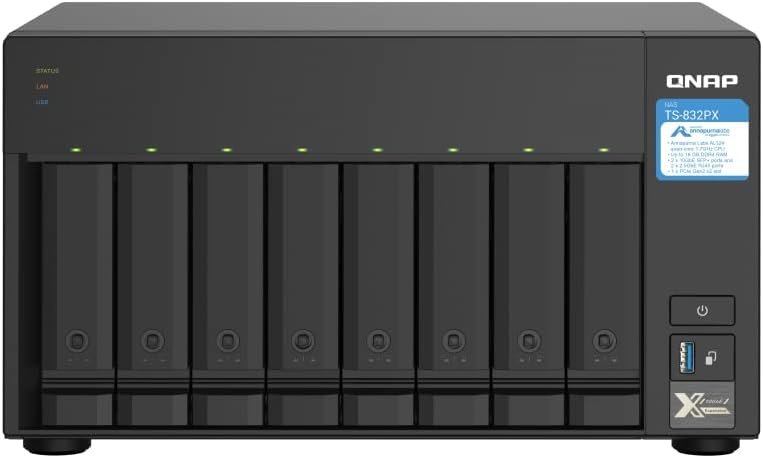
QNAP TS-832PX. Best Value 8-Bay NAS with 10GbE
The QNAP TS-832PX represents the most affordable path into 8-bay NAS territory with 10GbE networking already on board. At $2,163 from Mwave, it undercuts the Synology DS1823xs+ by over $1,100 while offering dual 10GbE SFP+ ports and dual 2.5GbE ports. That is four network interfaces straight out of the box, which is exceptional at this price point.
The trade-off is the CPU. The Alpine AL-324 is a quad-core ARM processor, not an x86 chip like the Ryzen in the Synology models. It handles file serving, basic media streaming, and surveillance recording well, but it will struggle with Plex transcoding, heavy Docker workloads, or virtualisation. If your primary use case is file storage, backup, and surveillance, the TS-832PX delivers excellent value. If you need to run VMs or resource-intensive containers, look at the Synology DS1825+ or Asustor AS6808T instead.
QNAP's QTS operating system is feature-rich but has a steeper learning curve than Synology's DSM. QNAP also offers QuTS hero with ZFS support for data integrity, which is a genuine advantage for enterprise deployments. The TS-832PX is a strong option for AU businesses that need capacity and networking on a budget, as long as the workload stays within what the ARM CPU can handle.
| CPU | Alpine AL-324 (4-core ARM, 1.7GHz) |
|---|---|
| RAM | 4GB DDR4 (expandable to 16GB) |
| Drive Bays | 8x 3.5"/2.5" SATA |
| Network | 2x 10GbE SFP+ + 2x 2.5GbE RJ45 |
| USB | 2x USB 3.2 Gen 1 |
| Expansion | QNAP TL JBOD expansion units |
| Warranty | 3 years (extendable) |
| AU Price (Mwave) | $2,163 |
Pros
- Dual 10GbE SFP+ and dual 2.5GbE built-in. Unmatched networking at this price
- Cheapest 8-bay NAS with 10GbE networking in Australia
- QTS and QuTS hero (ZFS) dual OS support
- Solid for file serving, backup, and surveillance workloads
- QNAP JBOD expansion via TL series
Cons
- ARM CPU limits Docker, virtualisation, and Plex transcoding
- No M.2 NVMe slots for SSD caching
- No PCIe expansion slot
- QTS has a steeper learning curve than DSM
- 4GB RAM out of the box is limiting for multi-user environments
Asustor Lockerstor 8 AS6808T. Most Processing Power Per Dollar
The Asustor Lockerstor 8 AS6808T packs an AMD Ryzen V3C14 CPU and 16GB DDR4 RAM into an 8-bay chassis for $3,002 at Mwave or $2,873 at Scorptec. That is more processing power and more RAM out of the box than any other 8-bay desktop NAS at this price point. Dual 5GbE networking is unusual in the NAS market but provides more bandwidth than standard 2.5GbE without the cost and complexity of 10GbE switching infrastructure.
Asustor's ADM operating system is less mature than Synology's DSM but has improved significantly in recent years. Docker support, media server capabilities, and surveillance recording all work well. The Lockerstor 8 also includes two M.2 NVMe slots for SSD caching, which improves random read/write performance for mixed workloads. Asustor is distributed exclusively through Dicker Data in Australia, which means stock availability can be less consistent than Synology or QNAP models. At the time of writing, the AS6808T is listed as out of stock at Scorptec, so check availability before committing.
The AS6808T suits power users who want the raw horsepower of a Ryzen CPU and 16GB RAM for Docker, Plex, or virtualisation workloads, and who are comfortable with Asustor's ecosystem rather than Synology's. If you are already in the Asustor ecosystem or value raw specs per dollar, this is a strong contender. For more on the brand, see our best NAS Australia roundup.
| CPU | AMD Ryzen V3C14 (4-core, 2.3GHz) |
|---|---|
| RAM | 16GB DDR4 |
| Drive Bays | 8x 3.5"/2.5" SATA + 2x M.2 NVMe |
| Network | 2x 5GbE RJ45 |
| USB | 3x USB 3.2 Gen 2 (10Gbps) |
| Expansion | Xpanstor 4 AS5004U (4 bays, USB-C) |
| Warranty | 3 years |
| AU Price (Mwave) | $3,002 |
| AU Price (Scorptec) | $2,873 (out of stock) |
Pros
- 16GB RAM out of the box. No immediate upgrade needed
- Ryzen V3C14 handles Docker, Plex, and VMs with ease
- Dual 5GbE networking. Faster than 2.5GbE without 10GbE switch cost
- 2x M.2 NVMe slots for SSD caching
- 3x USB 3.2 Gen 2 (10Gbps) ports
Cons
- ADM software is less mature than Synology DSM
- Asustor has smaller AU market presence. Stock can be inconsistent
- Dicker Data exclusive distribution limits retailer options
- No PCIe slot for 10GbE upgrade
- Currently out of stock at Scorptec
Rackmount Alternative: Synology RS1221+
If your 8-bay NAS is going into a server rack or comms cabinet, the Synology RS1221+ is the natural choice at $2,366 from Mwave. It runs the same DSM 7 software as the DS1825+, with a Ryzen V1500B CPU and 4GB ECC RAM (expandable to 32GB). The 2U rackmount form factor with four 1GbE ports (link-aggregatable) suits existing gigabit infrastructure, and the RX418 expansion unit adds another four bays for a total of 12.
The RS1221+ does not include 2.5GbE or 10GbE networking, which is a notable gap. A PCIe 10GbE card (like the Synology E10G18-T1 at $289 from Scorptec) addresses this but adds cost. For businesses already running or planning a 10GbE backbone, budget an additional $250-$300 for the network card. The redundant power supply variant, the RS1221RP+, is available at $3,200 from Mwave for environments where uptime is critical. Business models like these are rarely held in retailer stock, so expect 2-3 days for dropship processing even when listed as available.
What About UGREEN and TerraMaster?
UGREEN has announced the DXP8800 Plus, an 8-bay NAS with impressive specs on paper. However, UGREEN does not yet have an official Australian distributor, which means warranty claims currently go through international channels. Until AU distribution is confirmed and local stock is available, purchasing a UGREEN NAS in Australia carries a support risk that is hard to justify at this price point. This is expected to change in 2026, but the timing remains uncertain.
TerraMaster's F8 SSD Plus ($1,299 at Scorptec, $1,300 at Mwave) is an interesting option but it is an all-SSD unit, accepting only 2.5-inch drives. It uses an Intel i3-N305 with 16GB RAM, which is powerful hardware at a low price. However, the 8x 2.5-inch SSD-only limitation makes it unsuitable for traditional HDD-based bulk storage. It is designed for high-IOPS workloads like databases and application hosting, not for the capacity-driven use cases most 8-bay NAS buyers are looking for. At the time of writing, it is also out of stock at Scorptec. TerraMaster's Australian distribution through DSTech provides limited presence compared to Synology, QNAP, or even Asustor.
Networking: Getting the Most From an 8-Bay NAS
An 8-bay NAS can saturate a gigabit connection without even trying. If you are investing $2,000+ in a NAS and $2,000+ in drives, running it on 1GbE is a bottleneck. At minimum, use 2.5GbE (the DS1825+ includes this natively). For media production and multi-user business environments, 10GbE is where the performance ceiling lifts.
A basic 10GbE setup in Australia costs less than you might expect: a QNAP QSW-1105-5T 5-port 2.5GbE switch runs $159 at Scorptec, while a dedicated 10GbE switch starts around $300-$500. Synology's E10G18-T1 PCIe card adds 10GbE RJ45 to the DS1825+ for $289 at Scorptec. For a detailed breakdown of networking options and costs, see our NAS networking guide.
For remote access over NBN, remember that most NBN 100 plans deliver around 20-40Mbps upload, with NBN 250 topping out at roughly 25Mbps upload unless you are on a business plan. CGNAT (Carrier-Grade NAT) on some providers can block incoming connections entirely, making remote access via VPN or Synology QuickConnect/QNAP myQNAPcloud the only reliable options. If remote access to your 8-bay NAS is critical, confirm your ISP supports port forwarding or consider a provider that does not use CGNAT.
Buying Guide: Total Cost of an 8-Bay NAS Deployment
The NAS chassis is only part of the cost. Here is a realistic budget breakdown for a Synology DS1825+ deployment in Australia in 2026, which represents the most common 8-bay purchase scenario.

| NAS: Synology DS1825+ | $1,799 |
|---|---|
| RAM upgrade: 16GB DDR5 module | $100-$200 (approx) |
| Drives: 8x Seagate IronWolf 8TB | ~$2,000 |
| Drives: 8x WD Red Plus 12TB (alternative) | ~$3,200 |
| UPS: APC Back-UPS 700VA | $150-$200 |
| 10GbE card (optional): Synology E10G18-T1 | $289 (Scorptec) |
| 10GbE switch (optional) | $300-$500 |
| Total (8TB drives, no 10GbE) | $4,050-$4,200 |
| Total (12TB drives, 10GbE) | $5,700-$6,200 |
That is $4,000 to $6,200 for a fully deployed 8-bay NAS. For a business, this is a capital expense that should last 5-7 years. For a home power user, it is a significant investment that needs to be justified by the workload. If you are not sure you need 8 bays, our best 6-bay NAS guide covers the sweet spot for users who need more than 4 bays but do not quite need 8.
Australian Consumer Law protections apply when purchasing from Australian retailers. NAS vendors do not have service centres in Australia. Warranty claims go through the retailer, then up to the distributor and vendor in Taiwan. Expect 2-3 weeks minimum for a resolution. Before buying, ask your retailer: "If this fails, what is your process? Is an advanced replacement available?" That conversation tells you more about the retailer's value than the price on the sticker. For official information on your consumer rights, visit accc.gov.au.
Which 8-Bay NAS Should You Buy?
The right 8-bay NAS depends on your workload, budget, and existing infrastructure. Here is a direct breakdown by use case.
Best for most buyers: The Synology DS1825+ ($1,799 at Scorptec) covers 90% of use cases. File sharing, backup, Docker, Plex, surveillance, and hybrid cloud sync all work exceptionally well. Upgrade the RAM to 16GB and it handles business workloads without complaint. DSM 7 is the easiest NAS OS to live with day-to-day.
Best for enterprise and 10GbE: The Synology DS1823xs+ ($3,312 at Mwave) adds built-in 10GbE, ECC RAM, and a 5-year warranty. If your business depends on this NAS, the premium is justified by the hardware reliability and support structure.
Best value with 10GbE: The QNAP TS-832PX ($2,163 at Mwave) is the cheapest 8-bay NAS with 10GbE networking in Australia. The ARM CPU limits its versatility, but for file serving and surveillance it is hard to beat on price. Don't buy this if you need Docker, VMs, or Plex transcoding.
Best for raw processing power: The Asustor AS6808T ($2,873-$3,002) packs the most CPU and RAM of any 8-bay NAS at this price. 16GB RAM and a Ryzen CPU make it a strong Docker and virtualisation platform, but ADM's software ecosystem is less polished than Synology's. Best suited to experienced NAS users who prioritise hardware specs over software refinement.
Best rackmount: The Synology RS1221+ ($2,366 at Mwave) for rack environments. Add a 10GbE PCIe card for $289. The RS1221RP+ ($3,200) adds a redundant power supply for critical deployments.
Whichever model you choose, factor in drive costs, a UPS for power protection, and an offsite backup strategy. An 8-bay NAS holding 50-100TB+ of data without a backup is a disaster waiting to happen. Most Australian retailers operate on 3-5% NAS margin, so pricing across Mwave, Scorptec, PLE, and others will be remarkably similar. Buy from whoever offers the best support and stock availability rather than chasing a $20 saving.
Use our free NAS Sizing Wizard to get a personalised NAS recommendation.
See also: our NAS buying guide hub.
How much does it cost to fully populate an 8-bay NAS with drives in Australia?
Using current Australian prices: eight Seagate IronWolf 8TB drives cost approximately $2,000 total. Eight 16TB IronWolf Pro drives cost approximately $4,800. Eight 20TB drives push past $6,000. NAS-grade drive prices have risen significantly from early 2025 levels, so budget accordingly. Start with fewer drives in a flexible RAID configuration like SHR-2 and add more as prices stabilise or your capacity needs grow. See our best NAS hard drive guide for current pricing and recommendations.
Is RAID 5 or RAID 6 better for an 8-bay NAS?
RAID 6 is the default recommendation for an 8-bay NAS. With eight large-capacity drives, RAID rebuild times can stretch to 24-48 hours. During that rebuild window, a RAID 5 array is vulnerable to total data loss if a second drive fails. RAID 6 survives two simultaneous failures, which provides critical protection during those long rebuilds. The trade-off is losing two drives worth of capacity instead of one (120TB usable vs 140TB with 8x 20TB drives). For business data, the extra protection is worth the capacity cost. Our RAID explained guide covers this in detail.
Do I need 10GbE networking for an 8-bay NAS?
Not necessarily, but it helps. An 8-bay NAS in RAID 5 or RAID 6 can easily saturate a 1GbE connection (125MB/s). Dual 2.5GbE with link aggregation gives you up to 5Gbps (roughly 600MB/s), which is enough for most home and small office use. 10GbE (1,250MB/s) is worth the investment for video editing directly from the NAS, multi-user environments with 5+ concurrent users, or virtualisation workloads. The QNAP TS-832PX includes 10GbE SFP+ out of the box. The Synology DS1825+ needs a $289 PCIe card for 10GbE. Factor in a 10GbE switch ($300-$500) for the full benefit.
Can I expand an 8-bay NAS beyond 8 drives?
Yes, depending on the model. The Synology DS1825+ supports the DX525 expansion unit for up to 13 total bays. The DS1823xs+ supports the DX517 (5 bays) or DX1215 II (12 bays) for even larger deployments. QNAP offers TL-series JBOD expansion units. Asustor's Xpanstor 4 adds 4 bays via USB-C. Expansion units are a cost-effective way to grow without migrating to a new NAS, but they add another device, another power connection, and another potential point of failure. For massive capacity needs (20+ bays), a rackmount NAS with dedicated expansion slots is a more reliable architecture.
Should I buy an 8-bay NAS or two 4-bay NAS units?
A single 8-bay NAS is simpler to manage, more power-efficient, and provides better RAID flexibility than two 4-bay units. However, two 4-bay units give you physical redundancy: if one NAS fails, the other keeps running. For business environments, the ideal setup is an 8-bay primary NAS for capacity and performance, plus a second NAS (even a 2-bay or 4-bay) at a different physical location for backup. This provides both storage capacity and geographic redundancy, which is far more resilient than a single 8-bay unit alone.
What happens if my 8-bay NAS fails under warranty in Australia?
NAS vendors do not have service centres in Australia. Warranty claims follow the chain: retailer to distributor to vendor (typically in Taiwan), then back again. Expect 2-3 weeks minimum for a resolution, and replacement rather than repair is the standard outcome. Advanced replacements (receiving a new unit before returning the faulty one) are generally not available through standard warranty, though some resellers will let you purchase a replacement at full price and refund you when the faulty unit is returned. Have this conversation with your retailer before you buy, not after the failure occurs. Your data on the drives is not covered by warranty. A NAS is not a backup. Always maintain offsite copies of critical data.
Is the Synology DS1825+ or DS1823xs+ better value?
For most buyers, the DS1825+ at $1,799 is the better value. It runs the same DSM 7 software, supports the same apps and services, and handles typical file sharing, Docker, and media workloads without issue. The DS1823xs+ at $3,312 is justified if you specifically need built-in 10GbE networking, ECC memory for data integrity on critical workloads, or the 5-year standard warranty. If none of those features are requirements for your deployment, save the $1,500 and put it towards drives or a backup NAS instead.
Not sure if 8 bays is right for you? Start with our complete guide to the best NAS devices available in Australia to compare every option from 2-bay to 12-bay.
Read the Full NAS Guide →